
Why Tmux On A VPS Is The Real Line Between Vibe Coders And Engineers
Tmux keeps a terminal session alive after you disconnect, so running it on a cheap server lets your AI agents work for hours or days while your laptop is closed. That is the one capability long, unattended automations actually require.

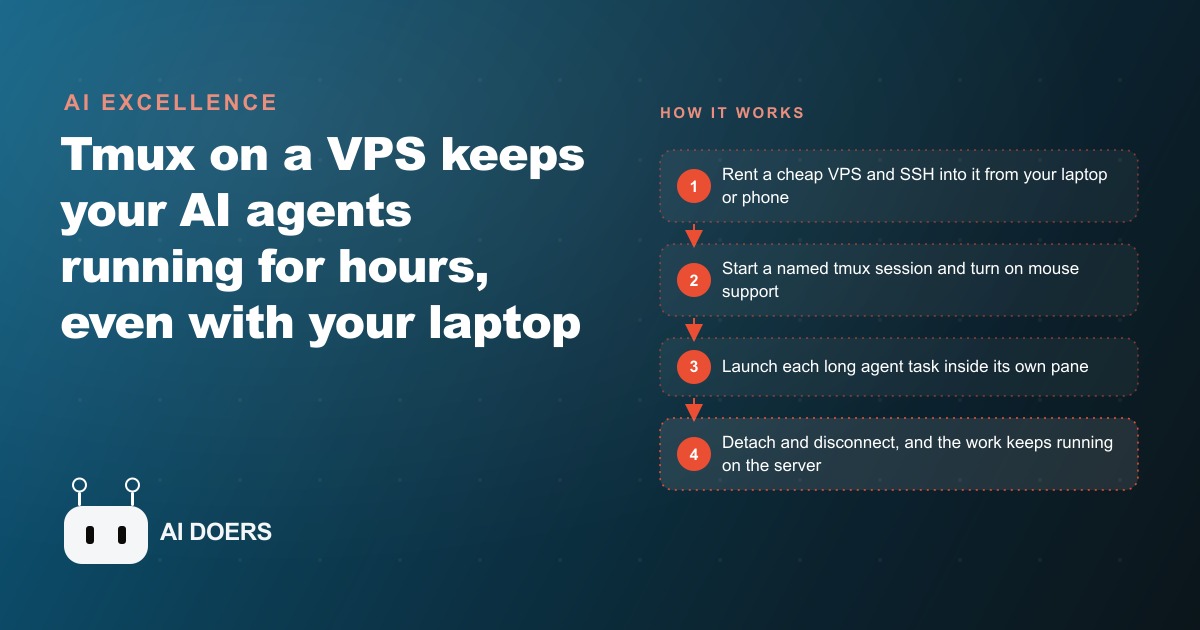
Somewhere in the last two years, a quiet line got drawn between people who play with AI and people who actually run it, and the line is not talent or budget. It is whether your automation stops the moment you close your laptop. I want to make a case in this essay that the humble decision to run your agents on a cheap server, kept alive by a tool called tmux, is the single move that puts you on the right side of that line.
I am Madhuranjan Kumar, and I have come to see this as more of a mindset than a technical trick. The whole promise of AI agents is that they do long, tedious work while you do something else. But if that work only survives as long as your laptop stays open and awake, you have not really escaped the desk. You have just moved the grind onto a machine that still depends on your presence. The interesting shift happens the day your automation stops caring whether you are there at all.
The idea underneath the tool
Tmux is a terminal multiplexer, which sounds intimidating and is not. It lets you run several terminal sessions at once, and, far more importantly, it keeps those sessions alive after you disconnect. That second property is the whole story. Normally, when you start a long process in a terminal and then close the terminal or lose your connection, the process dies with it. Tmux breaks that link. It detaches the running session from your screen without stopping anything inside it. The work keeps going in the dark.
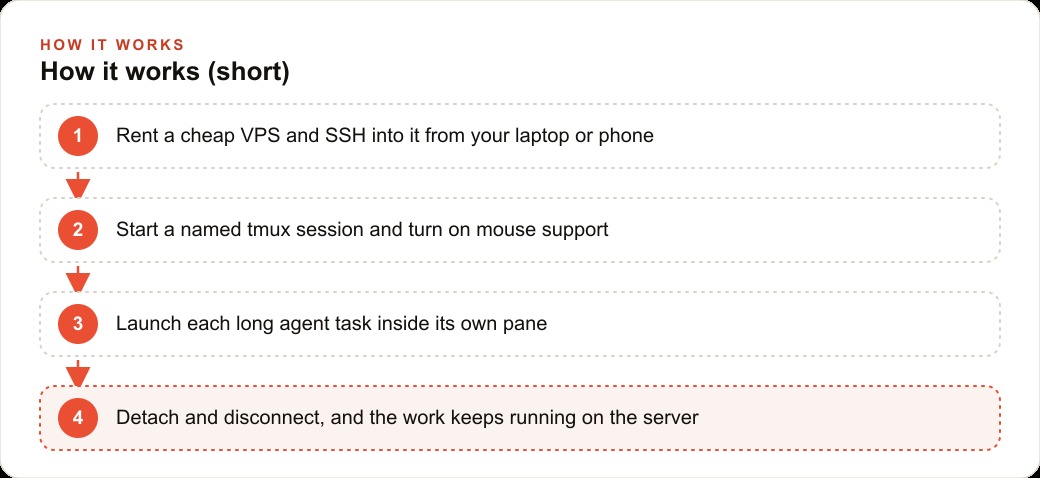
Pair that with a VPS, a cheap rented computer that lives in a data center and never sleeps, and something changes in how you relate to your own automation. The long-running jobs stop depending on your machine. You start a named session on the server, an agent begins a task that will take hours, and you walk away. You can close the lid, lose signal, let the battery die, none of it matters, because the work is not happening on your laptop anymore. Your laptop has become a window you look through, not the engine doing the work.
The handful of commands that make this real is genuinely small, and I think people overestimate the difficulty because the words sound technical. You start a named session. You press a key combination to detach while everything keeps running. You reattach later and drop straight back into the same live session, exactly as you left it. The one step people skip is turning on mouse support so you can scroll and click between panes instead of fighting keyboard shortcuts, and skipping it is why so many first attempts feel miserable. Beyond that, a session is just the whole workspace, windows behave like browser tabs, and panes are split screens inside one window, so you can watch several agents working side by side.
The convincing moment, the one that turns the concept into belief, is a small test you can run in a minute. Start an agent on a long task inside tmux, then deliberately cut the connection entirely. Close the terminal. Open a fresh one. Reconnect to the server and list your sessions. They are still there. The work is still running. Once you have seen an agent keep building after you closed everything, the old way of running long jobs on your laptop starts to feel faintly absurd.
Why the server is the real unlock
I want to press on why running this on a VPS rather than your Mac matters so much, because it is easy to dismiss as an optional upgrade. It is not optional. It is the difference in kind. A laptop is a personal device with a lid, a battery, and a life outside your automation. It gets carried to meetings, it sleeps, it reboots for updates. Every one of those ordinary events is a threat to a long-running job. A server has none of that baggage. It sits in a data center with steady power and a steady connection, doing exactly one thing: staying on.
You reach it over SSH, which is simply the protocol for connecting to it. You copy a connect command from your hosting panel, paste it, enter the password, and you are in. No mystique. And the economics make the whole argument almost embarrassing to resist. A box with as little as two gigabytes of memory runs for the price of a few coffees a month and can hold several named sessions at once. You can keep one session for quoting, one for reporting, and one for a long backlog cleanup, all running in parallel without interfering with each other. The server becomes a quiet back office that never sleeps, never asks for a day off, and never closes at five o'clock. From there you install your coding agents with a one-line command each, authenticate with a device code, and launch each long task in its own pane.
Most business owners have never set any of this up, and that is precisely why doing it puts you ahead. The capability is cheap and the instructions are short. What is scarce is the decision to treat AI as infrastructure you run rather than a toy you poke at.
What it looks like when a real business does it
Let me ground the whole argument in an illustrative example, because the abstraction only matters if it touches a real desk. Picture an electrician who is on job sites all day and has no interest in babysitting a computer. That is the perfect candidate, because the constraint is not skill, it is presence. He is never at a desk long enough to watch a screen.
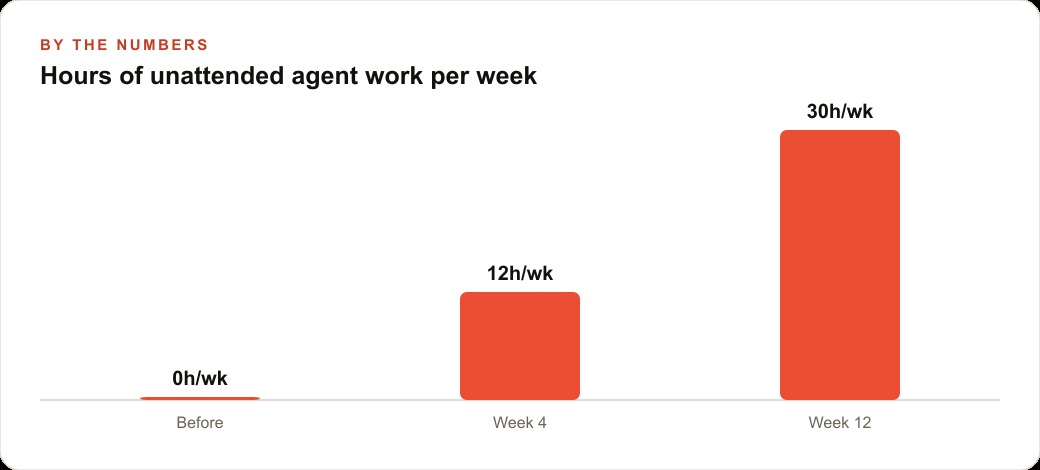
So I would rent a cheap VPS, start a named tmux session, and run the back-office automations there. One pane runs an agent that reads the day's new enquiries and drafts quotes from the company's pricing, so nothing sits ignored while he is up a ladder, and those quotes land straight in the CRM and website stack where the follow-up sequence keeps each prospect warm. Another pane keeps a long job churning, rebuilding the booking calendar or grinding a backlog of past invoices into a clean spreadsheet. Because it all runs on the server inside tmux, the electrician closes the laptop, drives to the next panel upgrade, and checks progress from his phone over SSH between jobs. If the phone loses signal or the battery dies, nothing stops. Illustratively, a business that captured zero hours of unattended agent work a week finds itself with a dozen, then thirty hours a week of work quietly completing on the server, all while the owner is on the tools. At the end of the week the back-office work is simply done, without a single hour spent sitting and watching a screen.
That reliability is what turns AI from a novelty into something a business actually leans on. And the freed capacity has somewhere valuable to go. The evenings the owner used to lose to paperwork can go into the parts of the business that grow it, the Facebook and Instagram ad campaigns that bring the enquiries in and the SEO and organic search content that earns them for free. The server handles the grind. The owner handles the growth. That division of labor is the entire point.
The mindset shift from operator to owner
There is a deeper change hiding underneath the commands, and it is really a change in identity, from operating your automation to owning it. When your agents live on your laptop, you are the operator. You have to be present for the work to happen, which means the automation is only ever as available as you are. The whole exercise still trades your attention for output, just at a slightly better exchange rate. That is not freedom. It is a nicer cage.
Moving the work onto a server that never sleeps flips the relationship. Now you own a small piece of infrastructure that runs whether or not you are watching, and your job shifts from doing the work to deciding what work should run and checking that it ran well. That is the same shift every growing business eventually has to make, from being the person who does everything to being the person who designs the systems that do it. Tmux on a VPS is just an unusually cheap and unusually early way to practice that shift, using AI as the labor instead of a hire.
The reason so few owners have made this move is not cost or difficulty, both of which are trivial. It is that treating AI as infrastructure requires a mental leap that most people have not made yet. They still think of AI as a chat window you visit, not a worker you employ around the clock. The moment you cross that line, a lot of possibilities open at once, because you stop asking what can I get an AI to help me with right now and start asking what work would I want running continuously in the background of my business. Those are very different questions, and the second one is where the leverage lives.
I will be blunt about the payoff. The business owner who runs a couple of named sessions on a cheap server, one drafting quotes, one grinding a backlog, one handling reports, has quietly built a back office that costs a few coffees a month and never takes a day off. That capacity does not just save hours, it changes what the owner is free to spend attention on, whether that is the Facebook and Instagram ad campaigns that bring demand in or the customer relationships that keep it. The server does the tireless part. The owner does the human part. That is not a productivity trick. It is a different way of running a business, and it starts with the decision to stop closing the lid on your own automation.
It is worth saying plainly that the barrier to all of this is psychological, not technical. The commands fit on an index card. The server costs less than a streaming subscription. What actually stops people is that setting up a server sounds like the domain of professional engineers, so they never try, and they keep running their long jobs on a laptop that sleeps the moment they walk away from it. Cross that imaginary barrier once, run a single real task on a server and watch it survive a disconnect, and the intimidation evaporates for good. The gap between the people who play with AI and the people who run it turns out to be one afternoon of unfamiliarity, and the reward for pushing through it is a back office that works while you sleep.
The line, and which side to stand on
So here is the throughline I have been building toward. The gap between playing with AI and running it is not about who has the fanciest model or the biggest budget. It is about whether your automation is tethered to your physical presence. The person whose agents die when the laptop sleeps is still doing the work, just with extra steps. The person whose agents run on a server that never blinks has crossed into treating AI as something the business depends on.
None of this requires deep Linux knowledge. It is a few commands you will use again and again, plus the one insight that a rented computer running tmux is a back office that never closes. You can absolutely set this up yourself on one project this week, and I would encourage you to run that disconnect-and-reconnect test just once, because seeing it work changes how you think. If you would rather have me stand up the server, wire your agents into tmux, and hand you a setup that just runs your back-office work in the background, that is exactly the kind of build I do for clients, and you can bring me in to handle it.
That is exactly what we do at AI DOERS. Book a private 30-minute call with Madhuranjan Kumar and we will map the fastest path to it for your specific business.
Book your call →
Madhuranjan Kumar
Madhuranjan Kumar brings 20 years of performance-marketing experience and has managed over $200 million in Facebook ad spend for brands across the United States and beyond. His expertise spans the full modern marketing stack: Meta, Google Ads, TikTok, email automation, CRM, and the websites that hold it together. At AI DOERS he turns that track record into lead-generation systems for businesses across every industry.