
What Is WebMCP and Why It Makes Browser Agents Reliable
WebMCP is a Chrome capability that lets a website declare agent-callable tools directly in its HTML or JavaScript, so browser agents take deterministic, schema-checked actions on your site instead of guessing from raw HTML or screenshots.


The one problem WebMCP was built to solve
Imagine a near future where a large share of web activity is not people clicking, but agents acting on their behalf. Booking the table, placing the order, filing the form, comparing the quotes. For that world to work, an agent has to be able to reliably do things on a website, not just read it. That single requirement, reliable action on any site, is the problem WebMCP was built to solve, and it is worth taking the idea apart carefully because it changes what a website is for.
WebMCP is a capability arriving in Chrome that lets a website declare agent-callable tools directly inside its own code. Instead of hoping an agent can figure out your page by looking at it, you hand the agent a clean, explicit list of the actions your page can perform, each with a defined shape. The agent stops interpreting and starts calling. To see why that matters, you have to understand how badly the current approach fails, because everything WebMCP does is a reaction to that failure.
Why today's browser agents are guessing, and why guessing breaks
Today an agent that wants to operate a website has two unattractive options, and both are forms of guessing. The first is to scrape the raw HTML of the page, clean it up, and feed that to a model so it can infer what the buttons and fields mean. The second is to take an annotated screenshot and have the model read the picture like a person would. Either way, the model is looking at an interface built for human eyes and trying to reverse-engineer how to drive it.
The trouble is that websites are messy on purpose. They are full of menus, banners, tracking, decorative elements, and layout that exists to please a person, not to be operated by a machine. All of that is noise to an agent. The model has to sift signal from clutter every single time, and because language models are probabilistic, the same page can be read correctly on one run and misread on the next. That is the core defect. The behavior is nondeterministic. An agent might add the right item to a cart today and click the wrong control tomorrow, and you have no clean way to know which run you are getting. For a business, nondeterminism at the checkout is not a rough edge, it is lost revenue, because the difference between a completed order and an abandoned one is whether the agent guessed right.
WebMCP attacks the guessing at its root. If the website simply states its available actions in a machine-readable way, the agent never has to infer anything. It reads the declared tools and calls them, the way any well-defined interface is meant to be called.
Declaring the tools inside your own page
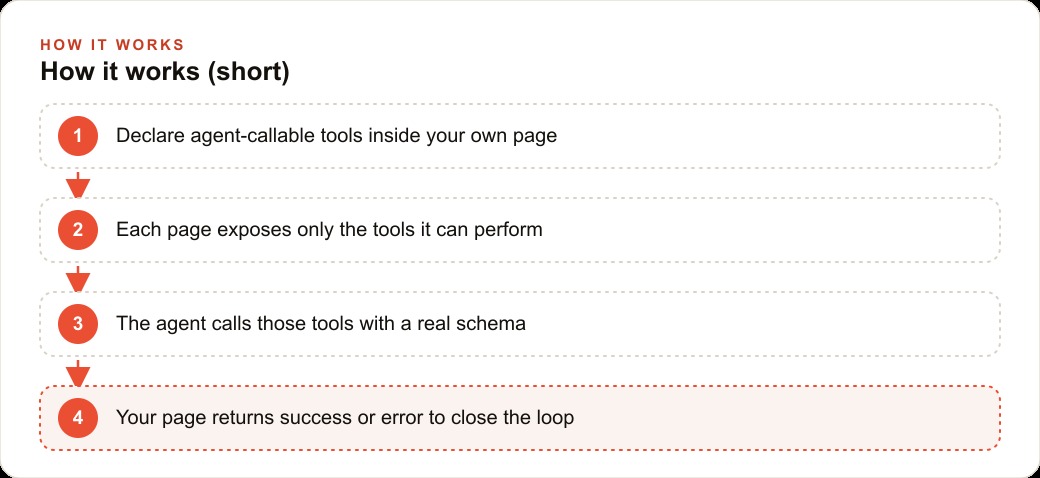
The mechanism is what makes this feel different from every prior attempt to make sites agent-friendly. You do not stand up a separate server somewhere and hope the agent has discovered it. You declare the tools inside the page itself, in the same code that already renders the site. When an agent lands on the page, the tools are simply there, part of the document, ready to be called with a real input schema rather than a vague description.
That inline declaration is the quiet revolution. The website becomes both the thing a human sees and the thing an agent operates, from one source of truth. There is no drift between what the page shows and what the agent can do, because they are defined together. And because the declaration carries a schema, the agent is not passing free-form guesses into a form. It is passing structured, validated input into a tool that expects exactly that shape.
Tools that appear and vanish with the page
The second idea that gives WebMCP its power is that tools are contextual. A page exposes only the tools that make sense on that page, and the set changes as the user moves through the site. This mirrors how a good interface already works for humans, where the available actions depend on where you are.
A homepage might register something like search products, browse categories, and apply filters. Step onto a product page and the relevant tools shift to add to cart and get similar items. Walk into a flight search flow and you might first see search flights, then, once results are on screen, the exposed set becomes set filter, reset filter, and list results. The agent's menu of possible actions follows the page it is actually on, the moment it lands there.
This contextual loading is not a cosmetic nicety. It is what keeps the agent focused and efficient. Rather than dumping every possible action the entire site can perform into the agent's limited working memory, each page offers a short, relevant list. The agent sees exactly what it can do here and now, which both reduces confusion and keeps it from wasting attention on irrelevant capabilities.
Two ways to declare the tools, for two kinds of site
WebMCP recognizes that not every website is built the same way, so it offers two paths to declare tools, and the difference maps neatly onto how your site is constructed.
The first is a declarative mode, aimed at simple, static pages. Here you add a tool name and a short tool description as attributes on a form, and a brief description on each input, and Chrome does the rest. It reads those attributes and transforms them into a callable tool with a full input schema, no scripting required. If your contact form, quote request, or newsletter signup is plain markup, you can make it agent-callable by annotating it, which is about as low-effort as this kind of capability gets.
The second is an imperative mode, aimed at real applications built with frameworks. In a dynamic app, the interface is constantly rendering and unmounting pieces of itself, so the tools have to track that. Imperative mode lets you register a tool when a component appears and remove it when that component goes away, so the agent-callable surface always matches what is currently on screen. If a filter panel is mounted, its tools exist. When the user navigates away and the panel unmounts, those tools disappear. The available actions and the visible interface stay perfectly in sync because they are wired to the same lifecycle.
Closing the loop, and keeping a human in it
Declaring a tool is only half of a reliable interaction. The other half is telling the agent whether the action actually worked, and this is a facet people underestimate. WebMCP supports proper responses through a submit listener, so when an agent invokes a form, your code can return a clear success or a specific error back to the agent. This closes the loop. The agent is not left assuming the order went through. It receives confirmation, or it receives a reason it failed and can react accordingly. That feedback is what turns a one-shot guess into a dependable transaction.
There is also a thoughtful answer to the obvious worry, which is agents doing things on your behalf without your say-so. WebMCP includes a review layer, with styling hooks that let the page surface a confirmation step so a human can approve before an agent actually submits something consequential. The agent can prepare the action, but a person can stand between the preparation and the commit. For anything that spends money or books a slot, that human checkpoint is not optional polish, it is the thing that makes the whole idea safe to adopt.
Why contextual tools beat both extremes
It helps to place WebMCP against the two nearby approaches, because that is where its design choice becomes clear. On one end, you can hand an agent a full set of tools for everything, but that floods the agent's limited context with capabilities it does not need on the current page, whether or not they are relevant. On the other end, looser skill-style instructions are lighter but give up the strict input schemas that make actions dependable.
WebMCP threads between them. It loads only the tools the current page actually needs, and it gives each one a proper schema. You get the focus of a small, relevant toolset and the reliability of strict, validated inputs at the same time. That combination, contextual and schema-checked, is the specific reason it can make agent actions deterministic where the older approaches could not.
What this changes for a business, made concrete
Consider a restaurant that takes orders and reservations through its own website. Today, when a customer's agent tries to place an order, it is squinting at a menu built for human eyes and clicking where it thinks the right control is, which means it sometimes adds the wrong dish or stalls at checkout. With WebMCP, the menu page declares tools like search menu, get item details, and add to order, so the agent finds the right dish and adds it deterministically instead of interpreting a picture. At checkout the exposed tools change to set delivery details and place order, and a submit listener returns a clear success or error, so the agent knows the order truly went through rather than assuming it did.
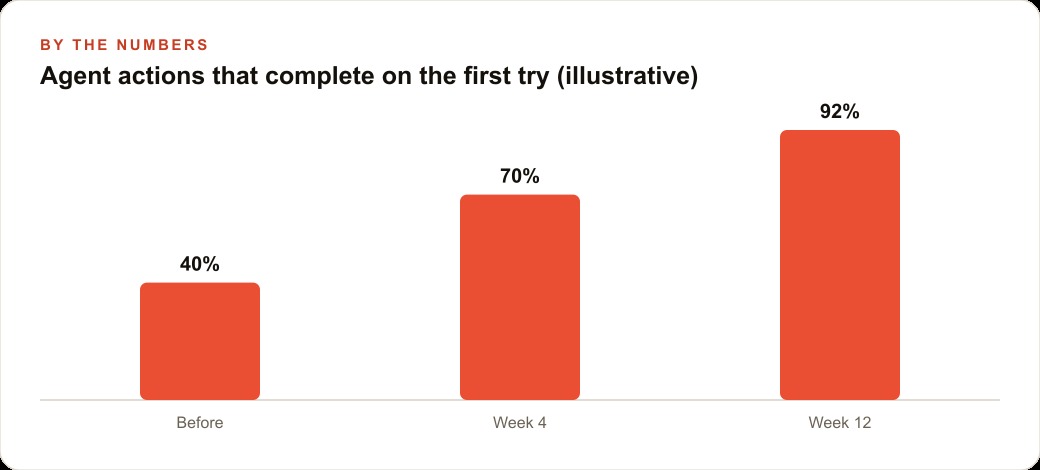
The reservation flow works the same way. A booking page declares check availability, set party size, and reserve table, loaded the instant the agent arrives, with the review layer letting a human confirm before a table is actually held. For a static catering or contact form, the declarative attributes alone make it agent-callable with no extra code. Put illustrative numbers on it and the point lands. If agent-driven orders used to complete on the first attempt roughly 40 percent of the time because of misreads, a clean tool interface can push that toward the high 80s or better, and every recovered attempt is a captured sale instead of an abandoned cart. That reliability compounds with the rest of the business too, because the same site that agents can operate cleanly is the same CRM and website stack where the completed order and the customer's details land ready for follow-up, and a site structured this explicitly tends to be cleaner for SEO and organic search as well, since clear structure helps every machine that reads the page.
The performance story is really an adoption story
It is easy to read all of this as a technical improvement and miss the commercial point, so let me state it directly. The value of making agent actions deterministic is not that engineers feel tidier. It is that more of the tasks customers start on your site actually finish. Every abandoned checkout, every misfired booking, every form an agent gave up on is revenue that walked away, and the walking away was invisible because no human was there to complain about it. A page that declares clean tools converts agent attempts into completed actions, and that conversion is the entire business case in one sentence.
There is also a compounding effect worth naming. Once your site is genuinely operable by agents, it becomes a destination agents prefer to send their humans, because the experience is reliable. Reliability is sticky. The first time an agent completes an order cleanly on your site, it has a reason to come back, and the first time it stumbles on a competitor's messy interface, it has a reason to route around them. In a world where agents increasingly stand between customers and the businesses they buy from, being the easy site to operate is not a nice-to-have. It is distribution.
Where this fits in the near-term web
Zoom out and the strategic read is simple. As agents become a real channel through which customers act, the sites that are easy for agents to operate will quietly get used more, and the ones that force agents to guess will quietly get skipped. Making a site agent-ready is therefore less a technical curiosity and more a way to stay in the flow of how people are starting to shop and book. It sits alongside the demand you already pay for, so the clicks you buy through Facebook and Instagram ad campaigns actually convert when an agent is the one finishing the task.
If you want to experiment today, the path is short. Install the beta browser, enable the WebMCP flag, add the tool inspector extension, and try declaring tools on a single static form before wiring a full app. Getting the tools clean, the schemas right, and the responses and review steps correct across a real ordering or booking flow is genuine engineering work, even though the concept is refreshingly simple. You can follow the steps above and make your own site agent-ready, or if you would rather have your store or booking flow built so agents can use it reliably from day one, that is the kind of work I do for clients.
That is exactly what we do at AI DOERS. Book a private 30-minute call with Madhuranjan Kumar and we will map the fastest path to it for your specific business.
Book your call →
Madhuranjan Kumar
Madhuranjan Kumar brings 20 years of performance-marketing experience and has managed over $200 million in Facebook ad spend for brands across the United States and beyond. His expertise spans the full modern marketing stack: Meta, Google Ads, TikTok, email automation, CRM, and the websites that hold it together. At AI DOERS he turns that track record into lead-generation systems for businesses across every industry.