
What Gemini 3 Means for a Small Business, Not Just Benchmarks
Gemini 3 can build a working app from one prompt, explain anything with interactive visuals, and tops the leaderboards. Here is what that actually changes for a real business and how I would use it for a client.

Gemini 3 topped every major AI benchmark released this season, and for most business owners, the leaderboard is the least interesting thing about it. The better frame is this: what can a business actually do with it on Monday morning that it could not do on Friday afternoon? The answer covers eight concrete capabilities, each with a direct application to a real operation. I, Madhuranjan Kumar, walk through each one below, with particular attention to the ones that change the category of task rather than just the speed of it.
1. One prompt that builds a working web tool instead of a wireframe
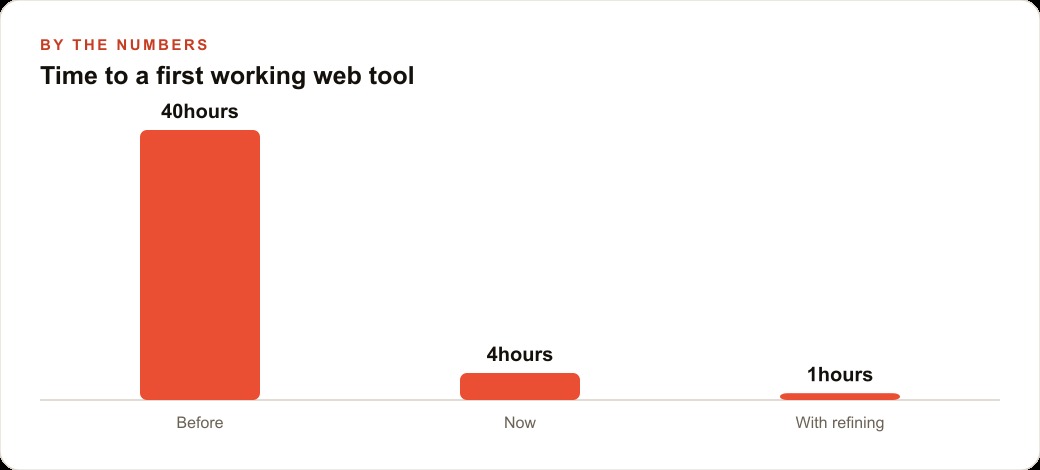
Before this model generation, building a working web application from a single prompt required many back-and-forth exchanges, debugging rounds, and careful specification of each feature. A one-sentence prompt produced a skeleton or a broken prototype that needed a developer to finish. Hours became the baseline for even a simple result.
Gemini 3 can generate a functioning web tool from a single plain-language description. A business owner types what the tool needs to do, and the model produces a working version with the logic connected and the interface usable. The developer timeline for a small internal tool collapses from days to hours or less.
For a small business, the practical effect is that ideas which were previously too minor to commission now get built. A simple quote calculator, a customer intake form with branching logic, a scheduling tool for a specific internal process: each of these used to require enough budget and timeline to justify a project. Now the threshold for building something is whether you can describe it in one clear sentence. That change in threshold is larger than it sounds. Every business carries a backlog of small tools it never built because they were too minor to commission and too complex to build without help. The one-prompt capability begins to clear that backlog, starting with whichever friction point has bothered the owner the longest.
2. Visual reasoning built from problems the model has never seen before
Benchmark performance usually describes how well a model answers questions close to things it encountered during training. Visual reasoning benchmarks built from genuinely novel problems test something harder: whether the model can think through a visual problem it has not memorized an answer for.
Gemini 3 posts a large lead on that category of benchmark over the next closest model. For a business that uses charts, data visualizations, photos, diagrams, or any visual material as part of its work, this is the capability that transfers most directly. The model does not just recognize what an image contains. It reasons about what the visual information means and what follows from it.
A distributor comparing supplier quotation tables submitted as images, a contractor reviewing an architectural diagram for specification compliance, a retailer analyzing a competitor's storefront photo: each of these tasks requires visual reasoning, not just visual recognition. That difference used to require a human expert reviewing the materials. Gemini 3 handles a meaningful portion of that analysis in seconds and can articulate the logic behind its interpretation, which makes the output verifiable rather than opaque. For a business that regularly handles visual data as part of its operational decisions, this shift is material.
3. Interactive animated explanations that staff and customers actually follow
Explaining a complex process to a staff member or a customer through text alone often fails. The explanation is read once, partially understood, and then set aside when questions arise. Video or interactive content works better but costs time and money to produce.
Gemini 3 can generate interactive, animated explanations of concepts and processes. Ask it to explain a multi-step procedure and it can return a walkthrough that moves through each step with visual emphasis rather than a wall of text. For training purposes, this changes the quality of what a business can give new hires without producing any custom video content.
For customer communication, the application is similar. A business that sends customers complex aftercare instructions, installation guides, or onboarding materials can replace static documents with explanations that move and clarify at each step. The customer who ignores a PDF is more likely to follow an animated walkthrough. That difference in comprehension has downstream effects on customer satisfaction and on the volume of follow-up questions the team has to handle. Over a month of customer interactions, fewer follow-up calls about instructions that were not followed adds up to real time recovered.
4. A million tokens that hold an entire codebase or three years of meeting notes at once
Context window size governs how much information a model can work with in a single session without forgetting what it read first. Most practical AI conversations hit a ceiling where the model loses track of details from early in the exchange, forcing the user to repeat context or lose the thread.
A million-token context window changes that for most business use cases. It means the model can hold an entire small business codebase in one session, or every email from a client relationship spanning two years, or a full year of meeting notes and decisions, all at once without truncating or forgetting.
For any business task that requires cross-referencing large bodies of information, this capability changes what is possible in a single session. An audit across 300 customer contracts for a specific clause type, a consistency check across a year of internal communications before a business review, a comparison of feature requests across a thousand support tickets: each of these tasks becomes feasible without breaking the work across multiple sessions and manually re-supplying context each time. The time saved is real, and so is the improvement in answer quality when the model has the full corpus rather than a carefully curated excerpt.
5. Autonomous multi-task sequences that run for minutes without needing input
Most AI models work well on single, well-scoped requests. Ask them to handle a multi-step project and they typically produce a plan and then wait for you to execute each step and approve the result before continuing.
Gemini 3 running inside a coding environment can plan a list of tasks and work through them continuously for several minutes before requiring human input. It researches, builds, checks its own output, and iterates, more like a capable team member executing a brief than a tool waiting for step-by-step instructions.
For a business owner, this changes the nature of delegation. Instead of walking a tool through each step of a process, you describe the outcome and let it work. The time savings are not incremental; they are structural. Tasks that previously required a session of back-and-forth exchanges become tasks that run while you handle something else. The quality of the output also improves, because the model can course-correct mid-sequence based on what it finds, rather than locking in an early decision and following it to a wrong conclusion later.
6. Speed and cost advantages from chips Google built rather than bought
The economics of running large AI models depend heavily on the hardware powering inference. Most model providers rent or purchase GPU capacity, which means their costs track with the GPU market and they share that infrastructure with competing demands.
Google runs Gemini on its own TPU chips, which are purpose-built for AI inference and developed over years of internal use before any external product used them. That vertical integration produces faster inference and lower per-query costs than GPU-dependent alternatives, and those cost advantages flow downstream to the pricing available to end users.
For a business that uses AI at scale across a team or for high-volume tasks, the cost difference matters in practice. A model that is meaningfully cheaper to run on the same task allows more usage within the same budget. Faster inference means shorter wait times on complex tasks. Both of these factors compound over a year of regular use. The chip advantage is structural and unlikely to disappear quickly, because reproducing years of TPU development requires both the investment and the timeline to do it. For users, the benefit shows up as lower bills and faster responses on the same category of work.
7. Reference image input that replaces five paragraphs of design description
Describing a design outcome in words is an imprecise communication method. You can specify color, layout, font choices, and spacing in detail and still produce an output that does not match what you had in mind, because words carry ambiguity that images do not.
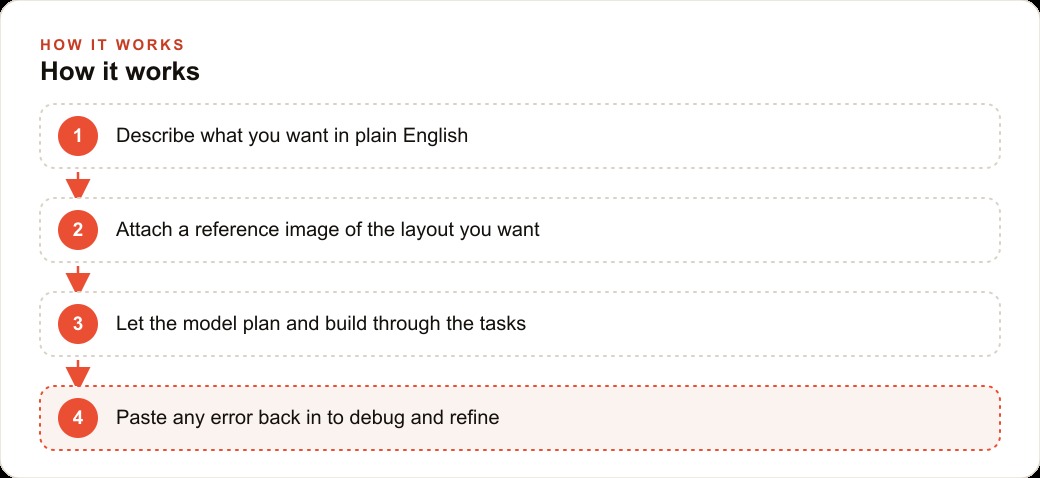
Gemini 3 accepts a reference image as part of a prompt. Show it a screenshot of the interface or design you want to match and it builds toward that visual target rather than inferring one from a text description. The image becomes the specification. The gap between what you ask for and what you get narrows significantly because the reference resolves the ambiguity that words cannot.
For any business that produces designed output, whether that is a web tool interface, a document template, a presentation format, or a report layout, this capability removes a significant friction point. You stop describing and start showing. That shift cuts the refinement cycle from several exchanges down to one or two, and the first version lands closer to the target because the model is working from the same visual reference you have in your head.
8. Paste the error and close the loop without starting over
Development and configuration processes break. When something stops working, the traditional path is to search for the error message online, read documentation, try several fixes, and hope one resolves the issue. This takes time even for experienced practitioners and can stop a non-technical owner cold.
Gemini 3 with enough context in the session and the error message pasted directly into the conversation diagnoses what broke and why. It identifies whether the issue is an outdated library version, an incorrect configuration parameter, a missing connection, or a logic error. It then produces the specific fix rather than a list of things to try.
Consider a veterinary clinic building its own internal tools to track patient histories, schedule follow-ups, and manage vaccination reminders. A 12-person practice with no in-house technical staff has no realistic path to those tools without this kind of debugging support. The practice had 280 active patients and 60 appointments per week, with no centralized way to flag which animals were overdue for annual checkups. The front desk was spending roughly 4 hours per week pulling individual records and cross-referencing vaccination dates against appointment history by hand.
The owner built a simple tracking tool with Gemini 3 over two evenings, hitting three errors in the process. Each error was diagnosed and fixed in minutes by pasting the message back into the session. The tool now runs the overdue check automatically each morning and produces a prioritized call list. The front desk recovered 3.5 hours per week, enough to handle outbound check-in calls the practice had been consistently skipping.
The debugging loop is what converted the project from a stalled experiment into a working tool. Without it, the first error would have been the end of the project for a non-technical owner. With it, each error is a five-minute fix and the project keeps moving forward. That difference is ultimately what makes the capability accessible to a business that would never have been able to use earlier model generations for serious internal tool work.
Where to start with these eight capabilities
The eight capabilities above are not equally weighted for most businesses. The order in which they deliver value depends on where the business's time goes. For a business with a backlog of unbuilt internal tools, capability 1 and capability 8 together are the priority: describe what you need, build it, fix what breaks. For a business that regularly handles visual data as part of decisions, capability 2 and capability 7 are the priority. For a business that trains staff or communicates complex information to customers, capability 3 is the most immediate value.
The least productive approach is to explore all eight capabilities in parallel without committing to using any of them on real work. One capability used consistently on a real task for 30 days produces more value than eight capabilities tried once in demo mode. Pick the one that addresses the friction point you feel most often and make it the default tool for that task before moving to the next. The compounding happens when capabilities become habits rather than experiments.
That is exactly what we do at AI DOERS. Book a private 30-minute call with Madhuranjan Kumar and we will map the fastest path to it for your specific business.
Book your call →
Madhuranjan Kumar
Madhuranjan Kumar brings 20 years of performance-marketing experience and has managed over $200 million in Facebook ad spend for brands across the United States and beyond. His expertise spans the full modern marketing stack: Meta, Google Ads, TikTok, email automation, CRM, and the websites that hold it together. At AI DOERS he turns that track record into lead-generation systems for businesses across every industry.