
The Complete Vibe Coding Workflow: Build, Version, and Review Apps Without Code
A step-by-step look at how to use Claude Code, GitHub Desktop, and Code Rabbit together to build custom business apps that are stable, versioned, and professionally reviewed.

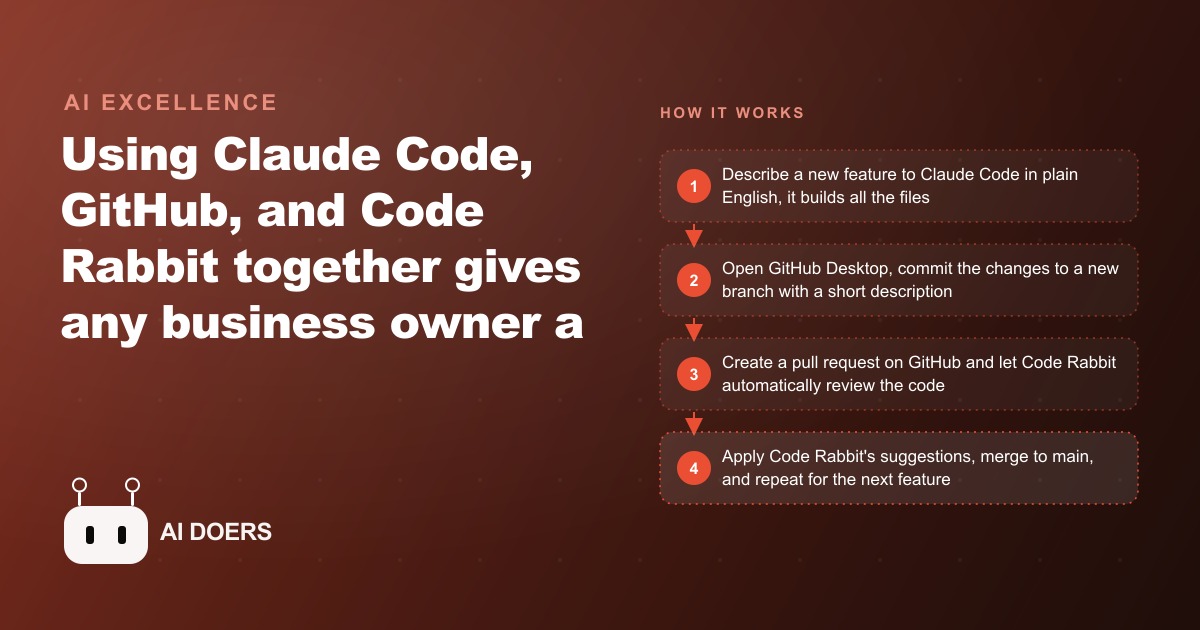
You can now build a real, working business app without writing a single line of code, and the reason it finally holds up in 2025 is not one magic tool. It is three ordinary tools used together in a disciplined loop. Miss any one of them and the whole thing turns into a fun afternoon that produces something fragile. Use all three and you get software that is stable, versioned, and professionally reviewed, built entirely by describing what you want in plain English.
I am Madhuranjan Kumar, and rather than hand you a vague pep talk about the future of coding, I want to give you the seven concrete pieces that make this workflow actually reliable. Here they are, each one a specific job in the system.
1. Claude Code is the builder that turns plain English into working files
The engine of the whole thing is Claude Code. You open a terminal in your project folder, activate it, and describe what you want in ordinary language: the purpose of the app, the main features, who will use it, and any design preferences. It generates a plan, creates all the necessary files, and produces a working application you can open in a browser. You bring the vision and the judgment about what the app should do. It handles the technical implementation.
The important shift is that your first prompt does not have to be perfect, because the relationship is conversational. You test the result, note what works and what needs adjusting, and follow up with targeted refinements. Changing a color, adding a button, swapping a layout, or fixing a bug all happen through the same plain-English interface, with no need to understand the underlying code. This is the piece everyone already knows about, but on its own it is also the piece that gets people into trouble, which is exactly why the next six items exist.
2. GitHub Desktop saves every working version as a checkpoint
The moment your app does something you like, you save that state. GitHub Desktop is where you do it. You write a short description of what this version contains and commit those changes, creating a checkpoint stored safely in the cloud. Even if something goes wrong with your computer, that version is not lost.
Think of each commit as a save point in a game. Every time you reach a state worth keeping, you save, so that a later experiment gone wrong can never erase the progress you fought to get. Business owners who skip this step because it feels like bureaucracy learn its value the hard way, the first time a promising new feature quietly breaks something that was working an hour ago, and there is no clean version to return to.
3. Branches are your undo button for entire features
Before you add anything new, you create a branch. A branch is a parallel copy of your app where you can experiment freely while your last good version stays untouched in the main line. If the new feature works out, you fold it back in. If it turns into a mess, you throw the branch away and your working app is exactly as it was.
This is the single habit that separates a stable build from a stressful one. Without branches, every new feature is a gamble against your existing work. With them, experimentation costs you nothing, because failure is always recoverable. It is the structural reason this workflow can grow an app in complexity safely instead of turning it into a pile of fragile changes stacked on top of each other.
4. Code Rabbit reviews and fixes the code automatically
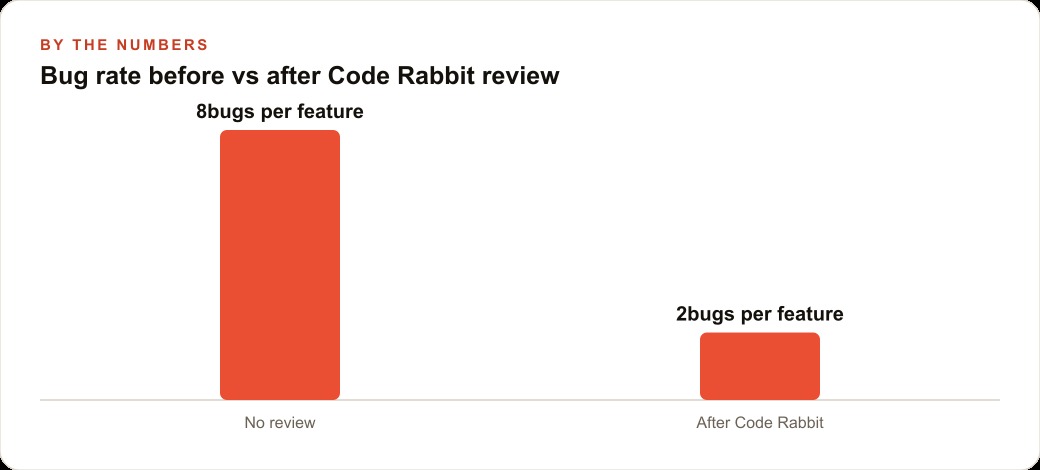
Here is the piece most no-code builders never add, and it is what makes the output genuinely trustworthy. When you open a pull request on GitHub, Code Rabbit automatically analyzes the new code. Within a minute or two it leaves detailed comments explaining exactly what it found: security issues, logic problems, performance concerns, and specific lines to improve. Many suggestions come with a one-click commit button that applies the fix directly.
Testing the interface only tells you the app looks like it works. Code Rabbit catches the problems you cannot see from the outside, the kind that surface later as a security hole or a subtle bug once real business data is flowing through the app. You do not need to understand the code it is critiquing. You just need to read the plain-language explanation and apply the fixes that matter, especially anything flagged as a security or logic issue.
5. The three-phase cycle is the rhythm that makes it repeatable
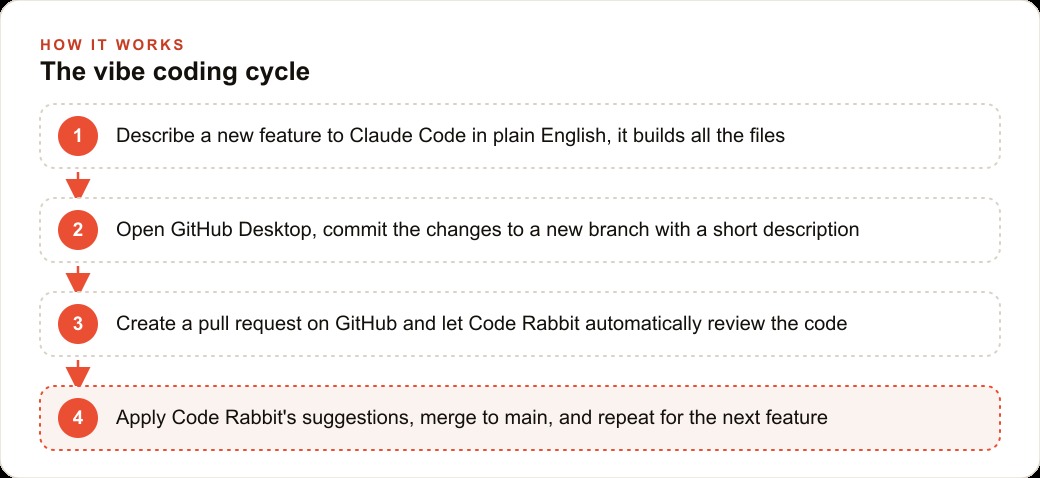
The tools only work because they run in a fixed loop, and the loop is the fifth piece. Phase one, build with Claude Code and get a version you are happy with. Phase two, commit that version to GitHub, creating a new branch first if you are about to add a feature. Phase three, open a pull request, let Code Rabbit review, apply the relevant suggestions, and merge back to your main branch. Then you start the cycle again for the next feature.
That rhythm is what lets complexity grow incrementally and safely. Instead of trying to describe a twenty-feature app in one impossible prompt, you build the core, lock it in, review it, and only then add the next layer. Each pass leaves you with something working, versioned, and reviewed, so the app gets steadily more capable without ever becoming a house of cards.
6. The per-feature cost is measured in pennies, not subscriptions
The economics are the sixth piece, and they are what make this practical for a small business rather than just interesting. Claude Code charges per request rather than a flat monthly fee, so adding a new feature typically costs between ten and thirty cents in credits. A complete first build of a reasonably featured app runs a few dollars. GitHub has a free tier that covers private repositories and unlimited commits. Code Rabbit offers a free trial and then a modest monthly plan.
Put together, the full workflow runs under thirty dollars a month. Set that against a commercial tool: for any business replacing even a fifty-dollar-a-month SaaS subscription, the math is immediate, and unlike the commercial product, the tool you build changes whenever your business changes. That adaptability does not show up in a price comparison, but over a year or two it is worth as much as the direct savings, and it frees budget you can redirect into Facebook and Instagram ad campaigns or Google Ads that actually grow the top line.
7. Your judgment is the seventh tool, and the one that ships it
The final piece is not software. Agents solve the blank-page problem and do most of a task, but they do not know your business, your customers, or your standards. You are the one who decides which version is right, which Code Rabbit suggestions matter for your use case, and when the app is finally good enough to rely on. The workflow gets you most of the way there fast. You finish the last stretch, send one or two cleanup prompts, and ship it yourself.
Expecting perfection from the first version is the most common way people give up too early. This process is iterative by design. Two or three passes of refinement produce a tool that works exactly the way you want, and the judgment you apply across those passes is what separates a real business tool from a toy.
A worked example: a used car dealership CRM
Let me run all seven pieces through an illustrative build. A mid-size used car dealership tracks customer follow-ups in a shared spreadsheet, and it works badly. Entries get overwritten, follow-up dates are inconsistent, and management cannot see pipeline status without reading dozens of rows by hand.
The owner opens Claude Code and describes a CRM: log customer names, contact info, the vehicle of interest, budget, last contact date, next follow-up date, a status dropdown of New, Warm, Hot, and Closed, a notes field, a sortable table, and a search bar. Claude Code builds it in about six minutes. The owner tests it, likes it, and adds a Priority flag that highlights those contacts in red at the top, which the tool adds in under a minute. That version gets committed to the main branch, and a new branch is created before anything else. A pull request triggers Code Rabbit, which flags one real issue: the notes field does not sanitize input, which could cause display errors. A one-click fix applies it, and the branch merges clean.
Over the next two weeks the team adds an automatic activity log, an email-template generator that drafts follow-ups based on the vehicle and budget, and a simple dashboard of pipeline counts by status, each through the same build, commit, branch, review cycle. Illustrative totals: roughly eight dollars in credits for all of it, against something like two hundred dollars a month for a commercial CRM, and the leads captured in it feed naturally into the wider CRM and website stack the dealership already uses for outreach. The app ends up simpler than any off-the-shelf product because it does only what this one dealership needs.
Why the discipline matters more than the demo
It is worth being honest about why this three-tool loop exists at all, because the temptation is to skip straight to building and ignore the rest. Anyone can produce an impressive demo with the builder alone. You describe an app, it appears, and for about an hour it feels like magic. The problem is what happens on the second day, when you add a feature and something you relied on quietly breaks, and you have no clean version to return to and no idea which line caused it. The demo was easy. Depending on it is the hard part, and the discipline is what closes that gap.
Each of the supporting pieces exists to answer a specific failure. Version control answers the fear that a new change will destroy old work, by giving you a save point before every experiment. Branches answer the risk of experimentation itself, by making failure free to throw away. Automated review answers the invisible danger, the security hole or logic bug you cannot see by clicking around the interface, by having a reviewer read the code you do not read yourself. None of these are optional flourishes. They are the difference between a toy that impresses you once and a tool you can trust with real customer data.
This is exactly why building everything in a single giant prompt is such a common mistake. A twenty-feature request produces a version riddled with gaps, and because it all arrived at once, you cannot tell which part works and which part is broken, nor roll back to a smaller working state. Building one layer at a time, and locking each layer in with a commit and a review before adding the next, is what lets complexity grow without turning into a fragile pile. Slower on any single feature, far faster over the life of the app, because you almost never have to unwind a mess.
The mistakes that sink people are predictable, which means they are avoidable. Skipping version control because it feels like bureaucracy, ignoring review suggestions because the app seems to work, and expecting the first version to be perfect are the three that account for most abandoned projects. Treat the loop as non-negotiable and those failure modes simply do not occur. The reward for that small amount of discipline is an app stable enough to run real business operations on, built for pennies, that you can change whenever your business changes, which frees both budget and attention to put back into the Google Ads and organic channels that actually bring customers in.
Putting the seven pieces together
To set this up yourself, create a GitHub account and install GitHub Desktop, install Claude Code with Node.js and your Anthropic API key, and connect a Code Rabbit account to your repositories so it activates on every new project. Create a repository for your first app, activate Claude Code in its folder, and write a specific first prompt about the app's purpose, its data, and the interface you want. Commit the working version, branch before each new feature, and run the build, commit, review cycle for everything after that.
You can build your first working app with this full system in a single afternoon. The learning curve is a little steeper than building without version control and review, but the stability of what you produce is dramatically better, and that stability is the entire difference between a demo and a tool your business can actually depend on. You can absolutely do this yourself, and if you would rather have someone stand up the workflow and build the first few tools with you, that is exactly the kind of work I help businesses with.
That is exactly what we do at AI DOERS. Book a private 30-minute call with Madhuranjan Kumar and we will map the fastest path to it for your specific business.
Book your call →
Madhuranjan Kumar
Madhuranjan Kumar brings 20 years of performance-marketing experience and has managed over $200 million in Facebook ad spend for brands across the United States and beyond. His expertise spans the full modern marketing stack: Meta, Google Ads, TikTok, email automation, CRM, and the websites that hold it together. At AI DOERS he turns that track record into lead-generation systems for businesses across every industry.