
Veo 3.1 Tested: Every New Feature Explained and What It Means for Your Marketing
Google's Veo 3.1 update introduces ingredients-to-video, frames-to-video, clip extension, and inline editing. Here is what each feature can actually do and how a restaurant can use them to produce professional video content.

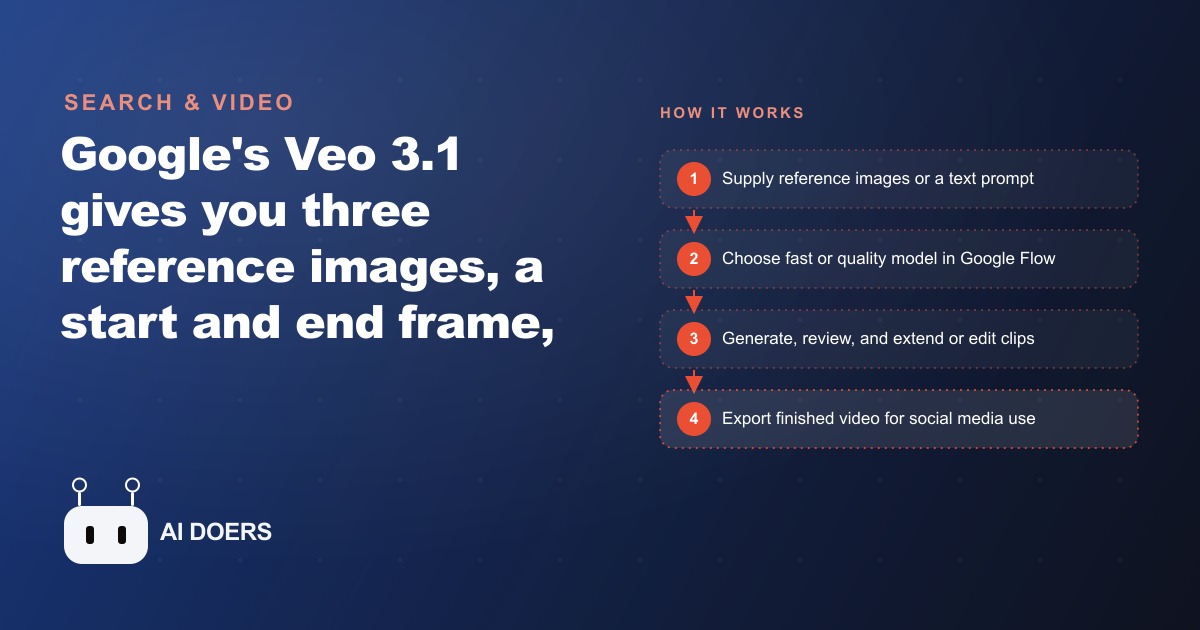
A restaurant that wanted a handful of polished promo clips used to be looking at a videographer, a food stylist, an editor, and several thousand dollars, with a timeline measured in weeks. Google's Veo 3.1 update collapses most of that, and it does it through four features that finally give you real control over what the AI produces: three reference images combined into one clip, motion generated between a start and end frame, clip extension, and inline editing that drops new elements into footage you already made. This is a hands-on playbook for turning those features into a working video system, written in the order you should actually do the steps.
The version number undersells the jump. What makes 3.1 matter for a business is not that the clips look better, though they do, but that you can now steer the output toward your specific product and your specific space instead of accepting whatever a text prompt happens to imagine. That control is the whole difference between an interesting demo and footage you can actually post.
Start by building a reference-image library, not a prompt
The instinct is to open the tool and start typing prompts. Resist it. The first move in this workflow is photography, because the ingredients feature is only as good as the reference images you feed it. A single professional photo session covering your space in a few lighting conditions, the bar, a visible angle of the kitchen, and ten to fifteen hero shots of your best dishes gives you enough raw material to generate months of video. That one-time shoot, budget it at roughly three hundred dollars for a half-day with a food photographer, becomes the foundation everything else draws from.
Organize those images before you generate anything. Sort them into settings, subjects, and objects, because the ingredients feature wants roughly one image for the environment, one for a person or character, and one for a product or style element. When your library is sorted this way, building a clip becomes a matter of picking three images and writing a sentence, instead of hunting through a camera roll every time. The groundwork here is unglamorous and it is exactly what separates people who produce consistent video from people who generate one lucky clip and never repeat it.
Match the feature to the model before you spend a credit
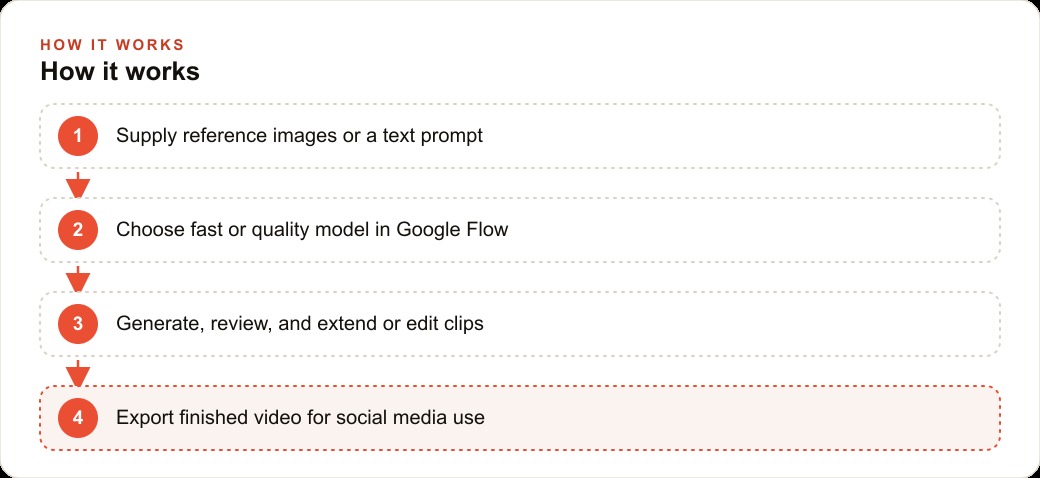
Veo 3.1 runs in two modes, a fast setting and a quality setting, and they do not support the same features. The quality mode produces sharper, more consistent results, but the ingredients-to-video feature runs on the fast model only. If you set up a project on quality and try to combine three references, the option simply is not there, and you have wasted the setup time figuring out why. Decide which feature you need first, then pick the matching model, not the other way around.
The rule of thumb that keeps this simple: reach for the fast model when you are combining reference images into branded product clips, and reach for the quality model when you are animating between two frames or need the cleanest possible single shot. Access runs through Google's Flow platform, through the create-video feature inside Gemini, or through third-party platforms that have integrated the Veo API, and those third-party routes often price per generation more cheaply. Paid Google plans start around twenty dollars a month with a higher tier well above that, and Google has offered trial periods, so test the output against your actual dishes and your actual room before committing to a subscription.
Combine three references into one branded clip
This is the feature that changes the economics, so it is the one to master first. In Flow you upload up to three reference images and the model weaves them into a single coherent clip. Upload a photo of your dining room, a photo of a signature dish, and a photo of a person, add a text prompt describing the mood and the action, and you get video that places that person in that room with that food, all built from still images and none of it requiring a shoot.
Write the prompt with specific verbs and a clear mood. Vague direction produces generic motion, and the point of supplying your own references was to escape generic. Describe what moves, how the light feels, and what the moment is, a couple lingering over a Friday-night cocktail at the bar, steam rising off a plate as it is set down. Generate two to four variations of the same idea, because output quality varies run to run, and pick the strongest. This is where short video starts to pay for itself, because clips that show appetite and atmosphere consistently outperform static photos in reach, and a good clip is exactly the kind of creative that drops the cost per lead on Facebook and Instagram ad campaigns when you put spend behind it.
Animate between two frames when you need a transition
The frames-to-video feature takes a first image and a last image and generates the motion between them. Supply the two endpoints, describe the action that connects them, and the model builds the animation. This is the tool for a before-and-after, a transition between two states, or a visual journey from one shot to another. Use the quality model here rather than fast, because frame-to-frame continuity is where quality mode earns its longer render time and produces the more consistent result.
For a restaurant this is how you show a dish coming together, an empty table transforming into a set scene, or a room shifting from afternoon light to evening service. The two frames give the model a fixed start and finish, which removes most of the guesswork that makes pure text-to-video unpredictable. You are no longer hoping the model lands somewhere usable. You are telling it exactly where to begin and where to end.
Extend and edit instead of regenerating from scratch
Two more features keep you from burning credits on full regenerations. Extension takes an existing clip and continues it forward in time using the last frame as the new starting point, and you can chain extensions to build a longer sequence from short pieces. Generate a base clip, review the variations, pick the best one, then extend it with a short description of what happens next. This is how a five-second clip becomes a twenty-second sequence without a single reshoot.
Inline editing lets you add an element to footage you already made. Draw a selection area on this breakdown, describe what to place there, and the model drops in a new object or figure at that spot. Note the limit clearly: the current version adds elements but does not remove them, so plan your base clip to be clean and use editing to add seasonal decorations, a new menu item, or a background detail. Keep the edits simple. The feature shines at adding a prop or a person in the background and struggles with heavy modification, so for any significant change, regenerating with a better initial prompt beats fighting the editing interface.
Write prompts that describe motion, not just a scene
A quiet reason people get mediocre results is that they describe a picture and expect a video. The model already knows what a plate of food looks like. What it needs from you is what happens in the shot, over the few seconds it runs. A prompt that says a bowl of ramen on a table produces a nearly static clip. A prompt that says steam curling upward off a bowl of ramen as chopsticks lift a strand of noodles, warm evening light from the left, gives the model a sequence to animate.
Build every prompt around three things: the subject and setting, which your reference images mostly cover, the motion, which is the verb work you have to supply, and the mood, which is the lighting and pace that make it feel intentional. Keep the motion physically plausible for a short clip. Ambitious camera moves and complex choreography tend to break, while a single clear action rendered well looks professional. When a clip comes out flat, the fix is almost always a stronger motion description, not a different tool. This habit carries across every feature, so it is worth building early rather than discovering it after a dozen lifeless renders.
A worked example: a restaurant's monthly video system
Here is the whole playbook running for a restaurant with a monthly social budget of around five hundred dollars, with illustrative numbers. The foundation is the reference library from step one, that three-hundred-dollar photo session that feeds the system indefinitely. From those images the ingredients feature generates promotional clips for each featured dish, atmosphere videos of the dining room at different times of day, and event-style footage for special occasions. A Friday-night promo showing the bar, a signature cocktail, and a couple enjoying the evening comes from three stills and one prompt.
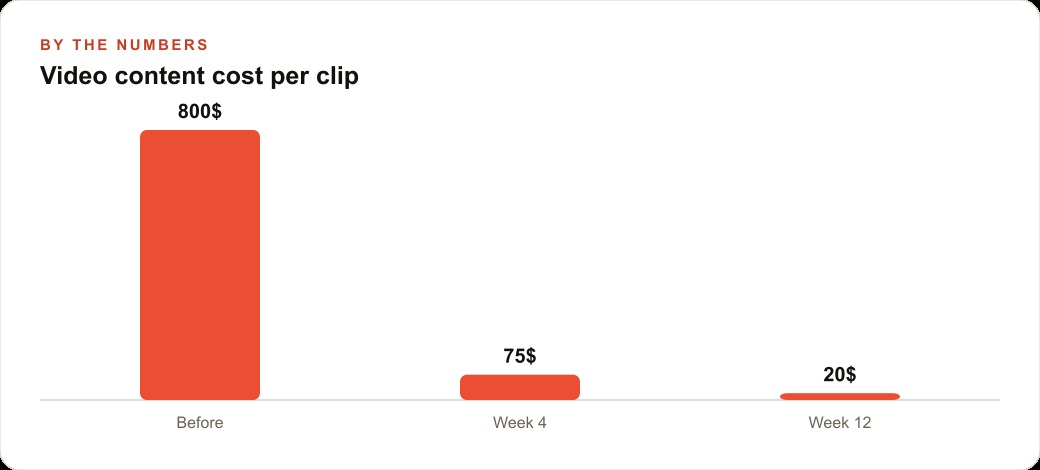
Set a posting cadence of three to five short videos a week, a common target in the category. At that rate, generating a week of content takes an hour or two of prompt writing and review, and the extension and editing features stretch existing clips further so you are not starting fresh every session. Put rough numbers on the cost per clip as the system matures: before AI, a single polished clip effectively cost several hundred dollars of production time. By the fourth week of running this workflow that drops toward seventy-five dollars of equivalent effort per clip, and by the twelfth week closer to twenty dollars as the reference library and prompt templates get reused. Reallocate a hundred dollars of the five-hundred-dollar budget to the AI subscription and unlimited content creation for the month is covered, leaving four hundred dollars to promote the best-performing clips.
That shift, from spending on production to spending on distribution, is the real win, because a limited budget goes much further promoting proven content than manufacturing it. The clips also do double duty. The same atmosphere and dish videos that run as social ads sit on the website and the reservation page, where motion content keeps visitors on the page longer and feeds SEO and organic search with the kind of rich media that flat menus never provided, and the leads those posts drive land back in the CRM and website stack where follow-up can actually chase the reservation.
Where AI video stops and real footage has to take over
The last part of the playbook is knowing the boundary. AI video is strongest for atmosphere, lifestyle, and product showcase content, and it is genuinely production-capable there now. It is not a replacement for everything. Content that requires specific real people, location-authenticated footage, or documentary-style credibility still needs traditional production, because a generated approximation of your actual staff or your actual room, presented as if it were real, sets up expectations that the visit will not meet.
Build the content strategy around that split. Use AI for background clips, atmosphere, product showcases, and animated formats, and reserve real filming for hero content where authenticity is the point. And build iteration into the workflow rather than expecting the first render to be perfect, because generating two to four variations and selecting the best is how the tool is meant to be used.
It also pays to know where each platform is genuinely ahead. In head-to-head testing, the leading rival on realistic human figures still handles physics, movement, and facial consistency more convincingly than Veo 3.1 in most scenarios, so a clip that leans on a believable person in motion may come out better there. Veo, in return, is more flexible with creative scenarios and stronger on post-generation editing and extension. The practical takeaway is not loyalty to one tool but matching the shot to the platform that renders it best, which is exactly the kind of judgment that comes from testing both against your own content rather than trusting a leaderboard. A restaurant owner can stand up this whole system in a weekend, or bring in someone who already knows both platforms to accelerate the first batch of footage and hand over a reusable library ready to post.
That is exactly what we do at AI DOERS. Book a private 30-minute call with Madhuranjan Kumar and we will map the fastest path to it for your specific business.
Book your call →
Madhuranjan Kumar
Madhuranjan Kumar brings 20 years of performance-marketing experience and has managed over $200 million in Facebook ad spend for brands across the United States and beyond. His expertise spans the full modern marketing stack: Meta, Google Ads, TikTok, email automation, CRM, and the websites that hold it together. At AI DOERS he turns that track record into lead-generation systems for businesses across every industry.