
How to Turn Claude Code Into Your Own Executive Assistant
An AI executive assistant that already knows your business can plan your day, run research, and draft work in parallel. Here is how the system is built and how a med spa could run on it.

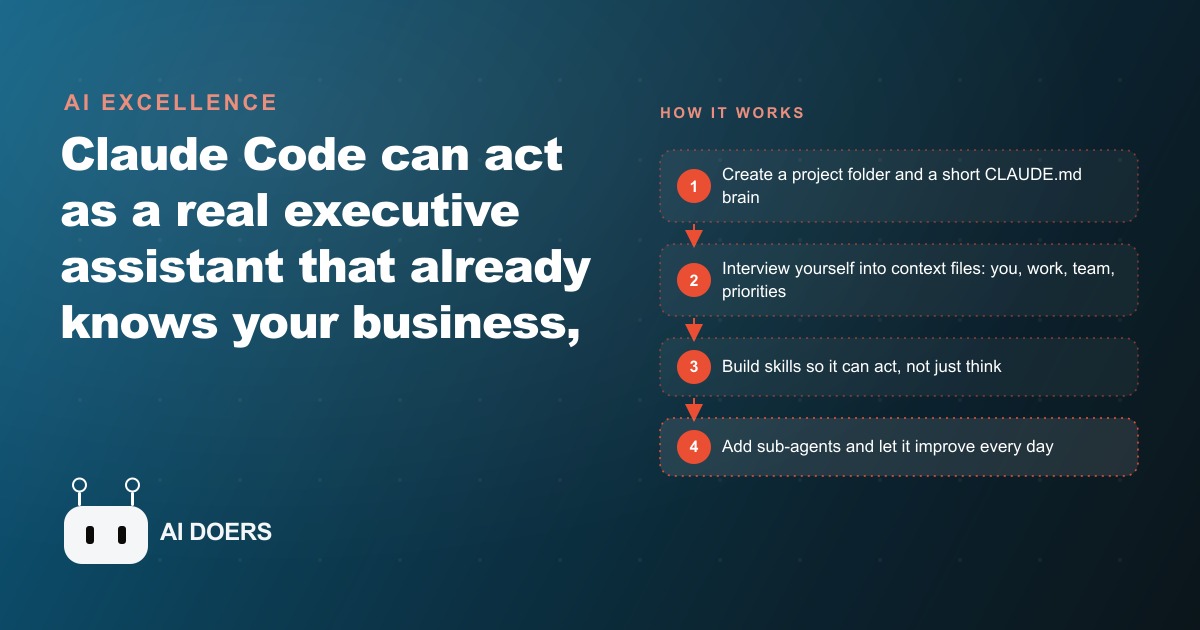
Most people talk to Claude like it is a stranger they just met, re-explaining their business every single time. This playbook fixes that. By the end you will have built an AI executive assistant inside Claude Code that already knows your name, your business, your team, your priorities, and the decisions you have made, so it can plan your day, run research, and draft work in parallel instead of answering one-off questions. I am Madhuranjan Kumar, and the difference is stark. A normal chatbot gets you maybe halfway because you keep feeding it context. A proper assistant starts at ninety percent because the context already lives in the project. The demo that sold me was four tasks running at once, planning the day, researching and drafting a post, checking on the team, producing a visual, all finishing in a minute or two, replacing at least twenty-five minutes of context switching. Here is how you build it, step by step.
Step one: give the assistant a home before you give it any work
The first mistake people make is asking for output before they have built any structure, and the assistant stays scattered as a result. Do the opposite. Open a plain folder on your computer as a Claude Code project. That folder is the home. Everything the assistant knows will live here as files, which is what makes this fundamentally different from a chat window that forgets you the moment you close it.
Inside that folder, create one file called CLAUDE.md. This is the single most important file in the whole system, and step two is entirely about getting it right. For now, just know that the home is a folder plus that one file, and that giving the assistant a fixed place to keep things is what lets it stay organized as it grows. A chat has no home. Your assistant does, and that is the foundation the rest of the playbook builds on.
Step two: keep the brain lean and let it route, do not stuff it
CLAUDE.md is the brain, but the trap is treating it like a filing cabinet and cramming every detail inside. Do not. This file loads before every single message you send, every time, so if it is bloated, every conversation gets slower and more expensive for no reason. The brain should hold two things only: the rules for how the assistant behaves, and a map that points to everything else.
Write it so it routes. It should say, in effect, if you need to know who I am, read the file about me, if you need business details, read the work file, if you need to know the team, read the team file. That routing is the entire trick. It keeps the assistant fast and cheap because the heavy context only loads when a task actually needs it, instead of dragging your whole business into every hello. Get this discipline right early and the system scales cleanly. Get it wrong and it bogs down the moment you add real detail.
Step three: interview yourself into context files
A brain with no memories is still just a smart stranger. Step three gives the assistant its life. Ask it to interview you, and let it pull the real details out of you and write them into separate files: one about you, one about your work, one about your team, one about your current priorities, plus a place to log decisions as you make them.
This is the step to slow down on, because the honesty of these files decides everything downstream. The more specific and truthful the detail you give, the more the answers sound like they came from someone who already works for you rather than a generic tool. Put in your real priorities for this quarter, the names and roles of your team, the way you actually make decisions, the things you keep having to explain. Every minute you spend here is repaid in every future session, because from now on the assistant reasons over your reality instead of a blank slate. This context is the entire advantage over a plain chatbot, so do not skip it and do not rush it.
Step four: turn your repeated work into skills
Context lets the assistant think about your business. Skills let it do work. A skill is a saved set of instructions for a task you repeat, like deep research, drafting a post, or producing a status report. Once a skill exists, you trigger it with one line and get a consistent result every time, and the output saves back into the project so the assistant remembers what it found.
Build your first skill from the single most repetitive task you do, not the fanciest one. Watch it run, then tell it what to fix. The first few runs will feel a little generic. After ten or twenty rounds of small feedback, the skill is sharp and reliable, and that is exactly the trade you are making: a little setup now for repeatable speed later. This is where the leverage compounds. One person defines a skill once, and from then on the whole operation runs that procedure the same way every time, no matter who triggers it. Add skills one at a time as you notice yourself doing the same thing twice.
Step five: delegate the heavy lookups to sub-agents
As your assistant takes on bigger jobs, you want the main agent to stay fast and focused. Step five is where sub-agents come in. A sub-agent gets its own fresh context and can run a cheaper model for routine work, so you hand off heavy lookups, long research passes, or bulk processing without clogging the main assistant's attention.
The practical effect is speed and cost control. The main agent stays light and responsive because it is not carrying the weight of every large task itself. It dispatches the grind to a sub-agent, gets back a clean result, and keeps moving. This is also what makes the parallel work possible, several tasks running at once, because the main agent can delegate rather than doing everything in a single crowded thread. You do not need this on day one, but the moment a task starts slowing the whole system down, that task belongs in a sub-agent.
Step six: feed it every day so it compounds
The final step is not a setup task, it is a habit. Because every research file, every logged decision, and every skill tweak stays in the project folder, the assistant compounds. Use it daily and a month later it knows far more than it did on day one, and it looks like a completely different, sharper tool. Skip it for weeks and it stagnates.
So build the daily loop. Run your morning skill, log the decisions you make, let it save the research it does, and give it feedback when it drifts. Back the whole project folder up so you can use it from any device and never lose the accumulated context. This is the quiet payoff of the file-based approach: the assistant does not reset. It remembers, and memory is what turns a clever tool into something that genuinely feels like it works for you.
A worked example: standing this up for a busy med spa
Let me make the whole playbook concrete with illustrative numbers, using an unnamed med spa whose owner juggles bookings, staff schedules, treatment launches, and a constant stream of client questions. First the context files, following step three: who the owner is, the services menu and pricing in the work file, the injectors and front-desk staff in the team file, and this quarter's goals, like filling slow afternoon slots, in the priorities file.
Then the skills, following step four. A morning skill reads the day's appointment calendar plus open follow-ups and blocks out the owner's time, so the first decision of the day is already made. A research skill pulls local competitor offers and seasonal demand before a new promotion. A content skill drafts a launch post for a new facial in the spa's own voice and saves it, ready to feed straight into Facebook and Instagram ad campaigns. A pulse skill checks whether the month's booking target is on track and flags clients who never rebooked, so the front desk can chase them, and those flagged clients drop into the CRM and website stack where follow-up automation handles the outreach.
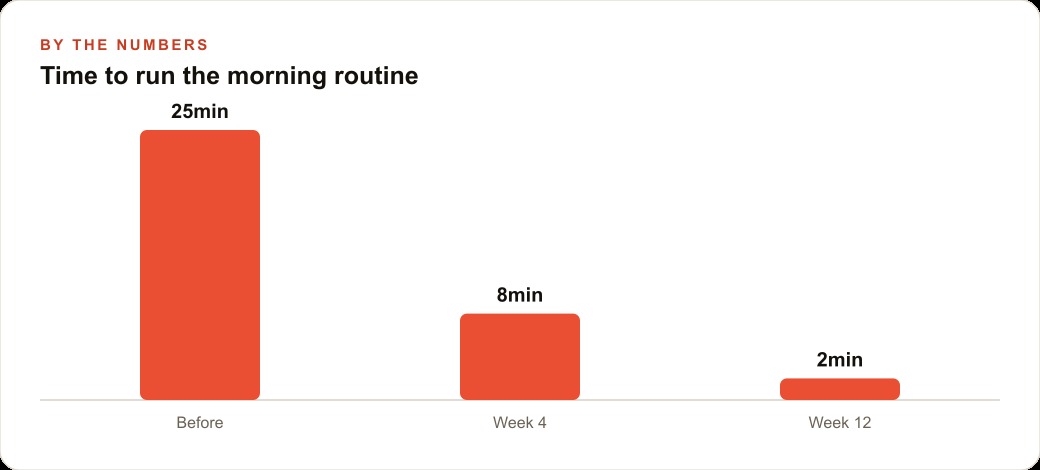
Now the numbers. Say the owner spent about two hours a day on this admin before, roughly 40 minutes planning the day, 40 minutes on marketing scraps, and 40 minutes chasing status and follow-ups. With the assistant, the morning routine that took 25 minutes of scattered checking drops to about 2 minutes of reading a finished plan, and the marketing drafting and status checks run in parallel while the owner does something else. Call it 90 minutes recovered a day. Over a 25-day month that is roughly 37 hours back, and if the owner's time is worth even 60 dollars an hour of billable or growth work, that is over 2,200 dollars of recovered capacity a month against the cost of a Claude subscription. The exact figures will vary, but the shape is reliable: an afternoon of setup buys back the most expensive hours in the week, indefinitely.
The two mistakes that sink most attempts
Before you build, it is worth knowing where this goes wrong, because two mistakes account for almost every abandoned assistant I have seen. The first is stuffing the CLAUDE.md brain instead of letting it route. It is tempting, when you sit down to write it, to pour everything you know about your business into that one file, on the logic that more context is better. It is not, for a mechanical reason: that file loads on every message, so a bloated brain makes every conversation slower and pricier, and it drowns the actual rules in noise. Keep it lean and let it point to the other files. The heavy detail belongs in the context files that load only when a task needs them, not in the brain that loads every time. Discipline here is what keeps the assistant fast a month from now when it knows a lot.
The second mistake is skipping or rushing the interview. People want output, so they create the folder, write a thin brain, and immediately start asking for work. The result is a smart stranger that produces generic answers, and they conclude the whole approach does not work. The truth is they never gave it a life. The interview step, where the assistant pulls your real priorities, team, and decisions into context files, is not a formality you get through to reach the good part. It is the good part. Every ounce of specific, honest detail you put in comes back as an answer that sounds like it came from someone who already works for you. Rush it and everything downstream stays generic. Slow down on it and the same skills suddenly feel tailored.
There is a third, gentler pitfall worth flagging: expecting a new skill to be perfect on its first run. It will feel generic the first few times, and people quit right there. The whole design assumes you refine a skill over ten or twenty rounds of small feedback until it is sharp. Treat the first output as a draft to correct, not a test the tool failed, and you will get to the reliable version that most people give up just before reaching. Knowing these three traps in advance is half the battle, because each one is easy to avoid once you see it coming and quietly fatal if you do not.
Putting the playbook to work
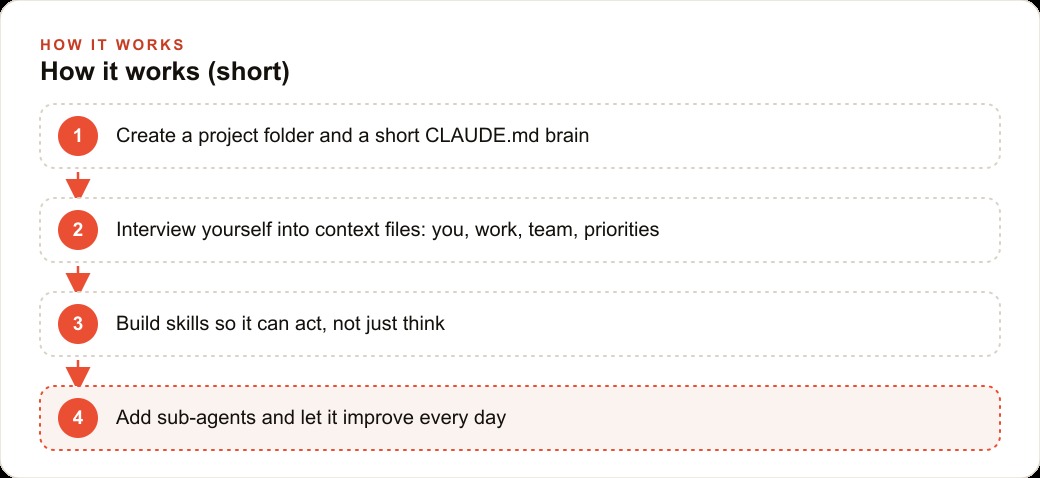
Here is the whole path in one breath. Create one folder and one lean CLAUDE.md that routes rather than hoards. Interview yourself into honest context files. Turn your most repetitive task into a skill and refine it with a few rounds of feedback. Delegate heavy lookups to a sub-agent so the main assistant stays quick. Then use it every day so it compounds, and back it up so it follows you everywhere. None of this requires writing code by hand. It is mostly clear thinking about your own routine, then letting the assistant wire it up.
You can absolutely build a first version yourself in an afternoon, and I would encourage any owner to try, because the act of interviewing yourself into those files is clarifying on its own. If you would rather have the structure, the context files, and the first few skills set up cleanly so it works on day one instead of week three, that is the kind of build I hand clients ready to run. Do it yourself, or bring in a hand and skip straight to the version that already works.
That is exactly what we do at AI DOERS. Book a private 30-minute call with Madhuranjan Kumar and we will map the fastest path to it for your specific business.
Book your call →
Madhuranjan Kumar
Madhuranjan Kumar brings 20 years of performance-marketing experience and has managed over $200 million in Facebook ad spend for brands across the United States and beyond. His expertise spans the full modern marketing stack: Meta, Google Ads, TikTok, email automation, CRM, and the websites that hold it together. At AI DOERS he turns that track record into lead-generation systems for businesses across every industry.