
Turn Any Website Into Clean, LLM-Ready Data in Seconds
Pair a coding agent with a web-scraping tool and any website becomes structured data, screenshots, and branding details in seconds, with no fragile pipeline to maintain. Here is how it works and how a local clinic can put it to use.


Most businesses make decisions on less data than they could easily have
I want to make a claim that most businesses will push back on, but I think the evidence supports it clearly: the majority of companies are making decisions on incomplete data not because the data does not exist, but because they have categorized the task of collecting it as something only a developer can do.
Consider what is publicly available and accessible right now, without a login, without a fee, without any permission: competitor pricing pages, local business directories with names and phone numbers and addresses, review aggregators with star ratings and complaint categories, job boards with compensation ranges and skill demands, conference speaker lists with the organizations those speakers represent. That information is updated continuously and is relevant to strategy, pricing, hiring, partnership, and product decisions that most businesses make on instinct or incomplete internal data because someone looked at that web content once, took a few manual notes, and moved on.
The problem has never been that the data was unavailable. The problem has been that collecting it at a useful volume and turning it into a structured format that feeds a spreadsheet or a model or a dashboard required writing code. Writing code meant engaging a developer. Engaging a developer for a data collection task meant scheduling it, waiting for availability, explaining the exact structure needed, and then maintaining the script when the source website changed its layout. That friction made structured web data collection economically impractical for most small and mid-size businesses, so they made decisions without it.
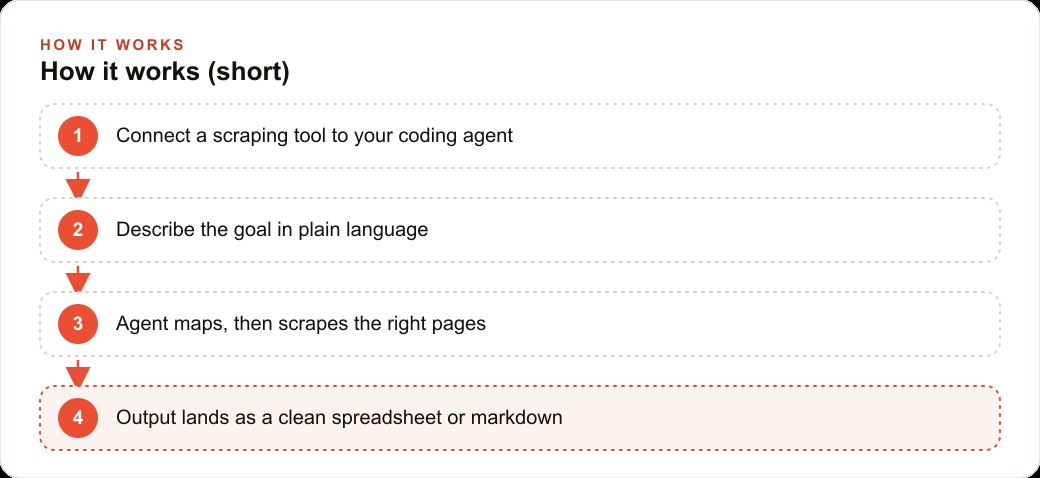
That friction is gone. A coding agent paired with a modern web-scraping tool collects structured data from any publicly accessible website in minutes. You describe the goal in plain language, the agent figures out the technical approach, and the output is a clean file you can open in a spreadsheet. The developer is out of the loop entirely. The question is no longer whether you can have the data. The question is whether you are using this while your competitors are not.
The agent-plus-tool approach removes the developer from the equation
The tool at the center of this workflow is a web-scraping service that exposes its functionality to an AI agent through a simple connection. The tool can do several distinct things: scrape a single page and return its content, map an entire site and list every URL with its position in the site's structure, crawl across multiple pages following internal links, search the web and then scrape the results, and extract specific fields as structured data. Those are distinct operations that a developer writing a script would have to implement separately. The agent selects among them based on what the task actually requires.
The connection setup takes about ten minutes. You add the scraping service as a tool the agent can use, store the API key in an environment file where it stays private, and create a short context document that tells the agent what each tool action does and when to use it. That context document is essentially the instructions a developer would have written in comments inside a custom script. The agent reads them and applies them when choosing an approach.
After that, the workflow is entirely conversational. You tell the agent what you need in plain language: pull every business listing from this local directory and give me a spreadsheet with name, address, phone number, and website. The agent decides whether to scrape the listing page directly, whether to map the site first to understand how pagination works, and whether to crawl multiple pages to collect the full dataset. It makes those decisions based on what it observes, not based on a rigid script. If the first approach fails, it tries another. If the data is spread across forty pages with a pagination pattern, it handles the pattern without being explicitly instructed to do so.
What you receive at the end is a structured file: a spreadsheet with consistent columns, clean values, and no manual entry. The same task performed manually would have required opening forty browser tabs, copying each row into a spreadsheet, standardizing the inconsistent formatting across different listing styles, and then verifying that nothing was missed. The agent produces the same output in a few minutes.
Why markdown is the format that makes scraped data immediately useful
The output format of any data collection step determines how useful the data is in the next step. Raw HTML is not useful. An unstructured text dump is not useful. A spreadsheet is useful for filtering and sorting but is not the ideal input for a language model. Markdown is the format that is simultaneously human-readable, machine-readable, and directly useful as input to an AI analysis step without any intermediate conversion.
When the scraping tool returns a page's content as markdown, it preserves the structural information that the HTML encoded: headings are heading-level content, lists are lists, tables are tables, links are identified with their anchor text. That structure is what allows a language model to reason accurately about the content rather than treating it as a flat wall of text. If you want to ask a model what are the five most common complaints across these forty reviews, the model performs that task far more accurately on well-structured markdown than on raw text, because the markdown preserves the boundaries between individual reviews.
The markdown output also includes metadata that would otherwise require separate extraction: the page's title, the full list of links, a summary that the tool generates automatically, and in some cases structured JSON for specific data types. That package covers most of what a business needs from a web page without requiring any additional parsing step. You get the content, the links, the structure, and a summary in a single response.
For branding and competitive intelligence work, the tool goes further: it can extract a site's logo, its dominant color palette, its typography choices, and a full-page screenshot. A design team or agency that needs to understand a client's current brand before a redesign can collect all of those assets in one request instead of manually inspecting the site, downloading assets, and reconstructing the color palette from screenshots.
The self-correcting loop that handles dynamic pages without babysitting
Modern websites are not simple HTML documents. Many of them load their content dynamically using JavaScript that runs after the page initially loads. A simple page fetch captures the HTML that was delivered but misses the content that rendered afterward. For a job board, that might mean getting the page shell without any of the listings. For a review site, it might mean getting the page header without any of the reviews. For a product catalog with infinite scroll, it might mean getting the first twelve items out of four hundred.
A good agent handles this without requiring you to diagnose and fix it. When a basic scrape returns a page with suspiciously little content, the agent recognizes the pattern: the page loaded but the content did not render in the initial response. It switches to a more capable rendering approach that waits for the JavaScript to execute before capturing the page content. The retry is transparent from your perspective. You receive the full content without needing to know that the first approach failed.
That self-correcting behavior is what makes the agent-plus-tool approach robust in practice and brittle scripts fragile by comparison. A script that a developer wrote for a specific site breaks silently when the site updates its rendering approach or its pagination structure. The agent notices the unexpected output, adapts its approach, and succeeds. The next time it encounters the same type of dynamic page, it uses the rendering approach from the start based on what it learned from the previous failure.
The self-correcting loop also handles rate limiting gracefully. Sites that serve many requests from a single source sometimes slow down or block access temporarily. The agent recognizes the pattern in the response, waits an appropriate interval, and retries. That behavior, which a developer would have to explicitly code into a custom script, is implicit in the agent's problem-solving approach.
A chiropractic clinic that built a referral partner list in eight minutes
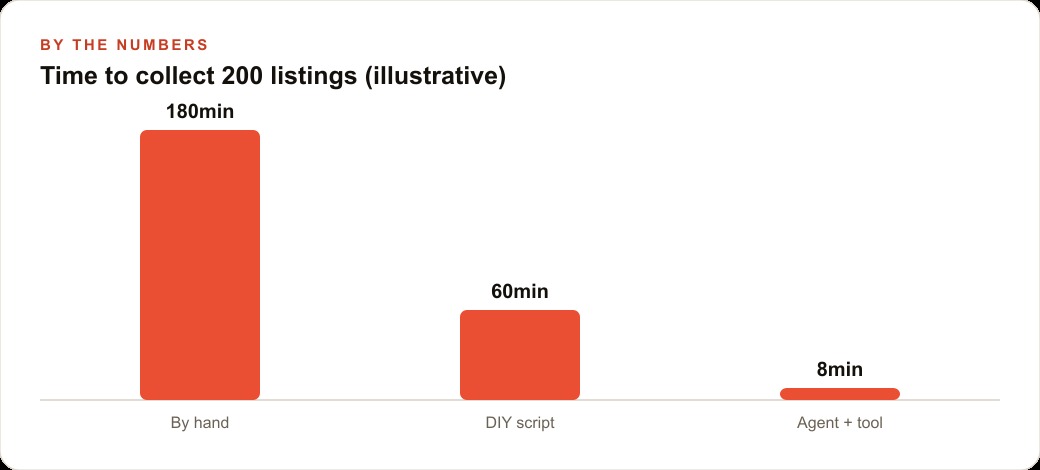
The clearest way to make this concrete is with a specific example. Consider a chiropractic clinic that wants to build a list of local referral partners: gyms, physical therapists, sports medicine practices, and athletic trainers whose clients might benefit from chiropractic care and who might benefit from a referral relationship in return. Building that list manually means searching, opening dozens of tabs, and copying names and phone numbers and websites into a spreadsheet for an afternoon. With the agent-and-tool setup, the process looks entirely different.
The clinic owner describes the task in plain language: pull a list of gyms, physical therapy practices, and sports medicine clinics within ten miles of this address from this local business directory, and give me name, address, phone, website, and category for each one in a spreadsheet. The agent maps the directory to understand its structure, scrapes the relevant category pages, handles pagination automatically, and produces a clean spreadsheet. If the directory loads its listings dynamically and the first scrape returns empty results, the agent switches to the rendering approach and retries. The whole process, including the retry, takes about eight minutes.
The clinic owner reviews the spreadsheet, identifies the relevant businesses, and has an outreach pipeline ready in the same morning. The same process that used to take a dedicated afternoon of manual work before even beginning to write an outreach message now takes less time than it takes to brew a pot of coffee. The time saved goes directly into the higher-value activity of making the outreach calls rather than assembling the list.
That same eight-minute workflow scales. The clinic can run it quarterly to catch new businesses that have opened in the area and remove ones that have closed. It can adapt it to other directories or data sources as its partnership strategy evolves. It can save the agent's configuration so the next run requires nothing more than a single instruction. The initial eight minutes of work creates a permanent capability, not just a one-time list.
The one legal check that matters before any production scraping workflow
Before anyone builds a production workflow around scraping a specific site, there is one check that is not optional: the site's terms of service. Most public business directories and review aggregators have terms of service that address automated data collection explicitly. Some permit it for non-commercial purposes. Some permit it subject to attribution requirements. Some prohibit it entirely. Violating those terms can result in blocked access at the IP or account level, and in some cases legal exposure for commercial use of data collected in violation of explicit terms.
The check takes about three minutes: open the site's terms of service page, search for the words automated, scraping, bot, crawl, or API. Read the relevant passages. If the terms prohibit automated collection and your use case is commercial, the right answer is to find the site's official data export or API, if one exists, or to find an alternative data source with more permissive terms.
For most local business directories, review aggregators, and publicly published business information, the terms permit reasonable automated collection for purposes that do not compete directly with the site's commercial model. The practical guidance is to check once per site before building a production workflow, to respect any rate-limiting signals the site sends, and to avoid collecting data that a reasonable person would consider private even if it is technically accessible.
That one check is the only non-obvious requirement in the entire workflow. Everything else is a description of what you need, a few minutes of agent execution, and a structured file at the end.
Structured data as a competitive asset, not a one-time project
The businesses that are going to pull ahead on data-driven decision-making in the next two years are not the ones that collect data once and then return to intuition. They are the ones that treat structured data collection as an ongoing capability and run it regularly enough that their understanding of the competitive landscape stays current.
Competitor pricing does not stay constant. New businesses open and old ones close. Review volumes change and complaint patterns shift. Job postings reveal where competitors are investing and where they are pulling back. None of that information is useful if it was collected six months ago and has not been refreshed since. The agent-plus-tool approach makes regular collection practical because the configuration is reusable. The same agent that collected local gym data for the chiropractic clinic this quarter can collect it again next quarter with a single instruction, and the output will reflect the current state of the market rather than a six-month-old snapshot.
The businesses treating structured web data collection as a developer task are already behind the businesses that have discovered they can do it themselves. The gap is not going to close naturally. It compounds in the direction of the businesses that are collecting and acting on current market intelligence while their competitors are making decisions on outdated or incomplete information.
The tool is free at the tier that covers real experiments. The agent is something you may already have access to. The capability takes one afternoon to configure and a few minutes to run per collection task. The only question left is what data you have been operating without that you could have collected this week, and what decision you would make differently if you had it.
That is exactly what we do at AI DOERS. Book a private 30-minute call with Madhuranjan Kumar and we will map the fastest path to it for your specific business.
Book your call →
Madhuranjan Kumar
Madhuranjan Kumar brings 20 years of performance-marketing experience and has managed over $200 million in Facebook ad spend for brands across the United States and beyond. His expertise spans the full modern marketing stack: Meta, Google Ads, TikTok, email automation, CRM, and the websites that hold it together. At AI DOERS he turns that track record into lead-generation systems for businesses across every industry.