
The 3-Part AI Agent System That Automates Almost Anything
You can automate most recurring work with three parts: a cron job for timing, Claude Code running headless with a reusable skill, and a browser agent that searches, fact-checks, and fills out forms on its own.

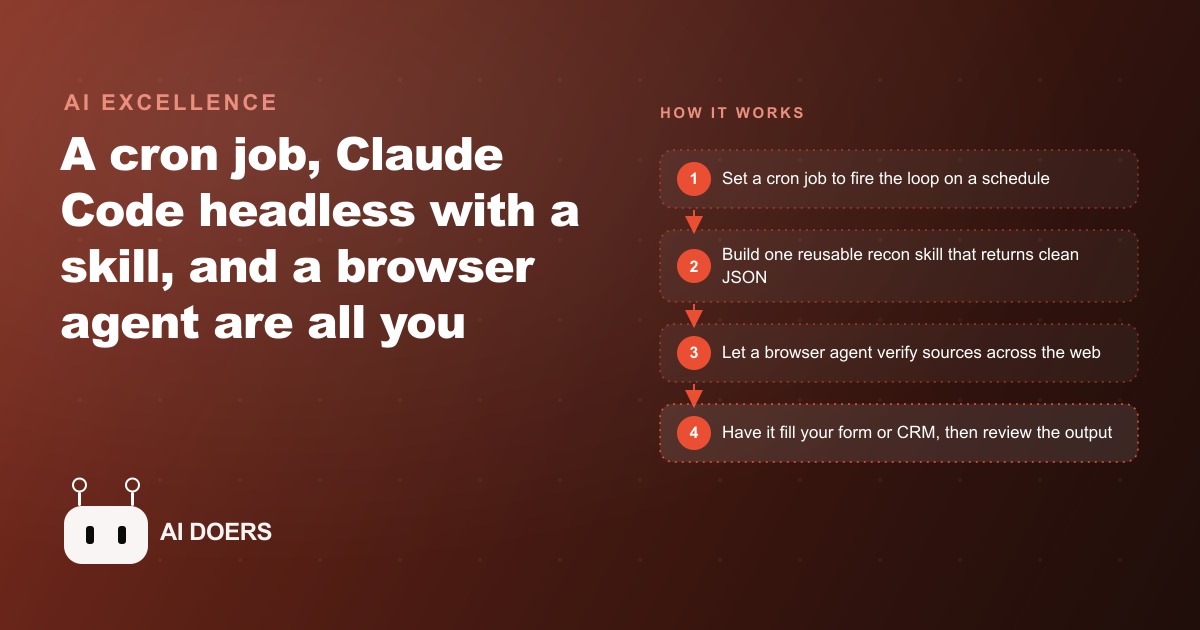
Most automation tutorials hand you ten tools and a wiring diagram that falls apart the moment you touch it. I am Madhuranjan Kumar, and this playbook does the opposite. It builds a system that runs while you sleep, searches the web, fact-checks itself across sources, writes a report, and even fills out a form, using exactly three moving parts. No sprawling stack, no five subscriptions, just a schedule, a skill, and a browser. Follow the stages in order and you will have a working loop by the end, and the same loop will stretch to cover almost any recurring job you point it at.
Stage 1: Set the cron job as the heartbeat
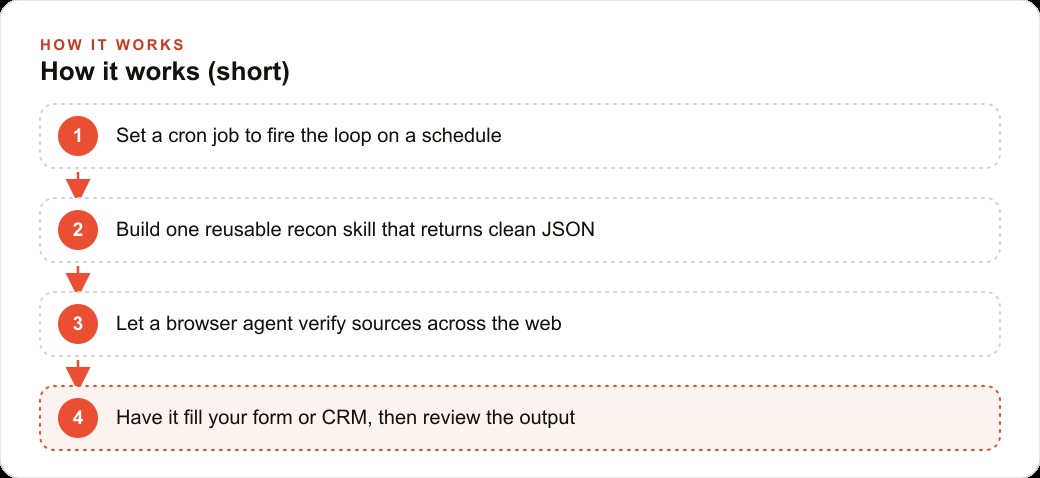
Every automation needs something to start it on time without you, and that is the entire job of the first part. A cron job fires a command on a schedule. That is all it does, and its simplicity is the point. You decide the time, it shows up, every day, forever, without being reminded. There is no dashboard to log into and no button to remember to press, which is exactly why it is reliable in a way a manual routine never is.
The trick that makes cron powerful rather than trivial is that you are not limited to one. You can stand up several cron jobs, each pointed at a different topic or task, each firing at its own time. One at six in the morning for your first research pass, another at noon for a second topic, a third in the evening for a cleanup run. Each one is a heartbeat for a separate loop, and they cost nothing to add. This is the seed of how the whole system scales later, so it is worth internalizing now: more coverage is just more heartbeats, not more software.
When you set up your first cron job, resist the urge to schedule ten things at once. Pick a single time that suits you and point it at a single command. You want one clean heartbeat working end to end before you add a second. A scheduled automation that is flaky is worse than no automation, because it fails quietly at 6 a.m. and you find out at noon, after you have already made decisions assuming it ran.
Stage 2: Build one reusable skill instead of a fragile prompt
The command that cron fires is where most people go wrong, and getting this stage right is what separates a system that lasts from one that breaks by Thursday. The command is a claude dash P call that triggers a slash recon skill, which means Claude Code runs headless, with full tool access, on the scheduled run. Headless simply means it runs without a window, doing its work in the background while you are asleep or busy.
The critical design choice is this: the job is driven by a reusable skill, not a long, fragile prompt. A skill is a saved recipe. It behaves the same way every single time the cron fires. A sprawling prompt, by contrast, drifts. It works today, breaks next week when the wording no longer lands quite right, and you never know why. Build the logic once, as a skill, and you build it once. That reliability is the whole reason to prefer a skill over a clever prompt, because an automation you cannot trust is an automation you end up babysitting, which defeats the point.
Here is how the skill gets made, and it is refreshingly plain. You tell Claude Code to read the docs for a search API such as SERP API and build a skill that reads the API key from an environment variable and pulls Google, YouTube, and news results back as clean JSON. That clean JSON is the fuel for the whole system, fresh, reliable context that sidesteps the CAPTCHAs and proxies that break homemade scrapers, and keeps the agent from hallucinating because it is working from real data instead of guessing. Then, before you schedule anything, you test the skill live, once, to confirm it returns what you expect. A flaky skill scheduled is just a flaky automation running at 6 a.m. Prove it works by hand first, and only then hand it to the cron.
Stage 3: Add the browser agent to verify like a human would
Search results alone are not trustworthy enough to act on, which is why the third part does the work a careful human researcher would do. The browser agent opens an actual Chrome window and works the topic the way a person would, not by trusting a single feed but by cross-checking. This is the step that turns a pile of links into something you can actually make decisions on.
Concretely, it finds relevant videos, reads their transcripts, and scrolls the comments for signal. Then it cross-checks what it found across independent sources, places like Reddit, Decrypt, and Hacker News, to verify a claim rather than repeating it. This verification step is the difference between a system that gathers noise and one you can actually rely on. Anyone can pull ten search results. The value is in confirming which of them are real before you act, because acting on an unverified claim is how automation quietly makes bad decisions faster.
When you add this stage, watch the first several runs with your own eyes before you trust it to run unattended. On a dedicated machine like a Mac mini, the browser runs visibly, so you can literally see it open pages, read, and scroll. Watching those early runs teaches you where it gets confused and lets you tighten the skill before you let it loose in the background. Once you trust it, the same run happens headless and you never see it again, which is the goal.
Stage 4: Close the loop by having it write into your system
A research system that dumps findings into a text file still leaves work for you. The final stage removes that last manual step. The browser agent navigates to your form or your CRM and fills every field itself, with no human in the loop. It picks the best finding, drops in the source URL so the claim is traceable, rates the find on a one-to-five scale so the strongest items rise to the top, and clicks submit.
That is the whole loop, end to end: cron fires, the skill pulls clean fresh context, the browser agent verifies across sources, and the results land structured and ranked in the place you already work. By the time you sit down, the output is waiting, built while you were doing something else. Once this last stage works, the system is genuinely hands-off for that task, and hands-off is the difference between a demo you show once and a tool you forget is even running because it just keeps delivering.
What makes this beat a stack of point tools
Before the worked example, it is worth being clear about why this pattern is better than stitching together five SaaS subscriptions, because the reason shapes how you extend it. The framework is reusable and cheap to grow. Once you understand the three parts, adding a fourth automation is not a new subscription and a new dashboard to learn. It is a second cron job and a second skill, both built the same way you built the first.
That means one mental model covers everything. A clinic can monitor insurance policy changes, a law office can track new case filings, a marketing team can watch brand mentions, all on the same pattern. The skill carries the logic, the cron carries the timing, and the browser agent carries the verification. You maintain one system instead of learning a new tool every quarter, and that compounding simplicity is the real payoff. Every point tool you avoid is a login you do not manage, a bill you do not pay, and an integration that cannot silently break on someone else's release schedule.
Worked example: a real estate agency that wakes up to ranked leads
Let me run the whole playbook through one business so the stages stop being abstract. Picture a small real estate agency where a junior team member spends the first ninety minutes of every morning doing the same manual research: checking new listings in target neighborhoods, noting recent sale prices, scanning local news, glancing at mortgage rate moves. It is necessary work and it is a waste of a person, because none of it requires judgment until the very end, and the front two thirds is pure gathering.
Here is how I would set this up. Stage one, a cron job fires every morning at 5 a.m., before anyone arrives. Stage two, the recon skill pulls fresh results through the search API, new listings in the target neighborhoods, recent sale prices, local market news, and rate moves, all in clean JSON. Stage three, the browser agent opens Chrome and does the verification a junior agent would do by hand, checking the listing portals, scanning local forums and news for price drops or new developments, and confirming details across sources instead of trusting one feed. Stage four, it fills the agency's own intake form or CRM entry, dropping in each property, its source link, and a one-to-five rating on how strong the opportunity looks, then submitting it.
By the time the team sits down, there is a ranked, fact-checked list of fresh leads and market moves waiting, built overnight with no one lifting a finger. And because the framework is reusable, I would not stop at one. A second cron job pointed at expired listings and a third at competitor open houses cover two more research jobs on the identical pattern. From there, the leads it surfaces do not just sit in a spreadsheet. They flow into the CRM and website stack where follow-up automation handles the first outreach, and the agency's paid growth on Facebook and Instagram ad campaigns gets sharper because the same verified market data tells you which neighborhoods to target this week. The property write-ups the agent drafts even feed SEO and organic search on the agency's site over time. The agency that automates this out-works the one still copying listings into a spreadsheet by hand every morning, and it does so on three parts, not thirteen.
The reason this framework ages well
One quiet advantage of building on three primitives instead of a platform is that nothing here is at the mercy of someone else's roadmap. A cron job will fire the same way in three years. A skill you wrote is a file you own. A browser agent driving real Chrome is not dependent on a fragile private integration that a vendor can deprecate in a release note. When a point tool changes its pricing, sunsets a feature, or gets acquired and shut down, the automations you built on top of it die with it, and you find out at the worst possible moment. The three-part system has no such exposure, because you control every piece of it and each piece is boring, stable, and replaceable. That durability is worth as much as the time savings, because an automation you have to rebuild every year was never really saving you anything. Build it once, understand it fully, and it keeps working long after the tool everyone was excited about this quarter is forgotten.
Build it one part at a time
The mistake to avoid with a playbook like this is trying to assemble all three parts at once. Build in order. Set a single cron job for a time that suits you. Ask Claude Code to read a search API's docs and build one recon skill that reads its key from an environment variable and returns clean JSON, then test that skill live until it is reliable before you schedule it. Only then add the browser agent to verify sources and fill your form, and watch the first few runs before you trust it to run in the background. One clean loop first, then a second, then a third, and never a new part before the previous one is solid.
You can absolutely build this yourself one part at a time, and I would encourage anyone comfortable with a terminal to try, because the first time you watch a loop run start to finish on its own is genuinely convincing. If you would rather have someone design the schedule, build the skill, and wire the browser agent to your CRM safely, that is the kind of work I do for clients, and you can bring me in to handle it.
That is exactly what we do at AI DOERS. Book a private 30-minute call with Madhuranjan Kumar and we will map the fastest path to it for your specific business.
Book your call →
Madhuranjan Kumar
Madhuranjan Kumar brings 20 years of performance-marketing experience and has managed over $200 million in Facebook ad spend for brands across the United States and beyond. His expertise spans the full modern marketing stack: Meta, Google Ads, TikTok, email automation, CRM, and the websites that hold it together. At AI DOERS he turns that track record into lead-generation systems for businesses across every industry.