
The 12 Claude Code Features That Actually Change Your Workday
These are the highest-leverage Claude Code features ranked by daily impact, not hype: skills, the status line, slash goal, slash rewind, sub agents, agent teams, remote control, routines, and auto memory.

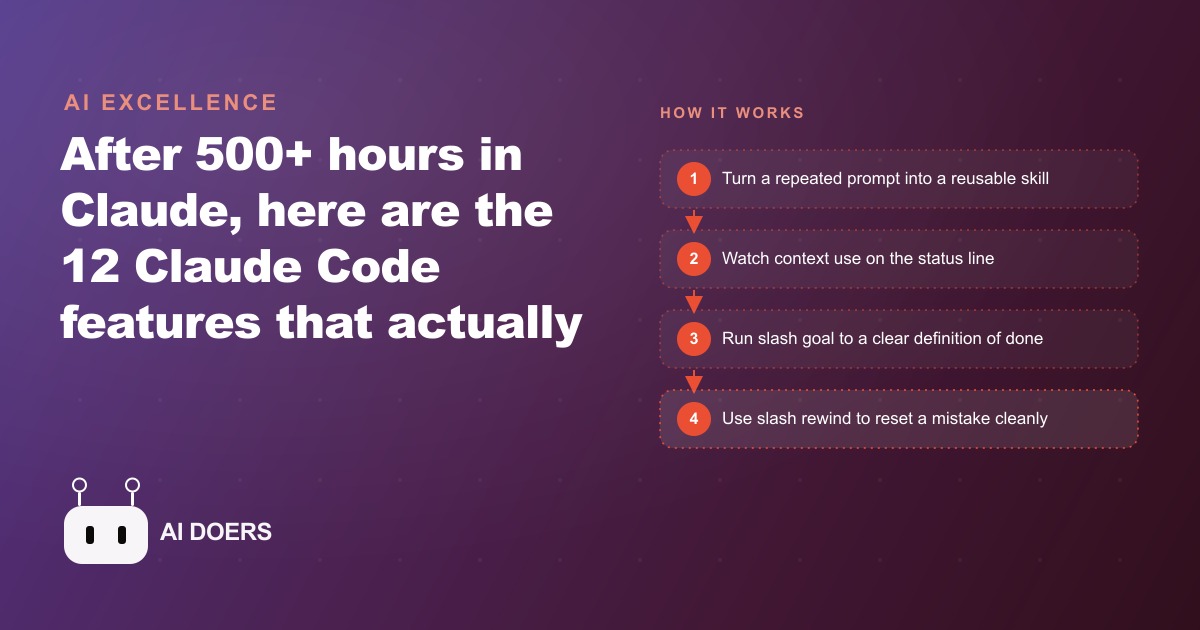
There is a difference between owning a powerful tool and running it well, and nowhere is that gap wider than with Claude Code, the terminal based AI coding agent from Anthropic. Most people who pick it up use a fraction of it and re prompt the same instructions all day, which is like buying a professional kitchen and cooking one dish from memory. I am Madhuranjan Kumar, and after a lot of hours living inside the tool, I have learned that the features are not equally valuable, so this playbook does not list all of them. It walks the path I would actually follow to turn a chaotic AI workflow into a leverage heavy operation, in the order the steps pay off, using a marketing agency as the running example.
Capture your most repeated task as a skill first
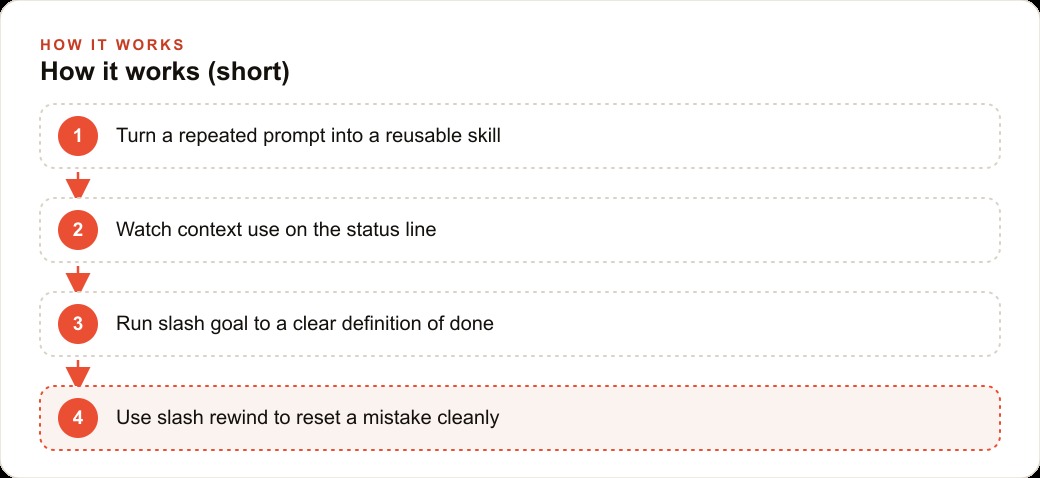
The highest leverage move, and therefore the first step, is to turn the task you re explain most often into a skill. A skill is just a markdown recipe that tells the agent exactly how you like a task done. The analogy I use is a cookbook. You do not reinvent a dish from memory every time, you open the recipe and follow it, and it comes out the same way every time. The moment the agent has these recipes, it stops depending on you remembering to include every instruction and starts producing the same quality output consistently, which is far more reliable than re typing the brief and hoping you did not forget a step.
For an agency, the obvious first skill is the one everyone dreads: the monthly client report. Write a skill that captures exactly which numbers to pull, how to frame the summary, and what tone to strike, and suddenly any team member produces the same polished report instead of a different version every month depending on who is on it. Start here, because a single well written skill removes more repeated friction than any other feature, and it teaches you the shape of everything that follows.
Put the status line in front of you so you stop hitting the wall
The most underrated step is turning on the status line, because it gives you visibility into the one thing that silently ruins long sessions. The status line shows your model, your effort level, and how much of the context window you have used. That last number is the one that matters, because when a session fills up, quality degrades and eventually you hit a wall, and without the status line you hit it by surprise. With it, you can see the wall coming and clear, compact, or hand off before you crash into it.
For an agency doing long content runs, drafting many pieces in one session, this visibility is the difference between a smooth afternoon and a mysterious slowdown nobody can explain. Set it up early, because every later step involves running the agent harder, and you want to see its limits before you push them.
Hand off overnight work with a real definition of done
Once you trust a skill or two, the next step is to stop babysitting long tasks. The slash goal feature makes the agent keep working until a clear definition of done is met, with verification built in, so you can start a job and walk away genuinely confident it will be finished rather than half done. The key phrase is definition of done. You do not say do some work on this, you say the task is complete when these specific conditions are true, and the agent works toward that and checks itself against it.
For the agency, the natural fit is the boring overnight pile: drafting a first pass of ten ad variations across three clients. You set a clear definition of done, fire it off at the end of the day, and review in the morning instead of watching it run. That single habit shifts the agency from doing the work in real time to reviewing work that got done while everyone slept, which is the whole point of leverage.
Reset mistakes cleanly instead of arguing with the agent
An essential step that people resist is learning to undo rather than correct. When the agent goes wrong, the instinct is to tell it it was wrong and explain the fix, but that just stacks more context on top of the mistake, and the mistake is still sitting there polluting everything after it. The slash rewind feature rolls both the code and the conversation back to an earlier clean checkpoint, so you restart from a known good state instead of building on top of a mess.
For an agency team, the practical rule is simple: when a draft goes sideways, rewind rather than negotiate. It keeps the work clean and it is faster, because you are not spending three rounds of back and forth trying to talk the agent out of a hole it dug. Adopting this discipline early prevents the slow accumulation of confused context that quietly wrecks long projects.
Split big jobs across sub agents working in parallel
With the basics solid, you can start parallelizing. Sub agents run in the background at the same time and report only to the main session, never to each other, which lets you split a large job across several helpers instead of grinding through it serially. You define them as markdown files with their own tools and skills, so each one is a specialist you can call on.
For the agency, this is how you attack that ten ad variations task from a different angle: rather than one agent grinding through all of them, split the work across sub agents running in parallel and collect the results in the morning. The mental model is a small team of assistants, each handed a slice, all reporting back to you. This is the step where the agency's throughput genuinely multiplies rather than just getting more consistent.
Stage a debate when a decision needs pressure testing
For decisions rather than production, there is a more advanced step. Agent teams differ from sub agents because they can actually talk to each other. You can spin up personas, say a skeptical beginner and a demanding leader, and let them debate a plan in rounds until they converge. This is not useful for cranking out drafts, it is useful for stress testing a strategy before you commit resources to it.
An agency can use this to pressure test a campaign angle by staging a debate between a persona representing the target customer and one representing the client's cautious executive, surfacing objections before the real client raises them. Use this step sparingly and deliberately, because it is a thinking tool rather than a doing tool, and knowing the difference is part of running the system well.
Let the system keep improving and running while you sleep
Two features form the autonomy layer that makes the whole setup compound. Auto memory has the agent review past sessions and update its own notes on a schedule, with no prompting, so it quietly gets more useful over time as it learns how your agency works. Routines let you schedule a real agent rather than a fixed script, so recurring work, like a weekly competitor scan, runs on its own on a calendar. Together they mean the system is not just faster when you use it, it is improving and executing even when you are not touching it.
For the agency, a routine that runs a competitor content scan every Monday morning, feeding a skill that formats the findings, means the account team walks in to a fresh briefing rather than starting the week by building one. This is the step where the operation stops being a tool you drive and starts being infrastructure that runs.
Stay off the desk with remote control
The final convenience step is remote control, which lets you drive a running local session from your phone or the web, fully synced both directions. It sounds minor and it changes how a busy person works, because you are no longer chained to the desk while a build runs. For an agency where account managers are constantly out meeting clients, remote control means checking a running content build from a phone between meetings and nudging it along without going back to the office. It is the step that lets the leverage you built follow you around instead of trapping you at a keyboard.
Run the playbook: a marketing agency's month
Put the stages together and here is the shape of the agency's month. It starts by writing one skill for the monthly client report, so every manager produces the same polished output instead of a different version each time. It turns on the status line so long content runs do not mysteriously slow down. For the overnight grind of drafting ad variations across clients, it uses slash goal with a clear definition of done, or splits the work across sub agents in parallel, and reviews in the morning. When a draft goes wrong, the team rewinds to a clean checkpoint rather than arguing. A Monday routine runs the competitor scan automatically, auto memory quietly makes the agent sharper about the agency's style over time, and account managers check running builds from their phones between client meetings.
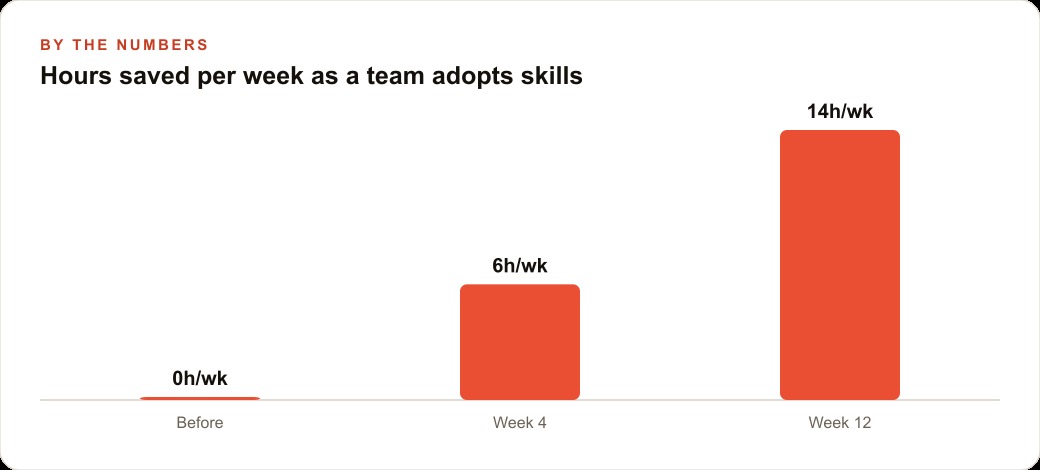
Put illustrative numbers on it. Say a mid sized account team was losing something like fourteen hours a week across everyone to repeated report building, re prompting the same briefs, and babysitting long drafts. A setup like this does not vanish that overnight, it ramps: maybe six hours a week recovered in the first month as the first skills land, climbing toward fourteen over a quarter as more of the repeated work gets captured and the overnight handoffs become routine. Those recovered hours are not abstract. They are the hours the team can redirect toward the work that actually grows the accounts, which for a marketing agency means sharper creative for Facebook and Instagram ad campaigns, better structured keyword and landing work for Google Ads, and the content that quietly compounds into SEO and organic search. The tool did not replace the marketers. It gave them back the time they were spending on repetition so they could spend it on judgment.
It is worth being clear about which features carried the weight in that month, because it is not the ones that sound most impressive. The debating agent teams and the cloud planning are genuinely interesting and they did the least for the agency's day. The unglamorous pair, skills and the status line, did the most, because they attacked the two things that actually drained the team: re explaining the same task and blindly crashing into context limits. That is the whole reason to rank features by daily impact rather than by how novel they are. A team that adopts the flashy features and skips the boring ones ends up with impressive demos and an unchanged workload, while a team that masters skills and the status line first quietly transforms its week before it ever touches the advanced tools.
Make the first move yourself
Start where the leverage is highest and add one feature at a time, in the order above. Take the single prompt you type most often and turn it into a skill, then run it twice to confirm the output is consistent. Add the status line so you always know your context use at a glance. Use slash goal with an objective definition of done for one overnight task and review the result instead of watching it. When something goes wrong, reach for slash rewind rather than piling on corrections. Once the basics stick, layer in sub agents for parallel work, routines for recurring jobs, and remote control so you are not chained to the desk.
The honest takeaway is that you will not value every feature the same, and that is exactly the point of ranking them by how you actually work. Start with skills and a status line, and the rest will earn their place as your workflow grows. You can build all of this yourself with the steps above. If you would rather have the skills written, the workflow wired, and your team trained to run it without the trial and error, that is the kind of setup I help businesses put in place, and you can bring me in to do it with you.
That is exactly what we do at AI DOERS. Book a private 30-minute call with Madhuranjan Kumar and we will map the fastest path to it for your specific business.
Book your call →
Madhuranjan Kumar
Madhuranjan Kumar brings 20 years of performance-marketing experience and has managed over $200 million in Facebook ad spend for brands across the United States and beyond. His expertise spans the full modern marketing stack: Meta, Google Ads, TikTok, email automation, CRM, and the websites that hold it together. At AI DOERS he turns that track record into lead-generation systems for businesses across every industry.