
Should Your Business Use an AI Browser Like ChatGPT Atlas?
AI browsers add a chat to every tab and an agent that can do tasks for you. Here is what is genuinely useful, what to watch out for, and how I would test one in a real business.

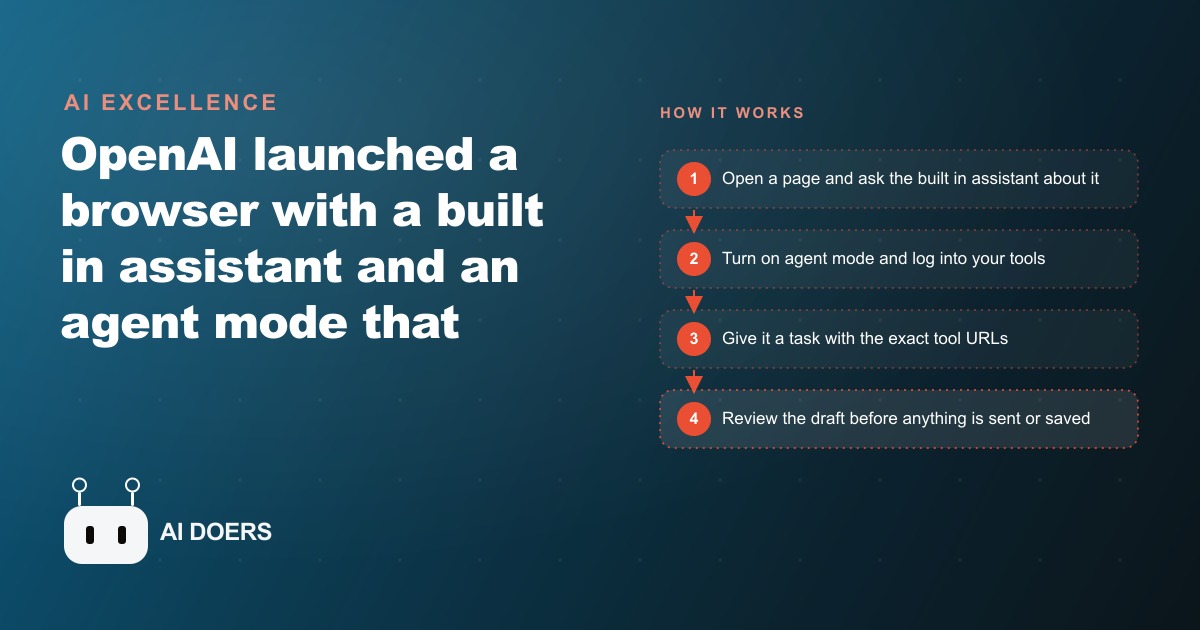
OpenAI launched a browser with a built-in AI assistant on every tab and an agent mode that can click through sites, extract information, draft content, and complete multi-step tasks across applications without the user touching the keyboard between steps. That agent mode is the specific new capability that changes something real: for the first time, a mainstream product lets you describe a research task in plain English and have software execute it across multiple sites while you do something else.
I am Madhuranjan Kumar, and my honest read of where this sits for a real business right now is this: the research and spreadsheet use case is genuinely useful today, the agent mode for complex autonomous tasks is promising but unreliable enough to require careful scoping, and the privacy tradeoff around browsing history is a real decision that deserves deliberate thought before any team rollout. This piece covers all three, including a concrete worked example for a business that runs a lot of regular research.
An Agent That Browses for You Is Real, But Reliability Is Still the Bottleneck
The agent mode in the browser can read a page, extract information, fill a form, draft an email, and move between applications without human input at each step. In the best case, it strings together a task that would take thirty minutes of manual clicking and completes it in five. That capability is real, not a demo trick.
The reliability gap is where real-world use diverges from a showcase video. An agent that completes a task successfully seven times out of ten creates a different kind of workflow than one that completes it nine times out of ten. With a 70 percent success rate, you still have to review every output carefully, because you do not know in advance which run failed and how. The failure might be subtle: a wrong number pulled from the wrong column, a price from a page with a stale listing, a form field skipped because the site rendered slightly differently than expected in that session. The review overhead on a 70 percent reliable agent erodes the time savings substantially and can exceed the time the automation saved.
The practical implication is to test any specific task type until you know its actual success rate before you rely on it. Run the same task ten times and count how often it completes correctly end to end, not just whether it produces any output. For tasks that hit nine out of ten consistently, the time savings are real and the review step is a light final check. For tasks that hit six or seven out of ten, the agent is better used in a supervised research mode that drafts outputs for you to review rather than as an autonomous executor that runs the full chain start to finish.
The Privacy Tradeoff Is Serious for Any Business Handling Client Data
The browser's memory feature learns from your browsing history over time and stores that context on your account with the provider. During setup, it offers to import your complete bookmarks and browsing history to make the assistant more contextually useful from the first session. For a personal user doing general research and shopping, that is a reasonable tradeoff to click through. For a business, it requires a deliberate decision made before installation, not a default accepted during setup.
What goes into the provider's memory when staff browse through it? Everything that flows through that browser. If team members use it to access client portals, insurance systems, CRM platforms, accounting tools, project management software, or any system that contains proprietary business data or client information, that browsing becomes context the provider holds and uses to personalize the assistant's responses. The provider processes and stores that context on their infrastructure under the terms of their privacy policy.
This does not make the tool unusable for business. It means the scope of where it is used requires a written policy, not an assumption. A clear rule about which accounts and sites may be accessed through the AI browser, established before it goes on any team machine, is the right approach. A healthcare practice should not access patient systems through it. A law firm should not open client matters through it. A marketing agency handling competitor research should think carefully about whether the browsing patterns they would not want a competitor to see should flow through a provider's memory system. These are specific decisions that can be made cleanly in advance. The businesses that make them explicitly will use the tool confidently in the right contexts without inadvertently creating a data exposure they had not considered.
Research and Spreadsheets Are Where These Tools Earn Their Keep Today
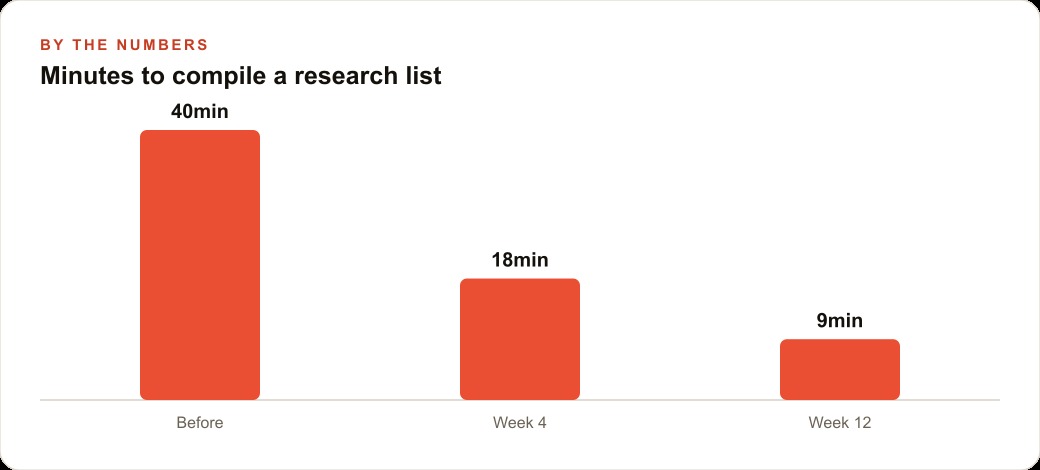
The clearest practical use case for AI browsers right now is research that feeds into a spreadsheet or a structured document. An agent that visits a list of pages you specify, pulls a specific type of information from each, and organizes the results into a structured output is doing something that previously required a person to click through each page and copy each piece of information manually. At a task like this, an AI browser is faster, more consistent, and less vulnerable to attention drift than a person doing the same work while fielding interruptions.
Think about the recurring research tasks that run in most service businesses. Checking competitor pricing across ten local providers. Compiling contact information for a list of referral partners. Pulling current rates from supplier pages before a contract renewal meeting. Verifying which services a set of competitors list on their sites. Gathering what questions local customers are asking on review platforms for content planning that feeds into SEO and organic content strategy. All of these are tasks where the agent browses public information, extracts specific pieces, and organizes them, with no sensitive account access required.
This is the sweet spot: public information, specific extraction, structured output. When the task fits all three criteria, the reliability is high, the time savings are real, and the output quality typically exceeds what a person produces while context-switching and fielding interruptions during a manual research session. Starting with this category of task is the right way to build confidence in the tool before extending it to more complex workflows.
Agent Mode Works Best When You Give It Exact Destinations, Not General Instructions
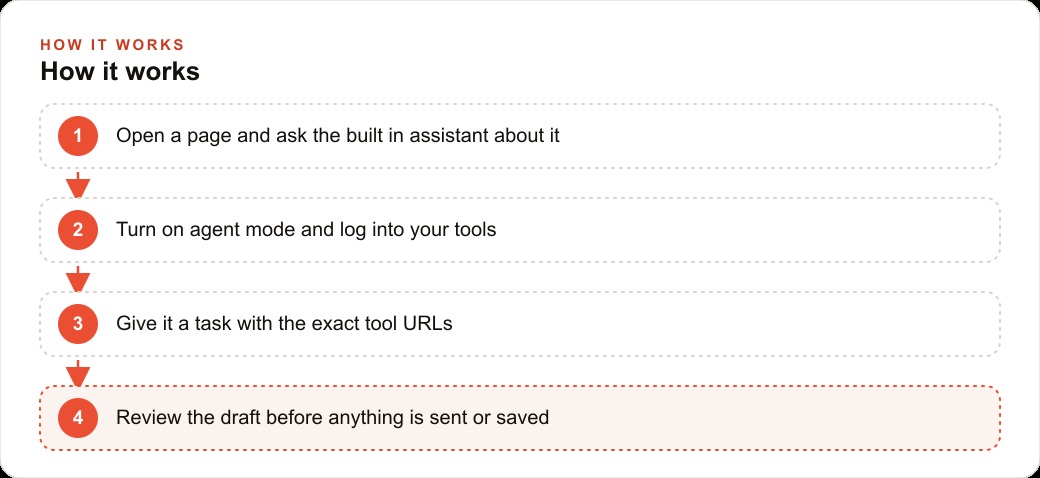
The single most effective adjustment most people can make when starting with agent mode is also the simplest: give the agent the exact URL of every site you want it to use, rather than letting it find the right destination on its own. Agents that are told to find the current price for a specific product will sometimes navigate to a comparison page, sometimes to a retailer's search results, and sometimes to a third-party review site rather than the authoritative source. That variation in starting point produces variation in results.
When you hand the agent a direct URL for each site it should visit, the task becomes deterministic at the navigation layer. The agent lands exactly where you intend, which eliminates one of the most common sources of variability in agent task results. For a list of ten suppliers, that means providing ten specific URLs in the task description rather than naming the suppliers and hoping the agent finds the right pages. For a competitor research task, it means providing the direct URLs of the specific pages you want checked rather than asking the agent to find each competitor's pricing page independently.
This habit alone raises the success rate on repetitive research tasks noticeably and consistently. It takes slightly more time to prepare the task description but produces substantially more consistent results, and over many runs of the same task the setup time is a small fraction of the total time saved. Combine this with a specific output format instruction, asking the agent to organize findings into a table with defined columns, and the result is a structured file ready to act on rather than a stream of notes that still needs to be organized manually.
A Recruiting Firm Shows What Practical AI Browsing Actually Looks Like
As an illustrative example, consider a recruiting firm that places candidates in mid-market companies across a few industry verticals. A meaningful share of each week currently goes toward research: monitoring company career pages for new openings, tracking compensation benchmarks, and building lists of contacts at target companies from public professional profiles and company websites.
An AI browser changes this work in a specific way. The recruiter builds a weekly company monitoring routine: twenty to thirty companies they want to track for new openings in target roles. They give the agent direct URLs to each company's career page and instruct it to note any new postings in a specific role category, pulling the job title, location, and posting date into a structured table. The agent visits each page and delivers an organized summary. The recruiter reviews the output, which arrives in a fraction of the time the manual check would take, and notes which companies are actively hiring.
The same flow works for compensation benchmarking before candidate conversations. The recruiter provides direct URLs to specific salary data pages on established compensation platforms and asks the agent to pull median compensation for a specific role title in a specific metro area. The agent organizes the results into a comparison. The recruiter validates the key figures against the original sources before using the data in a client conversation.
Illustratively, a recruiter spending a realistic estimate of eight hours per month on manual research and company monitoring across twenty to thirty targets could see that time drop to two to three hours of setup, supervision, and review using the agent for the research phase. These are illustrative estimates based on typical recruiting research workflows, not a guaranteed outcome for any specific firm or task. Even at the conservative end, the hours saved each month add up to meaningful time for the higher-value work of building relationships with candidates and hiring managers, which is the activity that actually produces placements. The same approach applies to monitoring the Google Ads presence of key competitors, pulling headline copy and offer structures from their landing pages into a structured comparison that informs ad strategy.
The Concrete Test to Run Before You Commit to Any AI Browser
The right way to evaluate an AI browser for your business is a structured trial on one specific use case rather than an open-ended exploration of everything the product can do. Pick a task that is well defined, repetitive, and based on public information. Install the browser on one machine. Skip the offer to import your full browsing history during setup until you have decided it is appropriate for your business context. Log in only to the accounts needed for the specific test task.
Run the test task five to ten times over a week, tracking how often the agent completes it correctly from start to finish. Note where it fails: does it navigate to the wrong page, miss a field, produce inconsistently formatted output, or occasionally return a result that is empty or clearly wrong? Each failure type has a specific fix, often a more precise task description, a more specific output format instruction, or a direct URL replacing a general site name.
If the task passes at nine out of ten or better after those adjustments, it is ready to become part of a regular workflow. If it stalls below seven out of ten, use the agent in supervised research mode where it drafts results for your review rather than operating autonomously end to end. The honest assessment is that AI browsers are genuinely useful for structured research tasks today and are developing quickly toward more reliable autonomous capability. A focused trial in an afternoon is the right way to find out whether this tool fits your specific workflows right now, without committing to a team rollout based on a best-case demo rather than average-case performance on your actual tasks.
That is exactly what we do at AI DOERS. Book a private 30-minute call with Madhuranjan Kumar and we will map the fastest path to it for your specific business.
Book your call →
Madhuranjan Kumar
Madhuranjan Kumar brings 20 years of performance-marketing experience and has managed over $200 million in Facebook ad spend for brands across the United States and beyond. His expertise spans the full modern marketing stack: Meta, Google Ads, TikTok, email automation, CRM, and the websites that hold it together. At AI DOERS he turns that track record into lead-generation systems for businesses across every industry.