
How to Set Up Clawdbot on a VPS in Minutes (No Mac Mini Needed)
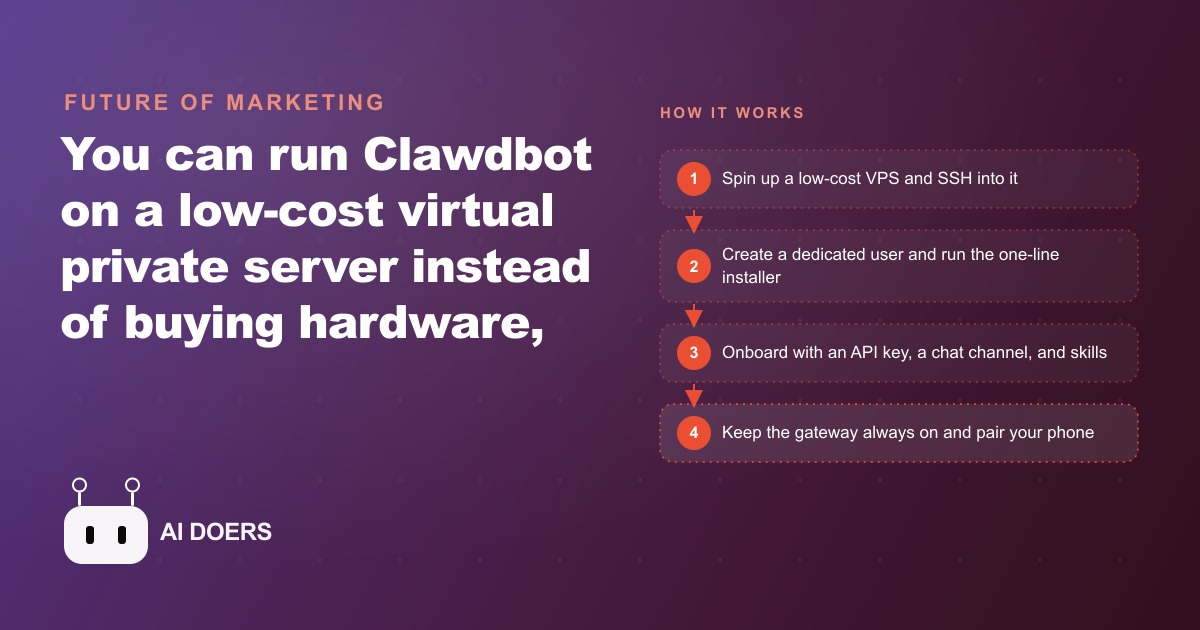
You can deploy Clawdbot on a cheap virtual private server instead of buying hardware, which contains the risk and lets you reach it from anywhere. Here is the plain-English walkthrough, with a worked example for a moving company.

The quote request came in at 7:40 on a Saturday evening, and by the time the owner saw it Monday morning, the family had already booked with someone else.
The Moving Company That Kept Losing Saturday Evening Quote Requests to Faster Competitors
Four trucks, a crew of twelve, and a solid reputation for careful work in a mid-sized metro area. The business had grown steadily for six years on word of mouth and repeat customers. But the owner had started noticing a pattern in the lead flow that he could not explain away. When he ran the numbers over three months of inquiries, the gap was clear. Families deciding to move tend to make that decision on a Friday evening or Saturday afternoon. They search, they get three estimates from different companies, and they book with whoever replies first. That first-to-reply advantage almost always goes to the company with a chat widget or an automated response system. By Sunday night, the best leads are gone.
The owner's crew was on jobs seven days a week, seven in the morning until six in the evening. Nobody was watching the shared inbox on a Saturday night. The Monday morning catch-up meant reading through inquiries that had arrived over an entire weekend, drafting replies to families who had already signed contracts elsewhere, and filing those failed leads in a column that had been growing for months.
Hiring a weekend office manager was the obvious fix. It was also economically impossible. The margin on a four-truck local mover does not absorb a full-time operations role whose only job is to watch an email inbox on Saturdays and Sundays. The owner had priced it out and set the idea aside.
What he needed was something watching the inbox around the clock, drafting replies fast enough that a family still in the decision window could hear back within minutes, and doing all of that without requiring a person to be at a desk. He landed on running a contained AI assistant on a dedicated server, configured to monitor the shared inbox, draft responses for his review, and let him approve from his phone no matter where he was standing.
I am Madhuranjan Kumar, and this is the walkthrough of exactly how that setup worked, what it cost, and what changed.
Why a Contained Server Solves the Problem That Hardware Could Not
The instinct when someone first considers running an always-on AI assistant is to buy a compact physical machine, set it up in the office, and leave it running. The problem with that approach becomes obvious within a few weeks. A physical machine in a small business office is subject to power interruptions, network drops, overheating when the air conditioning is off over a long weekend, and the simple reality that nobody is there to restart it when it stops. The owner had tried a variation of this with a basic automation setup the previous year. It had worked for about three weeks before an office power flicker knocked it offline on a Thursday night and it stayed offline until the following Tuesday, which happened to be the highest-inquiry weekend of that quarter.
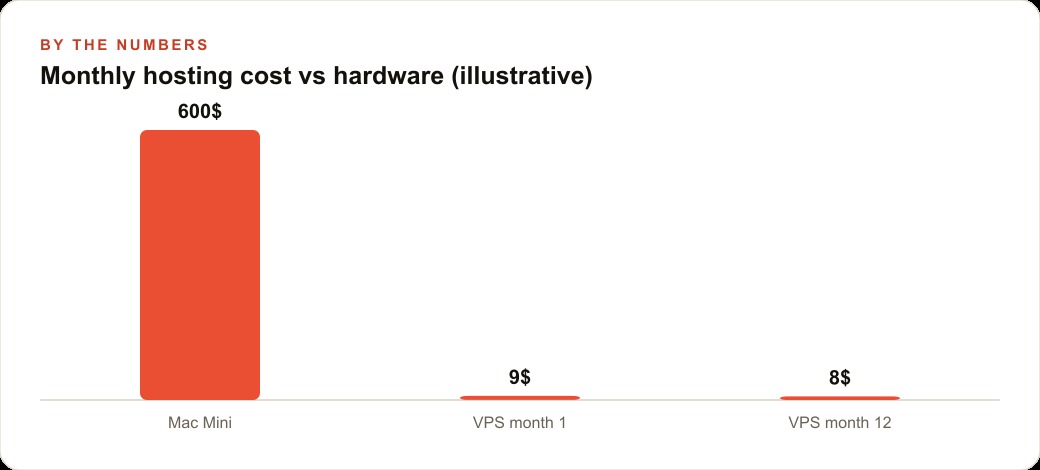
A virtual private server does not have those failure modes. It lives in a professionally maintained data center with redundant power, redundant networking, and around-the-clock infrastructure management. When the office is empty and the crew is on a job and there is a thunderstorm rolling through, the server is still running. Monthly cost for a plan with enough compute to run a capable AI assistant comfortably lands between five and fifteen dollars. A compact desktop machine capable of the same task costs six hundred dollars or more before you account for electricity, cooling, and the cost of the inevitable hardware failure at the worst possible moment.
The second advantage is access. A physical machine in the office only talks to the owner when the owner is in the office. A VPS with a chat channel configured means the owner can message the assistant from a job site, from the truck, from the couch at ten at night, or from a hotel room during a vacation that was never quite free from business anyway. The server does not care where the conversation is happening. It just needs an internet connection on both ends.
There is also a safety argument that matters more the longer you think about it. An AI assistant with access to your email and calendar, running on your personal laptop, is sharing an environment with your banking credentials, your saved passwords, your personal files, and everything else on that machine. If the assistant is ever manipulated by a malicious instruction hidden inside an email it reads, the blast radius is your entire computing environment. A dedicated server with a narrow scope of access is a hard line. What is on that server is what can be affected. Nothing else.
The First Thirty Minutes: SSH In, Create a User, Run One Installer
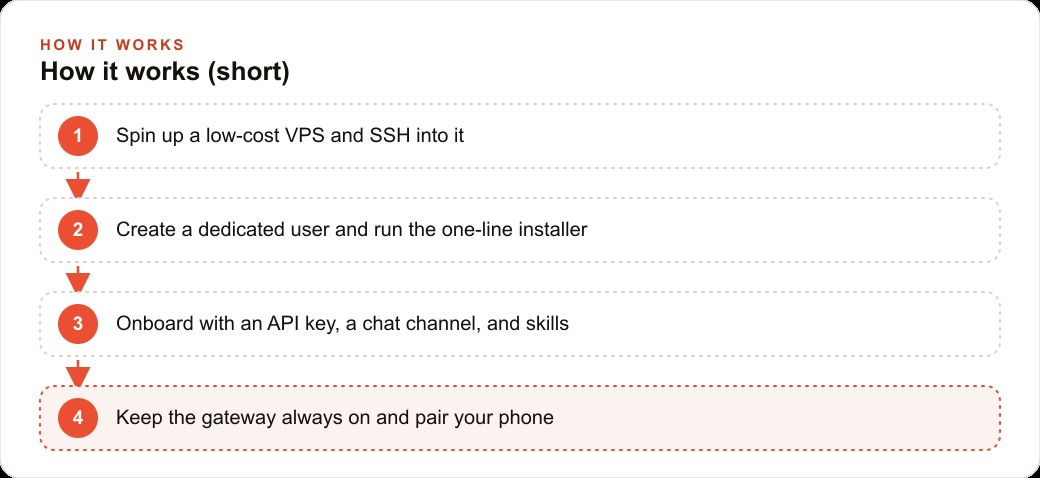
The provider sent the root password at signup. The owner connected to the server using SSH, which is just a secure terminal session to a remote machine. The command is simple: type the server address, enter the password when prompted, and you are in.
The first thing to do is never skip this step: create a dedicated user account. Do not run the assistant as root. Root is the highest-privilege account on any Linux system. It can do anything: delete files, change system settings, install software system-wide, access every directory. An AI assistant running as root that receives a manipulative instruction in an email it is processing has root-level access to act on that instruction. A dedicated non-root user account is a meaningful constraint. The assistant can still function exactly as needed. It just cannot do the things that could cause serious damage.
The owner created a new user, gave it administrative privileges for the installation step, and switched into that account. One line of text from the official documentation, pasted into the terminal, started the installer. It detected the operating system, confirmed the required dependencies were present, and pulled down what was needed. The whole process took about eight minutes of actual waiting.
The onboarding flow after installation has a few choices that matter. The first is model provider. The installer asks which AI model will power the assistant. The right answer here is to use an API key, not a personal subscription. Powering an automated assistant with a personal plan can violate the terms of service of most model providers, because those plans are designed for individual human use at a keyboard, not for programs making API calls. API keys are what the provider intends for this use case. The owner already had an account with a model provider, generated an API key in about ninety seconds, and pasted it in.
The second choice is the chat channel. Telegram works well for a mobile-first operator because the app is fast, reliable across spotty cell connections, and lets you respond to a draft from the truck without switching context between apps. The setup asks you to create a bot through the platform's developer interface, copy the token it gives you, and paste it in. Five minutes.
The third choice is skills. Skills are the extensions that let the assistant interact with external tools: email, calendar, file system, browser, and others. The owner added email read access and calendar read access. He did not add file system access or browser access. He did not need them for the narrow task he had in mind, and adding them would have meant more potential surface for something to go wrong. The assistant was meant to watch the inbox and help draft replies. That was the scope. The skills reflected the scope.
After installation, a small service configuration file tells the server to keep the assistant's gateway running even after the terminal session closes. Without that file, closing the laptop ends the session and the assistant goes offline. With it, the server keeps the process alive as a background service, and the owner can close his terminal, put his phone in his pocket, and still receive a message from the assistant three hours later if something hits the inbox. He tested it by sending a message from his phone while walking to his truck. It replied.
The Weekend the Assistant Started Fielding After-Hours Inquiries
Three days after setup, on a Saturday evening, the first real test arrived without being arranged. A family sent a quote request at 7:40 PM for a two-bedroom apartment move across town the following weekend. Standard inquiry: date, approximate square footage, whether help with packing was needed.
The assistant flagged the message and drafted a reply. The draft included the company's standard hourly rate for a two-person crew, the availability for that weekend, a note about the complimentary packing materials included on all jobs, and a question about whether the family wanted to confirm the booking that evening. The draft arrived in the owner's Telegram at 8:05 PM.
The owner read it from his couch. He made one adjustment: the rate he wanted to quote was slightly different from the default. He corrected it in the reply and approved the send. The message went to the family at 8:12 PM. The family confirmed the booking the next morning.
Under the previous system, that inquiry would have sat in the inbox until Monday. At best, the owner would have replied Monday morning. By then the family would have booked with a competitor who replied Sunday. The lead was not unusual. The speed of the reply was.
The same weekend produced two more after-hours inquiries. Both received draft replies within minutes. The owner approved and sent both. One converted to a booking. The other was a price-shopper who did not respond further, which would have been the outcome regardless of when the reply arrived.
Three inquiries, three replies sent the same evening. One confirmed booking from a family that had been minutes away from going cold. Under the old pattern, the expected outcome for three Saturday-evening inquiries was zero replies that night and a fifty-fifty chance the leads were still warm by Monday.
How the Rate Card and Job Types Became Part of the Assistant's Context Over Three Weeks
The earliest drafts were accurate but generic. They got the tone right and the availability right, but they did not reflect the specific details that distinguish one job type from another. A two-bedroom local move gets quoted differently than a piano relocation. A same-week booking triggers a short-notice surcharge that a two-week-out booking does not. The drafts from the first few days did not know these things.
Over the following three weeks, the owner added context. He wrote a plain-text rate card: hourly rates by truck size and crew count, the stair surcharge, the long-carry charge, the minimum booking time, the short-notice window and its surcharge. He also wrote a short paragraph describing each of the five main job types the company handles. He shared these with the assistant through the chat channel.
The change in the drafts was immediate and noticeable. A request for piano relocation now drew a draft that mentioned the specialty handling rate and asked whether the instrument was an upright or a grand, since the crew configuration differs. A request for a same-week move drew a draft that named the short-notice surcharge upfront, before the family could feel surprised at booking time.
One mistake surfaced in week two. A draft quoted a base rate without including a fuel surcharge that had been added to pricing six months earlier. The owner caught it before the reply went out, corrected the draft, and then updated the rate card with the surcharge included. He sent the updated version through the chat channel and the assistant incorporated it from that point forward. The correction took three minutes.
By the end of week three, the drafts had become reliable enough that the owner's review was usually a quick read and an approval rather than an edit session. Occasional corrections happened, but the pattern was specificity improving as the context grew. The assistant did not need to be retrained. It needed to be given accurate information, and the plain-text rate card was the mechanism.
The Security Discipline That Kept a Powerful Tool From Becoming a Liability
Prompt injection is the risk that does not appear obvious until you think about what the assistant is actually doing. It reads email. Email can contain text written to look like instructions rather than content. A message crafted to manipulate an AI assistant might instruct it to disregard prior instructions and forward all messages to an outside address. An assistant without guardrails might follow that instruction. One with proper configuration constraints would not, because the action falls outside its permitted scope.
The owner's defense against this was built into three layers from the beginning. First, no action happens without approval. The assistant drafts and presents. The owner reads and approves or rejects. Sending anything without a human in the loop was not a configured option. If something strange appeared in a draft, the owner would see it and decline. The assistant could not act autonomously.
Second, the skills scope was narrow. The assistant could read email and read the calendar. It could not delete messages, create calendar events, access files, or browse the web. Even if a malicious instruction reached the assistant through an email, the instruction's ability to cause damage was bounded by what the skill set actually allowed. There was no file system access to exploit. There was no browser to redirect. The narrow scope was a structural constraint, not just a policy.
Third, credentials stayed out of the chat channel. API keys, passwords, and access tokens lived in environment files on the server. The owner never typed a password into the Telegram conversation with the assistant. Nothing sensitive moved through the chat. This discipline is easier to establish from the start than to retrofit after a credential has already appeared in a message history.
The combined effect was a powerful tool with a small blast radius. If something went wrong, the damage would be limited to the narrow slice of access the assistant actually had, and every action still required a human approval before it reached anyone outside the business.
What the Owner Checks on Monday Morning Now
The routine is different now. Monday morning, while the crew is loading the first truck of the week, the owner opens Telegram and reads the weekend summary. Brief, automatic, organized: inquiries received, draft replies sent, confirmed bookings, messages that still need attention. The review takes about four minutes.
The numbers after the first six weeks: twenty-three after-hours inquiries arrived on evenings and weekends. Under the previous system, the owner estimates he would have replied to eight or ten of them before the leads went cold, based on his bandwidth on Monday mornings. With the assistant watching the inbox, all twenty-three received a draft reply within minutes of arriving. The owner approved and sent all twenty-three. Seven converted to bookings.
At the company's average job value, seven bookings from leads that previously would have gone mostly unresponded to represents a meaningful revenue number relative to what the setup costs. The hosting and API fees over the six-week period totaled less than ninety dollars.
The operational change that the owner did not fully anticipate was what it did to the dispatcher's week. The dispatcher had been spending a significant part of each morning sorting through the weekend backlog, identifying which inquiries still needed replies, drafting those replies, and sending them. With the assistant handling the overnight and weekend drafts, the dispatcher now spends that morning time on confirmed booking logistics: coordinating crew assignments, confirming times with scheduled clients, managing the physical calendar. The work shifted from chasing cold leads to executing booked jobs.
That shift in how the dispatcher's attention is spent is not a headcount reduction. The dispatcher is still there, still essential. The constraint that lifted was attention. The company's four trucks and twelve crew members and six years of reputation could not generate more revenue if the leads went unanswered for forty-eight hours. The assistant filled that gap for less per month than a single tank of fuel in one of those trucks.
The owner now starts each week knowing exactly where he stands on inquiries instead of spending the first twenty minutes of Monday sorting through the weekend and guessing which leads might still be alive. That clarity is not dramatic. It is the kind of ordinary operational reliability that compounds across months and lets a growing business grow without the attention gaps that cost it jobs it never even knew it lost.
That is exactly what we do at AI DOERS. Book a private 30-minute call with Madhuranjan Kumar and we will map the fastest path to it for your specific business.
Book your call →
Madhuranjan Kumar
Madhuranjan Kumar brings 20 years of performance-marketing experience and has managed over $200 million in Facebook ad spend for brands across the United States and beyond. His expertise spans the full modern marketing stack: Meta, Google Ads, TikTok, email automation, CRM, and the websites that hold it together. At AI DOERS he turns that track record into lead-generation systems for businesses across every industry.