
How to Generate Unlimited AI Images and Videos for Free Using ComfyUI
ComfyUI is a free, open-source platform that runs AI image and video generation entirely on your own computer. Here is how to set it up and use it for real business work.

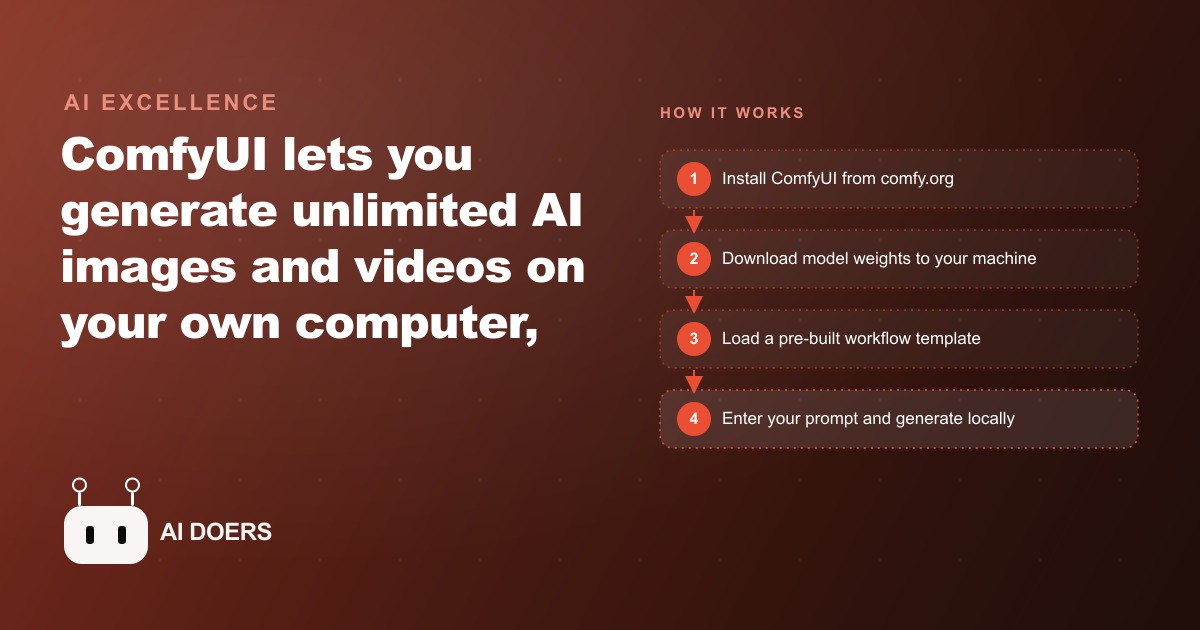
Here is a position most agencies will never say out loud: for a large share of the visual content businesses generate, paying a monthly AI image subscription is now the wrong call. Not risky. Not premature. Wrong. The free, open source option running on hardware you already own has quietly caught up, and continuing to rent per image generation out of habit is leaving real money on the table.
I am Madhuranjan Kumar, and I want to argue that case honestly, including the places where it falls apart, because a contrarian take is only worth anything if it survives its own counterexamples. The tool at the center of the argument is ComfyUI, and the reason it changes the math is simple: once it is set up, the marginal cost of every additional image is zero.
The claim: the quality gap that justified the subscription has closed
The usual defense of paid cloud tools is that they simply look better, and two years ago that was true. It is largely not true anymore for still images. The current best locally runnable model, Flux 1 Craya Dev, produces high detail, photorealistic output that is difficult to distinguish from commercial platform results for product photography, lifestyle imagery, and editorial style shots. That is the crux of my argument. If the output is competitive and the marginal cost is zero, the recurring fee is buying you convenience, not quality, and convenience is worth a lot less than most owners assume once they see the annual total.
ComfyUI is free and open source, available at comfy.org, with no restrictions on use. It runs the whole generation process on your own machine. Once you install it and download the model weights, nothing you make gets uploaded, nothing costs a credit, and nothing expires. The 200th image in a month costs exactly what the first one did, which is to say nothing beyond the electricity.
Why the interface scares people off, and why that fear is misplaced
The strongest emotional objection to ComfyUI is that it looks intimidating. Open it and you see a node based visual workflow, a diagram of connected boxes representing each stage of generation, and first time users often decide on the spot that this is a developer tool not meant for them. I think that reaction is the single biggest reason businesses keep overpaying, and it is based on a misunderstanding.
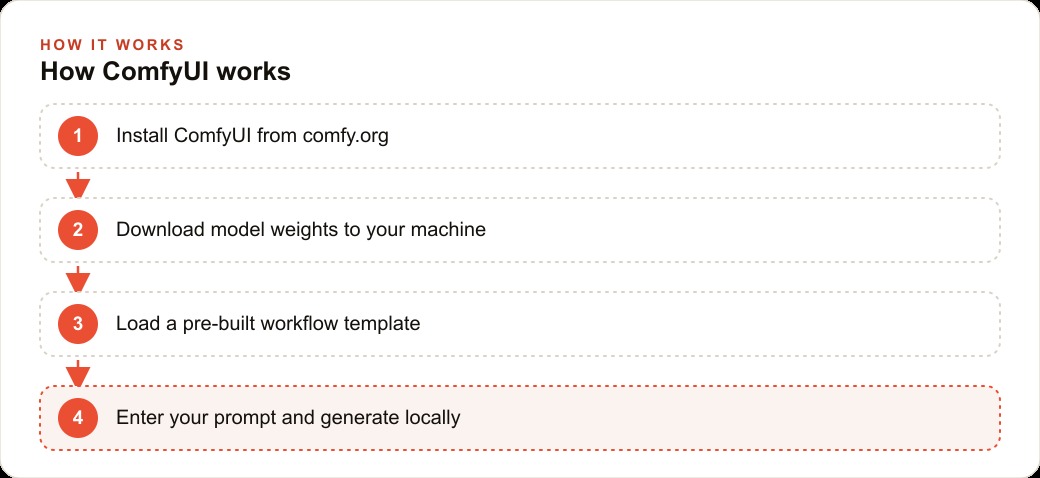
ComfyUI ships with pre built templates that hide all of that complexity. You go to Browse Templates, pick the kind of generation you want, whether that is text to image, image to video, or text to video, and the nodes are already wired up correctly. You type a prompt, click run, and it generates. Understanding the node architecture underneath is entirely optional, the same way you can drive a car without understanding the transmission. The scary diagram is available if you ever want to customize, and invisible if you never do. Dismissing the tool because of a screenshot is exactly the kind of surface judgment that keeps a subscription running for years.
Where my own argument breaks: video and Mac hardware
A contrarian case that ignores its weak points is just marketing, so let me be direct about where the free path is genuinely not ready. Video generation on a Mac is not viable for regular production. Using the Wan 2.2 model family on an M series chip, a six second clip can take twenty to sixty minutes. That is a fine occasional experiment and a terrible production schedule. If video is a core part of your content, the honest answer is that you need a PC with a modern Nvidia GPU, an RTX 3090 or newer, where the same clip generates in a few minutes. On the right hardware this breakdown argument holds. On the wrong hardware it collapses, and I will not pretend otherwise.
There is also the reality of prompt calibration. Local models do not have the polished, invisible prompt engineering layers that commercial tools quietly apply for you. You have to learn what language Flux responds to for your specific product category, which takes a few hours of iteration. That is a real cost. My argument is that it is a one time cost you pay once per product type and then reuse forever, not a recurring one, but it is still a cost and I would rather name it than hide it.
How it actually runs, so the claim is not hand waving
Let me make the mechanics concrete, because a contrarian claim needs to show its work. ComfyUI loads a set of model weights into your computer's memory and runs a workflow that takes your text prompt through a series of transformations to produce an image or a video. Those weights are large files that encode what the model learned in training. They live on your hard drive, load into memory when you start a session, and need no network access once downloaded.
For images with Flux 1 Craya Dev, you open ComfyUI, go to Browse Templates, and pick the Flux workflow. It prompts you to download the required files, including a text encoder around 9 GB, a VAE file, and the main diffusion model. On a Mac with an M series chip you want the full precision safetensors version, roughly 24 GB. On a PC with an Nvidia GPU the FP8 version, around 12 GB, works well. Put the file in the correct subfolder, restart, pick your model, type your prompt, and run. Every output saves automatically to a local folder. Nothing uploads. The files do not expire and are not subject to any platform's content policies after generation.
There is a genuine privacy dividend here that has nothing to do with cost. If you are developing a product line and generating concept images or packaging mockups before a public launch, you probably do not want those prompts sitting on a commercial AI company's servers. Local generation removes that concern entirely, because nothing is ever transmitted anywhere. For brands in regulated industries, that alone can justify the switch regardless of the money.
The numbers, worked for one e commerce store
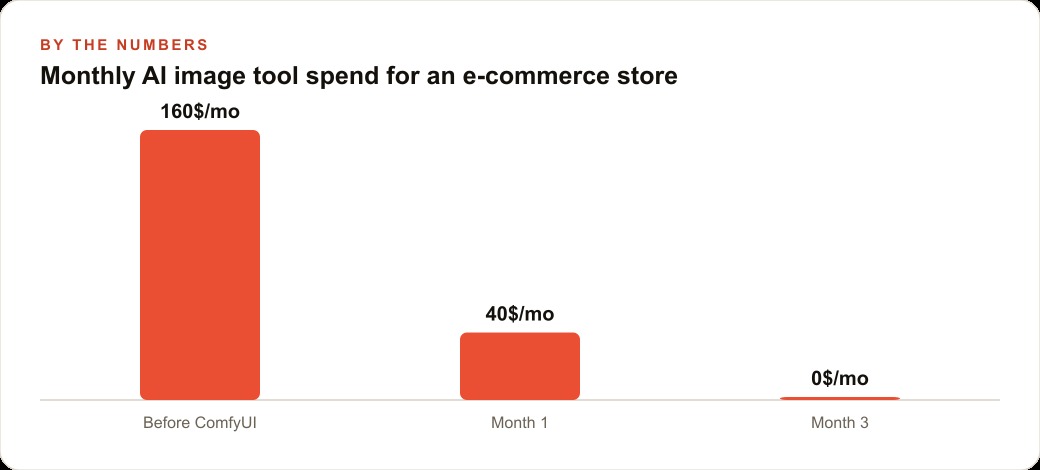
Now the part that makes the argument concrete, with illustrative figures. Take an e commerce store selling physical goods that currently splits its visual budget between a commercial AI image tool and commissioned photography. Say it spends 150 dollars a month on the AI subscription and commissions one photo shoot per quarter at 800 dollars.
Move the still image work to ComfyUI running Flux 1 Craya Dev. Run a batch of prompt tests across the main product categories, for a home goods brand something like ceramic pour over coffee dripper, white background, soft studio lighting, photorealistic. The first few runs need two or three iterations to dial in the look, and after that each category has a repeatable formula. For lifestyle scenes where the product must appear in context, use an image to image workflow with the real product photo as the starting image, so Flux composites the actual product into a generated environment. That replaces the studio rental for seasonal refreshes. For paid social, animate the best product shots into three to six second clips, which typically outperform static images.
On the economics, eliminating the 150 dollar subscription saves 1,800 dollars a year. Reducing photography by one shoot a quarter at 800 dollars saves another 3,200. That is roughly 5,000 dollars a year, against a one time setup cost that is zero if you already own a capable Mac or an RTX class PC. At zero marginal cost per image, running 200 images a month costs the same as running 20, which changes what kind of visual strategy is even economically thinkable. Suddenly testing ten creative directions instead of two is free, and that abundance is exactly what feeds better performing Facebook and Instagram ad campaigns, because you can afford to test broadly and keep only the winners. The same endless supply of product imagery dresses every page and quietly supports SEO and organic search, and the whole content operation still funnels its leads into the CRM and website stack where the actual selling happens.
The objection I hear most, and why it does not hold
The sharpest pushback to this whole argument is about time, not money. An owner says their hourly rate is high, the setup and prompt calibration take hours, and therefore the free tool is a false economy because their time is the real cost. It is a fair objection, and it still does not hold, for one reason: the time cost is paid once, while the subscription cost is paid every month forever.
Spend an afternoon installing ComfyUI and a few more hours calibrating a base prompt for each product category, and you have built a permanent capability. Next month you spend nothing and generate freely. The month after, nothing. A subscription reverses that math entirely. You pay again in month two, month three, and every month you keep the business open, whether or not you generate a single extra image. Any honest comparison has to weigh a one time investment against a recurring one, and over any horizon longer than a couple of months the one time cost wins decisively. The owner who frames setup time as a reason to keep renting is quietly choosing to pay that setup cost in installments, forever, to a vendor.
There is also a compounding advantage the subscription can never offer. Every prompt you calibrate, every workflow you refine, every reference image you save makes your local system more capable and more tailored to your exact products. You are building an asset that improves and belongs to you. A subscription builds nothing you own. When you cancel it, you are left with exactly what you started with, plus a stack of receipts. The local pipeline, by contrast, is worth more in month six than it was in month one, because you have shaped it around your brand. That is the difference between renting a capability and owning one, and for any business generating visuals regularly, ownership is the position that compounds in your favor.
The honest verdict
So here is my position stated plainly. For still image generation at any real volume, a business that keeps paying a monthly cloud subscription out of habit is very likely overpaying, and the quality excuse no longer holds. The switch pays for itself within the first month or two, and the privacy benefit is a bonus that money cannot buy from a cloud vendor. For video, hold the position only if you have Nvidia hardware, because on a Mac the free path is not ready and I will not pretend it is.
Avoid the four predictable mistakes. Do not expect polished results before you calibrate your prompts. Do not download the wrong model file for your hardware, full precision safetensors on Mac, FP8 on an Nvidia PC. Do not try to run video production on a Mac. And do not assume that a relatively uncensored local model exempts you from your own business standards and legal obligations, because it does not. Respect those and the argument holds.
To get started, go to comfy.org, download the installer for your operating system, and let it handle Python and dependencies automatically. Land on the template screen, pick the Flux workflow, and download the weights, on a Mac grabbing the full precision safetensors version from Hugging Face when prompted. Plan the large downloads to run overnight. You can run this whole system yourself, and for a business generating visuals at volume it is very likely the more sensible choice. The setup is a weekend at most, and it is the last time you will ever pay anything for the capability. If you would rather have someone set up the workflows, calibrate the prompts for your products, and hand you a local pipeline that works on the first run, that is the kind of build I do for clients, and you can bring me in to handle it.
That is exactly what we do at AI DOERS. Book a private 30-minute call with Madhuranjan Kumar and we will map the fastest path to it for your specific business.
Book your call →
Madhuranjan Kumar
Madhuranjan Kumar brings 20 years of performance-marketing experience and has managed over $200 million in Facebook ad spend for brands across the United States and beyond. His expertise spans the full modern marketing stack: Meta, Google Ads, TikTok, email automation, CRM, and the websites that hold it together. At AI DOERS he turns that track record into lead-generation systems for businesses across every industry.