
A Plain English Guide to Building Apps in Cursor When You Cannot Code
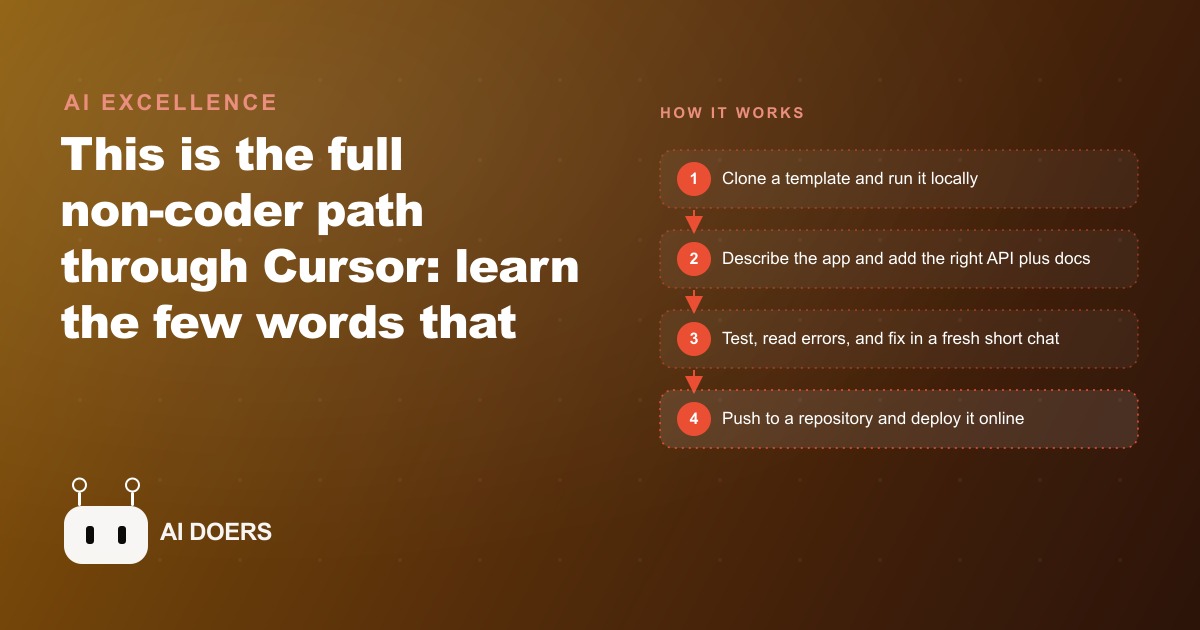
The complete non-coder path: learn the few words that matter, clone a starter template, plug in APIs with the right documentation, debug by reading the screen, and deploy a real tool online. Here is the whole arc and how I would aim it at a real business.

The vocabulary gap is the only barrier that actually matters
Every business owner who has tried to build software and concluded they cannot has made the same misdiagnosis. The barrier is not an inability to write code. It is an inability to describe what they want using the handful of vocabulary words that development environments recognize. Close that vocabulary gap and the coding is handled by an AI agent in Cursor while the owner guides it in plain language.
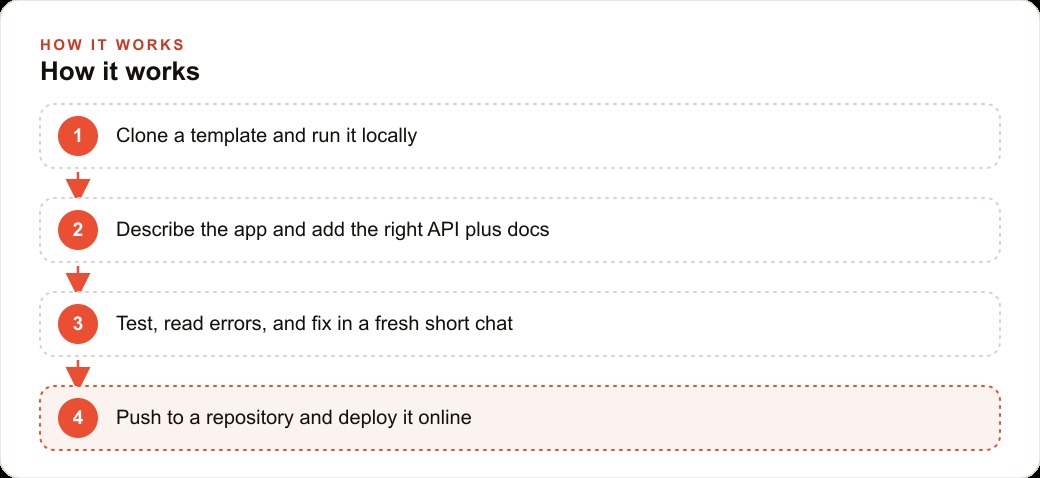
I am Madhuranjan Kumar. The full non-coder path has three phases: learn the few words that matter and build a simple image-generation tool, ship a marketing landing page and understand what "deployed" means, then build a real application with user accounts and saved data. Most people treat these as three separate projects. They are better understood as three depths of one skill, and the skill is description, not programming.
The vocabulary that matters is genuinely small. Run locally means the app is running on your computer and visible only to you in a browser. Codebase is the collection of files that make up the app. Database is the place where the app stores information that persists after you close it. Authentication is the system that lets users log in and keeps their data separate. Deploy means copying the app to a server so anyone with the URL can use it. Those five terms cover roughly 80 percent of the instructions a non-coder gives the agent. The rest emerges naturally from the error messages you encounter and paste back.
The reason this specific vocabulary matters is that the agent is running in a precise technical context. When you say "run the app" without saying "run it locally," the agent may interpret that instruction in a way that does not match your environment. When you ask to "save the quote" without saying "save it to the database," the agent may write code that stores it in memory and loses it when the page refreshes. Vocabulary is not jargon for its own sake. It is the interface between your intent and the agent's interpretation, and getting it right produces dramatically more accurate outputs from the first prompt.
Why templates beat blank canvases and where to find the right one
The blank canvas problem kills most first-time builders before they make meaningful progress. An agent given an empty directory and the instruction "build a job management app" will produce something, but it will be built on defaults that may not match your hosting environment, your database preference, your authentication approach, or your deployment target. The agent has to make many structural decisions simultaneously, and when those decisions conflict with the environment you eventually deploy to, the errors are hard to trace and fix.
A template removes every one of those blank-canvas decisions. A template is a working project that already runs, already connects to a database, already has an authentication layer, and already deploys to a specific platform. When you clone it and run it locally, you have a working application in under five minutes. The agent is no longer filling in architectural blanks. It is modifying something that already functions, which is fundamentally more reliable collaboration.
Finding the right template is simpler than it sounds. The major platforms where apps are deployed, services like Vercel, Railway, Supabase, and Render, each maintain template galleries of starter projects built to work natively with their infrastructure. If you need a web app that stores user data, search those galleries for a starter that already includes accounts and a database, clone it, run it locally, and describe your modifications to the agent. The brief changes from "build me an app" to "take this working app and add these three features," and the agent's output is significantly more accurate for the narrower scope.
The one counterintuitive rule: resist picking the most feature-rich template. Pick the simplest one that has the capabilities you actually need. A simpler codebase gives the agent less to misread and less surface area to accidentally break when it edits. The beginner's instinct is to start with something sophisticated. The experienced builder's habit is to start with something minimal and add.
For a locksmith building a service request and quoting app, the right template is a basic web app with a form that saves submissions to a database. One form, one database table, one list view of past submissions. That is the entire first template. Address validation, confirmation messaging, and quote calculation get added feature by feature in separate short chats after the base is working and confirmed.
APIs as building pieces, documentation as the instruction manual
Most useful applications connect to outside services rather than doing everything themselves. A quoting app might validate addresses, send confirmation texts, or calculate pricing based on distance. Each of those capabilities comes from an external service accessed through an API. Understanding what an API is changes how a non-coder collaborates with the agent.
An API is a building piece. You do not need to know how it works internally. You need an API key that proves you have access, and documentation that tells the service what you want and tells you what it will return. That is the whole model. The key is the building piece. The documentation is the instruction manual. Give both to the agent and it assembles the feature correctly.
The place most non-coder builds break down is outdated documentation. AI agents are trained on data with a cutoff date, and APIs change their methods, parameter names, and authentication requirements over time. An agent working from its own training knowledge of a service will often use a method that was deprecated six months ago. The integration will fail, and the error message will be cryptic enough that a non-coder cannot diagnose it.
The fix is to get the current documentation yourself before asking the agent to integrate. A research tool like Perplexity is good for this: ask it for the current integration guide for the service you need, confirm the result looks current, and paste it into the agent's context as part of your request. Now the agent is working from the actual instruction manual rather than a memory of an older version.
For the locksmith's quoting app, the building pieces are: a maps API to validate that an entered address is real and calculate distance from the business location, a messaging API to send the customer a confirmation with estimated arrival time and quote range, and a database to save every job request with its details and current status. Each piece has a key and a current manual. The agent assembles the feature once it has both, and the integrations work on the first or second try rather than after an hour of cryptic error chasing.
The research habit also applies to the business side. Before building a custom tool for customer follow-up, understanding what a well-designed web-crm system does gives you a better brief to bring to the agent. The agent builds what you describe; the quality of what it builds is bounded by the clarity and accuracy of your description. A brief that reflects a real understanding of the workflow the tool needs to support produces a better result than a brief that describes how the tool should look.
The short-chat rule: why long threads make the agent less reliable
Cursor's agent runs in a chat thread, and longer threads make it progressively less reliable. This is not a bug that will be fully engineered away. It reflects something real about how language models handle long sequences: the longer the conversation, the more competing context the model holds, the more it weighs earlier instructions against later corrections, and the more likely it is to contradict itself when you change direction mid-thread.
The practical rule is one task per chat. Finish a feature, confirm it works, and start a fresh chat for the next feature. This is counterintuitive for people accustomed to having one continuous conversation with another person, where accumulated history is an asset. In a coding conversation with an agent, accumulated history beyond the current task is a liability.
Starting each fresh chat well requires a brief orientation. Not a full re-explanation of the entire project, but a sentence or two: "This is a locksmith quoting app. It takes an address and job type, validates the address with the maps API, and saves each submission to a database. I need you to add a quote calculator that estimates price based on distance from our office." That context primes the agent for the new task without loading the full history of every prior decision.
The short-chat rule teaches a useful design discipline: define a task clearly enough that it fits in one focused session before you start. If your description of what you want to build takes more than two or three sentences of prerequisites, it is probably two tasks. Split it before you begin and the sessions stay short and accurate. A locksmith quoting app built as five separate single-task chats will be more coherent and more debuggable than one built in one long winding session with direction changes scattered throughout.
Long threads also make it harder to isolate what changed when something breaks. If you built and tested three features in one session and something stopped working, you cannot tell which change caused the problem. Short chats make each feature's implementation traceable and reversible, which is the difference between a debugging session that takes fifteen minutes and one that takes half a day.
Debugging as a skill you can learn in one session, not a reason to quit
The first error message a non-coder sees is usually the moment they conclude the approach will not work for them. That conclusion is almost always wrong. Debugging in the context of building with an AI agent is a repeatable three-step process that takes about two minutes once you know the steps.
Step one: find the error message. In a web app, right-click anywhere on the page, choose Inspect, click the Console tab, and look for red text. That red text is the error. In a server app, look in the terminal where the app is running. The error message is a specific technical statement about what went wrong and often exactly where. It is not a judgment about your competence or the viability of the project.
Step two: copy the full error message and paste it into a fresh chat with the agent. Add one sentence of context: "I got this error when I clicked Submit on the quote form." The agent reads the error alongside the relevant code, identifies the cause, and proposes a fix in most cases within the first response.
Step three: test again. If the fix produced a new error, repeat from step one. Most bugs in a first-build codebase resolve in one or two rounds.
The skill being developed here is not an understanding of the error messages themselves. It is tolerance for the loop. Professional developers debug constantly; what distinguishes them is that they do not interpret each error as evidence that the project is failing. Each error is a specific statement from the system about what it needs. Give it what it needs and keep going.
For the locksmith app, the most common first error will be in the address validation step, because it requires an API key to be correctly configured in the project's environment. The error will say something about an invalid key or an unauthorized request. Pasting that message into a fresh chat with one sentence of context produces a working fix in almost every case.
A business owner who learns to debug their own tools gains something less obvious too: they stop being held hostage by a developer's schedule for every small fix. A broken contact form, a failed email confirmation, a database query that returns wrong results, all of these get resolved in the same three-step loop. Strong seo-content landing pages that capture leads are only as valuable as the forms that actually submit. The owner who can fix a broken form in fifteen minutes captures revenue that the one waiting on a developer's ticket queue simply loses.
The deploy step: what changes the moment the app is on a public URL
Building locally and deploying are meaningfully different states. A local app runs only on your computer in your environment with your credentials. No one else can use it. When you deploy, you copy the app to a server that runs continuously and assign it a public URL. Anyone with that URL can use it, including customers and team members in the field.
Three things change at deployment that do not exist locally. First, the environment is different. Your computer has software, configurations, and settings that the server does not have. A common category of deployment errors comes from code that assumes your local environment rather than declaring its requirements explicitly. The fix is to paste the deployment error log to the agent with the context that you are deploying, not running locally, and the agent knows exactly where to look.
Second, data persistence becomes real and irreversible. Locally you create and delete test data freely. On the deployed server, real users create real records. A business owner who deploys a customer intake tool and then accidentally runs a database reset command in production has lost real customer data. The habit to establish before deployment is to keep test and production environments separate from the start, and to never run destructive commands without confirming you are in the test environment.
Third, the app becomes a business asset the moment it has a public URL. It can be linked from a website, included as the destination in meta-ads campaigns, and shared directly with customers and field staff. The standard for "working well enough" rises immediately: a bug that is tolerable when you are the only user becomes a business problem the moment customers encounter it.
For the locksmith, deployment means the quoting app can be linked from the business website and shared in every customer interaction. A customer who texts asking for a quote gets a link to the form. The form validates their address, calculates a price range, sends a confirmation, and creates a job record that the dispatcher can see. None of that happens in the local version. All of it starts the moment the app goes live.
Madhuranjan Kumar works with business owners on identifying the right tool for their most time-consuming repeated process, scoping it to the smallest version that actually solves the problem, and building it in a way that deploys cleanly and holds up under real use. If you want to build one specific tool for your business and want to do it right the first time without burning weeks on dead ends, that conversation is worth having.
That is exactly what we do at AI DOERS. Book a private 30-minute call with Madhuranjan Kumar and we will map the fastest path to it for your specific business.
Book your call →
Madhuranjan Kumar
Madhuranjan Kumar brings 20 years of performance-marketing experience and has managed over $200 million in Facebook ad spend for brands across the United States and beyond. His expertise spans the full modern marketing stack: Meta, Google Ads, TikTok, email automation, CRM, and the websites that hold it together. At AI DOERS he turns that track record into lead-generation systems for businesses across every industry.