
Perplexity AI Does Far More Than Search: Here Is What Most Businesses Are Missing
Perplexity combines live web research, deep analysis, trip planning, API automation, and document reading into one tool that Madhuranjan considers his most-used AI platform, and most users are only using the search part.

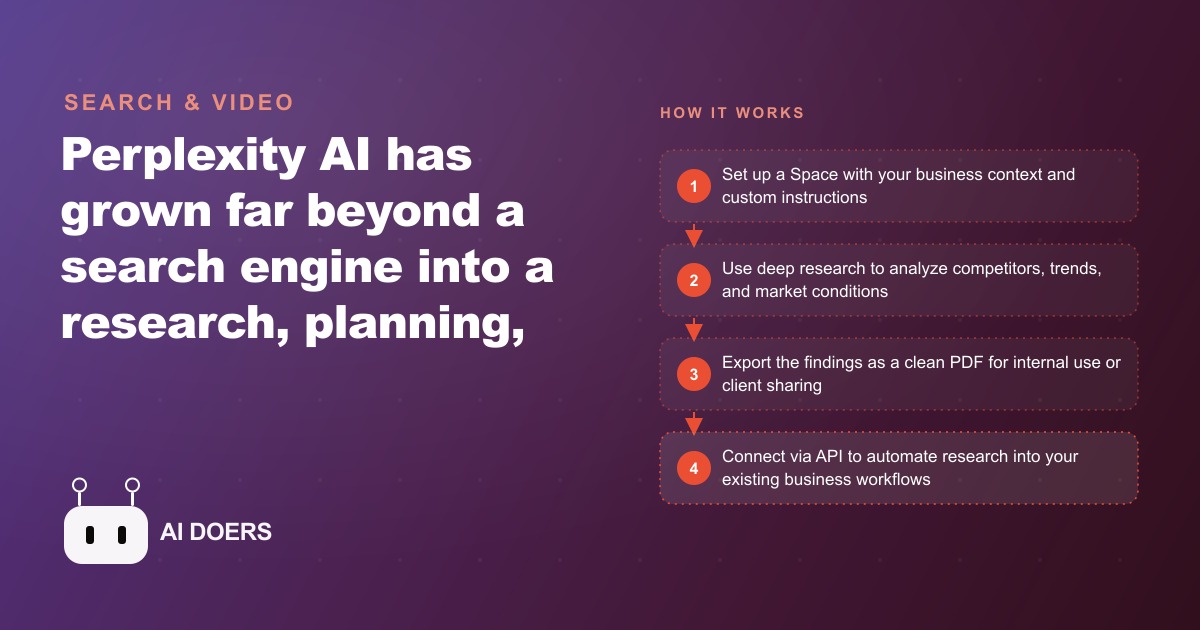
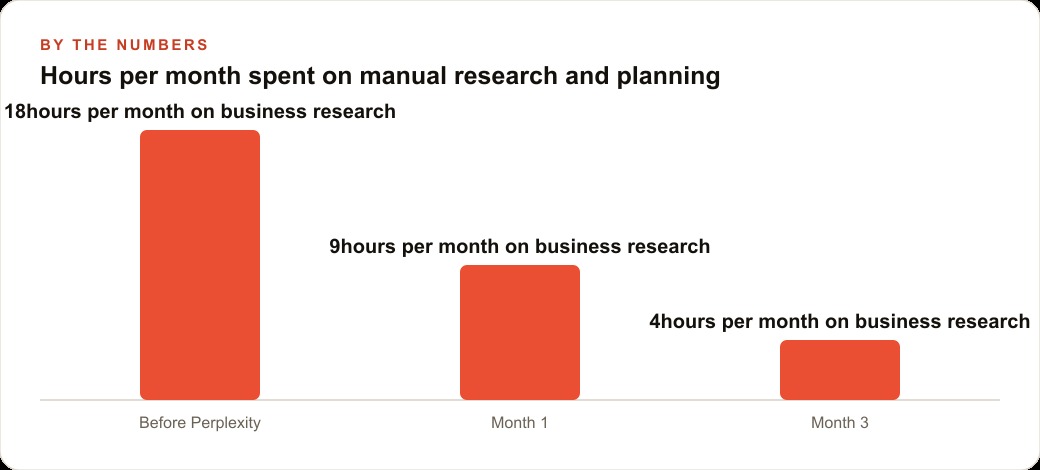
A family dining restaurant owner was losing roughly eighteen hours a month to research she did not enjoy and did not do well: menu trends, competitor pricing, supplier comparisons, and content ideas cobbled together across a dozen browser tabs late at night. Three months later that same research took her about four hours a month, and the tool that did it was one most people write off as just a smarter search engine. This is the walkthrough of how the restaurant put Perplexity AI to work, and why the search box is the least of what it does.
I am Madhuranjan Kumar, and Perplexity is the single most used AI tool in my own daily stack, so I know exactly which parts deliver and which get ignored. Most people open it, type a question, read the first answer, and never touch the features that actually change how a business operates. Here is how the restaurant went from eighteen research hours a month to four, step by step, and what each feature replaced along the way.
Month zero: the research tax nobody was tracking
Before anything changed, I asked the owner to log where her planning time actually went. The total was worse than she guessed. Updating the seasonal menu meant hours reading food blogs and squinting at competitors' online menus. Deciding on a new supplier meant scattered searches and half remembered reviews. Coming up with content for the restaurant's Google Business Profile meant staring at a blank box. None of it was hard, but all of it was slow, fragmented, and done at the end of long days.
That fragmentation was the real enemy. She used one tool to search, another to read documents, and her own memory to plan, and every switch cost time and focus. The whole point of the experiment was to collapse those scattered workflows into one place. Perplexity was the candidate because it does not just answer from frozen training data, it searches the live web, reads current pages, and returns a referenced answer, and it bundles several separate tools into one interface.
Weeks one and two: a Space became the restaurant's brain
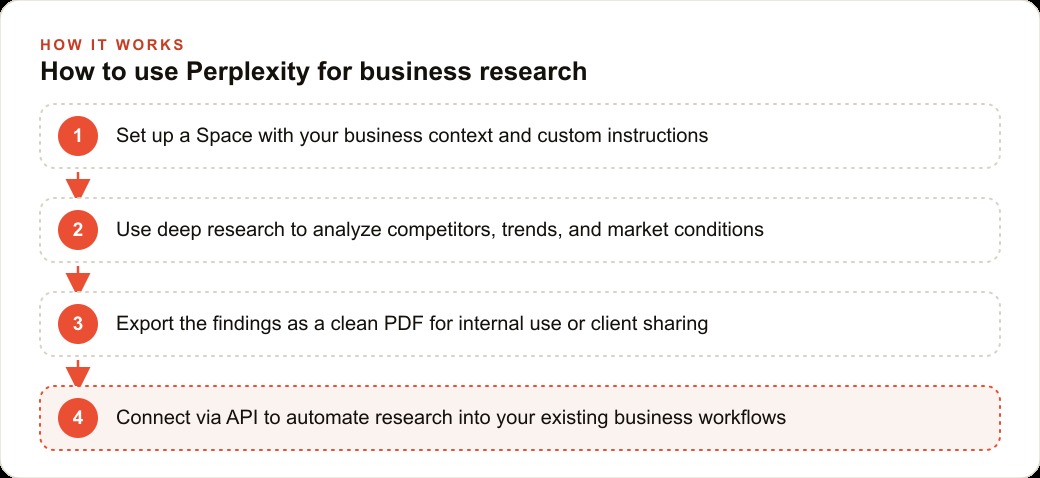
The first real setup step was building a Space, which is a persistent custom workspace with its own instructions, knowledge base, and saved history. This is the feature most people never open, and it is the one that made everything after it better. We named it Restaurant Research and wrote custom instructions telling Perplexity the context it would need on every query: the restaurant type, the city, the primary menu style, the price band, and the kinds of questions the owner researches most.
From then on, every question asked inside that Space arrived pre loaded with context, so the answers were about her restaurant in her market, not generic advice. This is the equivalent of a custom assistant built around the business, and setting it up took about fifteen minutes. We also spent a few minutes on the Discover page, clicking the Tech, Finance, and Arts tabs that matched her interests so the personalized feed learned to surface food and local business news worth glancing at each morning.
Weeks three and four: deep research replaced a night of tab hopping
The feature that sold her was deep research. Instead of a quick answer, it takes a few minutes, searches many more sources than a normal query, cross references them, and produces a structured report with citations you can export as a clean PDF. For her first run we picked a genuine, overdue question: a fall menu refresh. The prompt asked it to research trending comfort food dishes for the season, summarize what local competitors were featuring on their fall menus based on publicly available information, and note where key ingredient costs were heading.
Three minutes later she had a synthesized report with sources. That single run replaced what used to be an entire evening of reading blogs and clicking through competitor menus, call it thirty to sixty minutes of manual browsing compressed into three. She exported it as a PDF and walked into the kitchen meeting with a real brief instead of a gut feeling. Free users get five deep research runs a day, which is more than enough for a restaurant's pace. That was the moment the eighteen hour research tax started to fall.
Weeks five and six: content ideas and local search intent
Next we pointed Perplexity at the blank box problem, the Google Business Profile and the occasional blog post. A prompt like what questions do people in a mid sized city ask online when looking for a family friendly restaurant for a birthday dinner returned a list of real search intents. Those became posts, FAQ answers, and profile updates that spoke to what customers were actually typing. The same research through a dedicated keyword tool would have meant a paid subscription and more time.
This is where the value quietly spread beyond research. The long tail questions Perplexity surfaced fed directly into the restaurant's SEO and organic search footprint, and the same intent list sharpened the messaging behind Facebook and Instagram ad campaigns that promoted the birthday and holiday offers. The owner was no longer guessing what to say, she was answering questions people already had, and the leads and reservations those channels produced landed in the restaurant's CRM and website stack for follow up.
Weeks seven and eight: suppliers, events, and model choice
For supplier research, the owner asked Perplexity to compare local food distributors, summarize their reputations, and flag which had strong reviews for fresh produce delivery. For a planned private dining night, she used it to research what other restaurants in the area were doing for similar events and what pricing was common. Each of these was a task that used to eat an afternoon, now handled in minutes with sources she could verify.
One underused detail mattered here: the model selector. Inside Perplexity you can choose which underlying model handles a query, including Claude, GPT, Grok, Gemini, or Perplexity's own Sonar model, depending on the task. That flexibility meant she was reaching several top tier models through one interface without separate subscriptions. She learned to lean on the research strength for gathering and, when she needed polished long form writing, to take the findings to a writing focused model instead, because Perplexity is a research and synthesis tool first, not a creative writing tool.
Month three: the numbers and the automation option
By the three month mark, the research that once took about eighteen hours a month took roughly four. I want to be clear these are illustrative figures, but the pattern is what matters: routing menu research, competitor monitoring, content ideas, and supplier comparisons through one tool cut the time by more than half in the first month and by roughly three quarters by month three. The free tier carried almost all of it. She eventually upgraded to Pro at 20 dollars a month for unlimited model switching, higher deep research limits, PDF uploads, and API access, and the math was trivial: a single deep research run replaces far more than 20 dollars worth of her time.
The harder value to measure, and the more important one, was decision quality. Walking into a menu meeting with a synthesized report on trending dishes, competitor positioning, and ingredient costs produces better calls than walking in with impressions. Better decisions about pricing, promotion timing, and suppliers compound over a year into real money. For a restaurant thinking about scale, the API opens a further step: a simple automation in Make or Zapier can pipe a competitor name into Perplexity and drop the research summary into a Google Sheet, turning a manual chore into a background process.
The features the restaurant grew into over time
The first three months were about the core loop, but the tool kept revealing depth as the owner used it, and this is worth walking through because it is where most people stop too early. Pages turned out to be quietly useful. It generates structured, reference style documents on any topic that can be shared with a link, so when the owner wanted a one page explainer for staff on the new fall menu's ingredients and allergens, she had Perplexity draft it, edited it, and shared the link with the kitchen. That replaced a task she would otherwise have typed from scratch.
The Library was another slow burn. Every past conversation is stored and searchable, which meant the research she did in month one on supplier comparisons was still there in month three when a delivery problem made her revisit the decision. Instead of redoing the work, she searched her own history and picked up where she left off. For an owner whose research used to vanish into closed browser tabs, having a searchable archive of every question she had ever asked changed research from a disposable act into an accumulating asset.
Real time data closed the loop on the tasks that needed current numbers. Perplexity returns live information, so questions that depend on the moment, current ingredient cost trends, what is in season and moving in price, even scheduling around a regional food event, got current answers rather than a model's frozen guess. She used the trip planning feature once to build a two day schedule around a regional food market she wanted to source from, including the best times to visit specific vendors to avoid crowds, exported as a PDF she carried on her phone during the trip.
None of these were the headline feature, and that is precisely the point of this walkthrough. The value did not come from one killer capability. It came from a tool that quietly absorbed six or seven separate jobs the owner used to spread across different apps and her own memory, and doing them all from one interface with a consistent quality removed the friction that made research feel like a chore in the first place.
The deeper shift, and the one that took all three months to fully land, was psychological rather than technical. When research is slow and scattered, an owner avoids it, and decisions get made on gut instinct and half remembered impressions because gathering the real information feels like too much work at the end of a long day. When research collapses from an evening of tab hopping into a three minute deep research run, the owner starts doing it for decisions she used to wing. The fall menu got a real competitive brief instead of a guess. The supplier switch got a comparison instead of a hunch. The promotion timing got a look at what the market was doing instead of a coin flip. That is the compounding value that never shows up in an hours saved figure: not just that each research task got faster, but that the lower cost of research meant more decisions got made with evidence behind them. Over a year, better decisions about menu pricing, promotional timing, and supplier selection accumulate into real money in a way that is almost impossible to measure but very real to feel, and it all traces back to making the research cheap enough that avoiding it stopped being the rational choice.
Where these rollouts go wrong
The build was easy. The judgment is in avoiding three traps. First, using Perplexity like a plain search box and never opening deep research, Spaces, or the API, which is using maybe twenty percent of the tool. The fix is to spend thirty minutes setting up one Space and running one real deep research task, because that single experience changes how you think about it. Second, acting on real time data without checking the citation, because it can occasionally surface an outdated page. For any supplier contract or public claim, follow the source link and confirm. Third, expecting it to write polished original content from scratch, which is not its job. Use it to gather and synthesize, then hand the findings to a writing model.
What the walkthrough proves
A lean restaurant with no research analyst on staff recovered around fourteen hours a month and made better decisions by treating Perplexity as a research platform rather than a search box. The steps were simple: build a Space with your context, run deep research on the questions you have been putting off, export the findings, and connect an automation once the manual version proves its worth.
You can set this up yourself in about fifteen minutes with the plan above, or you can bring in someone who has built these research workflows many times and have it tuned to your business. Either way, the lesson holds: the search box is the smallest part of the tool, and the businesses that open the rest of it get a research department for the price of a subscription.
That is exactly what we do at AI DOERS. Book a private 30-minute call with Madhuranjan Kumar and we will map the fastest path to it for your specific business.
Book your call →
Madhuranjan Kumar
Madhuranjan Kumar brings 20 years of performance-marketing experience and has managed over $200 million in Facebook ad spend for brands across the United States and beyond. His expertise spans the full modern marketing stack: Meta, Google Ads, TikTok, email automation, CRM, and the websites that hold it together. At AI DOERS he turns that track record into lead-generation systems for businesses across every industry.