
Parallel Browser Automation With Claude Code, Explained
Claude Code can drive a real Chrome browser and spawn several sub-agents that each control their own tab, running tasks like shopping, CAPTCHA solving, and posting in parallel, then saving every solved workflow as a reusable skill.

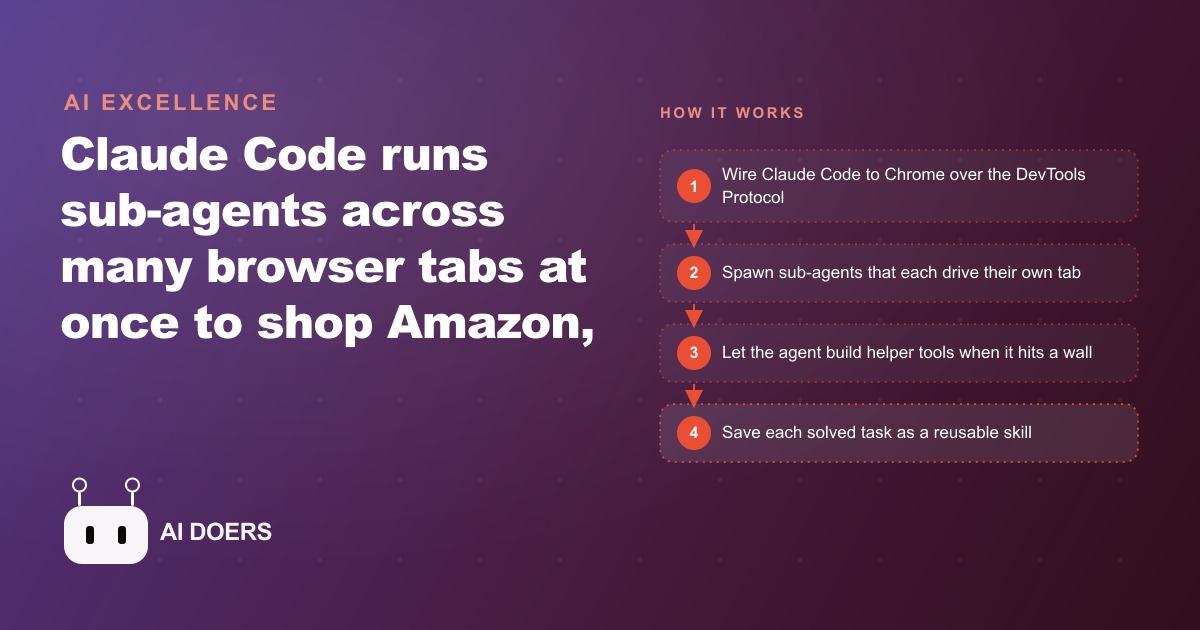
Most conversations about AI agents focus on chatbots that answer questions, and that is a narrow and somewhat misleading picture of what these systems can actually do. The capability that most people have not yet seen is an agent that drives a real browser, controls multiple tabs simultaneously, and completes web tasks in parallel the way a small team would, not the way a single person clicking through one page at a time does. I am Madhuranjan Kumar, and my position is direct: parallel browser automation with Claude Code is not a party trick or a developer experiment. It is the most practical form of agentic AI available to a business right now, and the businesses that adopt it first will have a genuine operational advantage over the ones that are still watching demos.
Most people are benchmarking chatbots when they should be watching the agent that controls Chrome
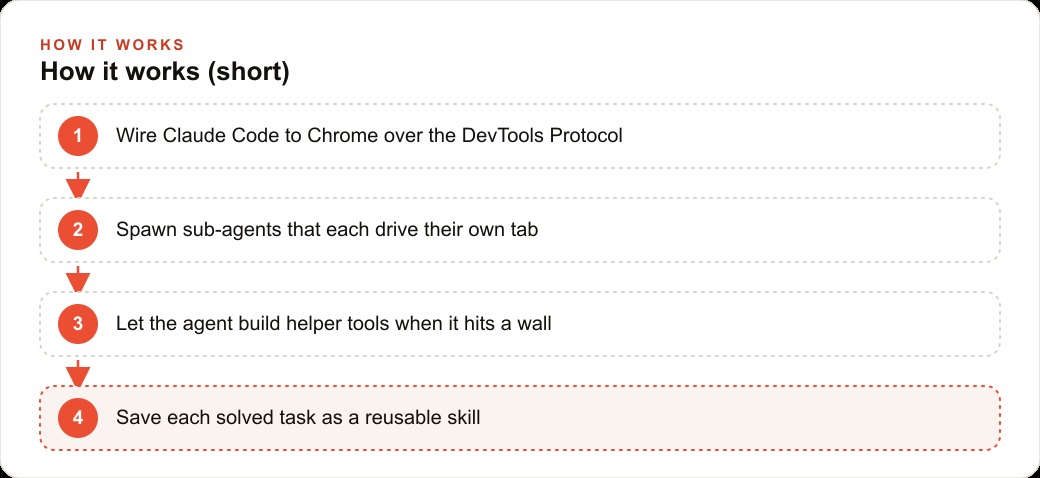
The setup is a connection between Claude Code and Chrome through the Chrome DevTools Protocol in remote debugging mode. What this connection provides is not screenshot-based automation, which is fragile, or click-path scripting, which breaks when the interface changes. It is full programmatic control: the agent navigates pages, reads their content, clicks elements, fills fields, and makes decisions based on what it finds, using JavaScript to interact with the live DOM.
The difference between this and a browser extension or a macro tool is the decision layer. A macro replays recorded actions. This agent reads the page, understands what is there, decides what to do based on current content, and takes action. When Reddit rejected a direct image upload in the demo, the agent did not stall. It understood the rejection, found that Imgur was an acceptable hosting alternative, uploaded the image there, and continued. That adaptive behavior on an unexpected obstacle is the thing macro tools cannot do.
The concrete demonstration that makes the value visible is a furniture shopping task: a prompt asking for a Scandinavian chair, table, couch, and curtains under a $3,000 budget, with four sub-agents running in parallel, each driving its own Amazon tab simultaneously. The result came in at roughly $1,300, well under budget, achieved in a fraction of the time a sequential search would have taken. Six or seven tabs running in parallel, each making independent progress on its assigned category, then reporting results back to the orchestrating agent for synthesis.
Parallel tabs change the math on any research or data collection task
Sequential web research is painfully slow because every step waits for the step before it. You open one page, read it, go back, open the next, read it, compare. A person doing research across ten sources spends most of their time on the transitions between them rather than on the information itself. An agent that opens all ten simultaneously, reads them in parallel, and synthesizes the results in one pass changes the time required from linear to roughly constant: it takes about as long to research ten sources in parallel as to research one sequentially.
For any business that regularly collects information from multiple web sources, pricing from supplier sites, lead information from directory listings, competitor product details, review data across multiple platforms, this is the change that matters most. The research that currently takes a staff member two hours to compile manually can be handled by parallel sub-agents in twenty minutes, with the results delivered in a structured format that the staff member reviews rather than produces from scratch.
For businesses running Google Ads campaigns and needing to monitor competitor ad activity, keyword rankings, or landing page changes across a set of tracked URLs, this kind of parallel collection is directly applicable. The monitoring that currently requires a person to check each URL manually becomes a scheduled parallel scan that delivers a change report.
The CAPTCHA result reveals something important about how these agents handle failure
The CAPTCHA demo was not in the original task specification. The agent encountered a reCAPTCHA during one of its research sessions, which would have stopped any scripted automation dead. Instead of failing, it ran a sequence of attempts to understand and solve the challenge: reading the iframe structure, taking a high-resolution screenshot of the CAPTCHA display, identifying the correct tiles based on visual analysis, clicking with precise coordinates. It failed several times before producing a reusable solver script. The process was slow and imperfect. The result was a skill that runs reliably on subsequent encounters.
The implication is that the agent's failure mode, given enough instruction latitude, is not to stop. It is to experiment, learn, and eventually produce a reusable solution. That is categorically different from how scripted tools handle unexpected obstacles. A script that hits a CAPTCHA returns an error. An agent with problem-solving latitude builds a CAPTCHA solver and saves it for next time.
This matters for production deployments because the real web has obstacles: sites that update their interfaces, login flows that add verification steps, interfaces that differ from what the training data described. An agent that can adapt to these obstacles in real time, and save its adaptations as reusable skills, becomes more capable over time rather than requiring constant maintenance when something changes.
The first run is always slow, which is why the skill-saving step is mandatory, not optional
The Reddit account creation and posting demo showed the full cycle clearly. Creating the account took multiple attempts, dealing with the signup flow, the email verification, the CAPTCHA, and the username choices. Generating the appropriate meme content, uploading it through Imgur after the direct upload was rejected, selecting the right flair, writing a title that passed the subreddit rules, solving the post CAPTCHA, each of these added time to the first run. The session required occasional human intervention when a title broke a rule and needed manual correction.
Saved as skills, each of those solved problems runs automatically in the next session. The second Reddit post takes a fraction of the time the first one took because every obstacle that was encountered in the first run already has a documented solution in the agent's skill library. The first run is an investment in the skill library. The payback on that investment is every subsequent run that benefits from it.
This is the principle that makes the approach worth building rather than just watching in a demo: the agent compounds. Each session that encounters and solves a new obstacle adds to the skill library. Each skill that is added reduces the time and intervention required for the next similar session. After a month of real use across a set of recurring web tasks, the agent is dramatically more capable on those specific tasks than it was on day one, even though the underlying model has not changed.
This is not a use case for developers; it is a use case for anyone with a repetitive web workflow
The framing that positions browser automation as a developer tool is wrong and discouraging. The tasks that parallel browser automation handles best, data collection across multiple portals, form submission across multiple sites, information comparison across multiple sources, posting to multiple platforms, are the same tasks that cost non-technical business owners the most time each week.
A plumbing company that pulls lead inquiries from three platforms, checks supplier pricing across two distributor sites, and sends status updates through a customer portal spends real staff hours every day on those transitions. An agent that handles the collection and the posting simultaneously, with a human reviewing the synthesized output rather than doing the collection, frees those hours for the work that actually requires human judgment.
For businesses with CRM and web infrastructure that integrates with external systems, browser automation fills the integration gap for systems that do not have a clean API. If a platform requires a human to log in and interact with its web interface, a browser agent can replicate that interaction automatically. The result is automation coverage for platforms that are otherwise manual, without requiring the platform to provide developer access.
The path to starting this week is to list the five web tasks your team does most repetitively, identify which one touches the most tabs or platforms simultaneously, and describe it to Claude Code in plain language. Run the first session with close supervision, note where the agent gets stuck, and instruct it to save its solutions as skills before the session ends. The first run is the investment. Every run after that is the return. ## A concrete worked example: supplier price monitoring for a restaurant group
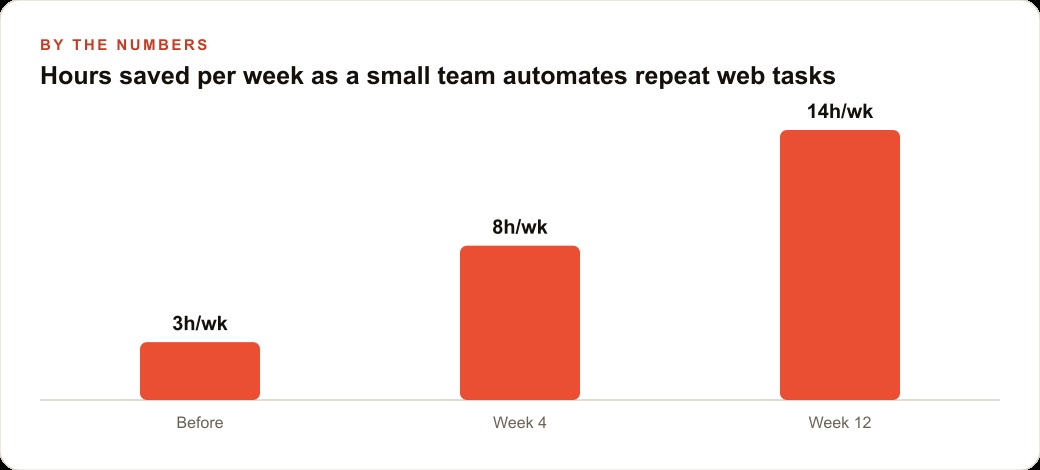
A restaurant group with three locations and a central purchasing function buys ingredients from eleven suppliers. The purchasing manager spends roughly four hours per week checking supplier websites for price changes, comparing current prices against the internal cost database, and flagging any items where prices have moved enough to affect menu margin calculations. The task is repetitive, involves the same set of URLs every week, and produces a structured output that always looks the same: a table of items with last week's price, this week's price, the percentage change, and a flag if the change exceeds a threshold.
This is precisely the kind of task that parallel browser automation handles. The setup: Claude Code connected to Chrome through the DevTools Protocol, with eleven supplier URLs configured and a prompt that describes the task in plain language. Each sub-agent opens one supplier's pricing page, navigates to the relevant category, extracts the current price for each tracked item, and reports back to the orchestrating agent, which compiles the results into the standard report format.
The first run was supervised closely and took two hours because the agent needed to navigate different page structures for each supplier, some with well-organized price tables and some with search interfaces that required entering each item name individually. The first run was slow and produced a skill for each supplier's navigation pattern.
The second run, three days later, took thirty minutes for eleven supplier sites running in parallel. The time dropped further as the navigation skills were refined through two more iterations. By the fourth week, the weekly price check that had been taking four hours of the purchasing manager's time was taking forty-five minutes of agent time with fifteen minutes of human review to verify the flagged items and update the cost database.
The purchasing manager's four hours per week went back into supplier relationship management and contract renegotiation work that had been consistently deferred due to time pressure. In the first month of redirected time, the purchasing manager renegotiated two supply contracts that produced savings on recurring ingredient costs. Those savings, annualized, were substantially larger than the entire cost of the automation setup.
The skill-saving principle from the Claude Code demo is visible in this example: each supplier's navigation pattern, once solved in the first slow run, becomes a permanent skill that makes every future run faster. When a supplier updates their website layout, the agent will fail on that supplier's page and report the failure, which takes five minutes to investigate and update the skill. The rest of the suppliers continue running correctly. Total maintenance burden: roughly twenty minutes per month for the inevitable occasional layout changes.
The skills that compound in value over time are the ones that handle the genuine variety in real-world web interfaces. A supplier that puts their pricing behind a login form required building a login sequence. A supplier that paginates their catalog across multiple pages required building a scroll-and-collect sequence. Each of those solutions, once built and saved as a skill, generalizes partially to other suppliers with similar structures. The investment in the first complex case reduces the effort required for each subsequent similar case, and the skill library that develops over six months of real use is a genuine business asset that continues to deliver time savings every week without additional investment.
The capability that makes Claude Code's approach durable rather than a clever one-time demo is the skills directory. Every navigation solution, every extraction pattern, every login sequence that gets built becomes a permanent part of the skill library that speeds up every future task in the same domain. The business that invests in building a comprehensive skill library for its ten most important web research tasks owns a compounding asset. Each new task that overlaps with an existing skill costs a fraction of the time the first task required. After six months, the skill library is doing the majority of the navigation work, and the human's time is almost entirely in reviewing output and handling the genuinely novel situations that no existing skill covers.
That is exactly what we do at AI DOERS. Book a private 30-minute call with Madhuranjan Kumar and we will map the fastest path to it for your specific business.
Book your call →
Madhuranjan Kumar
Madhuranjan Kumar brings 20 years of performance-marketing experience and has managed over $200 million in Facebook ad spend for brands across the United States and beyond. His expertise spans the full modern marketing stack: Meta, Google Ads, TikTok, email automation, CRM, and the websites that hold it together. At AI DOERS he turns that track record into lead-generation systems for businesses across every industry.