
Open Source AI Explained: Run Powerful Models Privately and for Free
Open source AI now rivals the closed models, and you can download and run it on your own hardware so sensitive data never leaves your machine. Here is what it is, why it matters, and how I would set it up for a real business.

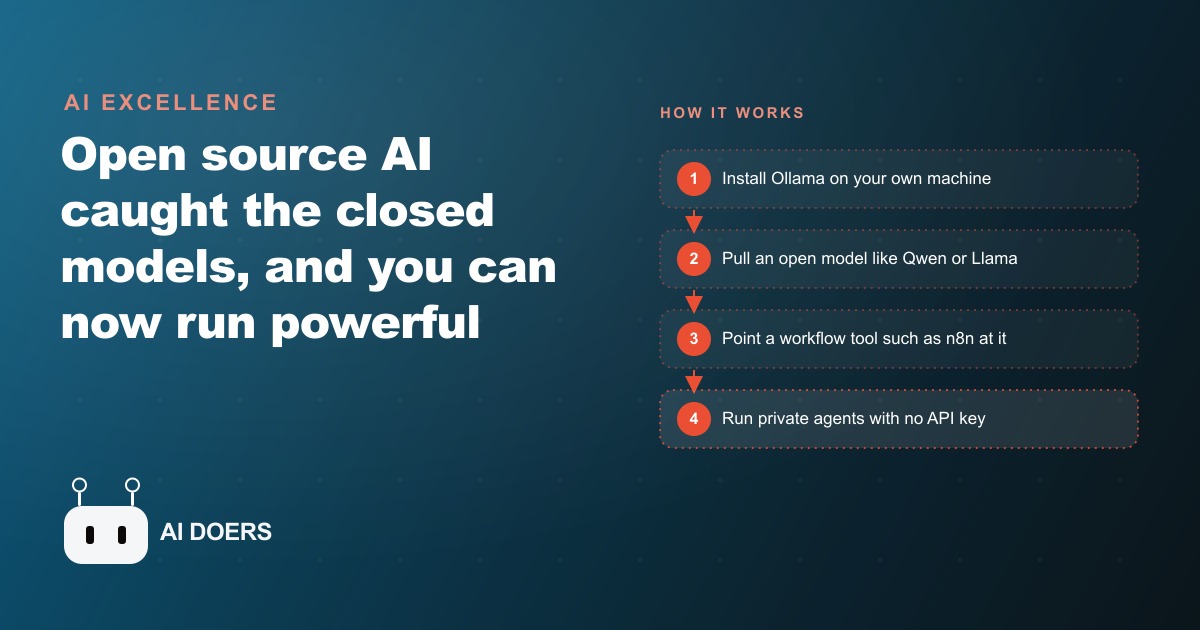
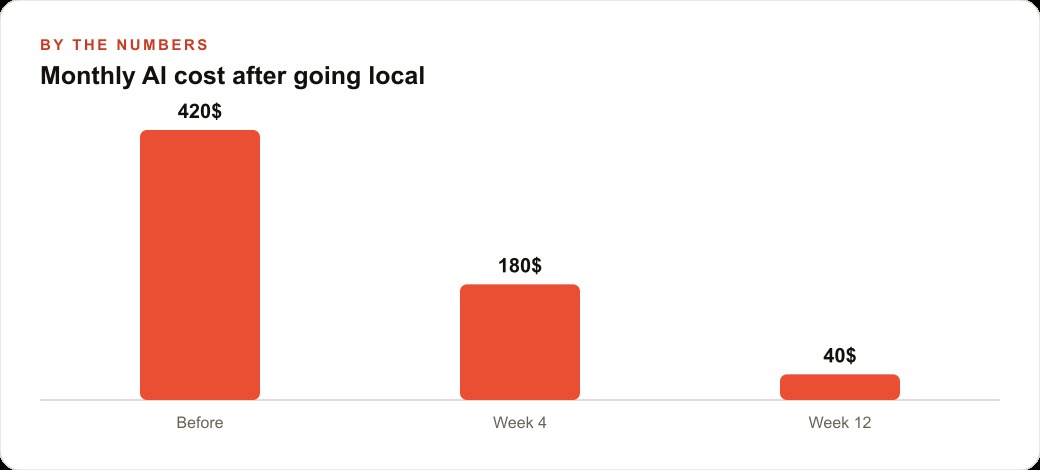
The moment I ran an honest audit of what I was spending on AI APIs, the number that came back was $420 a month. More than half of those calls were for classification, summarization, structured extraction, and first-draft generation. None of those tasks required a frontier model. They required something consistent, capable, and private enough that I could point it at client documents without worrying about data leaving my network. That audit led me to build a local AI stack on Ollama, and within twelve weeks the same volume of work cost me $40 a month. This is the exact playbook I used.
Stage One: Understand What Local AI Can and Cannot Do Before You Touch the Terminal
The quality ceiling on local open-source models shifted permanently in January 2025 when DeepSeek R1 was released. For the three years before that, the honest answer to "can I run a capable AI locally?" was "capable enough for experiments, not for production work you would stake your reputation on." R1 changed that. It was the first open-weight model to perform comparably to GPT-4 class models on rigorous reasoning benchmarks, and the releases that followed, Qwen 3, LLaMA 3.3, Mistral Medium 3, maintained that new standard. Something material happened in early 2025, and the downstream effect is that running a local model for business automation in 2026 is no longer a concession.
That said, I will not paper over the gaps that remain. The tasks where frontier cloud models still hold a clear edge: extended reasoning across novel domains where the model cannot rely on patterns from training data, synthesis that requires integrating information from a very long context window, real-time knowledge of events after the training cutoff, and tasks where the margin between an excellent output and a merely good output directly affects revenue or reputation. If you are writing a legal brief that a partner will sign, drafting a pitch deck a client will see, or producing analysis that will drive a large financial decision, the quality difference between an 8B local model and GPT-4o or Claude Opus is real and it matters.
For the other category of tasks, the gap narrows to the point where it rarely matters in practice. Classifying inbound support tickets into routing categories, summarizing internal meeting notes, extracting invoice line items from unstructured text, categorizing expenses, generating first-draft email responses from bullet-point instructions, and question-answering against documents you provide as context: these are tasks where a well-prompted 8B model produces output of comparable quality to a frontier model and does so locally, with no per-call cost, and with no data leaving your machine.
On the privacy question, I want to address the concern that stops many people from trying Chinese-origin open models like Qwen or DeepSeek: the worry that running them means sending data to Chinese servers. This concern misunderstands what open source means in practice. When you run a local model, you download the weights, which are static numerical files encoding the model's learned parameters, to your own hardware. The inference process, meaning the computation that turns your input prompt into a response, happens entirely on your machine using those local files. No query you send to a locally running model is transmitted anywhere. The country of origin of the organization that trained the model is irrelevant to the data path once the weights are on your disk. If you have been avoiding Qwen for privacy reasons, that concern does not apply to local deployment.
Stage Two: Install Ollama and Run Your First Private AI Model
Ollama is the tool that makes local model serving practical for someone who is not a machine learning engineer. It packages models in a standardized format, handles hardware detection automatically, manages memory allocation so models do not consume more RAM than they should, and serves a local API that other software can call. The design goal of Ollama is that the configuration decisions a user would otherwise need to make manually, such as which inference backend to use, whether to enable GPU acceleration, and how to manage concurrent requests, are handled automatically based on what your machine can actually do.
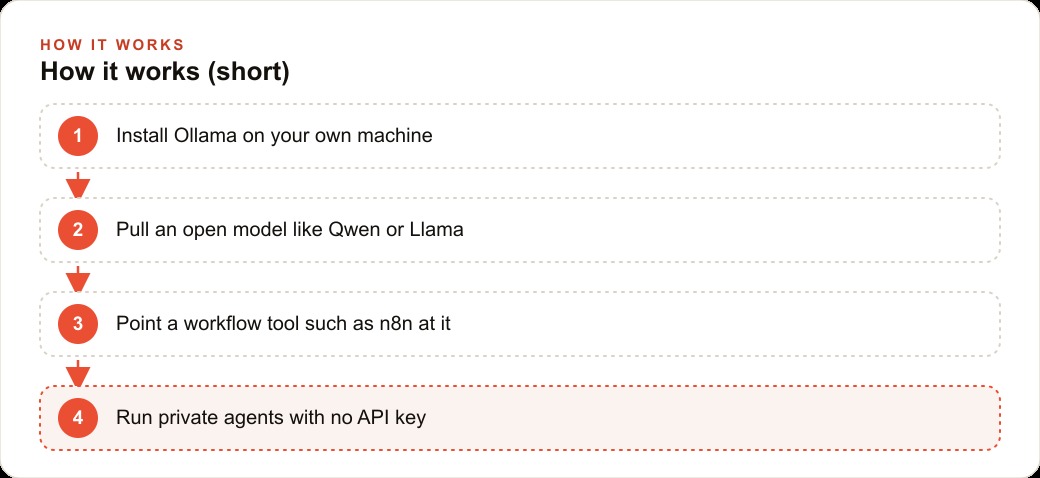
Installation is straightforward. On macOS, download the Ollama package from the official repository, open it, and drag it to Applications. On Linux, run the one-line install script from the official documentation, which downloads the binary, registers it as a systemd service, and starts the server. On Windows, the installer handles service registration automatically. After installation, Ollama starts in the background and is available without any configuration step.
Open a terminal and run: `ollama pull qwen3:8b`
I recommend Qwen 3 8B as the starting model for two specific reasons. First, in my own testing across text processing and extraction tasks, it consistently outperforms LLaMA 3 8B on instruction following and on producing valid structured JSON output, which is the capability that matters most when you are building automation. Second, it is about 4.9 gigabytes to download, which most connections can complete in under 10 minutes. When the download finishes, run: `ollama run qwen3:8b`
Type any prompt. The model responds using only your local hardware. This is the baseline: a working AI assistant that requires no network connection, no account, and no per-use payment after the model is downloaded.
Hardware requirements scale predictably with model size. The 7B and 8B parameter models fit in 16 gigabytes of RAM and produce usable response speeds on a modern CPU, faster with a discrete GPU. The 13B models prefer 32 gigabytes of RAM and become noticeably slow on machines with less. The 70B models need either a GPU with substantial VRAM or 64-plus gigabytes of system RAM, which puts them outside the range of typical laptops and most desktops. Start with the 8B model. Move up only after running a structured quality evaluation, not based on a general assumption that bigger is always better for your specific task.
Stage Three: Open the Local REST API and Verify the Automation Bridge
The terminal interaction is useful for testing and exploration. The capability that makes Ollama valuable as an infrastructure component is the REST API it serves automatically on port 11434. Every model you pull is accessible through this API using a request format intentionally designed to be compatible with the OpenAI API specification. Any tool, library, or framework that works with the OpenAI API can be pointed at local Ollama by changing the base URL and providing any non-empty string as the API key, since local Ollama does not perform authentication. No other changes are needed in most integrations.
Verify the API is active by running this from a terminal:
``` curl http://localhost:11434/api/chat \ -d '{"model": "qwen3:8b", "messages": [{"role": "user", "content": "Return only the word: working"}]}' ```
If the response includes the word "working" in a JSON payload, the local API is confirmed and the automation bridge is ready. If the command hangs or returns an error, confirm that Ollama is running as a background service before proceeding.
Before building automation that depends on this API, I strongly recommend benchmarking inference speed for your specific task. The practical performance difference between configurations is large. When I benchmarked document classification on inputs averaging 750 words, CPU-only inference on a machine without a discrete GPU took 7.3 seconds per document. The same machine connected to an external GPU over Thunderbolt took 1.8 seconds. A laptop with an integrated Apple Silicon GPU, which Ollama uses automatically on compatible Macs, took 2.1 seconds. For a daily batch that processes 150 documents, the difference between CPU-only and GPU-accelerated inference is 18 minutes versus 4.5 minutes. Measure your specific configuration before committing the workflow to a production schedule.
Stage Four: Build a Real Agentic Workflow With n8n Against Local Ollama
n8n is a self-hosted workflow automation platform with a visual node editor and integrations for over 400 services. It connects to the Ollama local API through a standard HTTP Request node. The combination of Ollama and n8n running locally means you can build agentic workflows where the AI processing step runs on your own hardware, the output is routed to any downstream service you have an account with, and the sensitive content being processed never touches an external server between input and output.
Install n8n with: `npm install -g n8n` and start it with: `n8n start`. The web interface opens at localhost:5678. Create a new workflow, add an HTTP Request node, set the method to POST, the URL to `http://localhost:11434/api/chat`, and the body to a JSON object following the Ollama API format. That node is now calling your local model. Connect it to any input source, a Gmail trigger, a file watcher, a scheduled cron, a webhook, and to any output destination. The structure of the workflow is standard; the only distinction from a cloud-API workflow is the URL pointing to localhost.
A workflow I run in production to illustrate the full pattern: every Sunday at 8 AM, n8n reads a CSV export of the previous week's business expenses from a local folder, sends each row to Qwen 3 8B with a prompt instructing it to classify the transaction into one of eight categories and return a JSON object, collects the classified results, calculates category totals, and writes two outputs. The first is a summary row in a Google Sheet shared with my accountant. The second is a plain-text narrative paragraph in a Notion page that I read on Monday morning. This workflow processes between 60 and 150 transactions per week. The AI classification step runs locally. The only network traffic the workflow generates is reading the input CSV from disk and writing the final outputs to Google Sheets and Notion.
Before running this locally, I was using GPT-4o-mini for the same classification at roughly $0.002 per document. Across 150 documents a week and 50 working weeks a year, that is $15 in API cost, which is genuinely trivial. The reason I moved it local was not cost: it was that the expense descriptions often include client names, project codes, and vendor details that I do not want traveling through any third-party inference infrastructure. The local workflow eliminated that exposure entirely at the same time that it eliminated the cost.
Stage Five: Calibrate Your Prompts to How an 8B Model Actually Behaves
The most common failure pattern I see after people get local AI working is writing prompts suited for a large frontier model and then concluding that the local model is broken when the output does not match. The smaller model is not broken. It has a different response to prompt specificity than you may be accustomed to.
A large frontier model will often infer the intended output format from context and produce well-structured results from brief, natural-language prompts. An 8B model benefits significantly from explicit format specification at the beginning of every prompt. The improvement I measured when I added explicit output format instructions to my classification prompt was substantial: parse-success rate on structured JSON output rose from 68 percent to 94 percent. The only change was adding a header to every prompt that read: "Return only a valid JSON object with these exact keys: category (string), confidence (high/medium/low), notes (one sentence). Do not include any text before or after the JSON object."
The other prompt adjustment worth making immediately: set temperature to 0.1 or lower for any task where you want consistent, deterministic output across similar inputs. Classification, extraction, and structured data generation all benefit from low temperature. Tasks where variety is desirable, like first-draft generation or brainstorming, work fine at the default temperature of 0.7 or higher. Specify temperature explicitly in every API call rather than relying on any default setting, because different tools and integrations have different defaults and you want the behavior to be predictable.
A practical evaluation cadence to build into your workflow development: before deploying any local AI step to a production automation, run it against 20 representative examples from your actual data, score each output against a simple rubric, and calculate the pass rate. A rate above 85 percent is production-viable with a periodic spot-check. Between 70 and 85 percent, add a human review step in the workflow for any output that will be acted on directly. Below 70 percent, the task as specified is not well-matched to the current model size, and the right move is either a stronger prompt, a larger model, or routing that task to a cloud tier instead.
Stage Six: Decide Which Tasks Stay Local and Which Go to the Cloud
The goal of a local AI stack is not to run everything on your own hardware out of principle. The goal is to route each type of work to the tier that matches its actual constraints. The decision for each task reduces to two questions: does the content need to stay on my machine, and does the task fall within the quality range of a model I can run locally?
Tasks that belong in the local tier when both answers favor it: document processing with confidential content, classification and extraction at high volume, internal automation that processes data from your own systems, and batch workflows where per-call cost compounds across thousands of operations per month.
Tasks that belong in the cloud tier: anything requiring knowledge of recent events after the model's training cutoff, reasoning chains that benefit from context windows much larger than what fits efficiently in local RAM, client-facing output where a quality gap between local and cloud would be directly visible in the final product, and agentic tasks that require real-time web access or external API calls as part of the reasoning process.
The practical system is to run a small local model for high-volume, private-data tasks and reserve cloud API budget for the smaller category of work where the quality ceiling actually matters. My own ratio after re-routing: about 70 percent of calls go local, 30 percent go to cloud APIs. The 30 percent that go to cloud is the category where I would notice the quality difference in the final output. The 70 percent that go local is the category where I would not, and where I was previously paying for more capability than the task required. The $40 monthly bill is what the 30 percent costs. The $380 I was previously spending on the 70 percent was waste that a calibrated local stack eliminated.
That is exactly what we do at AI DOERS. Book a private 30-minute call with Madhuranjan Kumar and we will map the fastest path to it for your specific business.
Book your call →
Madhuranjan Kumar
Madhuranjan Kumar brings 20 years of performance-marketing experience and has managed over $200 million in Facebook ad spend for brands across the United States and beyond. His expertise spans the full modern marketing stack: Meta, Google Ads, TikTok, email automation, CRM, and the websites that hold it together. At AI DOERS he turns that track record into lead-generation systems for businesses across every industry.