
One Context Gives Coding Agents a Git-Style Memory That Actually Persists
One Context is a simple file framework that lets a coding agent branch, commit, and merge its own memory across any session, which lifted Claude Code performance by about 13 percent. Here is what persistent agent memory means for a real business.

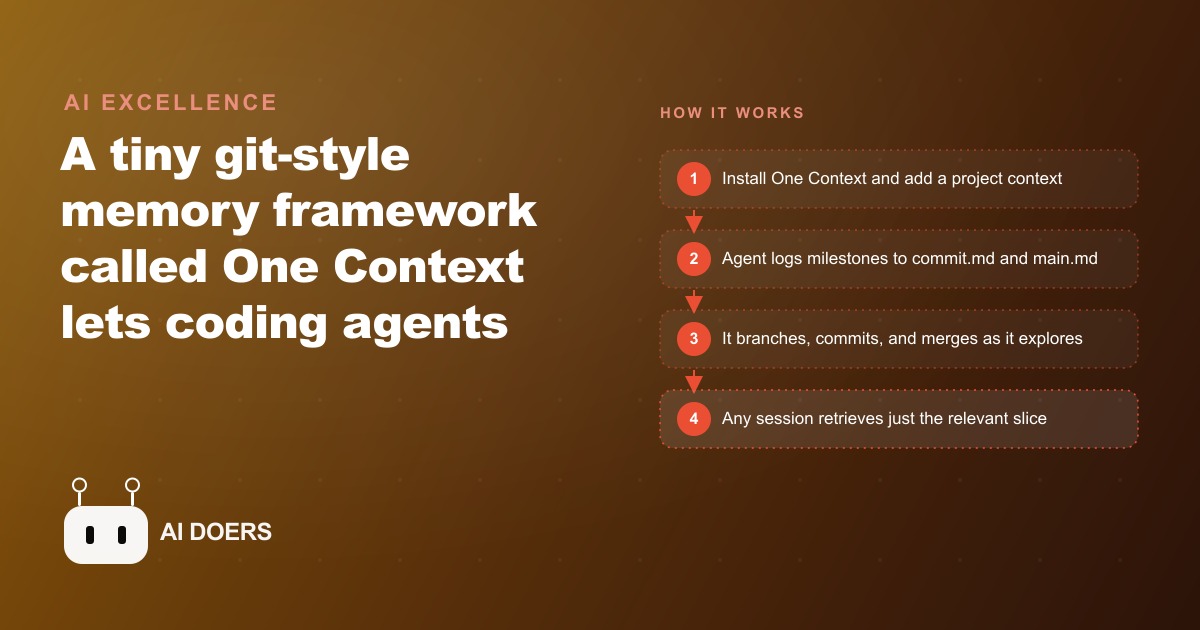
If you have run an AI coding agent on anything complex, you know the sinking feeling: the longer it works, the dumber it gets. It repeats mistakes it already made, forgets approaches it already tried, and asks you a question it answered an hour ago. That is not a fluke, it is the context window limit showing up in practice, and a small free framework called One Context fixes it by giving the agent a memory it does not lose. This is a hands on playbook for setting that up and building a workflow around it, stage by stage.
I am Madhuranjan Kumar, and the promise here is concrete. With this method Claude Code performed about 13 percent better on real software engineering tasks, and cheaper, smaller models like Grok 4.5 Air reached near frontier quality simply by feeding back the right past actions. The tool manages an agent's memory the way git manages code, using a method its creators call the Git Context Controller. Follow the stages below and you will have persistent, shareable agent memory running by the end of an afternoon.
Stage one: understand why the memory problem exists before you fix it
Do not skip the diagnosis, because it decides how you use every later stage. Modern models advertise around a million tokens, but the effective context window is closer to 120k to 200k tokens. That gap is the whole problem. Once a task runs long, the agent has to compact its conversation, and compaction is just a polite word for forgetting. Every agent today is built around this constraint, which is why they all start strong and degrade on long jobs.
The insight One Context is built on is that memory should not live in the chat window at all. It should live in plain files on disk, so it persists across every session and even across different agents. Internalize that before you install anything, because the entire workflow rests on the idea that the durable memory is the files, and the chat window is just a temporary workspace you load slices into. Get that mental model right and the rest of the playbook is obvious.
Stage two: install it and add your first project context
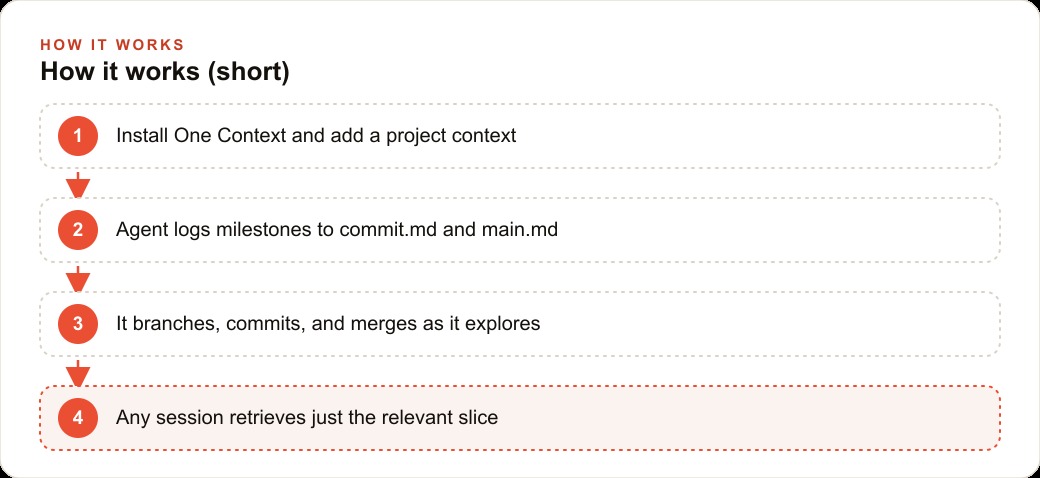
The setup is genuinely simple. Install with npm i -g one-context-ai, then run one-context to open a split view of your sessions on one side and the agent on the other. From there, add a context for each project and start your agent sessions inside that context. That is the mechanical setup, and it takes minutes.
The habit to build at this stage is one context per project, and if you work on a team, one shared context per project that everyone writes into. This is the decision that turns individual memory into team memory, so make it deliberately at the start rather than bolting it on later. Each session gets summarized by a stop hook and saved locally, which means the memory builds itself as you work instead of depending on anyone remembering to write notes. That automatic capture is the point: a memory system that relies on human discipline to update will rot, and this one does not.
Stage three: learn the four files so you know where knowledge lives
Before you rely on the system, spend ten minutes understanding its four core files, because knowing where each kind of knowledge lives is what lets you trust it. The file main.md holds the global context and roadmap of the project, the thing you read first to know where everything stands. A commit.md logs high level milestones each time the agent finishes a subtask. A log.md keeps the full raw history of observations and actions for when you need the detail. And a metadata index lets the agent find a specific piece of knowledge fast without scanning everything.
The reason this structure matters is that it maps cleanly onto how you actually think about a project. You want a one paragraph summary most of the time, occasionally the milestone level detail, and rarely the full transcript. The four files give you exactly those three altitudes. When you understand that main.md is the summary, commit.md is the milestone log, and log.md is the raw record, you can predict where any answer will come from, which is what makes the memory trustworthy rather than a black box.
Stage four: put the agent to work with branch, commit, and merge
Now use the git like actions, because they are what let an agent explore without destroying its own memory. The agent branches when it wants to try an alternate strategy, commits when it hits a milestone, and merges when an exploration is done, folding the result back into the main summary. Because the structure mirrors git, the agent can fork the conversation to chase a risky idea without losing the overall thread.
In practice this changes how you let the agent work. Instead of nervously keeping it on a short leash so it does not wander off and forget the goal, you let it branch to try the risky refactor, knowing that if the branch is a dead end it merges nothing and the main summary stays clean. The commits along the way mean that even a long, meandering session leaves behind a tidy record of what was tried and why. This is the stage where the 13 percent performance gain comes from in real terms: the agent stops re deriving context it already worked out and stops re breaking things it already fixed.
Stage five: retrieve progressively instead of reloading everything
Adopt one retrieval habit from day one, because it is where most people waste the benefit. When you ask where a project stands, let the agent read main.md first, drill into a branch commit next, and only open the raw log if it truly needs to. It pulls the relevant slice instead of dumping everything into the window at once.
This matters because the temptation is to reload the whole history to be safe, which just recreates the original context window problem you were trying to escape. Progressive retrieval keeps the working window small and focused, which is exactly what keeps a smaller, cheaper model performing near a frontier one. Train yourself and your team to trust the summary first and reach for detail only on demand. That single discipline is the difference between a memory system that speeds you up and one that slowly clogs.
Stage six: turn it into shared team memory
Once the solo workflow is smooth, unlock the real payoff, which is sharing. The same memory works across any session and any coding agent, whether Claude Code, Codex, or OpenClaw, so a team's knowledge actually accumulates instead of resetting every time someone opens a new session. Agree on the shared context per project you set up in stage two, and use the share button, which produces a chat link preloaded with that context, whenever you need a second person to pick up exactly where an agent left off.
This is where scattered agent runs become a living knowledge graph anyone on the team can query and contribute to. For a small shop that cannot afford to lose context between people, that compounding is the whole point. The knowledge an agent builds today is still there next week, and the next developer, even using a different agent, reads main.md and instantly knows the history instead of starting from zero.
The worked example: an e-commerce store that stops starting over
Let me ground the whole playbook in one business. Picture a growing online store where a small team uses coding agents to add features, fix bugs, and tweak checkout. Without shared memory, every new session re learns the codebase, re asks the same questions, and sometimes re breaks something that was fixed last week, which is expensive in both engineering time and lost sales.
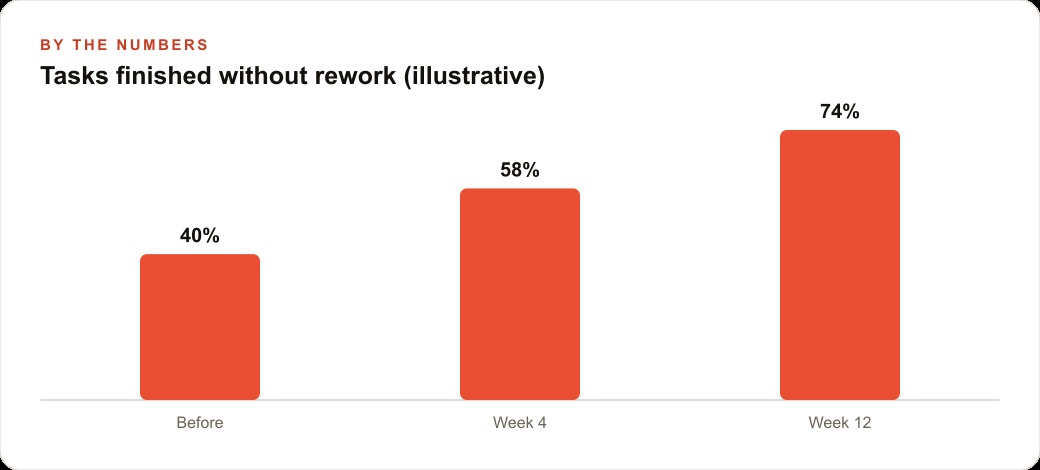
Following the stages above, I would set up one project context for the storefront. When an agent investigates a slow product page, it commits what it found and why. When it tries a caching approach that turns out wrong, it branches, and the dead end spins up on its own branch without polluting the main summary. Say the team ships around 40 percent of its tasks without needing rework at the start. With milestones captured and context shared, that figure climbs, illustratively toward 58 percent within a month and 74 percent by week twelve, because the agents stop repeating solved problems. During a flash sale, the shared memory keeps two people from fighting the same fire twice, since the second developer reads main.md and sees the cart bug history and the checkout edge cases immediately. That same cleaner engineering foundation is what keeps the store's CRM and website stack reliable under load, which protects the revenue coming in from Facebook and Instagram ad campaigns and Google Ads during exactly the moments a broken checkout would cost the most.
Common mistakes that waste the memory advantage
Because this is a practical playbook, it is worth being honest about how teams undermine it, since the failures are predictable. The first mistake is treating the memory files as write only and never reading them. If the agent commits milestones to commit.md but nobody ever asks it to summarize from main.md, you have built an archive nobody consults, which is just clutter with extra steps. The fix is to make the first move of every session a retrieval, asking the agent where the project stands before asking it to do anything new. That one habit is what converts stored memory into applied memory.
The second mistake is letting contexts sprawl. One context per project is the rule for a reason. When people create a fresh context per feature or per day, they fragment the memory back into the isolated silos the tool was meant to eliminate, and the compounding never happens. Discipline about scope, one durable context that the whole project writes into, is what lets knowledge accumulate rather than scatter. This is especially easy to get wrong on a team, where the natural instinct is for each person to start their own context, so agree on the shared context up front and hold to it.
The third mistake is over reloading out of anxiety. When an agent seems to have lost the thread, the temptation is to dump the entire log back into its window to be safe, which immediately recreates the context overflow you were escaping. Trust progressive retrieval. Let it read the summary, then the relevant commit, and only the raw log when it genuinely needs the detail. A smaller working window is not a limitation here, it is the mechanism that keeps a cheaper model performing near a frontier one, so protecting it is protecting your results and your token costs at the same time.
The fourth mistake is skipping the diagnosis in stage one and treating the files as magic. If you do not understand that the durable memory is the files and the chat is a temporary workspace, you will keep leaning on the chat and wondering why the agent forgets. The mental model is the whole game.
The fifth mistake, and the one that quietly wastes the most value on a team, is not committing to the shared context as a discipline everyone actually follows. It is easy to agree in a meeting that there will be one context per project, and just as easy for one developer under deadline pressure to spin up their own private context to move faster, which breaks the accumulation for everyone. The whole payoff of shared memory is that the second person to touch a problem inherits the first person's context for free, and that only holds if everyone writes into the same place. So it is worth treating the shared context the way a team treats its main branch in git: a shared resource with an agreed convention, not a personal scratchpad. When that convention holds, a genuinely powerful thing happens over a few months, which is that the team's collective engineering knowledge stops evaporating between sessions and starts compounding, so the codebase and the workflow get easier to work on rather than harder, and a new team member can read main.md and be productive on day one instead of week three. That compounding is the entire reason to adopt the system, and one undisciplined shortcut is all it takes to lose it.
The through line worth keeping
Better agents come from better memory, not just bigger models. Give a capable agent a git style memory and it stops repeating itself, and a whole team gets agents that grow smarter the more they are used. The playbook is short: install it and add a context, learn the four files, let the agent branch and commit and merge, retrieve progressively, and share one context per project.
You can wire this up yourself in an afternoon, and the workflow is light enough to keep. If you would rather have it set up cleanly across your team, with shared contexts and a sensible workflow tuned to your codebase, you can do it yourself or bring in an expert to do it right, and that is the kind of build I take on for clients.
That is exactly what we do at AI DOERS. Book a private 30-minute call with Madhuranjan Kumar and we will map the fastest path to it for your specific business.
Book your call →
Madhuranjan Kumar
Madhuranjan Kumar brings 20 years of performance-marketing experience and has managed over $200 million in Facebook ad spend for brands across the United States and beyond. His expertise spans the full modern marketing stack: Meta, Google Ads, TikTok, email automation, CRM, and the websites that hold it together. At AI DOERS he turns that track record into lead-generation systems for businesses across every industry.