
How NotebookLM Video Overview Turns Business Documents Into Narrated Presentations Automatically
NotebookLM now generates narrated video presentations from uploaded documents, with no recording, no slide design, and no production skills required. Here is what this means for businesses that produce documentation regularly.

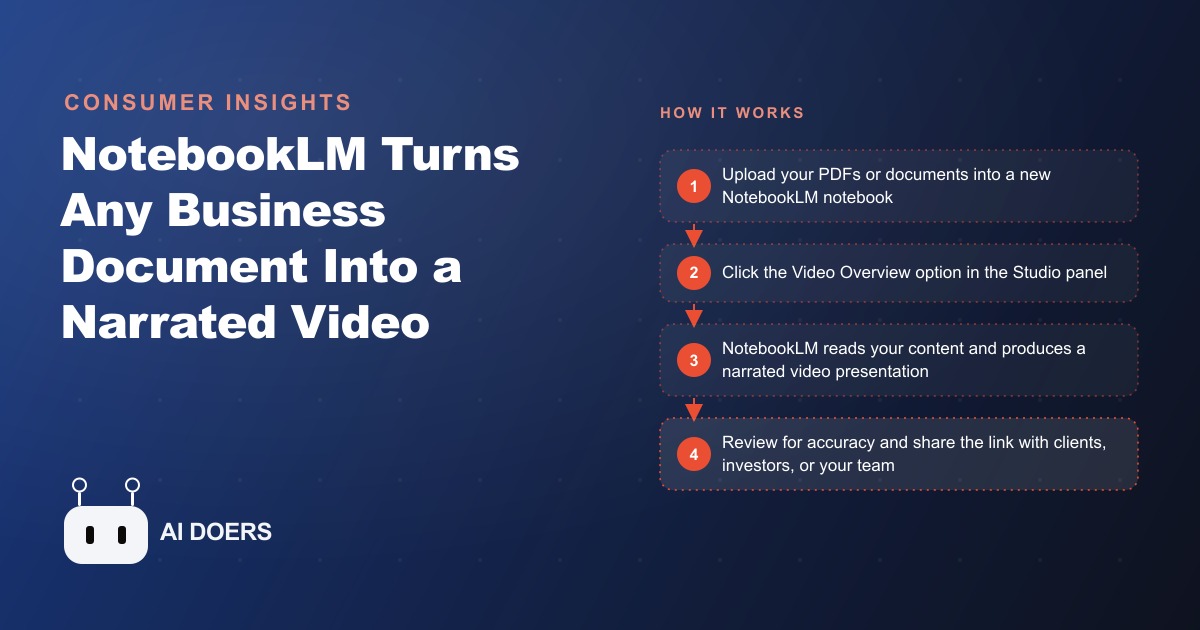
The Monday morning slide deck was eating four hours a week, and the agent who built it was a closer, not a graphic designer.
The 4-hour pitch deck problem
The agency handled both commercial and residential sales, with the commercial investor side requiring the most intensive preparation before every client interaction. Each week the lead agent assembled a portfolio presentation for the Tuesday investor call. The documents were never the problem. Across a typical active week the agency produced individual listing PDFs for each property, a comparative market analysis, cap rate projections, neighborhood research documents, and yield calculations. By Monday morning there was always more information than any investor would read carefully.
The problem was the gap between information existing and an investor actually engaging with it. A 40-page PDF containing the full analysis of a 20-property portfolio gets skimmed. A structured, narrated presentation of the same material gets watched. The agency knew this. Investor clients arrived at meetings having barely glanced at materials sent in advance, then spent the first half of a call asking questions already answered in the documents. The meeting that should have moved directly to decision-making started from orientation instead.
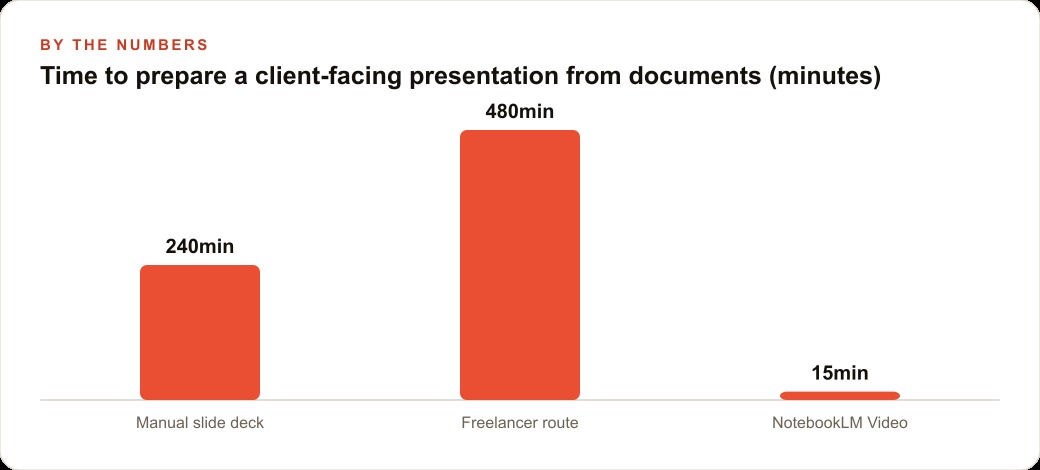
The standard fix was to build a proper presentation: open five or six documents in parallel, identify the figures worth surfacing, write slide content, lay out a visual structure, verify every cap rate twice because a misquoted figure in a commercial pitch follows you. On a productive week this took four hours. On weeks with multiple investor clients or a larger portfolio it stretched toward six. When time ran short the work went to a freelancer who charged $200 to $400 per presentation. Either way the cost was real: hours of senior agent time, or several hundred dollars per pitch, every week.
What made this painful was its redundancy. Every figure in the slide deck came from documents that already existed and were already thorough. The entire production process was one step: converting documentation that was complete into a format investors would actually engage with. Nothing new was being created. The bottleneck was entirely presentational.
A 20-property commercial portfolio review, prepared manually, typically required the agent to read through seven to nine separate documents, synthesize the relevant figures, and arrange them into a coherent narrative arc that an investor could follow. That process demanded two things in short supply on a Monday morning: uninterrupted concentration and design capability. The agent was excellent at the first and mediocre at the second. The result was four hours of work that produced a slide deck that was functional but not polished, professional but not impressive. The information was all there. The production quality was whatever four hours of effort by a non-designer could achieve.
The first upload: twenty listing PDFs and one click
NotebookLM is a free research and organization tool from Google, available to anyone with a Google account. It was originally notable for Audio Overview, which turned uploaded documents into a realistic two-host audio discussion of the key points in the material. Video Overview extends that capability: instead of audio, the tool generates a narrated video presentation from your uploaded documents, with a structured slide flow, a synthesized narration drawn from the source material, and a visual organization that moves through your content logically. No slides to write, no narration to record, no layout to design.
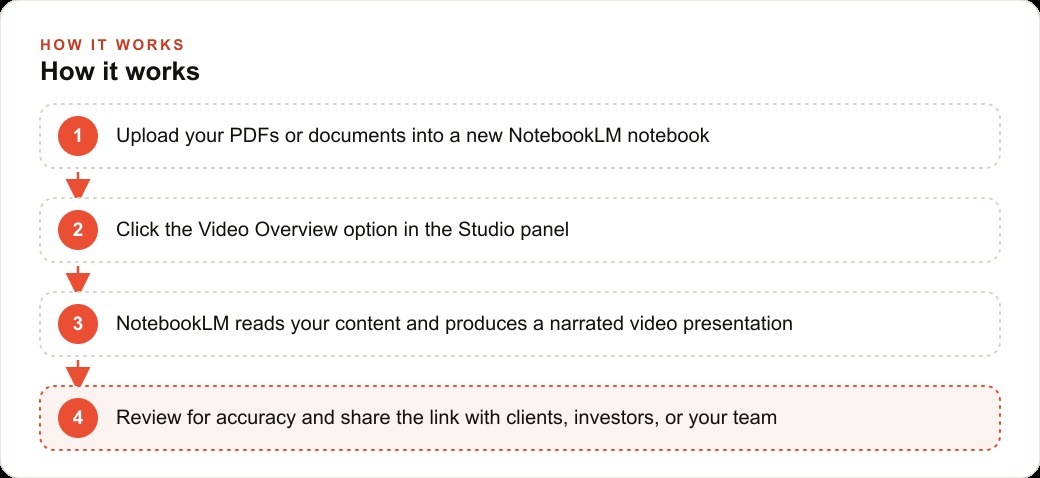
The agency's first real test was the current commercial portfolio: twenty listing PDFs, the week's market analysis report, and three neighborhood research documents. They uploaded everything into a new notebook at notebooklm.google.com and clicked the Video Overview button in the Studio panel. The generation process took about fifteen minutes. What came back was a structured narrated presentation that moved property by property through the portfolio, called out the key metrics for each, wove in the relevant market analysis context, and drew on the neighborhood research to support the location assessments.
The agent reviewed this breakdown against the source documents before sharing it. Two yield calculations had been rounded slightly differently from the source figures, and one property's square footage was stated in a way that could be interpreted ambiguously. Fixing those required updating the source documents to be more explicit and re-running the generation, which added about eight minutes. Total time from first upload to a verified, shareable presentation: twenty-three minutes.
The difference between twenty-three minutes and four to six hours is not a marginal improvement. It represents a completely different allocation of Monday morning. The same preparation that had previously claimed the better part of a working day now fit comfortably into a gap between two other tasks.
Source document quality emerged as the critical variable. Natively digital, well-structured PDFs produced clear and well-organized video sections. Two older listing PDFs that had been scanned from paper caused problems because the AI could not extract clean text from an unprocessed scan. That introduced a pre-upload step: a fifteen-minute review of source documents before uploading anything for a client-facing presentation, checking that section headings were explicit, key figures were clearly labeled, and individual properties were separated with clear headers in any combined document. With that step in place, the output became consistent. Without it, the quality was unpredictable in ways that took longer to fix than building the slide deck from scratch would have.
The tool is entirely free for the capabilities described here. Google also offers a paid tier through Google One AI Premium at roughly $20 per month, which provides higher usage limits for agencies running high volume, but for most real estate businesses the free tier is more than sufficient for regular client-facing use.
What the investor saw before the meeting
The agency sent this breakdown link the evening before the Tuesday call. The investor, managing a twelve-property commercial portfolio and evaluating three potential additions, watched the presentation that night. When the call started, the first question was a direct comparison: the cap rate differential between properties seven and twelve in the portfolio, and whether the yield projection on property twelve used a five-year or ten-year horizon.
That is a qualitatively different meeting from one that opens with "can you walk me through the portfolio." A client arriving with specific questions about specific properties is a client who has processed the material. The call operates on their questions rather than on the agent's explanation structure. The meeting that would have taken forty-five minutes ran for twenty-two minutes and ended with a clear decision: move forward on two properties, request additional analysis on the third before committing.
The narrated format did something the PDF could not. The investor had not just received information. They had absorbed it. The narration gave them a coherent framework, moving through the portfolio in a logical sequence and consistently emphasizing the metrics that matter for a commercial buyer. They arrived prepared in a way that reading the same documents rarely produced, even when clients genuinely intended to read everything.
After that call the agency standardized pre-meeting video presentations for every investor client. The pattern held across different investor types, different portfolio sizes, and different transaction stages. Clients asked more specific questions, reached decisions faster, and in several cases mentioned that the agency felt more thorough and professional than others they had worked with. That perception was not a positioning decision. It was a side effect of using the tool consistently.
One concrete extension of this workflow: for investor leads coming in through Facebook and Instagram ads, where a prospective buyer fills in a lead form and books an introductory call, the agency now sends a NotebookLM Video Overview of a relevant property set as part of the confirmation email. The lead who has watched a narrated portfolio overview before the first real conversation is materially further into the evaluation process than the lead who arrives with no context at all.
Three notebooks for three different audiences
Once the commercial investor workflow was running smoothly the agency extended the tool to cover every major document context they handled regularly.
The first expansion was residential buyer onboarding. For a first-time buyer, the relevant presentation is not cap rates and net operating income. It is neighborhood comparisons, school district data, timeline expectations, and a clear explanation of what happens at each stage of a purchase. The agency already had all of this documented: neighborhood research reports, a step-by-step buyer's guide, and the checklists they handed clients at the start of each engagement. Building a residential buyer notebook from those documents and generating a Video Overview produced a narrated walkthrough that first-time buyers could watch before their initial consultation. Buyers who came in having watched this breakdown had the right vocabulary and the right expectations. The consultation moved directly to the buyer's specific situation rather than process orientation.
The second expansion was internal training. The agency's onboarding documentation had accumulated over several years into roughly a dozen documents covering procedures, compliance standards, platform usage guidelines, and client communication expectations. New agents were expected to read all of it. Most read some of it and filled the gaps through questions over their first few weeks. Building a training notebook from those documents and generating Video Overview presentations for each major area produced a library of narrated instructional videos. A new agent joining the team now watches three videos totaling about thirty minutes rather than sitting through a two-hour orientation session led by a senior agent whose time would otherwise be spent on client work.
The third expansion was property-specific buyer packets. For a buyer approaching a final decision on a specific property, the agency built a notebook containing that property's inspection summary, HOA documents, disclosure statement, and comparative market analysis. The Video Overview walked them through everything relevant to making an informed decision on that specific property. Buyers who watched it before their decision call asked significantly fewer clarifying questions, because the narrated walkthrough had already answered most of them.
The structure that made this work was straightforward: separate notebooks per audience type, built from the documents relevant to that audience. The investor notebook contains financial analysis documents. The buyer notebook contains process guidance and property-specific documents. The training notebook contains internal procedures. The same tool, applied to different source material, produces completely different presentations. Keeping them separate is not overhead. It is what makes each presentation accurate and useful for the specific person receiving it. Tracking which clients have watched which presentations inside the CRM and website stack lets the agency start every follow-up call from the right context rather than from scratch.
The quality constraint nobody warns you about
The single thing NotebookLM Video Overview cannot compensate for is poor source material. This became clear to the agency within the first two weeks of using the tool.
A well-structured PDF with clear section headings, explicitly labeled figures, and organized sections produces a presentation that is coherent and accurate. The narration has a clear framework to work from, and this breakdown reflects the structure of the underlying document. A poorly organized document, one that buries key figures in long paragraphs, mixes content from different properties without clear separation, or uses inconsistent terminology, produces a presentation that reflects that disorganization. The AI synthesizes what is there. It does not reorganize a disorganized document. If the source is unclear, this breakdown will be unclear.
The fifteen-minute pre-upload document review the agency built into their workflow costs far less time than it saves. For commercial listing PDFs already produced to a professional standard, the review mostly meant confirming that headings were formatted as actual headings and that numerical figures were explicitly labeled rather than mentioned in passing. For older or externally sourced documents it occasionally meant adding section headers or pulling figures out of paragraphs where they had been mentioned conversationally. With that step consistently applied, the output quality became predictable. The investment in source clarity pays dividends every time the document is uploaded into any AI workflow, not just this one.
Six weeks in: what actually changed
After six weeks of treating NotebookLM Video Overview as a standard part of the workflow rather than an experiment, the agency had generated thirty-one client-facing video presentations and a library of seven internal training videos.
The time saved per client-facing presentation averaged roughly three and a half hours compared to the manual approach. On weeks with two investor presentations the cumulative recovery was substantial, and those hours went back into client conversations, property showings, and the follow-up work that actually moves transactions forward. The freelancer budget for presentation design, which had been running at $400 to $800 per month depending on volume, dropped to zero. For a boutique agency operating on tight margins that is not a minor line item.
The generated presentations were structured differently from freelancer-produced work: more conversational in narration, more thorough in coverage of source material. Investors who received them responded as well as they had to the polished freelancer versions, and in several cases better, because the narrated format covered more of the source material than a curated slide deck typically did.
Two effects emerged over those six weeks that the agency had not anticipated. The first was a forwarding pattern. Investors who received a pre-meeting video occasionally shared it with a colleague or partner also evaluating commercial real estate. In two cases over the six weeks that sharing led to a referral conversation the agency had not initiated. A narrated video presentation is inherently more shareable than a PDF or a meeting link. It conveys a level of preparation and professionalism that travels well to a second audience.
The second effect was on internal decision-making. When the team generated a Video Overview from the week's market data before their Monday review meeting, everyone arrived having actually processed the analysis rather than having glanced at it in the five minutes before the call. The quality of internal decisions improved because the shared reference point was a format the team had genuinely engaged with. The tool changed how the agency consumed its own analysis, not just how it presented analysis to others.
The underlying logic generalizes directly. Most businesses that communicate regularly with clients, investors, or internal teams already have the information they need to communicate. The bottleneck is consistently the conversion step that turns existing documentation into a format another person will actually engage with. NotebookLM Video Overview removes that bottleneck, at no cost beyond the time to upload and review, for any business that produces documentation and needs to turn it into something watchable. The documents already exist. The presentations were always the expensive part.
That is exactly what we do at AI DOERS. Book a private 30-minute call with Madhuranjan Kumar and we will map the fastest path to it for your specific business.
Book your call →
Madhuranjan Kumar
Madhuranjan Kumar brings 20 years of performance-marketing experience and has managed over $200 million in Facebook ad spend for brands across the United States and beyond. His expertise spans the full modern marketing stack: Meta, Google Ads, TikTok, email automation, CRM, and the websites that hold it together. At AI DOERS he turns that track record into lead-generation systems for businesses across every industry.