
NotebookLM: The Complete Guide to Google's AI Research Tool for Business Owners and Professionals
NotebookLM from Google is one of the most underused AI tools available. It turns your documents, PDFs, and videos into an interactive research assistant, and it now generates audio podcasts and full video explainers from your notes. Here is everything you need to know to use it for real work.

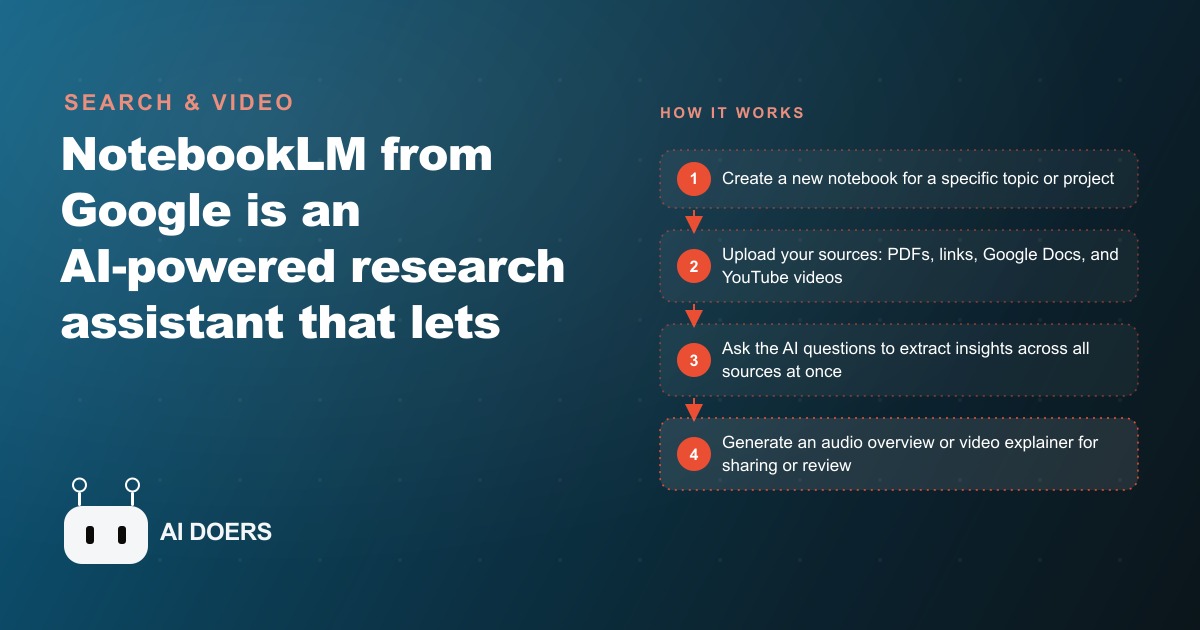
Most business owners are sitting on a mountain of documents they will never fully read. Industry reports, client files, contracts, meeting notes, training decks, and hours of recorded video pile up faster than any human can process them. NotebookLM, Google's free AI research assistant, was built for exactly this problem. It takes your own material, up to 50 sources in a single notebook on the free plan, and turns the pile into something you can question, summarize, and even listen to as a podcast. Below are seven capabilities that make it one of the most underused tools available to professionals right now, followed by a worked example of what it saves in real money.
1. Fifty mixed sources living in one grounded knowledge base
The foundation of NotebookLM is the notebook itself. Each one holds up to 50 sources on the free plan, and those sources do not have to be the same type. You can drop a 60-page PDF next to three YouTube links, a Google Doc, a pasted block of raw text, an audio file, and a handful of website URLs, all in the same workspace. That mix is the point. A single notebook can represent an entire project, a specific client, or a research area, with every relevant document under one roof.
What separates this from asking a general chatbot is grounding. NotebookLM answers only from the material you upload. It does not reach into the open internet or lean on its training data to fill gaps. If the answer is not in your sources, it tells you so rather than inventing something. For anyone doing professional work where a wrong fact carries a cost, that restriction is a feature, not a limitation. It keeps the tool honest and keeps you in control of what it knows.
The underlying model here is Google Gemini, one of the more capable systems on the market, but with a leash. It has all the reasoning power and none of the freedom to wander off your topic. That combination is what makes a notebook feel less like a chatbot and more like a well-read assistant who has actually studied your files.
2. One-click summaries that kill the skim-and-hope habit
The old way of dealing with a long document is to skim it, highlight a few passages, and hope you remember the important parts later. It is an unreliable system, and it quietly costs professionals hours every week rediscovering insights they already found once.
NotebookLM replaces that with a single action. Click any source you have uploaded and the tool generates a summary of it, complete with the key topics inside. You get the shape of a 50-page report in the time it takes to read a paragraph. From there you decide whether the full document is worth your attention or whether the summary already gave you what you needed.
This alone changes how you triage information. Instead of committing two hours to a report on the chance it holds five useful points, you read the summary, confirm the points are there, and pull only the sections that matter. The reading you do afterward is targeted rather than exploratory, which is where most of the wasted time hides.
3. Questions that draw across every source at once
Here is where a notebook stops being a folder and starts being an assistant. Rather than opening each document one by one, you type a question into the chat panel and NotebookLM answers by pulling from every source in the notebook simultaneously. Ask it to compare the recommendations in two industry reports, or to find where three separate contracts disagree, and it reads across all of them and hands you the synthesis.
Every answer comes with citations. Scroll to the bottom of any response and you see exactly which source each claim came from, with a click-through to the original passage. That traceability is what makes the tool trustworthy for real decisions. You are never taking the AI's word for it. You are using the AI to find the passage faster and then verifying it yourself in seconds.
The cross-source reading is the capability that saves the most time on complex work. Connections that would take a person days to spot across a dozen files surface in a single answer, and each one links straight back to the evidence.
4. Audio overviews that turn a notebook into a two-host podcast
The feature that made NotebookLM go viral is the audio overview. With one click, the tool generates a spoken conversation between two AI hosts who discuss the material in your notebook as if they had produced an episode about it. The early versions sounded stilted. The current ones do not. The pacing, the back-and-forth, and the way the hosts pick out the main themes now sound genuinely natural.
The practical value is that research becomes something you can consume while doing other things. Upload the sources for a topic, generate the audio overview, and listen to a ten minute summary during a commute or a walk instead of blocking out a reading session at your desk. For teams, it becomes a fast way to distribute knowledge. One person prepares the notebook, everyone else absorbs it as audio.
It is also a surprisingly good editing tool for your own material. Hearing your research explained back to you reveals the gaps quickly. If the hosts skip over something important or misunderstand a point, that usually means your sources were thin or unclear in that area, and you know exactly what to add.
5. Video overviews that build the explainer for you
Newer than the audio feature, video overviews take the same idea a step further. Instead of a spoken conversation, NotebookLM assembles a structured visual presentation with narration and slides, closer to an automatically generated explainer deck than a podcast. You point it at your sources, optionally tell it which audience to speak to or which angle to emphasize, and it produces the walkthrough.
For anyone who regularly turns research into something they have to present, this collapses a familiar chore. The work of pulling key points out of documents and arranging them into a coherent visual sequence, normally an afternoon of slide-building, becomes a first draft you can generate and then refine. It will not replace a polished client deck, but it gives you the skeleton and the narration to start from, which is the part most people find slow.
Used together, the audio and video overviews mean the same notebook can produce a listenable briefing and a watchable explainer from identical source material, with no additional writing on your part.
6. Mind maps that show how your ideas connect
Summaries and answers are linear. Sometimes you need to see the structure of a topic rather than read about it. NotebookLM generates mind maps from your notebook, laying out the key concepts and how they branch and relate to one another visually. This is available through the notebook's guide features, and it is especially useful early in a project when you are still building a mental model of a subject.
A mind map does something a summary cannot. It exposes the relationships between ideas, which is often where the real understanding lives. Seeing that two themes you thought were separate actually feed into the same conclusion, or that one topic underpins three others, changes how you approach the work. For teaching, onboarding, or simply orienting yourself in unfamiliar material, the visual map is frequently the fastest route to clarity.
7. The Plus tier that pushes each notebook to 300 sources
The free plan covers most individual and small business needs, but heavy researchers eventually hit the 50-source ceiling. NotebookLM Plus, available through Google One subscriptions, raises that limit to 300 sources per notebook and adds longer audio and video overviews plus priority access during busy periods.
The exact price depends on which Google One tier you already hold, but as a rough reference it lands somewhere in the range of $20 to $30 per month when bundled with the other benefits. The upgrade is genuinely worth it for people whose work is research-heavy: analysts, consultants, and anyone maintaining large reference notebooks that a 50-source cap keeps splitting into fragments. If you rarely approach the free limit, there is no reason to pay. The jump to 300 is for the users who are building deep, comprehensive knowledge bases and need everything in one place to get the best cross-source answers.
A worked example: what it saves a small accounting firm
Numbers make the value concrete, so here is an illustrative walkthrough for a small firm with eight staff serving mostly small business clients. Treat the figures as a model, not a reported result, but the arithmetic is the kind any owner can run for their own situation.
The firm's recurring bottleneck is client onboarding. Each new client arrives with a stack of documents: prior year returns, bank statements, payroll records, and entity paperwork. A staff accountant normally spends four to six hours in the first week reading through it all before the initial strategy call. Multiply that across a full year of new clients and it becomes a meaningful chunk of billable capacity spent on reading rather than advising.
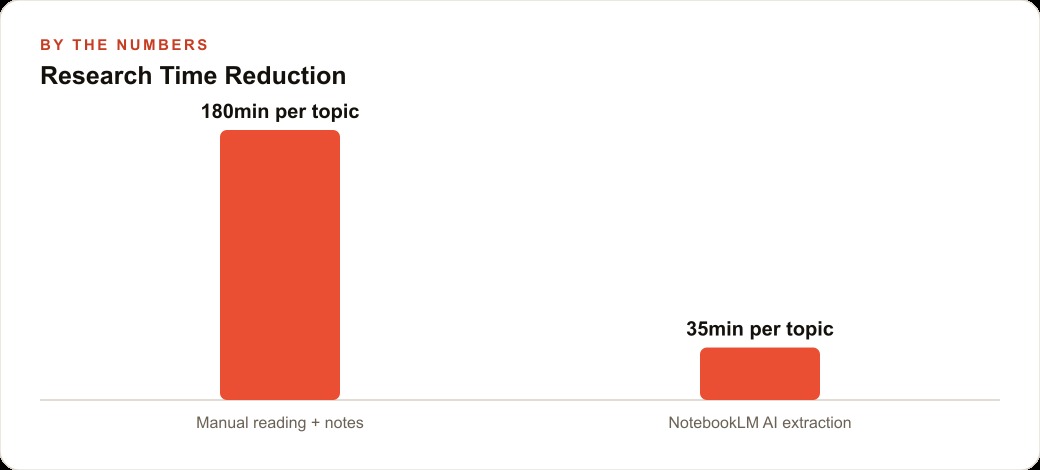
With NotebookLM, the accountant creates one notebook per new client and uploads every onboarding document into it. Then a single prompt does the heavy lifting: summarize this client's business structure, flag any significant changes from the prior year return, and note potential areas of concern. NotebookLM returns a structured summary in roughly two minutes, with citations pointing to the exact documents behind each point. The accountant asks a few follow-up questions about specific line items, verifies the flagged items against the source pages, and walks into the strategy call already prepared. The task that took four to six hours now takes 30 to 45 minutes.
Assume the firm onboards 40 new clients a year and saves about five hours each. That is 200 hours of staff time recovered annually. At a loaded staff cost of $30 per hour, the recovered capacity is worth around $6,000 a year, all on the free plan. Redirected toward billable work rather than overtime, that capacity compounds. The audio overview adds a second layer: when a new regulation drops, a senior accountant uploads it and generates a ten minute audio summary the whole team listens to on their commute instead of scheduling a two hour reading session.
The point of the model is not the exact dollar figure, which will differ for every firm. It is that the time barrier between a professional and the information they need is the real cost, and this tool removes most of it for free.
Where NotebookLM fits into a marketing operation
Because our work runs on constant research, a tool like this slots directly into how we serve clients. When we plan Facebook and Instagram ad campaigns, a notebook of a client's past creative, competitor ads, and industry reports lets us surface the angles that already work before we write a single line of copy. The same approach speeds up keyword and topic research behind SEO and organic search, where synthesizing a stack of competitor pages into a single briefing is exactly the cross-source task NotebookLM was built for. As an ads agency, our value is the judgment about which message and which audience will convert, and tools like this give us more hours to spend on that judgment instead of on reading.
Common mistakes that blunt the tool
A few habits quietly waste the potential. The first is feeding it poor source material and expecting magic. NotebookLM is only as good as what you upload, so blurry scans and disorganized notes produce muddy outputs. Spend a few minutes preparing clean sources first. The second is skipping verification. The citations exist precisely so you can check important claims against the original, so click through on anything that will drive a decision rather than trusting the summary blind.
The third mistake is building one giant catch-all notebook. Cramming every project into a single workspace confuses the AI and produces unfocused answers. Keep notebooks tight: one per client, one per project, one per research area. The fourth is never touching the studio. Plenty of people discover the chat, get value, and never try the audio or video overviews, which are often the features that save the most time once you use them.
Getting started this week
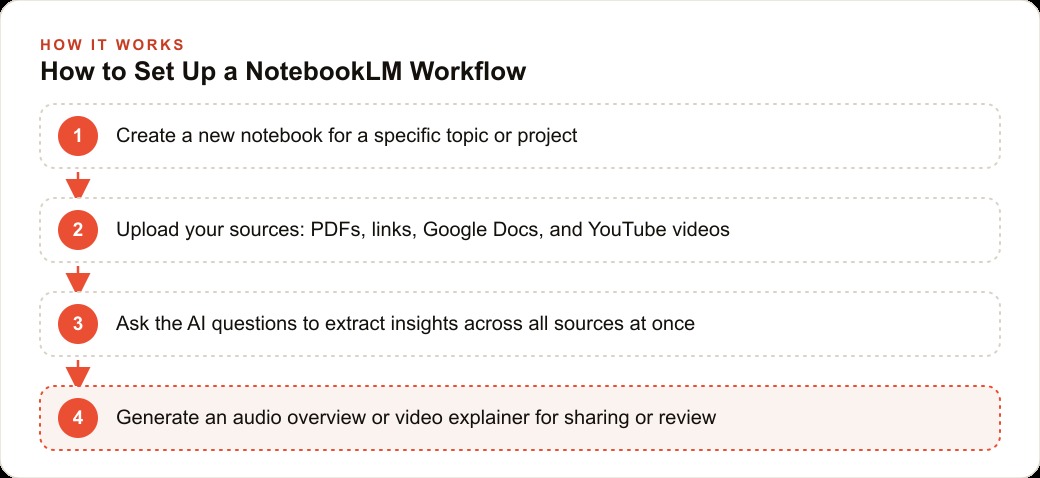
Setup takes about five minutes. Go to notebooklm.google.com, sign in with a Google account, and the free plan activates with no payment details. Create a notebook and give it a specific name tied to a real project rather than something generic like Research. Add your three to five most important sources first, the key PDF, the main website, the most relevant video, and ask a targeted question rather than a vague one. Instead of tell me about this, try what are the three main risks across these documents, and let the specificity of the question drive the specificity of the answer.
After your first session, generate an audio overview to catch gaps, and start saving the prompts that consistently produce your best answers. Over a few sessions you will build a reusable prompt library tuned to your exact type of work, and that is where the compounding time savings live. NotebookLM rewards steady use far more than occasional experiments, so pick your next real research project and build the habit there. If you want a working session to design a NotebookLM system around your specific business, that is exactly the kind of thing worth talking through together.
That is exactly what we do at AI DOERS. Book a private 30-minute call with Madhuranjan Kumar and we will map the fastest path to it for your specific business.
Book your call →
Madhuranjan Kumar
Madhuranjan Kumar brings 20 years of performance-marketing experience and has managed over $200 million in Facebook ad spend for brands across the United States and beyond. His expertise spans the full modern marketing stack: Meta, Google Ads, TikTok, email automation, CRM, and the websites that hold it together. At AI DOERS he turns that track record into lead-generation systems for businesses across every industry.