
The n8n Code Node, Explained for People Who Are Scared of Code
The code node is the most powerful tool in n8n and the one most owners avoid. Here is what it does, why you do not need to be a developer, and how I would wire it into a real service business.

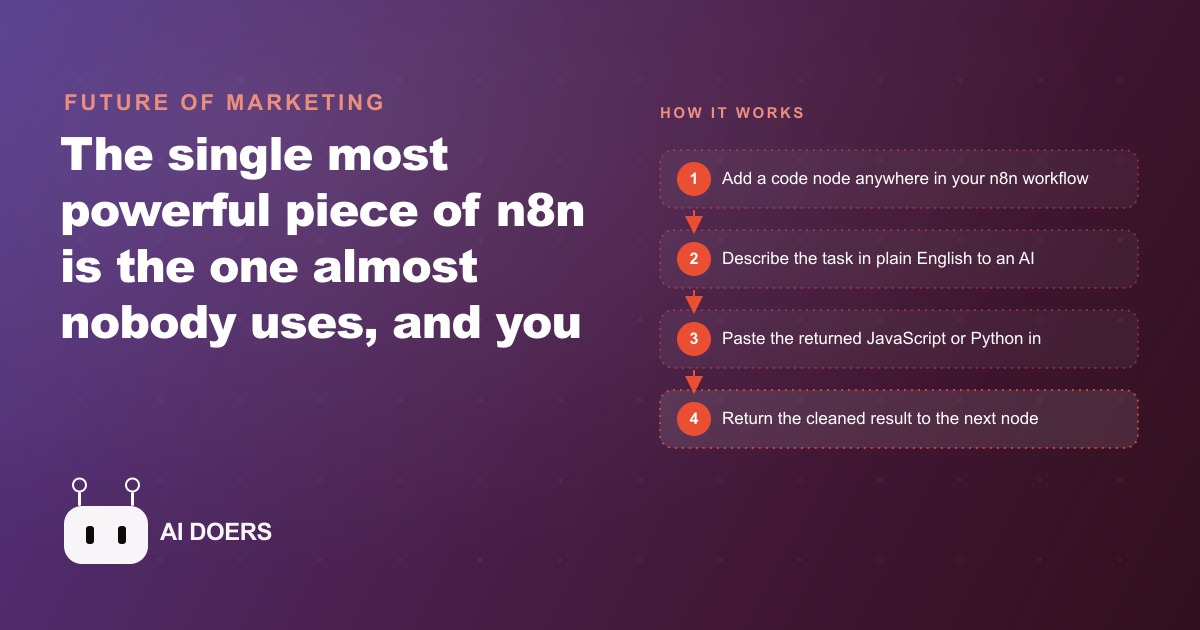
The most powerful node in n8n is the one most people click past without opening. I am Madhuranjan Kumar, and I have watched this happen across dozens of automation projects with clients: someone builds a solid workflow, hits a specific limit that prebuilt nodes cannot solve, and then makes one of three decisions. They abandon the automation. They construct a six-node workaround that requires explanation every time someone new touches it. Or they come to someone who points them at the code node, and the limit disappears. The argument I want to make here is straightforward. The code node is not a developer feature bolted onto n8n for technical users. It is the unlock that converts n8n from a capable but incomplete platform into one that can handle nearly any automation a real business needs. And because AI now writes the actual code for you, the barrier to using it is far lower than the word code suggests.
The 70% Problem
Every no-code automation platform is designed around its most common use cases. Filter a list. Send a notification. Move a record from one service to another. These tasks account for most of what most users need most of the time, and the drag-and-drop nodes built for them work extremely well. The problem starts at the edge of the common case, which is where real business workflows actually live.
The gaps in prebuilt nodes are predictable once you know to look for them. You cannot group records and calculate totals at the same time with standard nodes. The summarize node groups; the math operations calculate. They are separate, and wiring them together for a grouped sum across a large dataset requires a multi-node workaround that is cumbersome to build and fragile to maintain. You cannot handle binary file uploads through certain integration nodes that only expose text-based parameters. You cannot navigate a deeply nested JSON structure from an API response when standard edit nodes only see top-level fields. You cannot call a full external API with all available parameters when the simplified n8n wrapper exposes only a subset of them.
Each of these gaps is individually manageable with workarounds. Together they define the ceiling: the point at which n8n gets you 70% toward a complete automation but cannot finish the last 30%. That final 30% often contains the most valuable logic. The grouped calculation that produces a clean weekly report. The media upload that closes a content workflow. The nested data extraction that makes an API response actually useful to downstream nodes. The code node removes that ceiling entirely, and it does so through a structure simple enough that any business owner can learn it in an afternoon.
The deeper cost of hitting that ceiling repeatedly is easy to underestimate. Every time a workflow stalls at the edge of what prebuilt nodes can do, you either leave the automation incomplete or pay someone to build around the gap. Multiply that across the five or six workflows every serious n8n user eventually needs to tackle, and the total impact is significant, not just in money but in the accumulated frustration of a tool that almost works but never quite finishes the job. The code node resolves all of it in one move.
What the Code Node Actually Is
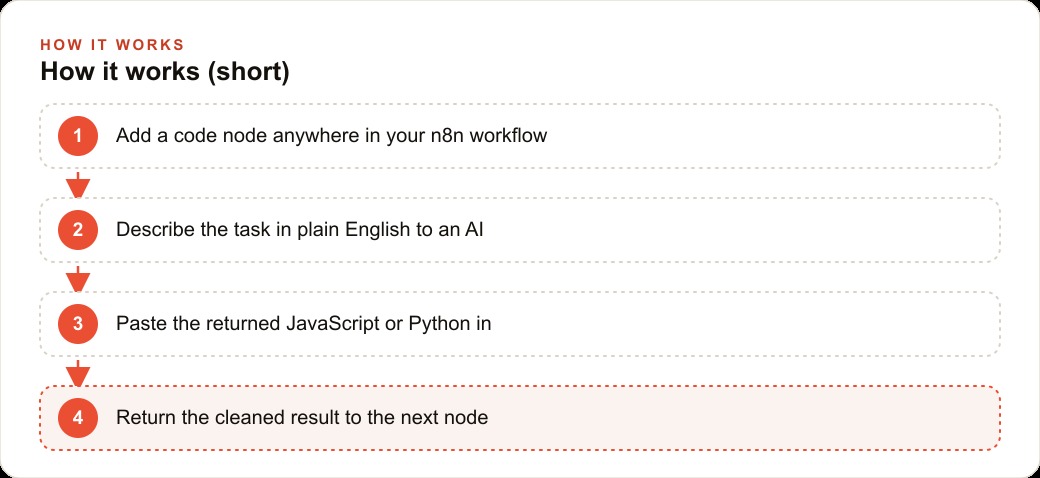
The structure of a code node is simpler than the word suggests. Data flows in from the previous node, you do something to it, and a return statement sends the result forward. That three-part pattern, input, process, return, is the complete model. There is no separate configuration file, no deployment step, no testing environment to set up. You write or paste the logic, run it against a real input, and see the output in the node panel immediately.
The built-in helpers are what make this accessible to someone without a development background. When you type a dollar sign inside the code node, n8n surfaces a list of shortcuts covering the most useful operations. You can make a fully authenticated HTTP request to any external service using credentials already stored in n8n, so the API key never appears in the code itself. You can pull data from any earlier node in the workflow by its name, not just from the immediately preceding step. You can access the current date and time, the workflow name, the execution ID, and other runtime details. Most practical code nodes are under thirty lines built from a handful of these helpers combined in a loop.
The AI-assisted approach closes the remaining gap entirely. You describe the transformation you need in plain English, paste that description into any AI assistant, and ask it to write the JavaScript for you. You also ask it to add comments above each section explaining what that block does. You paste the result into the code node and run it on real data. If something is wrong, you paste the error message back to the assistant with a one-line description of what you expected. You get a corrected version in seconds. That loop, describe, generate, paste, run, fix if needed, is the complete skill required to use the code node productively.
The dollar-sign helpers deserve emphasis because they compress what would otherwise be complex operations into readable, near-natural calls. Instead of writing raw HTTP fetch calls with manual header construction and error handling, you write one helper invocation and n8n manages authentication, retries, and response parsing. Instead of tracking which node number in a long workflow holds the field you need, you reference the node by name and the field by key. The code node does not require deep JavaScript knowledge. It requires knowing what you want, describing it clearly, and reviewing what the AI produces.
Every code node also runs in one of two modes: once for all items together, or once per item. The mode determines whether the input arrives as the full list of records or as one record at a time. Grouping and aggregation tasks almost always need the all-at-once mode, because you need the full dataset to build a grouped sum. Per-item tasks, like reformatting one record's fields, are cleaner in the per-item mode because you do not need to manage the looping yourself. Knowing this before you describe the task to the AI model saves a revision cycle, because the model writes noticeably different code depending on which mode you specify.
Where a Marketing Agency Hits the Ceiling
Illustratively, consider a marketing agency managing monthly performance reporting for fifteen to twenty clients. The team has built an n8n workflow that pulls campaign data from the advertising platforms, writes it into a shared spreadsheet, and sends a Slack notification when the pull is complete. It works well for the standard case. Then the account director asks for something more useful: a report that groups all campaigns by client, sums spend and lead count per client, calculates a cost per lead for each, and flags any client where the cost per lead exceeded the agreed monthly target.
This requires three simultaneous operations: grouping by client, calculating cost per lead per group, and evaluating a threshold condition against each calculated value. The built-in summarize node handles grouping. The built-in set node applies calculations. But executing a grouped calculation with a conditional flag across a large result set requires connecting these nodes in a sequence that grows to eight or nine steps, produces intermediate data shapes that are difficult to inspect while debugging, and breaks whenever the upstream campaign-data schema changes slightly. The team ends up rebuilding this section of the workflow twice a year when the advertising platforms update their export format.
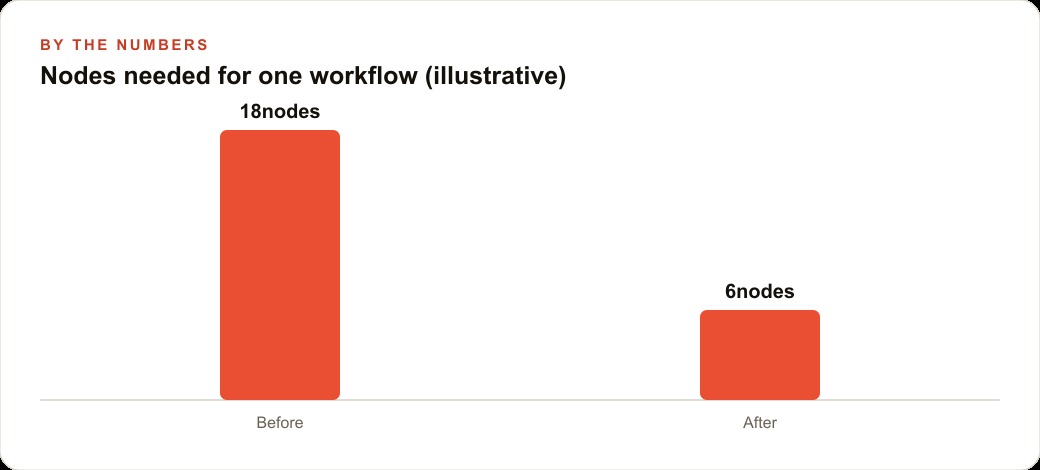
With a single code node, the entire operation fits in twenty-five lines. The campaign records flow in. A loop groups them by client name, accumulating spend and lead count for each new record belonging to that client. After the loop, each client group is enriched with the calculated cost per lead and a threshold flag. The return hands the clean array directly to the email node that formats the report. What required nine nodes and ongoing maintenance is now one well-commented function. Anyone who opens the workflow can read what it does without a walk-through from the person who built it.
The second gap the same agency hits is media uploads. The workflow is supposed to attach the monthly performance chart as an image to the client email. The chart is generated by a separate analytics tool and delivered as binary data via an API response. The email node in n8n accepts attachment paths and attachment URLs but does not accept binary data directly. The workaround requires saving the binary to a temporary storage location and referencing it by URL, which adds three steps, a separate credential, and a cleanup task. A code node using the HTTP helper with a multipart body handles the entire sequence in fifteen lines: fetch the binary, format it for attachment, send. Three nodes and a credential become one self-contained block.
The third gap is the reporting platform's API response structure. The relevant performance metrics sit inside a nested path three levels deep in the response envelope. The standard set node exposes top-level fields only. Reaching a value buried at the third level requires a chain of set nodes that reconstructs the structure layer by layer, and that chain breaks whenever the platform ships an API update that adjusts the nesting. A code node walks the nested structure directly, extracts the values by path regardless of what else changes in the response format, and returns a flat record with the exact fields the rest of the workflow needs.
The efficiency difference across these three additions is material. A reporting workflow that previously required twenty nodes and periodic manual intervention runs cleanly on seven. Fewer nodes means fewer failure points, cleaner error messages when something breaks, and a workflow that a new team member can read and understand in twenty minutes. For teams managing client campaigns through paid channels including Meta ads, having cost-per-lead data automatically grouped, calculated, and threshold-flagged each month creates an accountability layer that would otherwise require dedicated manual reporting time after every pull. The same cleaned output can be pushed straight into the CRM and client reporting stack so the account team and the client see the same numbers without anyone rekeying them.
What Happens When You Start the Conversation Right
The practical starting point for using a code node well is the description you write for the AI. Vague descriptions produce code that runs but does not do quite what you needed. Specific descriptions produce code that works on the first test.
A vague description sounds like: group my orders and calculate totals. A specific description sounds like: I have an array of records, each with fields customerName, productId, unitsSold, and revenueUSD. I want to group them by customerName and return one record per customer with totalUnitsSold as the sum of unitsSold, totalRevenue as the sum of revenueUSD, and a flag called belowThreshold set to true if totalRevenue is less than 500. Return the result in the mode where all input items are processed together. Please add a comment above each block explaining what it does.
The difference in what you receive back is significant. The vague version gives you a starting point that you revise two or three times. The specific version usually works on the first run or requires one small fix. The investment in writing a clear description repays itself immediately in the testing cycle.
Also ask the AI to handle edge cases explicitly: what if customerName is null, what if two records have different capitalizations of the same name, what if unitsSold is missing. Real data has these problems constantly, and a code node that fails silently on a null value is harder to debug than one that the AI wrote with explicit guards from the start.
The Discipline of Not Using It
The counterpart to everything above is knowing when to put the code node back. The mistake I see most often from people who discover it is applying it everywhere, including situations where simpler nodes do the job more cleanly.
A code node where a filter node would work produces a workflow that is harder to read and harder for others to maintain. The logic is hidden in a code block rather than visible as a condition in the node interface. Whoever opens the workflow next must open the block and read it before understanding what the node does. That overhead accumulates across every unnecessarily complex node in a long workflow and turns a readable system into one that only the original builder can confidently touch.
The guideline is specific. Use the code node when you need to group and calculate simultaneously, when a prebuilt node cannot perform a specific action like a binary upload, when you need the full parameter set of an API that the simplified integration does not expose, or when you need to navigate nested data that standard edit nodes cannot reach. For everything outside those four situations, use the node n8n built for that purpose.
For straightforward branching, the if node shows the condition in plain sight. For keeping records that match a rule, the filter node makes the rule visible without requiring anyone to open a code block. For renaming or restructuring fields, the set node is purpose-built. For sorting a list, merging two workflow branches, waiting a fixed number of seconds, or iterating over items one at a time, n8n provides dedicated nodes that any team member can understand on sight without explanation.
The discipline of knowing precisely where the code node belongs and where it does not is what separates a workflow that works today from one that lasts eighteen months from now when the person who built it is no longer around to explain it. The code node is the unlock. Applying it only where nothing else could do the job is the craft. Both together are what turn n8n from a platform with a ceiling into a complete automation infrastructure for a business that takes its operations seriously.
That is exactly what we do at AI DOERS. Book a private 30-minute call with Madhuranjan Kumar and we will map the fastest path to it for your specific business.
Book your call →
Madhuranjan Kumar
Madhuranjan Kumar brings 20 years of performance-marketing experience and has managed over $200 million in Facebook ad spend for brands across the United States and beyond. His expertise spans the full modern marketing stack: Meta, Google Ads, TikTok, email automation, CRM, and the websites that hold it together. At AI DOERS he turns that track record into lead-generation systems for businesses across every industry.