
How Mind Studio AI Agents Can Automate Research, Content, and Workflows for Your Business
Mind Studio is a Chrome extension that puts a library of AI agents directly into your browser sidebar and lets you build custom automation workflows through a visual editor. Here is what it does, how it works, and how a service business can use it to reclaim hours every week.

Ninety percent of knowledge work happens inside a browser. Reading documents, scanning competitor content, reviewing customer comments, drafting emails, composing reports, searching for information: all of it takes place in tabs. Yet the dominant paradigm in AI tool design, for the past several years, has been to ask workers to leave the browser, open a separate application, paste in the content they were just reading, describe the context the AI cannot see, wait for a response, and then carry the output back to wherever they were working. This is a round trip that takes thirty to ninety seconds and requires a mental context switch every single time.
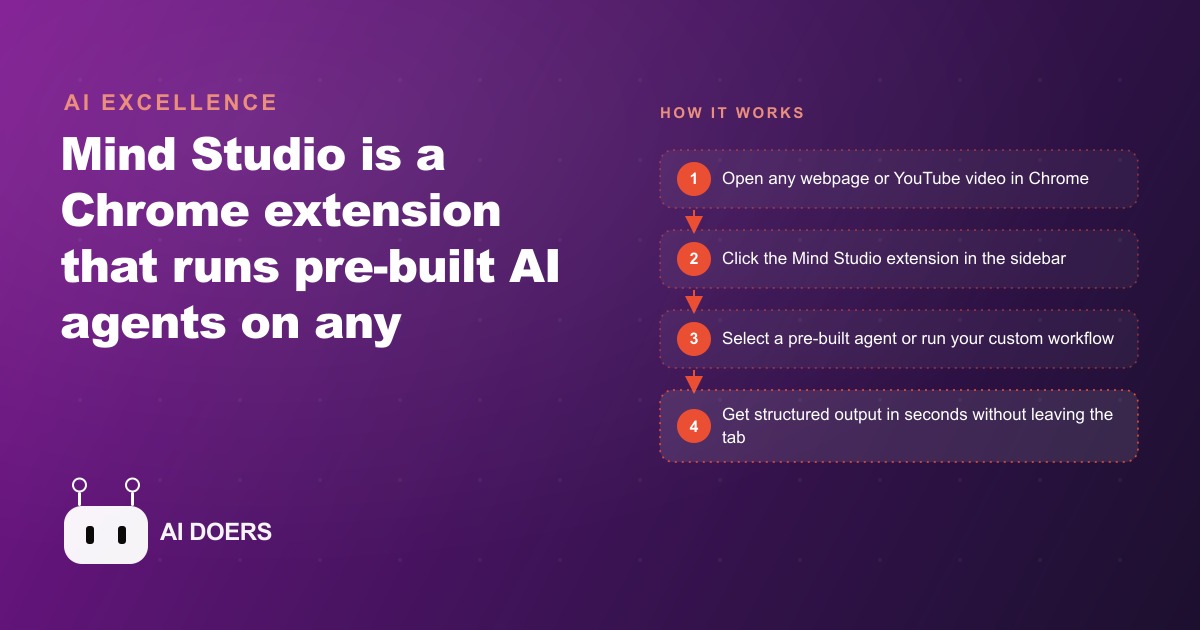
Mind Studio is a Chrome extension that eliminates that round trip by placing a library of AI agents directly in the browser sidebar. Madhuranjan Kumar has spent time with the tool because it represents something he considers underappreciated in the AI tools conversation: a design choice that treats the browser as the workspace rather than the chatbot window as the workspace. That inversion changes who can build useful automation and how quickly they can build it.
The Context Problem That Pre-Browser AI Never Solved
The fundamental limitation of AI tools that require a separate window is that the AI cannot see what you are seeing. You are looking at a customer review, a competitor's product page, or a research article. The AI is looking at whatever you chose to paste into its input field. These two views are almost never identical. The pasting step requires you to decide what is worth including, and that decision is itself a form of work that the AI was supposed to reduce.
The mismatch creates a predictable failure mode. You paste a review and ask the AI to analyze it. The AI produces an analysis. The analysis misses a detail that was visible in the context of the full page but not in the excerpt you pasted. You notice the gap, paste more content, re-run the request, get a second response, and repeat. By the third iteration, the efficiency gain of using the AI has been partially or fully consumed by the back-and-forth required to give the AI the context it needed to be useful in the first place.
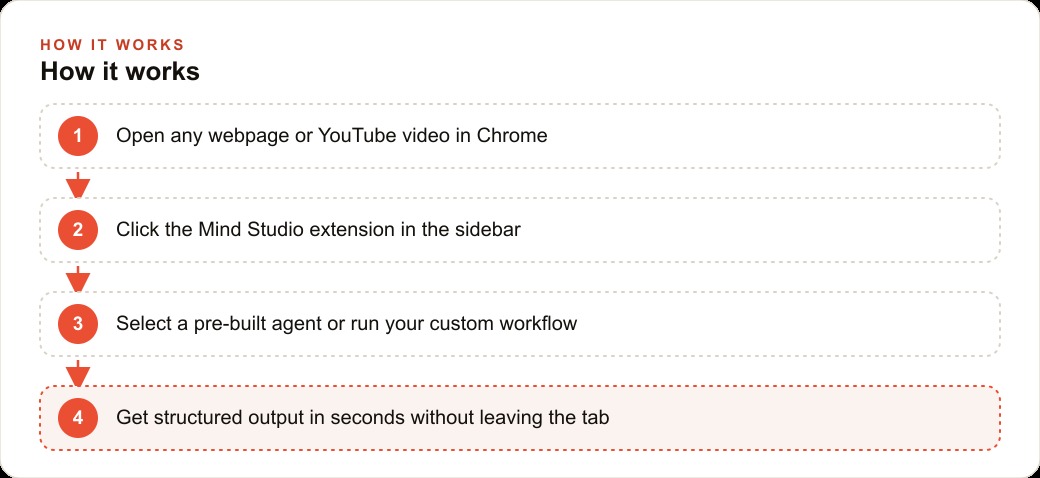
Mind Studio addresses this at the architectural level. Because the extension lives in the sidebar, it can read the active tab's content without requiring any manual pasting. You navigate to the page you want to analyze, open the sidebar, and the agent already has access to what is on the page. You issue the request and the response reflects the actual content rather than an excerpt you selected under time pressure.
This sounds like a minor convenience. In practice it changes the economics of using AI for content-adjacent work. When the context transfer is automatic, you use AI assistance more often for shorter tasks because the overhead per task is low enough that the return on a fifteen-second interaction is positive. When the context transfer requires manual effort, you tend to save up tasks and batch them, which means the AI gets used less frequently for exactly the tasks where real-time feedback would be most useful. The sidebar format also keeps the output inside the browsing session. When an agent produces a summary, a reformatted document, or a thread extracted from a video transcript, the output appears in the sidebar and can be inserted directly into whatever field is active in the main window. The copy-paste step between applications disappears. The workflow stays in one place.
Why the Comment Analysis Agent Is Free Competitive Research
Among Mind Studio's pre-built agents, the comment analysis agent has the clearest immediate business value for anyone who produces content or sells online. The agent reads a YouTube video's comment section, or any comment thread accessible in an open tab, and produces a structured analysis: the main topics people are raising, the questions that keep reappearing, the complaints about the existing content, and the general sentiment distribution across the thread.
For a business that already creates content, this is a research input that most teams do not collect systematically because the manual version is too time-consuming. Reading 200 comments on a competitor's video and categorizing them by topic and sentiment takes thirty to forty minutes per video. The comment analysis agent produces a structured version of that analysis in under two minutes.
The competitive research application is direct. You navigate to a competitor's most-viewed recent video, open the sidebar, and run the comment analysis agent. Within two minutes you have a categorized view of what the audience found valuable, what questions this breakdown failed to answer, what criticisms appeared repeatedly, and what additional content the comments reveal the audience wants. This is the kind of primary research that agencies charge significant fees to conduct through focus groups and surveys. The comment section is already public, and the agent makes it readable in structured form.
For a business running paid advertising, the use case extends further. Comment sections under competitor ads often contain the most unfiltered audience response available anywhere: complaints about pricing, questions the ad did not answer, comparisons to alternatives, and explanations of why people did or did not convert. A comment analysis pass on a competitor's ad comments produces a briefing document that is more specific and more current than most market research reports.
Madhuranjan's observation about this agent is that it changes what counts as accessible research rather than what counts as possible research. The data was always public. The agent changes the time cost of collecting it in a usable form, which changes how often the task gets done and therefore how well-informed the resulting content decisions are.
What Chaining Blocks Means for a Team With No Developer
Mind Studio's custom agent capability uses a visual block editor. Each block represents one step in an automation workflow: a trigger, a text generation step routing to any supported model, a web search via a connected search engine integration, a URL scrape, an email send, a Slack message, a Google Sheets append, contact enrichment via a connected data source, or a connection to Make.com for more complex external integrations. Blocks connect to each other. The output of one block becomes the input of the next.
This is a visual programming interface for multi-step automation that requires no code. The relevant question for evaluating it is not whether it is technically sophisticated but whether the blocks available cover the automations that actually matter for a knowledge-work team. For most content and marketing operations, the answer is yes.
A team that needs to monitor competitor content, summarize it, assess whether it requires a response, draft that response, and route it to the right Slack channel for review can build that workflow entirely within Mind Studio's block editor. The trigger is a URL opening in a tab. A scrape block reads the content. A text-generation block summarizes and assesses it. A conditional logic block routes to either a Slack message (if response is warranted) or a Google Sheets log (if not). A second text-generation block drafts the response if the first block flagged it. The entire workflow runs inside the browser where the monitoring was already happening.
The multi-model routing capability inside the block editor adds a dimension of flexibility that matters for teams watching API costs. Different generation blocks within the same workflow can use different AI models. A summarization step can route to a fast, low-cost model. A draft-generation step can route to a more capable model. The routing happens inside the workflow definition rather than requiring the user to switch between applications or accounts. For a small team managing costs across multiple AI providers, this allows the workflow to spend compute selectively on the steps that actually require it.
For a team without a developer, the block editor's value is that it makes the automation legible. Every step is visible as a named block. A non-technical team member can understand what an existing workflow does by reading the block diagram, which means they can maintain and modify it without needing the person who built it to explain it each time. This matters in small organizations where knowledge silos form quickly.
The Dental Clinic That Saved Eight Hours in the First Week
A dental clinic with two locations and a small marketing coordinator role provides a concrete illustration of how Mind Studio's capabilities add up in a specific business context. The coordinator was responsible for the clinic's social media presence, patient review responses, blog content, and local competitor monitoring. These were four distinct task categories with no shared tooling, which meant context was never transferred between them even when one category's findings were directly relevant to another.
The coordinator started using Mind Studio by activating three pre-built agents in the first week of a trial. The TLDR agent, which summarizes long-form content, was pointed at dental industry newsletters and continuing education articles that the clinic wanted to keep up with but that rarely got read in full. The YouTube-to-thread agent was used on patient education videos from dental associations to produce shareable summaries for the clinic's social accounts. The comment analysis agent was pointed at the YouTube channels of competing clinics in the city, producing weekly reports on what patients were asking and complaining about in those clinics' comment sections.
The comment analysis results in the first week surfaced three recurring questions in competitor comment threads that the clinic's own website did not answer: what the sedation options were for anxious patients, whether the clinic accepted a specific regional insurance plan, and how long the wait for an emergency appointment typically ran. The coordinator added FAQ entries for all three to the clinic's website within forty-eight hours. Those entries began appearing in local search results within the following week.
The coordinator then built one custom agent using the block editor. The workflow: trigger on any URL in the dental news category, scrape the page content, generate a two-sentence summary with a flagged patient relevance score (high, medium, or low), and append the result to a Google Sheet that the clinic's dentists reviewed during their weekly administrative hour. The dentists had previously received a manually compiled weekly reading list that the coordinator produced by spending about two hours reading and summarizing source articles. The custom agent replaced that two hours with a five-minute review of the populated Sheet.
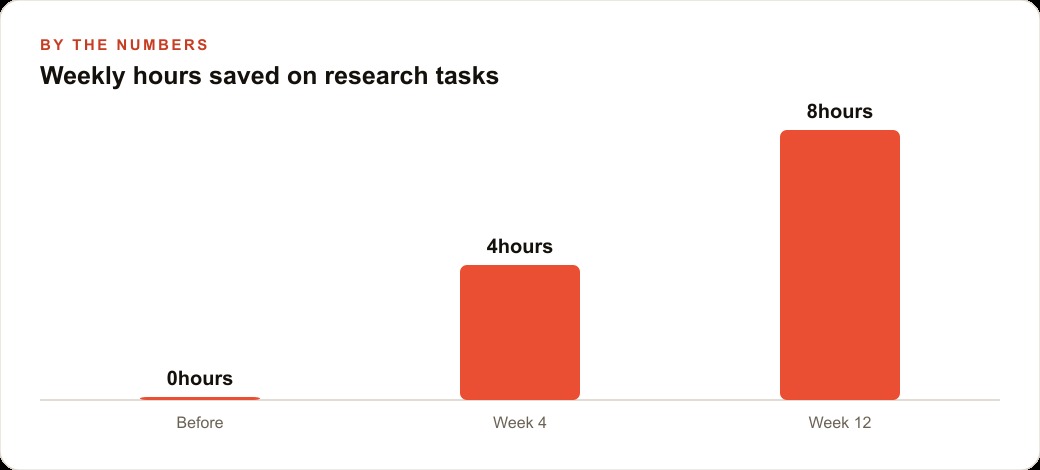
By the end of the first week, the coordinator's time accounting showed: TLDR agent for industry reading, forty minutes recovered; YouTube-to-thread for social content, one hour recovered; comment analysis for competitor monitoring, two and a half hours recovered; custom news agent for the weekly dentist briefing, two hours recovered. Total recovered: just over six hours in the first week, against a target of eight hours the coordinator had set as the threshold for expanding the tool's role in the operation.
The coordinator reached the eight-hour threshold in week three, after refining the comment analysis workflow to run on a scheduled basis rather than requiring manual triggering for each competitor channel. The refinement took about twenty minutes in the block editor. The total recovered in week three was eight hours and fifteen minutes.
The pattern the clinic's experience illustrates is that the value of a browser-native AI tool is not concentrated in any single agent or use case. It accumulates across tasks that were previously too small to justify the overhead of opening a separate application, re-entering context, and waiting for a response. When that overhead is removed, the threshold for using AI assistance drops to the point where tasks of two or three minutes become worth automating. That change in threshold is where most of the time saving actually comes from. Not from a single dramatic win, but from the elimination of dozens of small frictions that had previously been accepted as simply the cost of knowledge work. The browser sidebar, in this reading, is not a feature. It is an architectural decision that changes which tasks are worth automating at all.
That is exactly what we do at AI DOERS. Book a private 30-minute call with Madhuranjan Kumar and we will map the fastest path to it for your specific business.
Book your call →
Madhuranjan Kumar
Madhuranjan Kumar brings 20 years of performance-marketing experience and has managed over $200 million in Facebook ad spend for brands across the United States and beyond. His expertise spans the full modern marketing stack: Meta, Google Ads, TikTok, email automation, CRM, and the websites that hold it together. At AI DOERS he turns that track record into lead-generation systems for businesses across every industry.