
Microsoft's CTO Says AI Will Write Most Code. Here Is What Accounting Firms and Business Owners Need to Actually Do About It
Kevin Scott is not a pundit speculating about AI's impact on software. He runs the engineering organization at the company that builds the tools. His answer about developer jobs is more nuanced and more urgent than most coverage suggests.

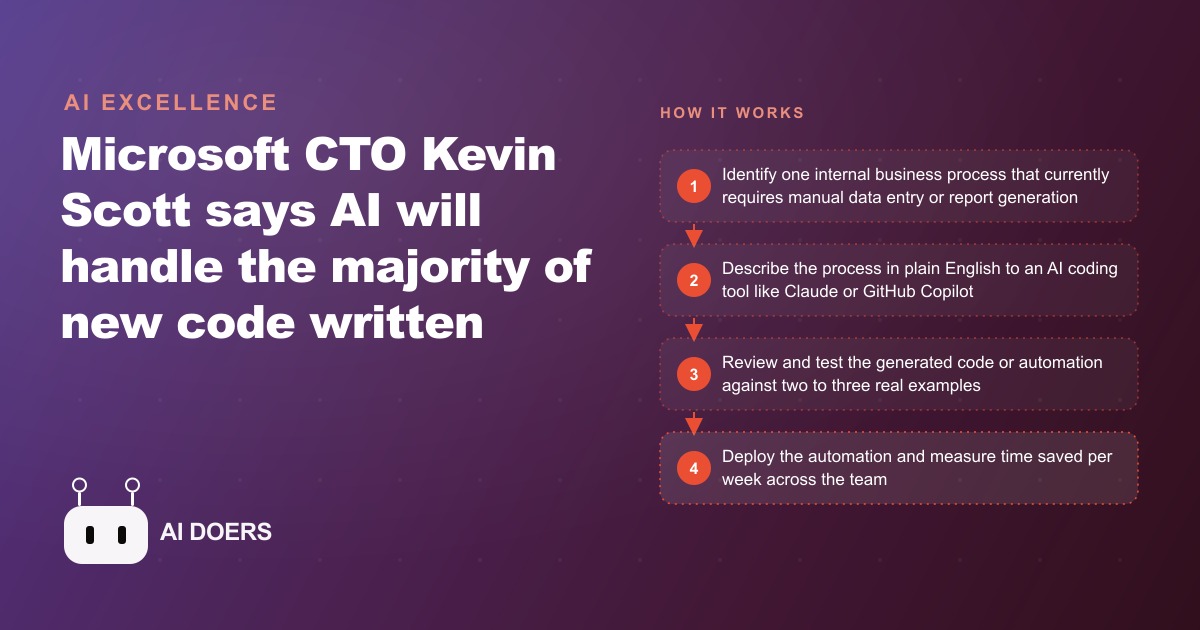
Microsoft's chief technology officer told an interviewer he expects AI to write the majority of new code within five years. Most of the coverage treated that as a story about programmers and their job security. I read it as a to-do list for every business owner who has been putting off automating the tedious parts of their operation. Madhuranjan Kumar here, and this is the exact playbook I would hand a firm that wants to act on that prediction instead of debating it.
The reframe is simple. If code is about to become cheap to produce, then the thing that was really blocking you from building custom tools was never the code itself. It was the cost of a developer and the uncertainty of a software project. That barrier is dissolving. What follows is the sequence I use to move a business from "we have always done this by hand" to a working automation, usually inside a single quarter, without hiring anyone.
Start with the process that quietly bleeds the most hours
Before you open a single AI tool, you need a target. The mistake almost everyone makes is starting with the most exciting idea rather than the most expensive one. Do not automate the flashy thing. Automate the boring, repetitive, high-frequency task that eats staff time every week and produces zero strategic value.
Walk your operation and look for any process that moves data between systems, reformats a file, or produces a document from structured inputs. These are the candidates. In an accounting firm it is reformatting bank exports, building reconciliation summaries, or assembling client onboarding packets. In a service business it might be copying lead details from an inbox into a spreadsheet, or generating the same three reports every Monday morning.
Rank them by one number: hours consumed per week multiplied by the loaded hourly cost of the person doing them. The process at the top of that list is your first project. You want something painful enough that the time savings are obvious, but bounded enough that you can describe it in a few sentences. A task that takes three hours a week and follows the same steps every time is a far better first target than a sprawling workflow with a dozen exceptions.
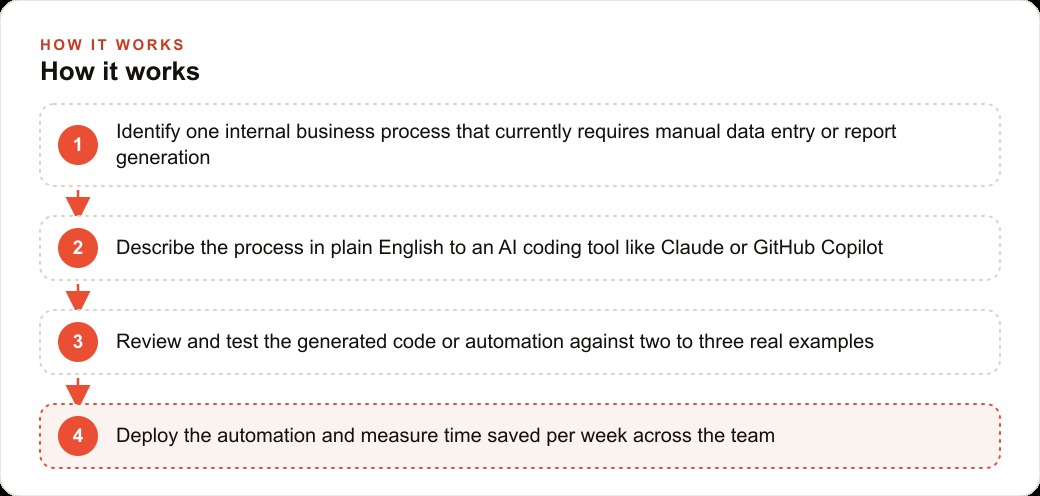
Write the specification before you touch any AI tool
This is the stage that separates the people who get a working tool from the people who give up after two frustrating attempts. An AI coding tool is only as good as the instructions you give it, and the instruction it needs is not "the output I want." It is "the logic that produces the output."
The people who fail describe the destination. "I need a report that shows which clients are behind" tells the AI almost nothing. The people who succeed describe the machine. "Read our billing export CSV, find any client whose balance older than sixty days is greater than zero, group them by account manager, and output a list sorted by outstanding balance from highest to lowest" is something an AI can build on the first try.
So write your specification in plain English, step by step, as if you were training a new hire who is very literal and has never seen your business. Name the input file and the columns it contains. Name the rule that decides what happens to each row. Name the exact shape of the output. Note the edge cases you already know about, such as a bank that labels the amount column differently or a date format that varies. Fifteen minutes spent writing this document saves an hour of back and forth later.
Prototype the automation in a single focused sitting
Now open a capable AI tool such as Claude or GitHub Copilot, paste your specification, and ask for a script or a spreadsheet formula that does the job. You are not aiming for perfection here. You are aiming for something in the right direction that runs.
For most well-scoped tasks, the first generation lands you seventy to eighty percent of the way there in about two minutes. Paste the code into a file, run it on one real example, and see what happens. It will probably break or produce a slightly wrong result. That is expected and completely fine. Describe exactly what went wrong to the AI, in the same plain language you used for the specification, and let it revise. Repeat this loop five to ten times.
Two things matter during this sitting. First, do it in one block of uninterrupted time so you keep the context in your head. Second, keep the scope frozen. The temptation to add "and also it should email the result" mid-build is how a thirty minute prototype turns into a three day project. Ship the narrow version first.
Test against real data until it stops surprising you
A prototype that worked once is not a tool. Before you let your team rely on it, run it against a batch of real historical examples, including the messy ones. Pull ten or fifteen actual files from the last few months and run every one through the automation.
You are looking for the cases where the output does not match what a person would have produced. You do not need to understand why the code is wrong. You need to spot the discrepancy and describe it. This is a skill your team already has in a different form. Reconciling two sets of numbers and finding where they diverge is exactly the same muscle. When you find a mismatch, feed the example back to the AI, explain the correct behavior, and let it patch the logic.
Keep a short log of the edge cases you found and how the tool now handles them. That log becomes your confidence document. When it stops surprising you across a full batch of real inputs, the automation is ready to deploy.
Deploy it where your team will actually use it
The best automation dies if using it requires technical knowledge your staff does not have. The final build step is packaging. Turn the script into something a non-technical team member can run with a double click, or wrap the logic in a simple internal form, or connect it to the tools your team already lives in.
This is where your customer and operations systems matter. A tool that dumps clean, structured data straight into the CRM and website stack your team already uses is adopted immediately, because no one has to change their habits. A tool that produces a file someone then has to import manually gets used for two weeks and then quietly abandoned. Ask the AI to help with this packaging step too. Generating a small interface or a scheduled job is exactly the kind of work these tools now handle well.
Measure the hours you recovered, then queue the next three
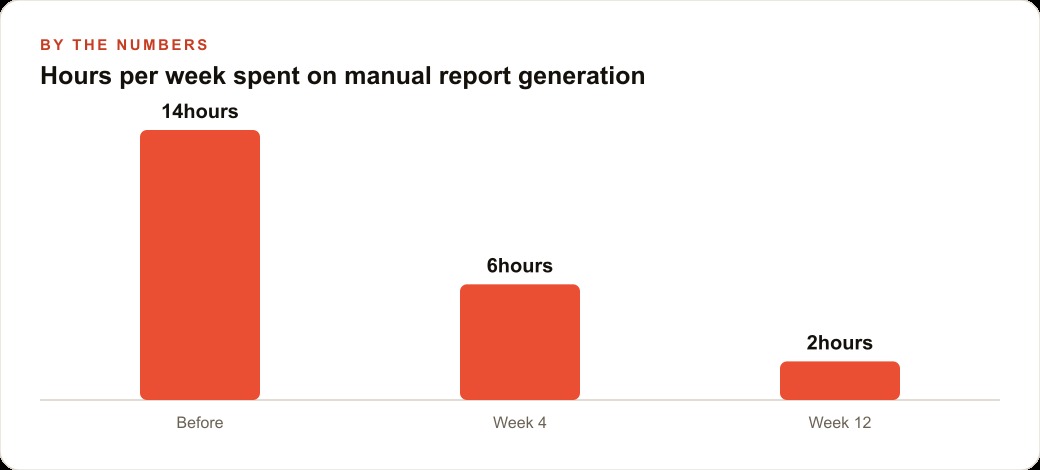
Once the automation is live, measure the before and after honestly. Track the hours the task consumed last month and the hours it consumes now. That single number is what justifies the whole effort and what convinces a skeptical partner to let you keep going.
Then do not stop at one. The compounding value comes from treating this as a repeatable practice rather than a one-time win. Go back to your ranked list, take the next three processes, and work through them over the following month using the same five steps. A firm that automates three to five processes in a quarter typically recovers ten to fifteen staff hours per week. Those hours can be redirected toward client-facing work, or absorbed as capacity so the business grows without adding headcount.
Build the two skills that make this repeatable
Notice what you did not need in any of the steps above: you did not need to know how to write code. The two skills that actually carry this playbook are specification and testing. Specification is the ability to describe a process precisely enough that a machine can build it. Testing is the ability to run real examples and identify when the result is wrong.
Both are business skills, not engineering skills, and both improve every time you use them. This is why the Microsoft prediction is a business-side opportunity and not only a developer-side disruption. The people who thrive are the ones who understand their own operation deeply and can now translate that understanding directly into working tools.
A worked example: the reconciliation task that ate nine hours a week
Here is how the whole playbook runs in practice. A twelve person accounting firm has three staff accountants who each spend about three hours a week reformatting client bank export files into the firm's reconciliation format. The exports arrive in different layouts from different banks, the column names are inconsistent, and the manual work is copy, reformat, and check for errors. Nine hours a week at a loaded rate of forty five dollars an hour is four hundred and five dollars a week, or roughly twenty thousand dollars a year.
A few years ago, automating this would have meant hiring a developer for a project estimated somewhere between five and ten thousand dollars, with a specification to agree, a timeline, and testing. The managing partner never green-lit it because the payback felt uncertain.
Following the playbook, the partner picks this as the top-ranked process because it scored highest on hours times cost. She writes a specification: take a CSV of bank transactions in any of three known layouts, where columns always include a date, a description, and an amount, and convert it to the firm's standard reconciliation format with fixed column names and a running balance column. She opens Claude, pastes the specification, and gets a working Python script in about two minutes. She runs it on one real export, finds the running balance is off by one row, describes the issue, and gets a corrected version. In under thirty minutes she has something that works on the first file.
She then tests it against fifteen historical exports, catches two banks that use an unusual date format, feeds those back, and lets the tool handle them. She packages it so a staff accountant can drop a file into a folder and get the formatted output back. Total time invested across the whole project: two to three hours. Ongoing cost: zero beyond the subscription the firm already pays.
The recovered value is roughly twenty thousand dollars a year in staff time. That ratio, three hours of setup against a five figure annual return, is the entire argument. The same firm can then point the freed capacity at the work that actually grows the practice, whether that is more client advisory hours, a sharper presence on SEO and organic search, or simply handling more clients without a new hire.
Where developers still fit in this playbook
None of this means developers disappear from your world. It means the developer you engage should be the one who understands your business, not just the one who writes clean code fastest. When you hit an automation that is genuinely complex, or that touches sensitive client data and needs real security review, a short engagement with someone who understands both the technology and your workflow is worth paying for. Domain expertise combined with AI coding tools is a far more durable capability than raw coding speed alone.
The underlying principle in the Microsoft prediction is not that technology is coming for jobs. It is that building custom software is now accessible enough to fix the operational inefficiencies most firms have simply accepted as the cost of doing business. The firms that run this playbook early build a structural speed and cost advantage. The firms that wait discover, a year or two later, that the advantage has moved to their competitors and that catching up requires far more disruption than acting now would have. Pick your top process this week, write the specification, and start the loop.
That is exactly what we do at AI DOERS. Book a private 30-minute call with Madhuranjan Kumar and we will map the fastest path to it for your specific business.
Book your call →
Madhuranjan Kumar
Madhuranjan Kumar brings 20 years of performance-marketing experience and has managed over $200 million in Facebook ad spend for brands across the United States and beyond. His expertise spans the full modern marketing stack: Meta, Google Ads, TikTok, email automation, CRM, and the websites that hold it together. At AI DOERS he turns that track record into lead-generation systems for businesses across every industry.