
Meta's SAM Audio: Pull Any Single Sound Out of a Recording by Typing It
SAM Audio is a free, open model that isolates a voice, an instrument, or a background noise from a mixed recording just by typing what you want, which makes professional audio cleanup something any small business can do.

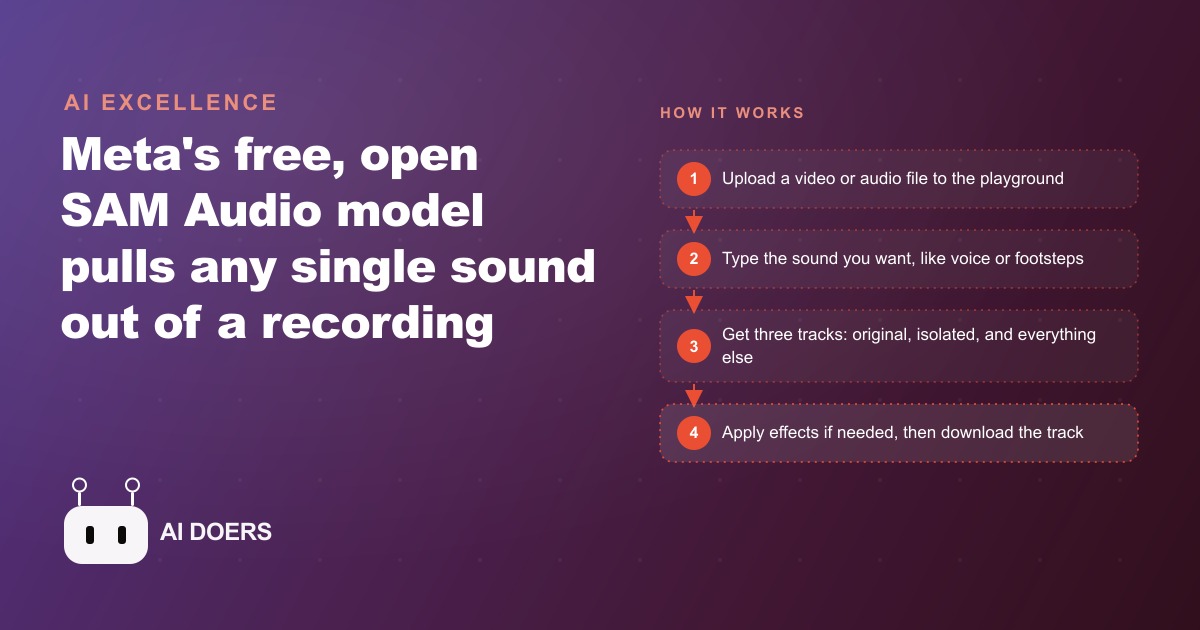
Type the word "voice" and Meta's new SAM Audio model will lift a clean human voice out of a recording made in a crowded, noisy restaurant, and it does it for free. That is the kind of trick that used to require an audio engineer and expensive software, and it just became something anyone can do by typing a single word.
Meta released SAM Audio as part of its Segment Anything family, and the idea is simple to describe and startling to watch. You give it a mixed recording, a video with background chatter, a podcast with a hum, a song with several instruments, and you tell it in plain language which sound you want. You type "guitar" or "footsteps" or "voice," and the model pulls that exact sound out of the mix. No waveform editing, no plugins, no audio training. The instruction is a word, and the output is the isolated sound.
What actually shipped and why it is different
Sound separation is not new. Studios have had tools that split a song into vocals and instruments for years. What is new here is the interface and the price. SAM Audio is prompt-driven, which means you describe the sound you want in ordinary language instead of hunting through frequency bands or training a model on examples. And it runs for free in Meta's Segment Anything playground, with the model weights released openly so anyone can download and modify it. There is no subscription gate to get started, which is the detail that turns a research demo into something a small business can actually use on Monday.
The output structure is worth understanding because it is what makes the tool flexible. Every run gives you three tracks. The first is your original audio, untouched. The second is the isolated sound you asked for, that voice or that guitar pulled cleanly out. The third is the inverse, everything except the sound you named. That third track is quietly the most useful one for a lot of jobs, because "everything except the background noise" is exactly what you want when you are cleaning up a recording. You are not stuck with one result. You get the full recording, the piece you asked for, and everything but that piece, and you pick whichever one fits the job.
Who this changes things for
The obvious beneficiaries are anyone who records audio in imperfect conditions, which is nearly every small business making content. The restaurant owner filming a quick promo in a busy dining room. The trainer recording a testimonial on a phone in a gym with music playing. The consultant capturing a podcast episode in an office with a noisy air conditioner. All of these people used to face the same wall: the content was good, but the audio was too messy to publish, and fixing it meant either re-recording or paying someone with audio skills. SAM Audio removes that wall. Type "voice," take the isolated track, and the messy raw recording becomes a clean, usable one.
Musicians and editors get a different gift. Because you can isolate a single instrument or remove it, you can rebuild a mix track by track. Type "guitar" and get just the guitar, or the inverse to get the backing without it. That opens up remixing, sampling, and cleanup work that previously required either the original session files, which you rarely have, or expensive separation software. For anyone producing music-backed content, this is a real capability handed over at no cost.
Podcasters and video creators sit right in the middle of this. The single most common complaint about home-recorded audio is background noise, a fan, a street, a room that echoes, and it is the exact problem the inverse track solves in one word. Type the noise you want gone, or type "voice" and keep only that, and a recording that felt too rough to publish becomes clean enough to put in front of a paying audience. For a creator who publishes weekly, that is the difference between shipping consistently and stalling every time the recording environment is less than perfect.
There is a longer arc hinted at here too. A model that can isolate a named sound from a mix is the same idea that could one day live inside a small device like a hearing aid, isolating a specific voice in a loud room in real time. The editing use case and the assistive-hardware use case are the same underlying capability at different sizes. That is worth noticing because it tells you this is not a one-off gimmick; it is an early version of a technology that is going to keep getting more capable and more embedded.
Cleaning and styling live in the same tool
One detail that gets lost in the excitement about isolation is that SAM Audio is not only a cleanup tool; it is also a styling tool. Once you have pulled a sound out of a mix, you can apply effects to it, a studio reverb to give a dry voice some warmth, a concert-hall ambience to make a clip feel larger, or an underwater effect for a creative moment. That means the same tool that removes the noise from your recording can also give the result a polished, intentional character. You are not exporting to a separate audio editor to make it sound good; you clean and shape in one place.
For a small business, that combination matters because it collapses two steps into one and removes another reason to hand audio to a specialist. A voice recorded in a dead, echoless room can sound flat and lifeless, and a touch of the right ambience makes it sound like it belongs in a professional production. The point is not to over-process everything; it is that the control is there when a clip needs it, and it is free. Cleaning up a noisy recording and then giving the isolated voice a small, tasteful lift is now a single short workflow rather than a chain of tools and skills.
The move to make: build a clean-audio step into your content pipeline
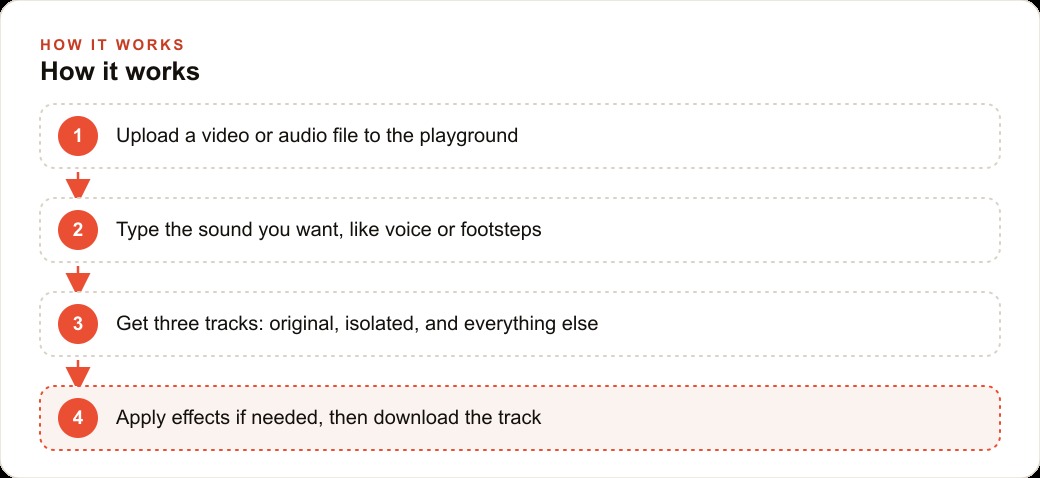
If you publish any video or audio, the concrete action is to insert a cleanup step between recording and posting. The workflow is short. Upload your video or audio file to the playground. Type the sound you want to keep, usually "voice" for spoken content. Take the isolated track, or the inverse if you would rather strip a specific noise, and if the clip needs polish you can apply effects like studio reverb or a room ambience after isolating. Then download the cleaned track and drop it back into your edit. Four steps, no audio expertise, and the raw footage you would have thrown away becomes publishable.
This matters more than it sounds because audio quality is one of the strongest signals of whether content feels professional. Viewers forgive a lot of visual roughness, but muddy or noisy audio makes even good footage feel amateur, and it directly hurts how long people watch. Clean audio keeps viewers watching, and watch time is what every platform rewards. When you run Facebook and Instagram ad campaigns, the creative with crisp, clear audio holds attention through the hook, and holding attention through the hook is most of the battle in a paid feed. A free tool that reliably fixes your audio is, in that sense, a conversion tool as much as an editing one.
The same cleaned recordings do double duty across channels. A clean testimonial or explainer clip works in an ad, on your social feed, and embedded on a landing page, and that same footage transcribed becomes text that feeds SEO and organic search without any extra recording. One cleanup step upstream pays off in every place the content lands downstream, which is exactly the kind of leverage a small team should be hunting for.
A worked example: a field-recording business cleans up its footage
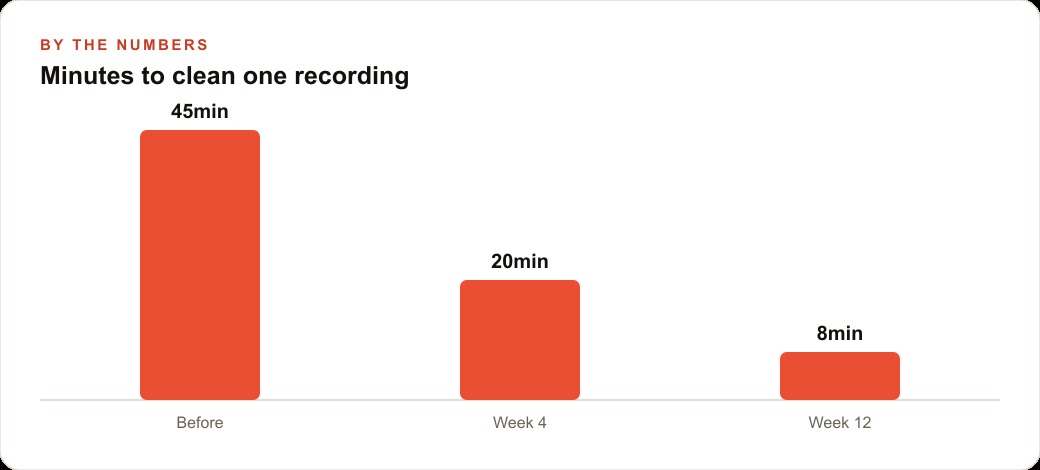
Consider a small business that records short customer testimonials on location, at events, in stores, in the field. The footage is authentic, which is the whole point, but the audio is always compromised by the environment. Before SAM Audio, the owner faced a bad set of options: publish clips with distracting background noise, pay an editor to clean each one, or re-shoot in a quiet room and lose the authentic feel. Cleaning a single messy recording by hand, with the tools and skills they had, took the better part of an hour per clip, and they produced dozens of clips a month, so most of them simply went out noisy or never went out at all.
They added SAM Audio as a standard step. Each raw clip goes into the playground, the editor types "voice," takes the isolated track, and drops it back over this breakdown. In the first few weeks the process was unfamiliar and they were learning which track to keep and when to add a touch of room ambience so the isolated voice did not sound too dry, so a clip still took around twenty minutes end to end. By a couple of months in, with a repeatable routine and a feel for the settings, they had it down to under ten minutes per clip. The illustrative arc is a cleanup time that fell from roughly forty-five minutes to eight as the process matured.
The payoff shows up in volume and quality at once. Clips that used to be shelved for bad audio now get published, so the business puts out more content from the same amount of shooting. The published clips sound clean, so they perform better and reflect better on the brand. And the cost of the tool is zero, which means the entire return is time recovered and content rescued rather than an expense to justify. The cleaned testimonials also landed in the business's CRM and website stack, where they became social proof attached to the sales pages, so a fix that started as an audio chore ended up strengthening the whole funnel.
The honest limits and the mistakes to avoid
The tool is genuinely simple, but getting consistent, publish-clean results across dozens of clips takes a repeatable process and a little judgment. The first mistake is expecting perfection on messy inputs. Isolation is very good, but a recording with extreme noise or overlapping voices will not come out flawless, and you need to listen critically rather than trusting the label. The second mistake is not deciding in advance which of the three tracks you want. For spoken content you usually want the isolated voice; for removing one specific noise you want the inverse. Knowing which before you start saves a lot of second-guessing.
The third mistake is treating cleanup as an afterthought instead of a fixed step. The businesses that get value from this are the ones that make it a standard part of the pipeline, every clip, every time, so it becomes routine rather than a special effort applied only when someone remembers. Build it into the process and it pays off on autopilot. Treat it as optional and you will keep shipping noisy audio because you were in a hurry.
The bottom line
Meta handed the world a free, open tool that does something that used to cost money and require skill: pull any named sound out of a mixed recording by typing a word. For a small business making content, the immediate win is clean audio without an engineer, and clean audio is one of the highest-leverage upgrades you can make to how professional your content feels. Insert a cleanup step, learn which track to keep, and make it routine.
You can run this yourself, and the free playground means there is nothing stopping you from testing it on your worst recording this afternoon. If you would rather have a clean audio pipeline built around your own footage, so every clip your team records comes out publish-ready and feeds directly into ads and landing pages that convert, that is the kind of setup worth a focused conversation. Either way, the capability is now free, open, and sitting in a browser tab, and the businesses that fold it into their process will simply sound more professional than the ones that do not.
That is exactly what we do at AI DOERS. Book a private 30-minute call with Madhuranjan Kumar and we will map the fastest path to it for your specific business.
Book your call →
Madhuranjan Kumar
Madhuranjan Kumar brings 20 years of performance-marketing experience and has managed over $200 million in Facebook ad spend for brands across the United States and beyond. His expertise spans the full modern marketing stack: Meta, Google Ads, TikTok, email automation, CRM, and the websites that hold it together. At AI DOERS he turns that track record into lead-generation systems for businesses across every industry.