
How to Make ChatGPT Actually Know Your Business
ChatGPT answers feel generic until you give it lasting context. Here are the four ways to customize it, when to use each, and how I would set it up for a working business.

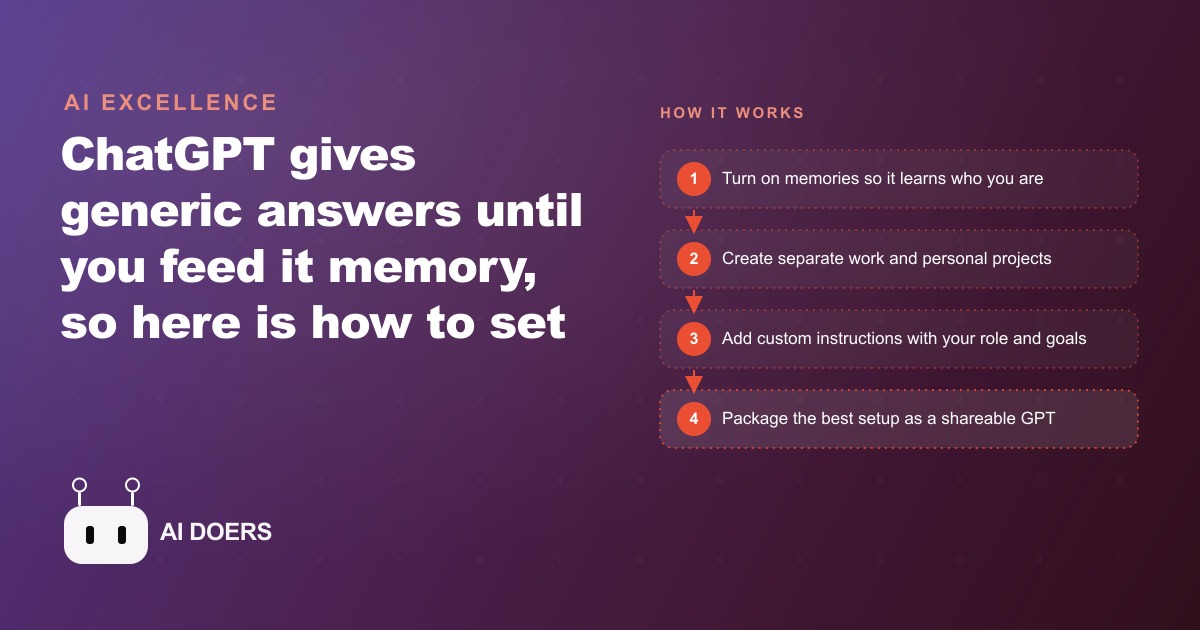
A photography studio was using ChatGPT every day and getting almost nothing out of it, and the reason was not the tool. It was that the tool did not know a single thing about the business. I am Madhuranjan Kumar, and I want to walk you through how one small studio went from generic, throwaway AI drafts to replies that sounded like they came straight from the front desk, by setting up the four ways ChatGPT can carry context between chats. The transformation took an afternoon of setup and paid back a little more every week after that, so follow the journey stage by stage and you can copy it onto your own business.
Where the studio started: polished drafts nobody could use
At the beginning, the owner used ChatGPT the way most people do. They opened a blank chat, asked it to write a reply to a wedding inquiry or draft a caption, and got back something grammatically perfect and completely generic, the kind of text that would fit any studio on the planet and therefore fit theirs poorly. Every draft needed heavy rewriting to add the actual package names, the real pricing tiers, the studio's warm and slightly playful tone. The owner was spending as much time fixing the AI as they would have spent writing from scratch, and they had quietly concluded the tool was overhyped.
The real problem was context, or the total absence of it. ChatGPT started every conversation as a clever stranger who had never heard of the studio. It has four built-in ways to carry context between chats, and the owner, like almost everyone, had never touched any of them. The rest of this journey is the studio switching those four layers on, one at a time, and watching the output shift from stranger to teammate.
Chapter one: turning on memories to break the ice
The first move was the easiest one, which is why it came first. In settings, under personalization, the owner switched on saved memories. From that point ChatGPT began quietly recording details it decided were important, that the owner runs a photography studio, the kinds of shoots they do, how they like things phrased. Within a week of normal use, the drafts already felt a notch less generic, because the model was carrying a few basic facts from one chat into the next instead of starting cold every time.
Memories are the perfect on-ramp for a beginner, but the studio hit their known limitation quickly. The model chooses what to remember, and those facts leak into every chat indiscriminately. The owner noticed a personal detail from a weekend-plans conversation surface in the middle of a client email draft, which is exactly the kind of bleed that makes memories a starting layer rather than the final answer. It proved the value of context and simultaneously proved the studio needed a cleaner way to keep work and personal separate. That set up the next chapter.
Chapter two: splitting work and personal into projects
To stop the bleed, the studio moved to projects. A project is a folder that groups related chats and gives them their own memory, their own extra instructions, and their own uploaded files. Anything placed inside a project only influences chats within that folder, so work context and personal context finally stopped mixing. The owner built two: one project for the studio itself, and a separate one for personal and marketing ideas, kept deliberately apart so studio details never crept into their own content brainstorming.
Inside the studio project, the difference was immediate. The owner switched on project memory so it learned the recurring questions clients actually ask, and now when they opened a chat in that project and typed write a reply to a wedding inquiry, the model already operated inside the studio's world. No more generic openings, no more personal facts wandering in. The folder gave the context a boundary, and the boundary was what made the whole thing trustworthy for real client work. This is the layer where most businesses should live, and it was the turning point in the studio's journey from novelty to tool.
Chapter three: custom instructions and the goals field that changed everything
With projects in place, the studio added the layer that put them in full control: custom instructions. Unlike memories, nothing here is auto-collected. Custom instructions are static fields you fill in by hand, so you decide exactly what the model knows. The owner wrote in the brand description, the style of shoots on offer, the pricing tiers, the turnaround times, and the booking policy, then set the level of detail they wanted in answers. Because they typed it themselves, there were no surprises and no leaks, just a clean, deliberate description of the business the model read on every relevant chat.
The single most valuable field turned out to be current goals, and this is the lesson the owner wished they had learned first. When the model knows what the business is actively trying to achieve, every answer bends toward that outcome. The studio was pushing newborn sessions that quarter, so the owner added exactly that to the goals field. Suddenly the suggestions changed character. A caption idea would lean toward newborn work, a reply to a general inquiry would gently mention newborn availability, a content plan would prioritize filling those slots. The model stopped being a neutral writing tool and started acting like a team member who knew the current priority. Those goal-aware drafts fed directly into the studio's Facebook and Instagram ad campaigns and its SEO and organic search posts, so the push for newborn sessions carried the same intent across every channel without the owner re-explaining it each time.
Chapter four: packaging a front-desk GPT for the assistant
The last chapter solved a different problem, which was consistency when someone other than the owner used the tool. For that, the studio built a GPT. A GPT is essentially a project built around a single job and packaged so you can hand it to someone else. It carries its own instructions, its own knowledge files, and its own tools, and crucially it deliberately ignores your account-wide memories so it behaves the same way for whoever uses it. The owner built a front-desk GPT and loaded it with a knowledge file of the studio FAQ, the session-prep checklist, and the gallery-delivery steps.
Because a GPT stays isolated and predictable, the owner could hand it to an assistant and trust it to answer client questions the same way every single time, without any of the owner's personal context bleeding in. That isolation is the feature, not a limitation. The front desk needed a tool that was consistent and shareable, and a GPT is exactly that. The studio now had a clean progression across all four layers: memories for quick personalization, projects to separate work from personal, custom instructions for deliberate control, and a GPT to package and share the best setup. Where those clean, context-rich answers needed to trigger a booking or capture a lead, they flowed into the CRM and website stack, so a well-informed reply turned into a booked session instead of just a nice email.
An interlude: how the four layers stack and interact
Partway through the setup the owner hit a confusing moment worth pausing on, because you will hit it too. The layers do not all behave the same way, and knowing the order prevents odd results. Memories and custom instructions apply account-wide, which means they follow you everywhere, including inside your projects. Projects add their own memory and instructions on top of that account-wide base. GPTs are the exception, staying isolated and ignoring your account memories entirely so they behave predictably for anyone you share them with.
That interaction explains a puzzle the owner ran into: a client email drafted inside the studio project once came out in a slightly off tone, and the culprit was an account-wide custom instruction pulling against the project's own settings. Once the owner understood that account-wide layers feed into projects while GPTs stand apart, the fix was obvious, and the odd results stopped. It is a small piece of mental model that saves a lot of head-scratching, and it is the reason the studio settled on keeping account-wide instructions minimal and letting each project carry the context specific to its job.
The numbers after twelve weeks
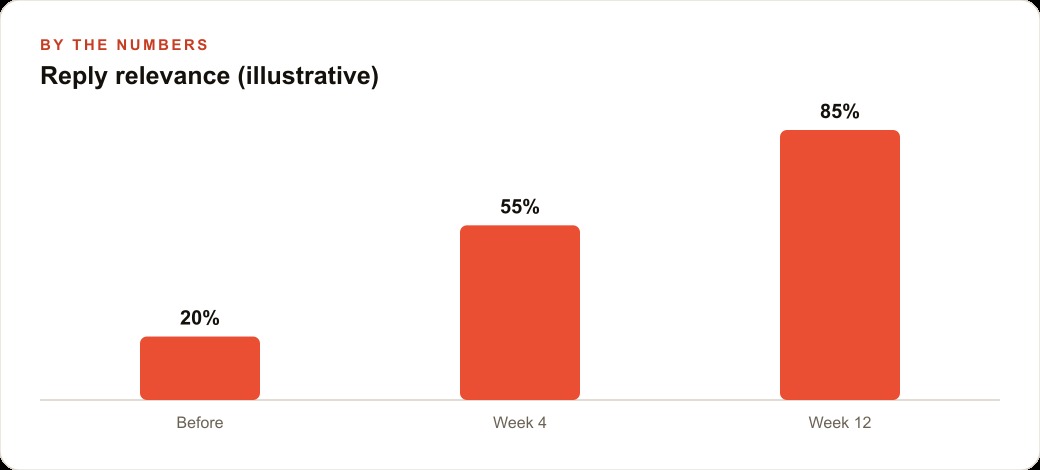
Let me put illustrative figures on the journey so the payoff is concrete. Before any of this, the owner spent roughly 12 minutes turning each AI draft into something usable, rewriting it to add the real details and fix the tone. Across maybe 30 client replies, captions, and inquiries a week, that is about six hours a week of editing, which is most of a working day gone to fixing a tool that was supposed to save time.
By around week four, with memories on and projects in place, the drafts were landing much closer to ready, and the editing time per piece had roughly halved. By week twelve, with custom instructions written, the goals field set, and the front-desk GPT handling routine client questions, the owner estimated the drafts arrived about 85 percent finished instead of the earlier 20 percent, and the per-piece editing time had dropped from 12 minutes toward a couple of minutes of light review. That is several hours a week handed back, plus an assistant who could now answer common questions consistently without pulling the owner into every message. Nothing about the underlying model changed across those twelve weeks. The only thing that changed was how much the model knew, and that was entirely within the owner's control the whole time.
The lesson the studio took away is worth stating plainly. The whole setup takes an afternoon, and the payoff compounds every time you skip re-explaining your business to a blank chat. Think about how much time a small team loses each week pasting the same background into the model, correcting the same wrong assumptions, and reminding it of the same pricing. That friction disappears once the context lives in a layer the model reads automatically, and the tool stops being a clever stranger and starts behaving like someone who has worked at your company for a year.
It is worth underscoring who gets the most out of this, because the studio is not a special case. Any business that leans on ChatGPT for writing, planning, or customer replies can run the same playbook, and you need no technical team to do it. If you draft social posts, answer the same customer questions, write quotes, or summarize information every week, these context layers make every output sharper and faster. Retail shops, clinics, agencies, trades, and solo operators all benefit for the same reason the studio did: the work is repetitive, and the model only needs to be told once who you are and what you care about. The owners who win are simply the ones who stop re-explaining themselves in every prompt and instead bake that information into a layer the model reads on its own.
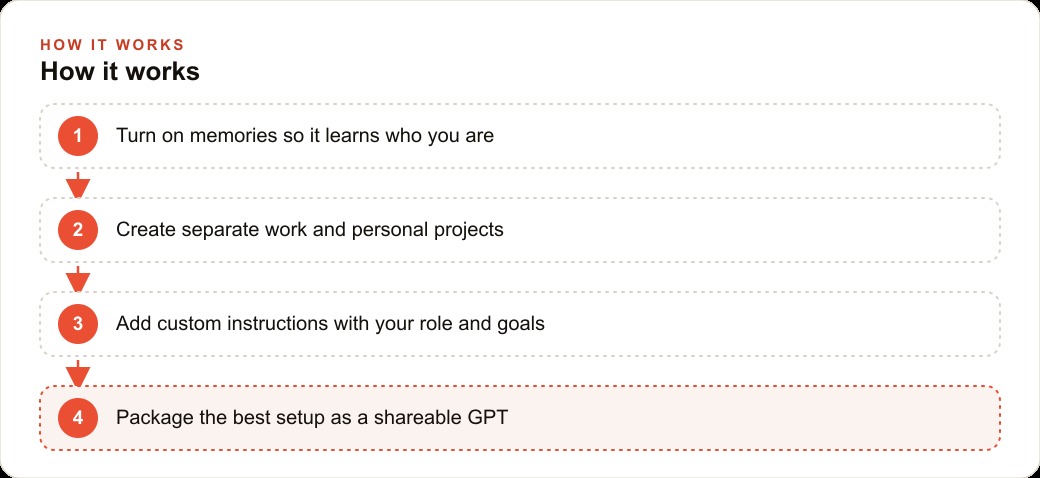
If you want to follow the same path, start at the easy end and graduate. Turn on memories and let the tool learn the basics for a week. As patterns appear, move the important facts into custom instructions where you control them, filling in your role, your preferred level of detail, and above all your current goals. Once you are using ChatGPT regularly, create a work project and a personal project, switch on project memory in each, and add the instructions and files that belong to each side of your life. From then on, a neutral question goes in a plain chat, work goes in the work project, and anything you want to share with a teammate becomes a GPT. The harder part is deciding what context actually matters and writing it so the model behaves the way your business truly does, which is the judgment work where a lot of people stall. You can build it yourself with the steps above, or bring in someone who has wired this up many times and have it handed over already tuned to how you work.
That is exactly what we do at AI DOERS. Book a private 30-minute call with Madhuranjan Kumar and we will map the fastest path to it for your specific business.
Book your call →
Madhuranjan Kumar
Madhuranjan Kumar brings 20 years of performance-marketing experience and has managed over $200 million in Facebook ad spend for brands across the United States and beyond. His expertise spans the full modern marketing stack: Meta, Google Ads, TikTok, email automation, CRM, and the websites that hold it together. At AI DOERS he turns that track record into lead-generation systems for businesses across every industry.