
Loops Explained: The New Coding Meta That Replaces Prompting
A loop is a trigger plus a verifiable goal that lets an agent run itself until the work is done. Instead of prompting your coding agent step by step, you design loops that prompt it for you. Here is what that means and how a real business can use it.

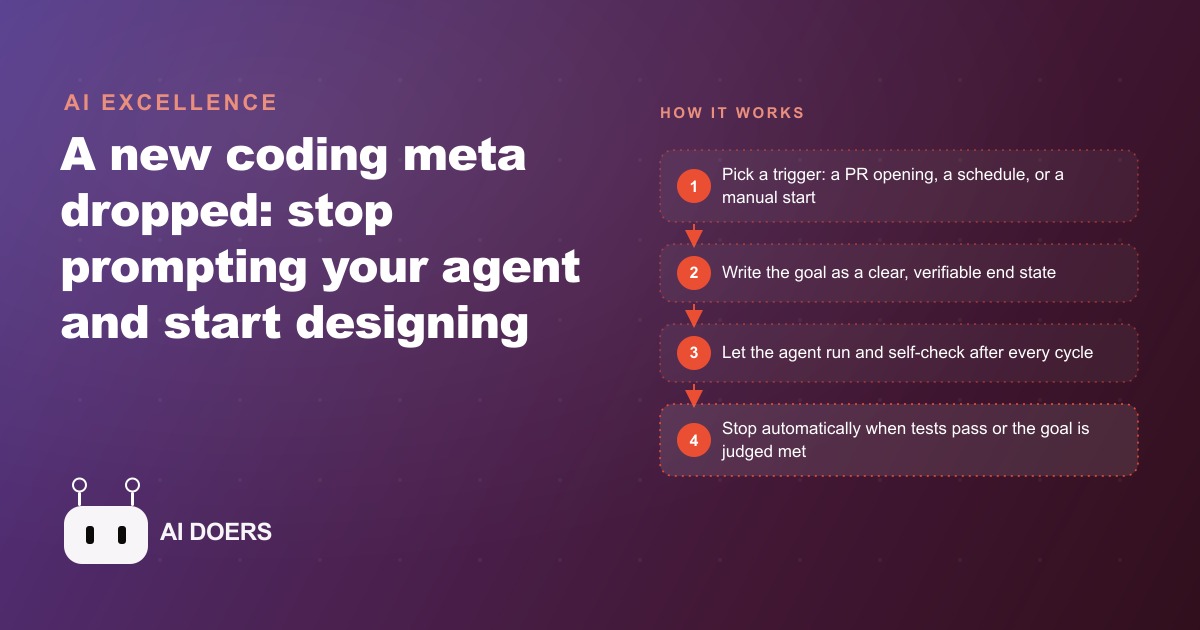
A single post about AI agents accumulated five million views in under twenty-four hours last weekend, and the idea it described is about to change how most businesses think about software doing work on their behalf.
I am Madhuranjan Kumar, and the post did not announce a new model or a new product. It announced a new way to think about what you are building when you build with AI. The argument was that engineers should stop prompting their coding agents one step at a time and instead design loops that prompt the agent automatically, running until a verifiable goal is reached. That shift from instruction to loop is simpler to describe than it is to internalize, and the gap between understanding it and acting on it is where most businesses are stuck right now.
Last weekend a five-million-view post changed how engineers think about agents
Boris Cherny, an engineer at Anthropic, wrote publicly that he no longer prompts Claude directly when working on a project. He writes loops. The loops prompt Claude, read the result, decide whether the goal was reached, and if it was not, prompt Claude again. He steps back and the loop handles the iteration.
Peter Steinberger picked up the idea and posted a version of it that spread far wider. His formulation was direct: you should not prompt coding agents anymore. You should design loops that prompt your agents. Within a day, five million people had seen it. Within the weekend, the framing had become the dominant way the AI engineering community was discussing how to use agents for real work.
What made it spread is that it names something engineers had already discovered independently and could not fully articulate. Anyone who has built a complex software project with an AI agent knows the experience of typing the same kind of instruction over and over. The agent does a step, you review it, you give the next step, it does that step, you review again. The agent is fast. The human in the loop is the bottleneck. A loop removes the human from the iteration without removing the human from oversight.
The framing also gave a name to the failure mode that makes most agentic workflows frustrating in practice. When you prompt an agent step by step, you are the one deciding when the work is good enough to proceed. When you design a loop, the loop makes that decision against a standard you defined once. That shift in where the judgment lives is what the post was really about.
A loop is not an automation, and the distinction reshapes what AI can do for any business
The word loop gets used loosely in conversations about AI, and the casual usage muddies the concept. A loop as Boris Cherny and Peter Steinberger described it is not the same thing as an automation. That distinction matters for any business thinking about what to build next.
An automation is a fixed sequence of steps. Step one runs, then step two, then step three, and the automation stops. The result is whatever the last step produced. If that result is wrong, a human has to restart the process. An automation does not judge its own output. It executes and stops.
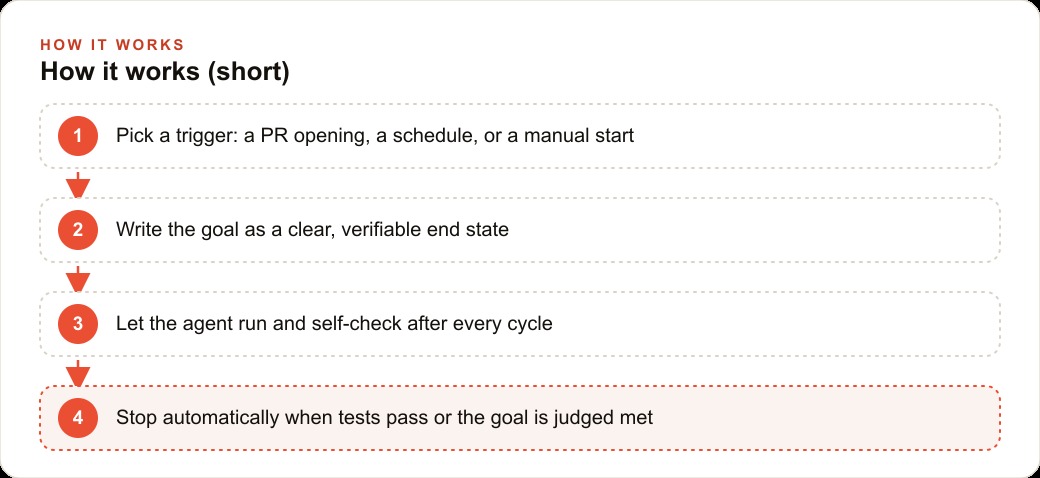
A loop is different because it contains a decision. After each cycle, the loop checks whether the goal was met. If it was, the loop stops. If it was not, the loop runs again with what it learned from the previous attempt. The decision is what makes it a loop rather than a sequence. The agent is not just executing steps in order. It is evaluating its own output against a standard you set and deciding whether to continue.
For a business owner, this distinction changes what AI can reliably do without human oversight at every step. An automation can send a report. A loop can keep improving the report until it passes a quality check. An automation can process a batch of invoices. A loop can process invoices and keep retrying the ones that fail validation until they pass. An automation can generate social media content. A loop can generate content, check it against a style guide, revise the pieces that fail, and stop only when everything meets the standard.
The verifiable goal is the central design element. A loop requires a way to check whether it is done. That check can be deterministic, like all tests passing or a document containing the required sections, or it can be non-deterministic, where a second model reads the output and decides whether the goal was reached. Non-deterministic verification is flexible but expensive, because every cycle burns tokens on the checking step as well as the working step. Deterministic verification is cheaper and more reliable wherever you can define the goal precisely enough to check it mechanically.
The three trigger types that cover almost every repeatable job worth automating
Every loop starts with a trigger. The trigger is what tells the loop to begin its first cycle. There are exactly three kinds of triggers that cover almost every real-world situation where a loop makes sense, and knowing them makes it easier to identify which jobs in your business are candidates.
The first trigger is an action. Something happens in a system and the action fires the loop. A pull request is opened. A form is submitted. A file lands in a folder. A new row appears in a database. A customer sends a message. The action is the signal that work is needed, and the loop starts the moment the signal arrives. Action triggers are the right choice when work should happen in response to a specific event rather than on a schedule.
The second trigger is a schedule. The loop runs at a fixed time or on a fixed interval. Every morning at seven. Every thirty minutes. Every Sunday night. Scheduled triggers are the right choice for maintenance work, monitoring, and anything that needs to run regularly regardless of whether a specific event occurred. A nightly loop that checks for data quality issues and keeps cleaning until every record passes a validation rule is a scheduled trigger in action.
The third trigger is a human starting it manually. The owner opens a tool, clicks a button, and the loop begins. This is the simplest trigger and the right choice when the work is occasional or when the owner wants direct control over when it runs. Manual triggers are also a good starting point for any loop that is still being tested, because they let you observe the first few cycles before trusting the loop to run on its own schedule.
Any business process that is genuinely repeatable can be broken down into one of these three trigger types combined with a verifiable goal. A client intake process is triggered by a form submission, and the goal is a complete and validated record with all required fields. A daily content review is triggered by a schedule, and the goal is every flagged item resolved. A competitor pricing analysis is triggered manually, and the goal is a comparison sheet covering all monitored products with no missing values.
Claude Code already ships a loop command and most users have not touched it
The tool most directly relevant to this shift already has the capability built in, and most of its users have not yet explored it. Claude Code ships with a slash loop command. The command runs a prompt on a recurring interval. You specify the interval and the goal, and Claude Code keeps firing the agent until the goal is met or you stop it.
A realistic use of the command: run slash loop every five minutes, read the project specification file, compare what is currently built to what the spec requires, and keep building until the full spec is implemented. Each cycle the loop finds what is missing and builds it. The loop stops when the entire specification is satisfied. That is not a hypothetical workflow. It is available in the tool today, using functionality that most users have scrolled past in the documentation.
Cursor Automations offers a similar capability in a slightly different form. A loop in Cursor can fire when a pull request is opened, review the changed code, identify issues, fix them, commit back, run the test suite, and confirm that tests and continuous integration both pass before stopping. The trigger is an action (a PR opening), the goal is deterministic (tests pass and CI is green), and the agent runs itself through however many cycles it takes to reach that state. That is a complete working loop with no human needed between start and finish.
For businesses that do not write code, the same mental model applies to the no-code tools they already use. Workflows that check a condition, branch based on the result, and try again if the goal is not yet met are loops even when the platform does not use that word. Understanding the concept changes what you ask those tools to do. Instead of designing a workflow that runs once and stops, you design one that runs until the work is genuinely done by a measurable standard.
The connection to business operations outside of software is direct. A loop that checks whether a new lead in the system has been qualified, researched, and assigned, and keeps working until all three steps are complete, is more reliable than an automation that does those steps once and moves on regardless of the result. Any business investing in paid advertising through Meta and Facebook or Google Ads and feeding those leads into a follow-up system benefits from agents that verify their own output rather than agents that produce a result and hand it over regardless of quality.
The cost reality that stops most businesses before they start, and how to think around it
The teams that are pushing the limits of the loop model report costs that most businesses cannot absorb. Peter Steinberger included his own token spending in the original post that drove the five million views: 1.3 million dollars per month. That number circulated alongside the viral post and became, for many people, the primary takeaway. Loops are expensive. This is not for us.
That reaction is understandable and inaccurate, because the 1.3 million dollar figure comes from a team running loops that remove human oversight almost entirely from a large-scale software development operation with thousands of parallel agent cycles. Most business loops do not look like that. They run on smaller data, narrower tasks, and less frequent cycles. A loop that runs three times a day on a list of two hundred leads costs a fraction of what a full software development loop costs. A loop that generates and quality-checks ten pieces of content per week is well within reach for a small business.
The right way to think about loop cost is to calculate the token consumption per cycle for the specific loop you want to build, then multiply by the number of cycles per time period you actually need. A loop that uses five thousand tokens per cycle and runs twenty times per day consumes one hundred thousand tokens per day. At current pricing for capable models, that is a few dollars per day. For a loop that saves a human several hours of work per day, the return is immediate.
The more honest cost concern is not the token spend. It is the design time. A poorly designed loop with a vague goal will run indefinitely, burn tokens on cycles that do not make progress, and produce output that is expensive and wrong. The investment is in defining the goal precisely, choosing the right trigger type, and testing the verification step before running the loop at scale. That design work is what the five million views were really pointing at. The insight was not that loops are easy. It was that designing loops well is the new skill that separates builders who use AI effectively from those who are still prompting one step at a time.
For businesses building content operations through SEO and content programs, the loop model offers a specific advantage: a loop that generates content, checks it against a quality standard, and revises until it passes produces more consistently good output than any single-pass generation workflow. The investment in getting the verification step right, defining what a good piece of content actually is in machine-checkable terms, pays back across every article the loop produces from that point forward.
That is exactly what we do at AI DOERS. Book a private 30-minute call with Madhuranjan Kumar and we will map the fastest path to it for your specific business.
Book your call →
Madhuranjan Kumar
Madhuranjan Kumar brings 20 years of performance-marketing experience and has managed over $200 million in Facebook ad spend for brands across the United States and beyond. His expertise spans the full modern marketing stack: Meta, Google Ads, TikTok, email automation, CRM, and the websites that hold it together. At AI DOERS he turns that track record into lead-generation systems for businesses across every industry.