
Let GPT Control Anything: A Plain Guide To Function Calling
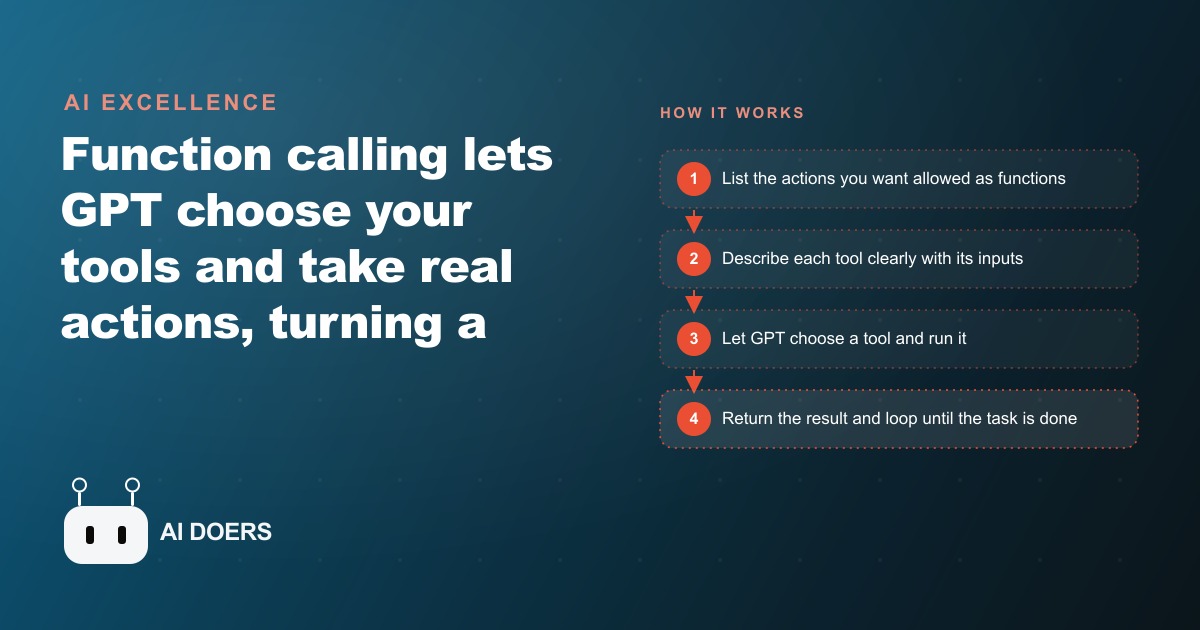
Function calling lets GPT choose your tools and take real actions across your systems. Here is how a coffee shop would use it to run its daily admin.

I am Madhuranjan Kumar. This is the story of a neighborhood coffee shop and the ninety minutes its owner spent every morning before the first customer walked in the door.
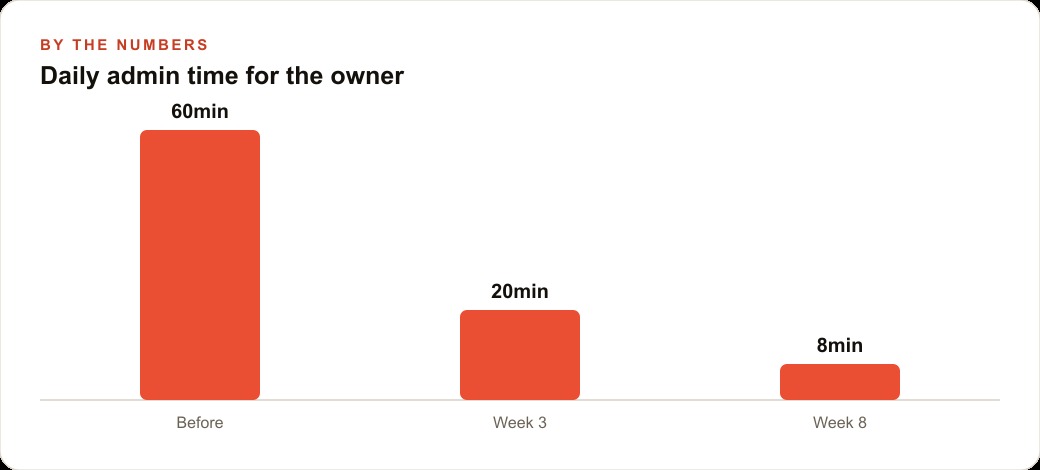
The shop had been open for four years. The owner had built a loyal regular base, knew most of them by name, and had the quality and the room right. Consistent five-star reviews reflected that. The operational layer was a different story. Every morning the same loop played out: check yesterday's sales on the point of sale terminal, walk the storage area to count stock on key items, figure out what to order and write the supplier email, draft something for the social account about whatever felt worth sharing. Ninety minutes minimum, every day, before the espresso machine was fully preheated.
The Problem: Ninety Minutes Every Morning Before the First Customer Walked In
The owner had tried variations of this routine across four years. Digital checklists had helped with remembering every step without making any individual step faster. A spreadsheet for tracking stock had reduced some mental load without reducing time. Hiring a part-time manager to handle admin was on the table but felt like an expensive solution to a problem that was really about data being stored in too many disconnected places rather than about there not being enough hours.
The actual friction was the movement between systems. Sales data lived in the point of sale application. Stock was tracked in a spreadsheet updated manually after the morning count. The supplier communicated by email and wanted orders in a specific format. The social account needed something connected to what was actually happening in the shop, which meant reading the sales data and then writing something based on it. No single step was complicated. Each required going to a specific place, reading specific information, and doing something specific with it. The time cost was almost entirely transition overhead: picking up context, switching tools, carrying information manually from one system to the next.
The owner had been using an AI assistant to draft social posts for about six months. It saved time on the writing but did not touch the data-gathering steps that had to happen before writing could start. Reading about function calling changed that.
The Discovery: Giving an AI a List of Actions Instead of Just Questions
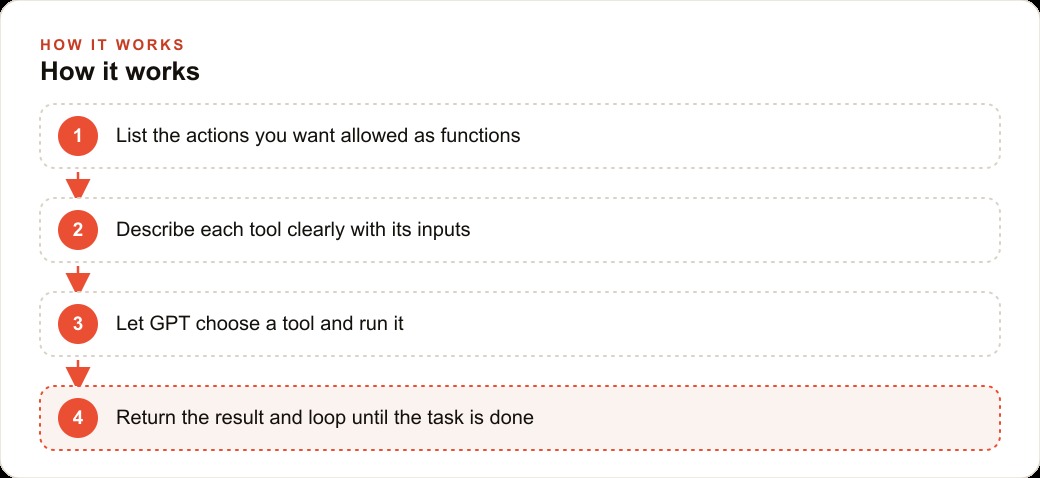
Function calling changes what an AI model does in a workflow in a specific and important way. Without it, you ask the model a question and it returns a text response that a human reads and acts on. With it, you describe a set of specific actions the model is allowed to perform, each with a name, a description of when to use it, and the parameters it requires. The model reads a request, decides which action to take, fills in the required parameters, and returns a structured output that code can execute directly rather than a text response a human has to interpret.
The structured output is the key mechanism. When a model returns text, a human reads it and decides what to do next. When it returns a function call, the code runs the function, gets the result, and sends that result back to the model so it can decide its next step. This loop continues until the task is finished. The human sets it in motion with a single request and reviews the final output. Everything in between runs without a person manually carrying information from one system to another.
The boundary on what the model can do was what made the owner willing to try it. Function calling means the model can only perform the specific actions you defined. It cannot reach outside the list of functions you gave it. The sales data would be read-only from the model's perspective. The stock spreadsheet would be read-only. The supplier order sheet could only have rows added, never deleted or modified. The social account could only receive new posts, not have existing ones changed or removed. The scope of what the model could touch was exactly what the owner defined, making the trust question easy to resolve before any live connection was built.
Building the First Two Functions: Reading Sales Data and Checking Stock
The owner started with two functions before adding any others. The first connected to the point of sale system. Most modern point of sale platforms expose an API specifically for this kind of integration. The function took a date as its input and returned yesterday's total revenue, the five items that sold in the highest quantities, and the hour of the day with the most transactions. Writing the function description carefully was the most important part of this step. The description tells the model when to call the function, not just what the function returns. A description that said "reads sales data" was less useful than one that said "call this to get yesterday's transaction summary including top sellers and peak hour, before checking stock or placing any order." The specificity of the when mattered as much as the specificity of the what.
The second function read the stock spreadsheet. The spreadsheet already existed and had been maintained manually each morning. The only change required was that the spreadsheet tool the owner used supported API access, which it did. The function returned current quantities for each of the eight items the owner tracked. The description specified that this function should be called after the sales function and before the order function, because knowing what sold yesterday was necessary context for deciding what to reorder based on current stock levels.
Building these two functions took three hours spread across two afternoons. Most of that time was integration work rather than conceptual difficulty. The function definitions themselves, the name, description, and parameter schema for each one, took under twenty minutes to write. The code that ran when each function was called was standard API connection code available in any basic documentation. The owner had no prior programming background and completed this by following documentation step by step.
The first test run using only these two functions produced something immediately useful. The owner typed a request asking the system to check yesterday's sales, look at what was running low, and identify what to order. The model called the sales function, received the response with yesterday's numbers, called the stock function, received current quantities, reasoned about which items were both selling strongly and below a reasonable reorder threshold, and returned a list of specific items with suggested quantities. Total elapsed time: fourteen seconds. That sequence normally took thirty to forty minutes of manual system-switching.
The First Morning the Full System Ran: Seven Minutes Instead of Ninety
The first morning with all four functions connected ran at five forty, a quarter hour before the manual routine would normally have begun. The owner typed one request: check yesterday's numbers, see what needs ordering, add it to the supplier sheet, and post something about the top seller today.
The model called the sales function and received the daily summary. It called the stock function and received current quantities. It compared both data sets, identified two items below threshold that had also sold strongly the previous day, called the order function twice to add both items to the supplier sheet with appropriate quantities, then drafted a short social post naming the top seller and called the social posting function to publish it.
Time from the single typed request to all four actions completed: seven minutes, most of which was the functions executing rather than the model reasoning. The owner spent the remaining minutes reviewing the two rows added to the supplier sheet and reading the social post before it went live. Both looked correct. The order quantities matched what the manual routine would have produced. The post was accurate and appropriately brief.
The ninety-minute loop had become a seven-minute review. The owner made coffee.
The emotional reaction was careful skepticism rather than immediate enthusiasm. Three days in a row going correctly was more convincing than one. After two weeks of consistent results, the owner stopped treating the system as an experiment and started treating it as the morning routine. The manual version of the loop no longer existed in the schedule.
Week Eight: Four Functions Chained, Eight Minutes of Total Daily Admin
By week eight the system had grown beyond the original four functions. A fifth function checked for supplier email responses and flagged any mentioning delivery delays or product substitutions, pulling the summary into the morning output so the owner could see it in the same place as the order confirmation rather than in a separate inbox scan. A sixth function checked the weather forecast for the day and included it as context in the social post when relevant. Rainy mornings correlated with higher afternoon traffic and stronger hot drink sales. The owner had learned to mention a warm special when rain was coming, and the model now made that connection automatically.
The complete morning chain ran in this order: read sales, read stock, check weather, check supplier inbox, add order rows for items below threshold, compose and post social content incorporating the day's top seller, any relevant weather note, and any active promotion. Elapsed time on a routine morning was eight minutes. On mornings when the supplier inbox contained something requiring attention, it was eleven or twelve minutes because the model took additional time to summarize the supplier note into the format the owner preferred before returning the full output.
The owner's morning had shifted from ninety minutes of active system management to a ten-minute review window where the decisions had already been assembled and the owner was confirming rather than producing them. The cognitive load difference was noticeable and distinct from just the time difference. Producing the decisions had required gathering data, holding it in working memory, and reasoning through the connections. Reviewing decisions already produced required reading a summary and checking that the reasoning matched what the owner would have chosen. The latter is substantially easier and leaves more mental energy for the first customers of the day.
Total weekly admin time in week one of the old routine: roughly seven hours across the week. Total weekly admin time in week eight with the function-calling system: roughly fifty minutes across the week, nearly all of it review time. The recovered six-plus hours went back into customer interactions during the morning rush, which the owner had previously been too occupied with the admin backlog to be fully present for.
What This Pattern Means for Any Business Running Repetitive Data Loops
Function calling works for any workflow that follows a read-something, decide-something, do-something loop across data from multiple systems. The coffee shop routine is a clear example because each step is discrete, the data sources are separate but connectable via standard APIs, and the decisions at each step are rule-based rather than judgment-intensive.
The pattern scales to other industries without much modification. A retail store owner who checks inventory, generates purchase orders, and updates the website with current availability is running three functions in sequence. A property manager who checks maintenance request tickets, matches them to available contractors by skill and location, sends scheduling emails, and updates a tracking sheet is running four functions with conditional branching. A marketing team that checks campaign performance daily, flags any ad sets where cost per result exceeded a threshold, drafts adjustment notes for the account manager, and posts a daily summary to the team communication channel is running four functions with a data comparison step in the middle.
The design discipline that makes function calling reliable over time is in how functions are defined rather than in how they are called. Each function should do exactly one thing. The description should specify when to call it, not just what it returns. Required inputs should be marked as required so the model does not proceed with a blank field and produce an incomplete result. The scope of each function should be as narrow as the workflow allows: read-only unless writing is explicitly required, append-only before allowing modifications, no deletes unless the workflow requires them and you have decided in advance what an accidental deletion would actually cost.
The hardest part of building a function-calling workflow is not the code connecting the functions to the underlying systems. It is writing function descriptions precise enough that the model calls the correct function in the correct order reliably across many different request phrasings. Descriptions that overlap in meaning confuse function selection. Descriptions too vague leave the model guessing about the appropriate situation for a given function. The test for whether a description is good enough: if a colleague who had never seen the code read it, could they predict which function to call given a specific request? If yes, the description is adequate. If the answer involves uncertainty, rewrite it before proceeding.
The owner of the coffee shop had no prior programming background. The setup took three hours spread across two afternoons. The return was visible on the first morning the system ran: ninety minutes became seven. That ratio is realistic for well-defined repetitive loops in most business contexts, which is why function calling is one of the highest-leverage AI investments a small business can make right now with the tools currently available.
That is exactly what we do at AI DOERS. Book a private 30-minute call with Madhuranjan Kumar and we will map the fastest path to it for your specific business.
Book your call →
Madhuranjan Kumar
Madhuranjan Kumar brings 20 years of performance-marketing experience and has managed over $200 million in Facebook ad spend for brands across the United States and beyond. His expertise spans the full modern marketing stack: Meta, Google Ads, TikTok, email automation, CRM, and the websites that hold it together. At AI DOERS he turns that track record into lead-generation systems for businesses across every industry.