
How to Unlock Gemini 3's Hidden Animation Power
Gemini 3 already knows GSAP and Motion.dev deeply. To get stunning scroll animations, split the work into two stages: first have the model plan the full timeline as a world-class motion designer, then hand that plan to a coding agent that only implements it.

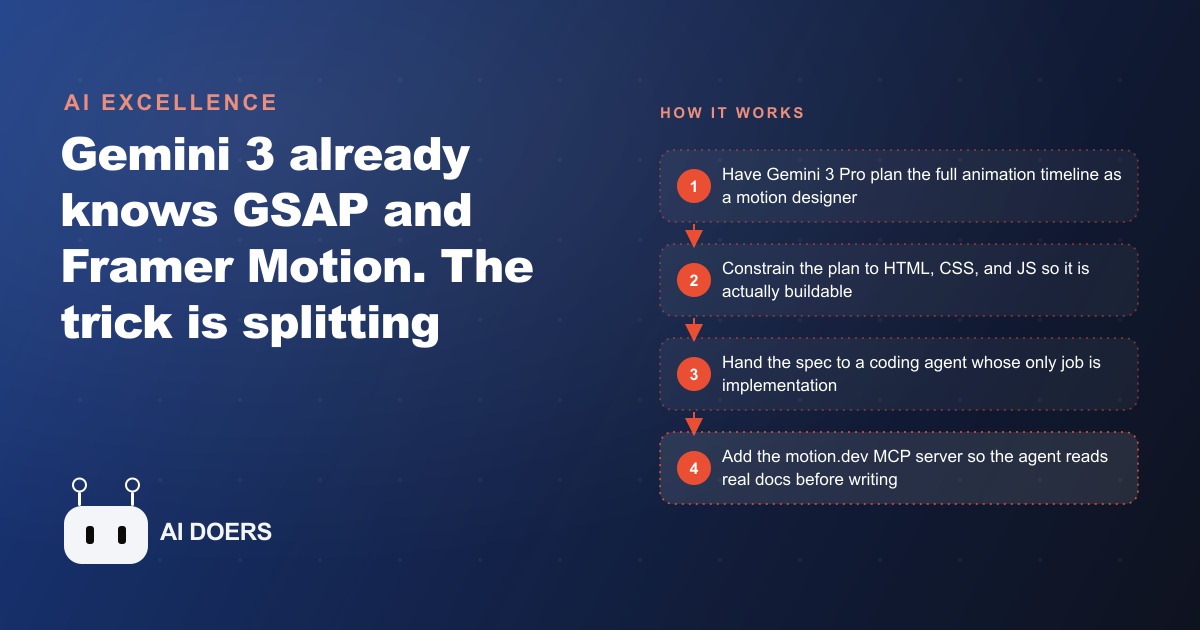
Gemini 3 already knows GSAP and Motion.dev better than most working front-end developers. That is the twist almost nobody uses. The reason your AI generated landing pages look like templates is not that the model lacks skill. It is that you are prompting it in a way that forces it back to safe, boring defaults. I am Madhuranjan Kumar, and here are eight specific moves that unlock the stunning, custom-feeling animation the model is already capable of but rarely shows you.
1. Treat animation as the thing that separates custom from template
Start by naming the real gap. The distance between a decent looking website and one that feels genuinely unique is almost entirely animation and micro interactions. Layout, fonts, and colors get you to competent. Motion is what makes a visitor feel the page was built for this brand and no other. Every move below exists to close that specific gap, so keep it front of mind. If a page feels like a template, the fix is rarely a new color scheme. It is the absence of intentional motion, and that is exactly the thing the model can produce once you ask correctly. Think about the sites that have made you stop scrolling and pay attention. Almost none of them were memorable for their typography or their palette. They were memorable for how something moved, a reveal that felt satisfying, an element that responded to you, a sense that the page was alive rather than printed. That feeling is not luck or a big budget. It is a series of deliberate motion decisions, and every one of them is now within reach of a good prompt.
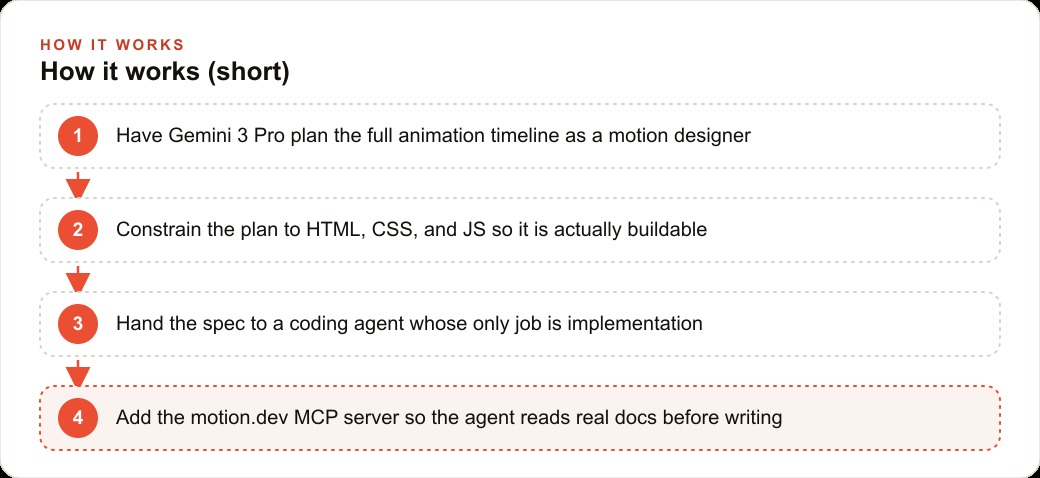
2. Stop teaching the model the library, start giving it a process
Here is the mindset shift that changes everything. You do not need to teach Gemini 3 how GSAP or Motion.dev work. It already carries deep knowledge of both. What it needs from you is the right process and precise prompt specifications. The intelligence lives in the model. The structure has to come from you. Once you internalize that, you stop wasting prompt space explaining libraries the model knows cold, and you spend that space describing the exact experience you want, which is the only part it genuinely cannot invent on its own.
3. Split creative planning from implementation, always
This is the single highest leverage move on the list, so give it the most weight. Never ask one prompt to both invent the animation and write the code for it. When a single prompt carries both jobs, the model quietly reverts to whatever is easiest and most common, which is exactly why generic prompts produce bland output. Separate the two stages. First plan the full timeline as a pure creative exercise. Then hand a clear, finished spec to a coding agent whose only job is to build it. The difference in output is dramatic, and it is the reason most people never see what the model can actually do. They collapse two jobs into one prompt and get the average of both.
There is a reason this works, and understanding it makes you better at every other move on the list. Creative invention and faithful implementation pull the model in opposite directions. Invention wants freedom and ambiguity. Implementation wants precision and constraint. Ask for both in one breath and the model resolves the tension by retreating to the safest option that technically satisfies the request, which is always the generic one. By splitting the job, you let the model be genuinely bold in the planning stage, where boldness is exactly what you want, and genuinely precise in the build stage, where precision is what you want. You stop forcing it to average two incompatible mindsets and instead let it fully commit to one at a time.
4. Describe the timeline explicitly, like one long sentence
Vague requests get vague motion. Ask for a cool animated landing page and you get sliced full screen sections with dull fade transitions. Spell out the exact behavior instead and the result becomes genuinely creative. The counterintuitive lesson here is that specificity is not a cage, it is a key. Most people assume that giving the model more freedom produces more creative work, so they keep their prompts loose and open. The opposite is true. A loose prompt gives the model permission to reach for the most common pattern, and the most common pattern is boring by definition. A tightly described timeline forces the model off the well-worn path and into the specific, unusual thing you actually asked for, which is where all the interesting motion lives. The example that proves it: asking for a continuous horizontal text flow in a single container, like reading one long sentence rather than flipping through slides, completely changed the output. So describe layout, element coordination, and feel in plain, concrete language. The more explicit your specification, the more creative the model gets, which feels backwards until you remember that specificity is what frees it from the safe default.
5. Reach for the right library for the right job
GSAP and Motion.dev are not interchangeable, and knowing which to use is half the battle. GSAP is built for complex scroll driven motion, where many elements move together on one timeline. Its ScrollTrigger scrub mode ties animation progress directly to how far the user has scrolled, so the motion follows the scroll in both directions. Motion.dev, formerly Framer Motion, is best for UI state transitions and component level micro interactions, and models know it especially well because it is the most popular animation library in the space. My rule of thumb: reach for GSAP on landing pages where scroll tells the story, and reach for Motion.dev inside the app where taps, hovers, and state changes need to feel satisfying. Picking the wrong tool is not fatal, but it makes the model work against the grain of the library, and against-the-grain code is where the subtle bugs and janky frames come from. Match the tool to the job and the model produces motion that feels native rather than forced.
6. Constrain the plan to HTML, CSS, and JavaScript
When you let the planner dream without limits, it proposes effects that only work with heavy 3D models, complex SVG, or generated video assets, and then you are stuck unable to build what it imagined. Add a hard constraint. Tell the planner to stick to HTML, CSS, and JavaScript and to avoid 3D models, complex SVG, and video. This keeps every idea it produces actually buildable by a coding agent. The constraint does not make the output less creative. It channels the creativity into techniques you can ship this week instead of ones that need a render farm and a week of asset work.
7. Use split text for copy that assembles as you scroll
One specific technique deserves its own place because it delivers a lot of perceived quality for very little effort. GSAP can animate a paragraph word by word, line by line, or character by character. Adding split text with easing makes copy reveal smoothly as the user scrolls, so the words assemble rather than just appearing. This is the kind of detail that makes a visitor feel the page is alive without them ever consciously noticing why. When you plan the timeline, call for split text on your headline explicitly, and describe the easing, because that reveal is often the single moment that makes someone say the page feels premium.
8. Add the Motion.dev MCP server so the agent reads real docs
The last move protects everything above from breaking on details. The Motion.dev MCP server gives any coding agent two tools: one to list the documentation and one to read it. With it attached, the agent retrieves the correct, current documentation before writing a line, so the animation code it produces is accurate rather than plausible looking but subtly wrong. This is the same discipline that separates reliable AI work from the kind that looks fine until it breaks in a real browser. Give the builder ground truth to reference, and the finished page behaves the way the plan promised.
One more detail worth stealing sits inside this move. For things like cursor-following animations, do not let the agent hard-code pixel coordinates, because those break the moment the layout shifts or the screen size changes. Instruct it to use a ref to read the actual bounding box of the real elements at runtime and tie the motion to those live values, then loop it. That single instruction is the difference between an animation that looks perfect on your laptop and one that survives a phone, a tablet, and a resized window. Real docs plus real element measurements is how you get motion that holds up outside the demo.
Putting the eight moves together on a real page
Let me make this concrete with one worked example so the list stops being abstract. Picture a bakery that lives on craving and atmosphere, where the homepage needs to feel like the smell of fresh bread rather than a flat menu. Following the moves in order, I would first plan the timeline as its own step, giving Gemini 3 Pro a system instruction in Google AI Studio that casts it as a world class motion designer thinking only about the one core interaction that makes a visitor say wow. I would describe that interaction explicitly: as the visitor scrolls, a continuous horizontal line of the day's pastries flows across the screen, each item easing into focus, while the headline reveals character by character using GSAP split text so the words assemble like dough coming together.
I would constrain the planner to HTML, CSS, and JavaScript and forbid 3D models, heavy video, and complex SVG, so every idea stays buildable. Then I would hand that finished plan to a coding agent whose only job is implementation, with the Motion.dev MCP server attached so it reads the real GSAP and Motion.dev docs before writing. For the order button and cart, I would specify Motion.dev for the small state transitions that make tapping feel satisfying. The bakery keeps its same menu and prices. The only change is that the site now feels handcrafted, which is exactly the feeling that sells baked goods, and it took two prompts instead of twenty.
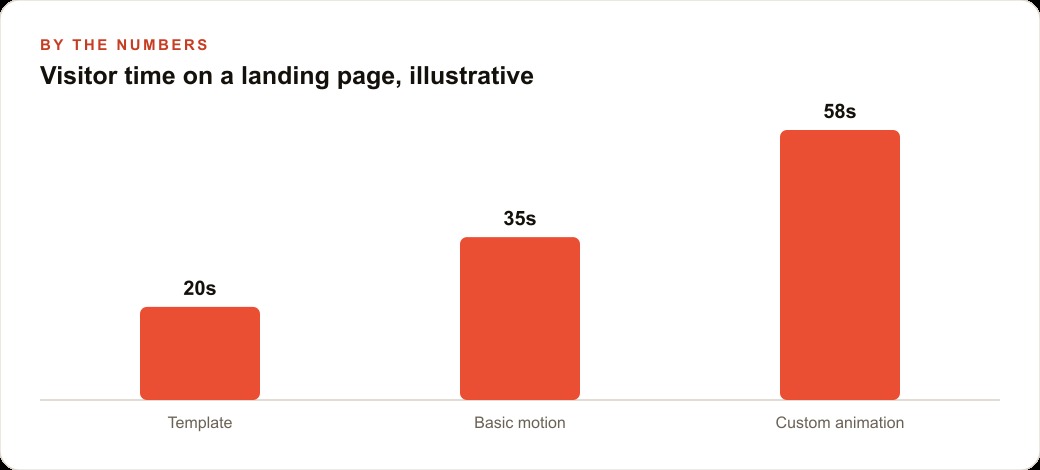
Here is why this matters beyond craft. A page that holds attention longer and feels premium changes the economics of everything pointed at it. When your landing page keeps a visitor engaged, the traffic you buy through Facebook and Instagram ad campaigns converts at a higher rate, so the same ad spend produces more booked orders. The same is true for anyone running Google Ads, where a more engaging destination lifts the quality of every click you already pay for. And because a well built animated page is still just clean HTML, CSS, and JavaScript, it stays fast and crawlable, so it keeps earning through SEO and organic search long after the ad budget stops. Motion is not decoration. On a page whose entire job is conversion, it is a lever.
The one habit to change first
If you take only one thing from these eight moves, make it number three. Refuse to write the animation and the code in a single prompt. That one habit, splitting the creative plan from the build, is what holds most people back from ever seeing what Gemini 3 can actually do. Plan the timeline first as its own step. If you do not know how to describe an animation, let the model describe it for you by casting it as a motion designer and asking for the one interaction that makes a user say wow. Then constrain it hard, hand the spec to a builder, and give that builder real docs to read.
You can absolutely do all of this yourself, and I would start by separating planning from building on your very next page. If you would rather have someone plan the timeline, constrain it correctly, and wire up a coding agent that ships a stunning animated site on the first pass, that is exactly the kind of build I do for clients, and you can bring me in to handle it.
That is exactly what we do at AI DOERS. Book a private 30-minute call with Madhuranjan Kumar and we will map the fastest path to it for your specific business.
Book your call →
Madhuranjan Kumar
Madhuranjan Kumar brings 20 years of performance-marketing experience and has managed over $200 million in Facebook ad spend for brands across the United States and beyond. His expertise spans the full modern marketing stack: Meta, Google Ads, TikTok, email automation, CRM, and the websites that hold it together. At AI DOERS he turns that track record into lead-generation systems for businesses across every industry.