
How to Move From ChatGPT to Claude Without Losing Your Memories
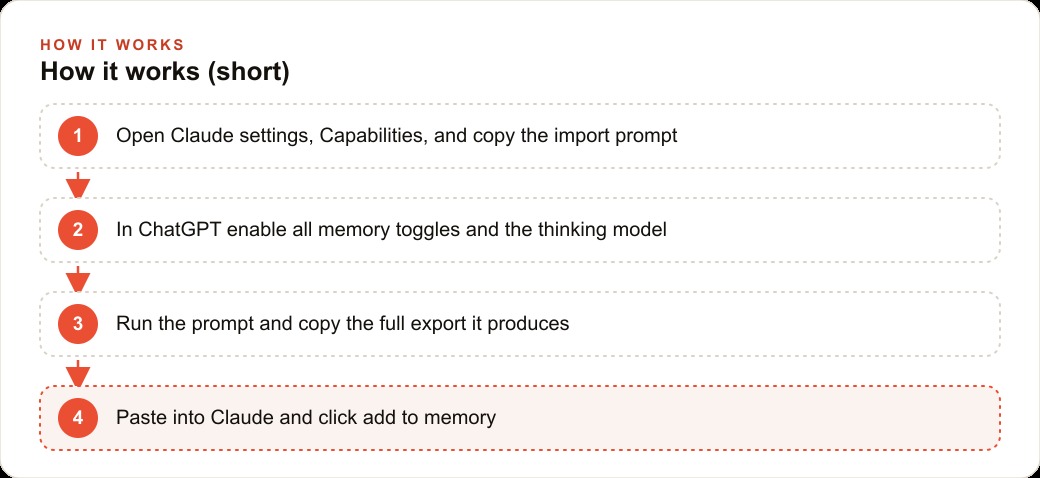
Claude added a built-in import that copies a prompt you run inside ChatGPT, and the trick to capturing everything is to turn on all three ChatGPT memory toggles and switch to the thinking model before you run it.


The switching cost that kept the firm on a tool that no longer fit
The consulting firm had been using ChatGPT for 18 months. Over that time, the tool learned a significant amount about how the firm worked: the tone they used in client-facing proposals, the standard clause language they returned to on contracts, the house style for briefing documents, and the terminology specific to each of three active client engagements. None of that context was written down in a single place. It was distributed across ChatGPT's memory system, in the instructions saved to each project, and in the history of hundreds of conversations.
I am Madhuranjan Kumar, and the firm had started to find Claude more useful for the heavy drafting work that made up most of its billable output. The writing quality felt different. The context handling on long documents was better. But every time someone opened Claude to try it on real work, the difference in useful context was immediately visible. Claude knew nothing about the firm. ChatGPT knew almost everything. Going back to ChatGPT took two seconds. Building context in Claude from scratch felt like a project that would take weeks of correcting and re-teaching before the output quality matched what was already available in the other tool.
What kept the firm on ChatGPT was not affection for the product. It was the switching cost, and specifically a switching cost that felt higher than it actually was, because the team did not yet know that Claude had a built-in import path. The import does not ask for a data export file or an API key. It gives you a prompt to run inside ChatGPT, and you paste the result back into Claude. That process takes about 10 minutes for the basic memory layer, with additional time for migrating each project separately.
The import is also more accurate than most people expect. Claude's memory system handles incoming context by categorizing it, formatting it cleanly, and regenerating it each night based on new conversations. The migrated context does not sit frozen at the import date; it is a starting point that the system continues building on from the first day of use.
Understanding that the cost was a single afternoon rather than weeks of re-teaching was the fact that changed the firm's decision. They had been tolerating a tool that no longer fit because they believed the alternative was expensive. The alternative was not expensive. It was one careful afternoon of migration.
The first import attempt and why it returned almost nothing
The first team member to try the import started in Claude's settings, navigated to the Capabilities tab, and copied the import prompt. The next step was to open ChatGPT, paste the prompt, and run it. What came back was five items. For a tool the firm had used daily for 18 months on complex client work, five memories was not a snapshot of their context. It was almost nothing.
The instinct at this point is to assume the import is broken or that ChatGPT simply does not store as much context as it appeared to. Neither assumption is correct. The export returned five items because of the default settings active in ChatGPT when the prompt ran. In the default state, ChatGPT does not draw from its browsing history, does not search across the full chat history, and limits the scope of what the extraction prompt can reach. The prompt worked correctly; it ran against a narrow slice of the available data.
This is the part of the migration that most people abandon. They run the prompt, get a thin result, conclude that their context is not portable, and continue with whichever tool they started on. The thin result is not the conclusion. It is the signal that two specific settings need to be changed before running the prompt again.
The gap between five items and the firm's actual 18 months of accumulated context is not a flaw in the import mechanism. It is a gap created by running the prompt without unlocking the full scope of what ChatGPT stores. Once the firm's team member understood that, the path forward was clear: adjust the settings, run the prompt again, and compare the output.
Two settings that unlocked the full picture
The fix is in ChatGPT's personalization settings. There are three memory toggles that control what the extraction prompt can access, and all three need to be enabled before running the import prompt. The first toggle covers saved memories: the explicit facts ChatGPT captured and stored from conversations over time. The second covers browser memories: context learned from browsing behavior when the ChatGPT browser feature was used. The third covers chat history, which is the setting that makes the largest difference. It allows the extraction prompt to reach across historical conversations and pull patterns and context that were never explicitly saved as memories but are present in the history of how the firm used the tool.
After enabling all three toggles, the model in the chat also needs to change. The default auto mode in ChatGPT does a quick pass when the extraction prompt runs. Switching to the thinking model before running the prompt gives the extraction substantially more reasoning cycles to look through the account history, trace patterns across conversations, and surface context that a shallow pass would not find. The thinking model takes longer to run, typically an additional minute or two, but the output is worth the wait.
With all three memory toggles enabled and the thinking model selected, the firm's team member ran the extraction prompt a second time. The output was a code block with over 50 items: the house style for proposals, the standard clause language from contracts, terminology specific to each of the three active client matters, preferences for how the firm structured briefing documents, and a set of communication preferences the team had mentioned across many conversations. That was the actual context built over 18 months. The first run caught five items because it was looking through a narrow window. The second run caught over 50 because the window was fully open.
Copying that code block, pasting it into Claude's memory import field, and clicking add to memory loaded all 50-plus items into Claude's memory system in a clean, categorized format. The firm now had its full context in both tools, which meant they could compare Claude's output on real work tasks from a fair starting position for the first time.
Migrating project context, not just general memory
The general memory captured in the first migration phase was the background layer. The richer context was in the projects. The firm had three active client matters managed as ChatGPT projects: a contract dispute that had been running for nine months, an employment case at the seven-month mark, and a regulatory compliance project started three months earlier. Each project held files, prior conversation context, saved instructions, and the specific terminology that had been refined over many working sessions.
The general import does not capture project context automatically. Projects are separate containers in ChatGPT, and the extraction prompt needs to be run from inside each one to capture the matter-specific content. The process for each project is identical to the general migration: open the project in ChatGPT, verify that all three memory toggles are on in personalization settings, switch to the thinking model, and run the extraction prompt from inside the project context so the model has access to the project's specific history.
For the contract dispute project, the extraction returned the template clause language the firm had developed, the timeline of key events in the matter, the client's stated priorities and concerns, and the three open issues the most recent working session had identified. For the employment case project, it returned the factual summary the firm had built, the relevant regulatory framework as they had narrowed it, and the tone guidance the client had given for correspondence with the opposing party. For the regulatory project, it returned the compliance checklist structure the firm had developed and the three outstanding items still under review.
In Claude, the team created three new projects, one for each client matter. The extracted content for each matter went into the project memory. The standing instructions from the original ChatGPT project, things like citation style, letter format, and conflict-check reminders, went into Claude's project instructions field so they applied across every conversation within that matter. After approximately 12 hours, the memory update cycle completed and each project reflected the content that had been imported.
The step most migrations overlook is running the extraction from inside each project rather than from the general chat. That distinction matters because project context is richer and more specific than general memory. General memory holds what ChatGPT learned about the user across all conversations. Project memory holds what the firm taught it specifically about each client matter. Both layers are needed for a complete migration, and each requires a separate extraction run.
What the review pass found and why it mattered
The team did a review pass on the imported memories before using them in real work. The pass took about 20 minutes across all three projects and the general memory. It was the step one team member had considered optional and the other had argued was necessary. The second team member was right.
The review found four issues. The first was a client matter name that came through as a shortened version rather than the full formal name the firm used in all correspondence. The second was a timeline date in the contract dispute that was off by one month, likely because the extraction model inferred it from context rather than reading it from a specific saved fact. The third was a clause description that captured the general intent of a standard clause but paraphrased it slightly differently from the firm's actual language, which would have produced a subtle style drift in any drafting the agent did using that memory. The fourth was a preference note that attributed a communication style to the wrong client matter, mixing context across two projects.
None of these errors was catastrophic on its own. A slightly wrong date in a background memory would have been a small error in the short term. A paraphrased clause is a small divergence from the firm's actual language. But all four, left uncorrected, would have shown up in real work in ways that required correction after the fact rather than prevention upfront. In legal and consulting work, an output that contains an incorrect date or a subtly wrong clause is not an interesting artifact. It is a problem that creates risk if it goes out uncorrected.
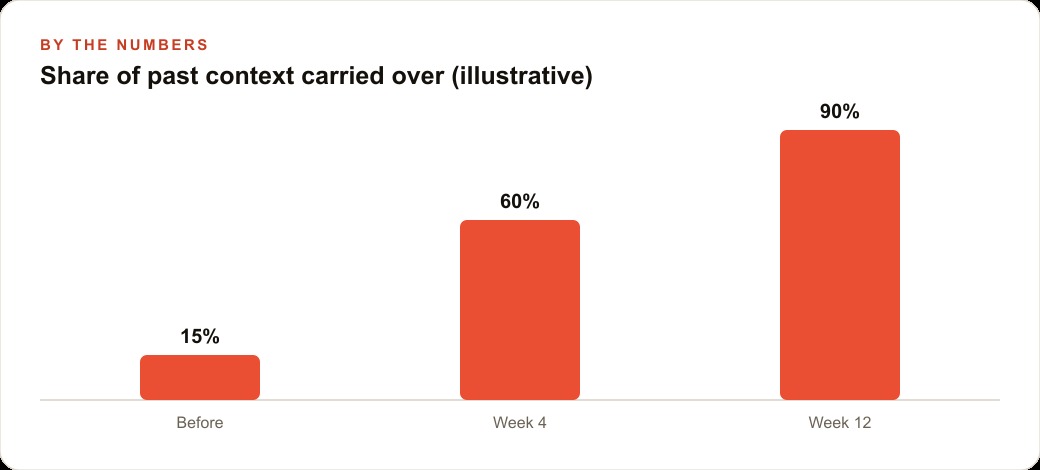
The review pass caught all four and corrected them directly in Claude's memory interface using the edit function. The firm now had a memory system that reflected its actual context rather than an approximation of it, and the team had a clear sense of how accurate the import had been overall. Approximately 46 of the 50-plus imported items were accurate on arrival. Four required correction. That is a 90-plus percent first-pass accuracy rate, which is a reasonable starting point that the review pass brings to full accuracy in 20 minutes.
The lesson the review pass reinforced is that the extraction is a high-quality approximation, not a perfect copy. Specific proper nouns, dates, and clause language need a human eye before they go into a context system that will generate real work products. The 20-minute investment in the review pass is the step that converts a high-quality approximation into a reliable foundation.
The firm's first week running on Claude with full context
By the fourth day of the first week, the team had a clear read on what the migration had actually transferred. The proposal a team member drafted for a new business inquiry came back in the firm's actual voice and style on the first draft rather than requiring three rounds of editing. The briefing document for an upcoming client meeting reflected the matter-specific terminology and the structure the firm used, not a generic consulting document format. The reply to a counterparty's request for information used the clause language the firm had developed, because that language was now in the memory system the agent referenced.
The concrete time savings were immediate. The firm had a rough estimate of how long re-orienting ChatGPT took at the start of each working session before context refreshed: typically two to four minutes of setup, including pasting the project context and any standing instructions. For a team member who opened a project session eight to ten times per day, that was 16 to 40 minutes of daily re-setup that produced nothing billable. With Claude's persistent memory reflecting the full context from the migration, the first message in each session was productive rather than administrative.
The nightly memory regeneration was the feature that surprised the team most in the first week. Claude's memory system updated each night based on the new conversations from that day, which meant the context in the system was not frozen at the import date. By the end of the first week, the three project memories reflected context from five new working sessions, including a correction to one of the open timeline issues in the contract dispute that had been resolved in a client call on Wednesday. The system was learning the new state of each matter without anyone manually updating it.
The share of context recovered from the 18-month ChatGPT history was approximately 85 to 90 percent on the first import, corrected to full accuracy in the 20-minute review pass, with the remaining gaps filling in over the first week of normal use. By day five, the team was operating on Claude with context that felt as current and accurate as what they had been working with in ChatGPT, and in several respects more so, because Claude's handling of long document drafts produced fewer structural revisions than the previous tool had.
The firm's conclusion after the first week was that the switching cost they had been afraid of turned out to be one careful afternoon plus one review pass. What had appeared to be a weeks-long re-teaching process was in practice a single day of migration that produced a working context in the new tool the same evening it started. The 18 months of accumulated value transferred. The tool that fit the work better was now running with the full history behind it.
That is exactly what we do at AI DOERS. Book a private 30-minute call with Madhuranjan Kumar and we will map the fastest path to it for your specific business.
Book your call →
Madhuranjan Kumar
Madhuranjan Kumar brings 20 years of performance-marketing experience and has managed over $200 million in Facebook ad spend for brands across the United States and beyond. His expertise spans the full modern marketing stack: Meta, Google Ads, TikTok, email automation, CRM, and the websites that hold it together. At AI DOERS he turns that track record into lead-generation systems for businesses across every industry.