
How to Cut a $10,000 AI Agent Bill With Local Models
Keep frontier models like Opus and GPT for the hard work, then move embeddings, transcription, classification, and chat onto open-source models running on a GPU you already own. The routine tasks become nearly free and your data never leaves the building.

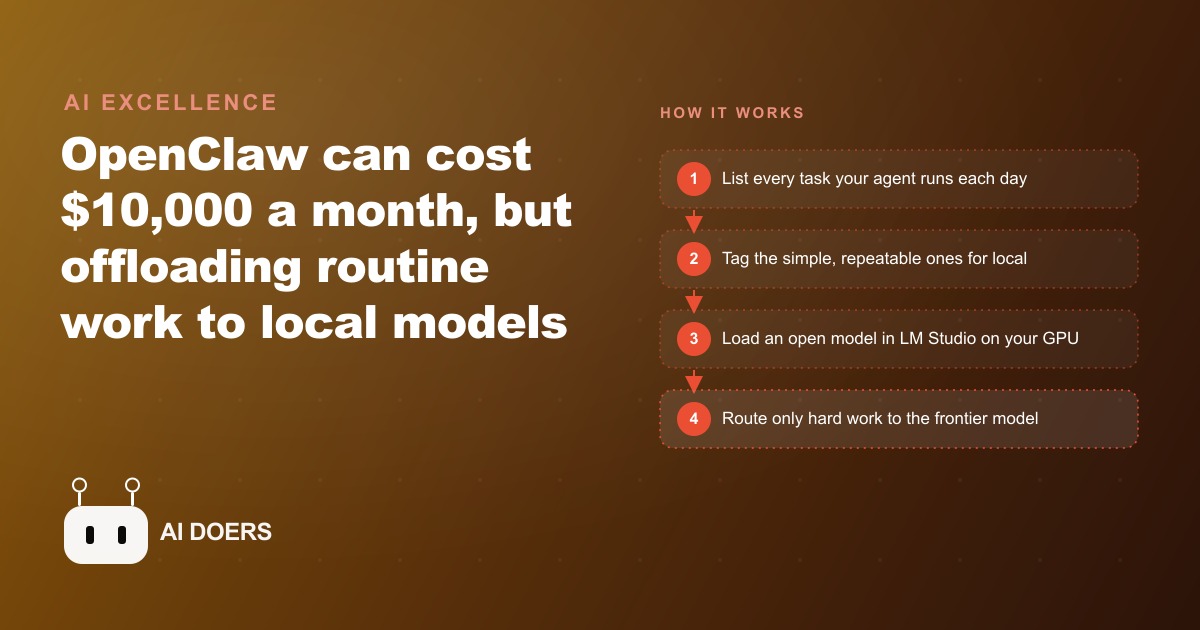
Some teams are spending upward of ten thousand dollars a month just to run their AI agent in the cloud, and almost none of that money needed to be spent. The reason is simple: every task, no matter how trivial, gets routed to a top-tier frontier model, so you pay premium prices for work a much smaller model could finish without blinking. I am Madhuranjan Kumar, and this is one of the easiest large costs I know how to cut. Here are seven moves that take a runaway agent bill and turn most of it into a few dollars of electricity, while keeping your data on your own machine.
1. Accept that local models handle about ninety percent of the work
The mental unlock comes first. Open-source models you run on your own hardware are genuinely good enough for roughly ninety percent of everyday use cases. Not the hardest ten percent, but the bulk of what an agent actually does all day: embeddings, transcription, classification, document extraction, routine chat. Once you believe that number, the whole strategy follows, because it means the frontier model was doing ninety percent of its work at a premium for no reason. The move is not to abandon frontier models. It is to stop reaching for them by reflex on tasks that never needed that much horsepower.
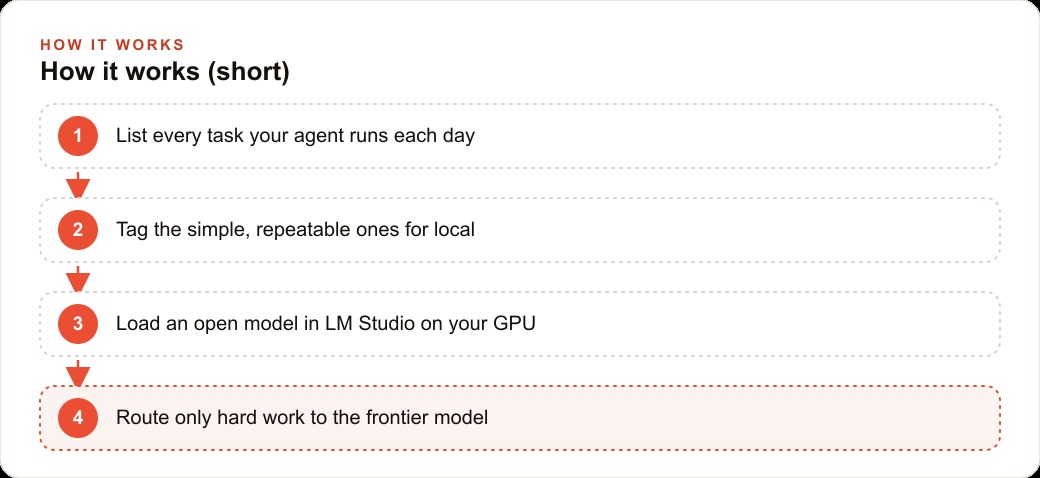
2. Split every task by difficulty before you route it
The architecture that saves the money is a clean split. Reserve frontier cloud models like Opus and GPT for coding and complex planning, the work where quality genuinely cannot slip. Send everything else to local open-weight models. That single routing decision is where the savings live. Most teams never make it, because their agent was built to call one model for everything and nobody went back to sort the tasks. Sit down and label each task your agent runs as either hard or routine. The hard ones stay in the cloud. The routine ones, which are the majority, move to a model running on a GPU you already own.
3. Use hardware you probably already have
People assume this requires a brand-new machine, and it does not. An older NVIDIA RTX 30 or 40 series card, an aging gaming laptop, or a small DGX Spark box can all serve local models perfectly well. The only real limit is VRAM, which just caps how large a model you can load, not whether you can run one at all. This is the move that kills the last excuse, because the up-front cost most people fear is often already sitting under a desk. Before you budget for anything, take inventory of the graphics hardware your business already owns, because the odds are good that it can carry the routine load today.
4. Let LM Studio pick the model so setup stays painless
The tooling is no longer the barrier either. LM Studio is the lowest-friction way to run models locally, because it looks at your machine and picks a model that fits, then ships its own interface so you can be running in minutes rather than wrestling with configuration. This matters because the fear that stops most owners is not cost, it is the imagined complexity of self-hosting. The reality is closer to installing an app. The move here is to start with the simplest possible path, get one model running and answering, and only add complexity once you have proven to yourself that the routine work runs fine locally.
5. Pick a model family sized for the sweet spot
Not every open model is worth running, and you do not need the biggest one. Powerful open-weight families like Qwen, Llama, GLM, and NVIDIA's NeMoTron run on your own hardware, and a model around thirty billion parameters tends to hit the sweet spot of speed and quality for everyday tasks. Big enough to be genuinely useful, small enough to run fast on hardware most offices already have. The move is to resist the instinct that bigger is always better. For transcription, classification, and summarization, a well-chosen mid-size model is faster, cheaper, and more than accurate enough, and it leaves the frontier model free for the rare hard task.
6. Follow the experiment, productionize, scale path
The sequencing is what keeps this from becoming a mess. Start every new workflow on a frontier model while you are still figuring out what works, because you want the smartest tool available when the process is undefined. Once it is repeatable, productionize it so the steps are reliable and written down. Then scale by identifying which of those now-documented steps a local model can take over, exactly the way you would hand a documented process to a new hire. This is the move that turns a one-time cleanup into a habit. You are not trying to move everything local on day one. You are moving each step down to cheaper hardware the moment it is stable enough to hand off.
7. Treat a separate GPU box like an external card you SSH into
For the teams that want more horsepower without buying a whole new workstation, there is a clean trick. Treat a machine with a strong GPU, a 5090 box or a DGX Spark, like an external graphics card you connect to over SSH from a laptop. Some agent tools can even find the machines on your network and connect for you. This is the move that lets a lightweight laptop tap into serious local compute sitting in a closet or a back office, so the person working never needs the powerful hardware in front of them. It also means one shared GPU box can serve the routine load for a whole small team, spreading the cost across everyone who uses it.
What the seven moves add up to in one real business
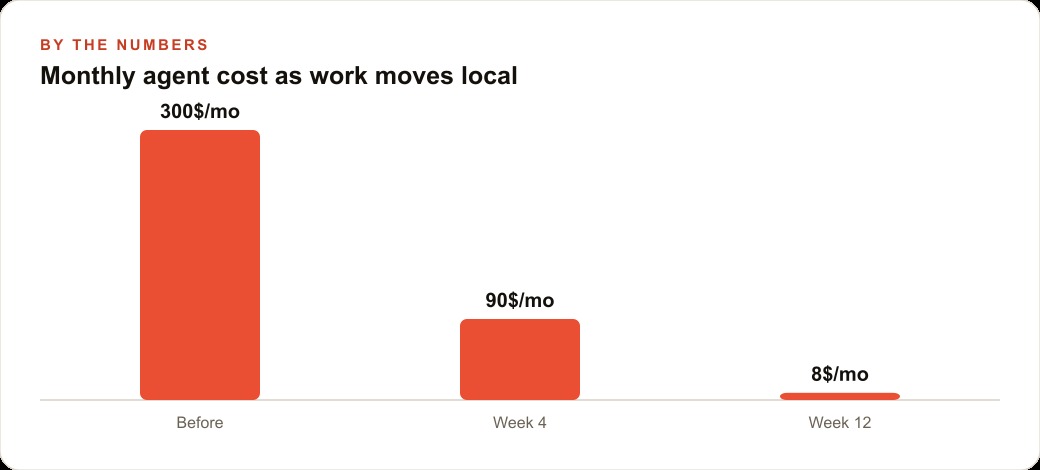
Let me make the savings concrete with a worked example and illustrative numbers, because the pattern is easy to nod at and worth actually running. Take a busy dental practice that records consultation calls, sends post-visit summaries, and lets the front desk search past treatment notes. Today, imagine all of that runs through a hosted frontier model at around three hundred dollars a month, and worse, it means protected health information is leaving the building on every call, which is a genuine privacy headache in healthcare.
Here is how I would rebuild it. A single local model on the practice's existing computer handles call transcription, turns each recording into a clean note, classifies it by treatment type, and powers a private search over past visits. None of that patient information ever leaves the office. The practice still keeps a frontier model on hand for the rare hard task, like drafting a tricky insurance appeal letter, but the daily grind of transcribing, summarizing, and tagging now runs locally for the cost of electricity, call it a few dollars a month. That is roughly three hundred dollars a month down to under ten, which is close to thirty-five hundred dollars a year saved, plus a tighter privacy posture at the same time. Those numbers are illustrative, but the ratio is the real point: the routine work was always the cheap work, you were just paying cloud prices for it.
The proof shows up beyond healthcare too. A knowledge-base tool that scrapes articles, embeds them, and summarizes them used to cost twelve to twenty dollars a month on a cloud model and now runs free on a local Qwen model. A custom CRM that used to query a frontier model now answers with local Qwen, so every question and answer stays in-house. The pattern is identical every time: keep the frontier model for the hard ten percent, move the routine ninety percent onto hardware you already own.
The money you free up does not have to sit idle either. The same budget that was quietly leaking to cloud inference can go into the work that actually grows the business, whether that is stronger Facebook and Instagram ad campaigns, the follow-up automation living in your CRM and website stack, or the content that builds SEO and organic search over time. Cutting the bill is not just defense, it is funding.
NVIDIA is leaning hard into this direction too, shipping open models like NeMoTron alongside the hardware and an enterprise agent stack, so the open ecosystem only gets stronger from here. The playbook stays the same for every business: audit your stack, list every task a smaller local model could handle, keep coding and complex planning in the cloud, and move the rest onto a GPU you already own.
The real barrier is a mindset, not a GPU
Everything above is technically simple, and yet most teams paying enormous cloud bills will not make the change. The blocker is almost never the hardware or the tooling. It is a mindset that treats the frontier model as the safe default and anything else as a downgrade. Owners feel that routing a task to the most powerful model is the responsible choice, as if using a smaller model somewhere is cutting a corner. That instinct is exactly backwards, and it is the single most expensive belief in modern AI operations.
Using a frontier model to classify a support ticket or transcribe a call is not being careful. It is being wasteful, the same way flying a cargo jet to deliver a single envelope is not thorough, it is absurd. The task defines the tool it deserves, and the overwhelming majority of tasks an agent runs all day are routine work that a mid-size local model handles indistinguishably from the expensive one. The quality difference on those tasks is often zero. The cost difference is a hundredfold. Clinging to the frontier model out of a vague sense of safety is paying a hundred times over for a result you could not tell apart in a blind test.
The second half of the mindset shift is about ownership of your own data and infrastructure. Running everything through a cloud model does not just cost money, it means your operational data and your customers' information leave the building on every call, which in regulated fields is a genuine liability rather than a convenience. Moving the routine work local flips that. The data stays on a machine you control, the recurring cost collapses to electricity, and you stop renting capability you could own outright. There is a durability argument here too. A local setup keeps working regardless of a provider changing prices, deprecating a model, or rate-limiting you at the worst moment. You are no longer fully dependent on a bill that someone else can raise.
I find the cleanest way to break the mindset is to force the question on every task explicitly. For each thing your agent does, ask what is the smallest, cheapest model that produces an acceptable result here, and default to that, rather than asking what is the best model and defaulting to the most expensive. Flip the default and the savings appear almost immediately, because you discover how little of your workload genuinely needed the frontier model in the first place. The hard ten percent becomes obvious precisely because it is the small set of tasks where the cheap model visibly falls short, and everything else quietly moves down.
None of this means frontier models are bad or that you should avoid them. They are extraordinary at the hard ten percent, the complex planning and the genuinely difficult coding, and you should absolutely keep them for exactly that. The point is discipline about the split. Reserve the expensive tool for the work that needs it, move the routine majority onto hardware you already own, and the bill that felt like a fixed cost of doing business turns out to be almost entirely optional. The teams spending ten thousand dollars a month were not buying ten thousand dollars of value. They were buying a few hundred dollars of hard work and paying frontier prices for the rest out of habit.
You can do all of this yourself, one workflow at a time. If you would rather bring in someone to map the workflow, right-size the models, and wire it together so it just works, that is exactly the kind of build I do for clients, and you can bring me in to handle it.
That is exactly what we do at AI DOERS. Book a private 30-minute call with Madhuranjan Kumar and we will map the fastest path to it for your specific business.
Book your call →
Madhuranjan Kumar
Madhuranjan Kumar brings 20 years of performance-marketing experience and has managed over $200 million in Facebook ad spend for brands across the United States and beyond. His expertise spans the full modern marketing stack: Meta, Google Ads, TikTok, email automation, CRM, and the websites that hold it together. At AI DOERS he turns that track record into lead-generation systems for businesses across every industry.