
How to Build a Cursor-for-X Agent With the Vercel AI SDK
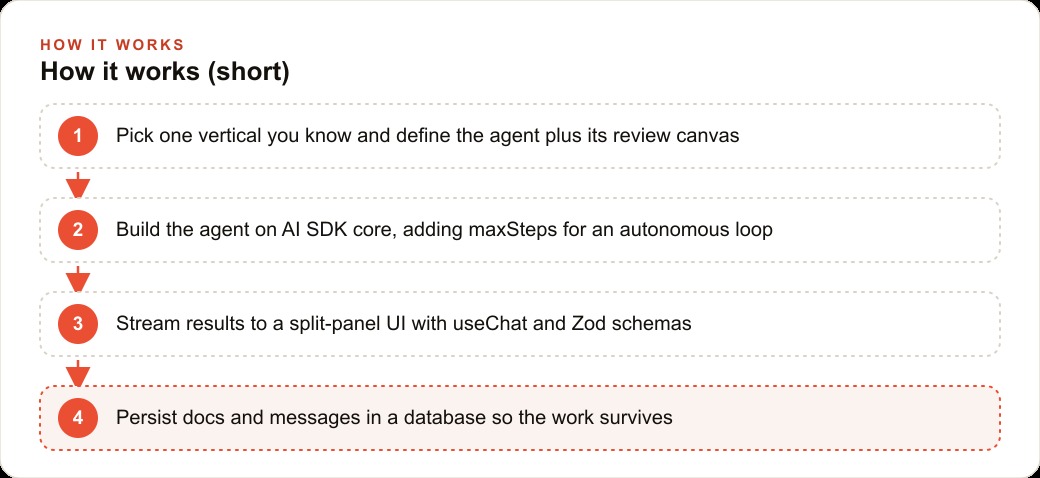
Vertical agents are the opening of this cycle. Pair a tool-using agent with a specialized review canvas, then build both with the Vercel AI SDK: core for the model and agent loop, UI for streaming, Zod for structured output, and shared state plus a database for persistence.

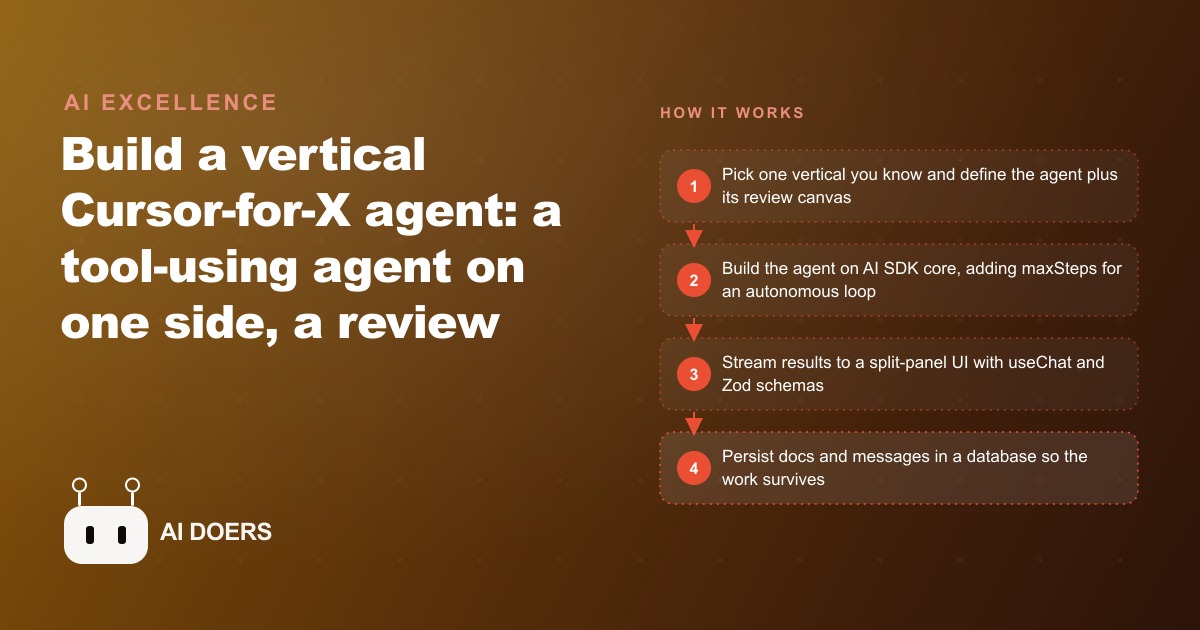
Cursor for code crossed $400 million in annual revenue in two years. Every professional domain that runs on documents is next, and the build pattern is nearly identical.
The bet that Madhuranjan Kumar keeps sharing with technical founders is not complicated: vertical agentic software is where the value of this cycle gets captured. Coding was the first domain to reach real product-market fit with an agent-plus-canvas model. The same shape is coming for contracts, client briefs, investor reports, clinical notes, and architectural drawings. If you know a vertical well, that is your opening. The build, using the open-source Vercel AI SDK in TypeScript, is approachable enough that a founding team can own it. Here is how it works, piece by piece.
The two-panel split that defines every Cursor-for-X product
Every Cursor-for-X product has the same structural signature: an AI agent on one side doing real, tool-assisted work, and a human-facing canvas on the other where the work lands and can be reviewed, edited, and approved. Cursor pairs a coding agent that writes files, runs commands, and calls tools with a code editor where you watch changes land in context and intervene when something needs correction. Strip the domain and the shape is the same for every vertical.
The agent side needs tools. Not just the ability to generate text but the ability to do domain-specific work: search a clause library, check a draft against a playbook, call an external data source, write a structured output that something downstream can parse. The canvas side needs to make that work visible, versioned, and co-editable. The model proposes; the human reviews; the loop continues until the output is correct. That two-panel structure is not optional. Without the canvas, users have no visibility into what the agent did and no surface on which to co-work with it. Without the agent tools, it is just a chatbot that generates text they paste somewhere else.
The business insight is that every professional domain has the same underlying shape: a body of work that requires specialized knowledge to produce, a human who needs to review and approve that work before it goes anywhere, and a massive time cost in the drafting and checking steps between start and approval. The agent handles the drafting. The canvas handles the review. The loop closes the gap between the two. That is the entire product pattern, and it maps cleanly onto law, medicine, finance, architecture, marketing, and every other document-heavy profession.
Vercel AI SDK core: swap any model without rewriting your logic
The Vercel AI SDK sits at the center of this build because it solves the model-dependency problem before it becomes a problem. Most teams who wire a product directly to one model provider discover, usually at the worst possible moment, that they need to switch models or test a newer release and their entire architecture is tied to the previous provider's API shape. The SDK abstracts that away with a provider-adapter pattern: install one small adapter package per provider, import it, and your underlying logic stays unchanged when you switch models.
The core toolkit gives you a clean set of building blocks. generateText produces a one-shot completion. streamText switches to streaming output, which cuts the perceived latency for longer outputs and matters significantly for the canvas experience where the user is watching content appear. streamObject pairs streaming with a Zod schema and produces structured JSON in real time, which is what you need when the agent's output is not prose but a typed data structure your frontend can render and your database can store.
The practical implication is that the right model for drafting a clause might be different from the right model for verifying it against a compliance database, and with the SDK you can use different models for each task without rewriting the agent logic. That flexibility matters as the model landscape changes rapidly. Locking to one provider's API is a technical debt that compounds quickly. The SDK's abstraction layer is not overhead. It is the choice that keeps the codebase maintainable as the underlying model options evolve.
maxSteps: how one property turns a tool call into an autonomous agent loop
The single property that converts a chatbot into an agent is maxSteps. Without it, the model can call a tool once but cannot act on the result. With it, the SDK handles the entire call-tool-respond-call-again loop automatically. Set maxSteps to 10 and the agent can call a tool, process the output, decide whether to call another tool, and keep going until it reaches a stopping condition or hits the step limit.
Each tool in the agent's toolkit is defined with four things: a name that is human-readable and descriptive, a description that tells the model when to use this tool and what it does, a parameters schema that defines the shape of its inputs using Zod, and an execute function that runs when the model decides to call it. The execute function can call an external API, search a database, run a calculation, or call another model. The model sees the tool's return value and decides what to do next based on it.
That loop is the core of what makes the agent capable of multi-step work rather than single-turn responses. For the law firm Cursor for contracts described below, the agent's toolkit includes a clause search tool, a playbook compliance checker, a missing-terms detector, and a redline writer. With maxSteps set to 10, the agent can receive a contract, call the clause search, check the results against the playbook, identify missing terms, and write a redline, all in a single invocation, without the user having to prompt each step manually. The user submits the contract and the agent does the work.
Zod schemas as the typed contract between agent and output
Zod is to TypeScript what Pydantic is to Python: a schema definition and runtime validation library that ensures structured outputs have exactly the shape you expect. In a Cursor-for-X build, Zod does two distinct jobs.
The first is defining tool inputs. Every tool the agent can call has a parameters schema written in Zod. When the model decides to call a tool, it must fill the parameters according to that schema. The field descriptions within the schema are not cosmetic. They are instructions to the model: "rate: the annualized cap rate as a decimal, not a percentage" tells the model something different from "rate: the cap rate." More descriptive field definitions produce more reliable structured outputs, particularly for complex domain-specific schemas where the model might otherwise make reasonable but incorrect assumptions about what a field expects.
The second job is defining the shape of the agent's final output. When you use streamObject with a Zod schema, the SDK streams the output as structured JSON and validates it against the schema as it arrives. The frontend receives a typed object, not a string it must parse and validate. For a canvas that renders a contract redline, a property analysis, or a clinical summary, receiving a typed object that matches an expected interface means the rendering logic is simple and the edge cases are handled at the schema level rather than scattered across the component. This is what makes the canvas feel reliable rather than fragile.
useChat and createDataStreamResponse for live sub-agent visibility
The frontend half of a Cursor-for-X product is built on useChat, the Vercel AI SDK's hook for streaming chat interfaces. useChat manages the message history, the input state, and the connection to your API route. It exposes an append function for programmatically sending messages, which is what you use to trigger the agent from the canvas rather than waiting for the user to type. The messages array contains the full conversation including tool calls and their results, which you can render in the chat panel to give users visibility into what the agent did and why.
The harder problem is sub-agent visibility. When a tool's execute function calls another model to do specialized work, a plain streamText inside it produces output that goes nowhere visible. The parent stream is waiting for the tool to return a result, and the child stream's output is invisible to the user during that wait. The fix is createDataStreamResponse, which merges streams and lets you push custom data into the response. You loop over the child stream's text deltas and write each one to the merged stream, so users see the sub-agent working in real time rather than seeing a loading state for an indeterminate period.
For a document-heavy agent where sub-tasks like checking a clause against the playbook or verifying a missing term might each run for several seconds, live visibility into the sub-agent work dramatically changes the user experience. The canvas feels responsive and transparent rather than opaque. Users understand what the agent is doing and intervene earlier if something is going in the wrong direction. Sub-agent transparency is not a nice-to-have feature. It is the difference between a product that users trust and one they do not.
The playground canvas: a split screen that remembers both sides
The canvas is the product. The agent is what populates it. For most Cursor-for-X products, the canvas is a split-panel layout: a chat or instruction area on one side where the user communicates with the agent, and a content area on the other where the document, report, or output lives and updates in real time as the agent works.
Shared React state acts as the bridge between the two panels. When the agent produces output, it updates the shared state, which re-renders the content panel. When the user makes an edit in the content panel, that change goes back into the context the agent receives on the next turn. The two panels are not separate interfaces. They are two views of the same shared state, and the value of the canvas model is precisely that co-working loop: the agent proposes, the user adjusts, the agent picks up the adjusted context and continues.
Versioning on the canvas closes the loop for professional use cases. The contract Cursor auto-versions the output as V1 when the agent produces its initial redline, and as V2 when the user's edits or the agent's revision cycle produces an updated version. Nothing is lost. Every version is reviewable, and the final approved version is the one that gets exported or sent to the counterparty. That version trail is also the audit record, which matters in any professional context where the chain of edits needs to be reconstructable.
Persistence beyond the session: React state for speed, a database for survival
React state is fast but volatile. The moment a user closes a tab or a session ends, the work is gone. For a Cursor-for-X product used by professionals on documents that matter, that is not acceptable. Every document produced, every message in the conversation, and every version of the output needs to persist in a database.
The pattern that works is a two-layer persistence model. React state handles the live streaming experience: as the agent produces output, shared state updates in real time without the latency of a database write on every token. When the agent finishes a response or a meaningful checkpoint is reached, the output is written to the database. Supabase is the common choice for this because it provides a straightforward JavaScript client, real-time subscriptions, and a Postgres foundation that handles the relational data model most professional applications need. The demo auto-versions output as V1 and V2 by timestamp, which works because the timestamp is applied at the database write, not in the stream.
A law firm building the pattern: illustrative numbers on what changes
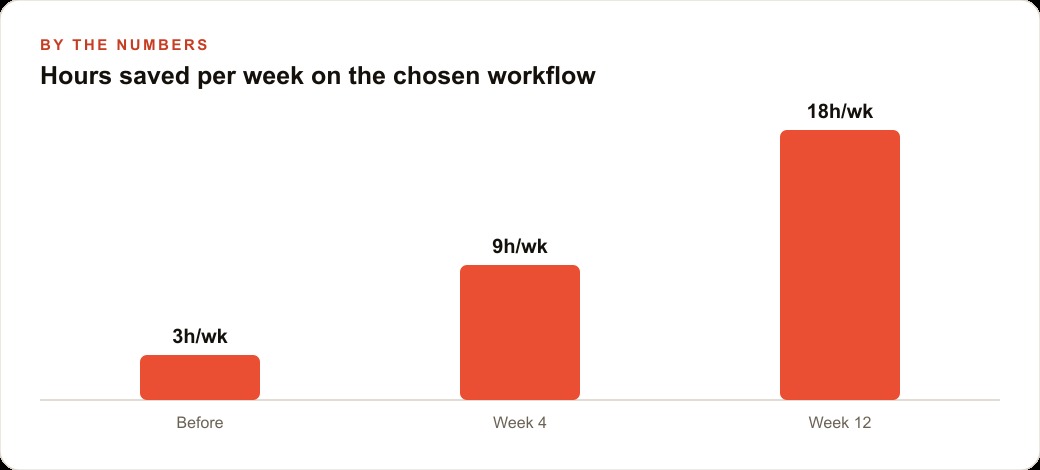
The law firm use case makes the whole pattern concrete. Associates at mid-size firms regularly spend two to three hours per contract reviewing a new draft against the firm's standard playbook: checking that key clauses are present, verifying that the firm's standard positions on liability and indemnification are reflected, identifying missing terms that should be negotiated, and writing a summary memo of what to push back on. The work is high-stakes, which is why a human does it. It is also highly repetitive in structure, which is why it is a strong candidate for an agent to handle the first-pass labor.
In the Cursor-for-contracts build, the agent receives an uploaded contract and runs a multi-step review loop using maxSteps. It calls the clause search tool to identify what is present. It calls the playbook checker to compare each clause against the firm's standard positions. It calls the missing-terms detector to flag what is absent. It writes a redline version of the contract with proposed changes marked, and it produces a structured memo with a Zod-validated output shape that the canvas renders as a formatted document. The whole run happens without any custom runtime logic because the SDK manages the loop.
The associate opens the canvas and sees the redline and the memo appearing in real time in the content panel. They watch each sub-agent step in the chat panel. When the agent finishes, the associate reads the redline, makes the adjustments they disagree with, and sends the output to a partner for review. The associate who previously spent two to three hours on the initial review now spends forty-five minutes reviewing and adjusting what the agent produced. At a firm doing eight to ten contract reviews per week per associate, that is sixteen to twenty-plus hours of associate time recovered weekly. The associate does not leave the workflow. They do the judgment work that requires a licensed attorney. The agent removes the mechanical labor that surrounds that judgment.
The CRM and website stack that manages client matters and document storage connects to the Supabase layer so the finished documents live in the right matter folder automatically rather than being manually uploaded after the fact. For firms whose clients arrive through Google Ads or referral campaigns where speed-to-engagement matters, the Cursor for contracts also means faster turnaround on the documents that move a new client engagement from signed retainer to active work.
The build pattern works for any vertical where the work is document-heavy, repeatable in structure, and valuable enough that a human still needs to review the output before it goes anywhere. A pitch deck Cursor for an investment bank. A brief Cursor for a law firm. A treatment-plan Cursor for a clinical practice. A campaign-brief Cursor for a marketing agency. The two-panel structure, the Vercel AI SDK agent loop with maxSteps, the Zod schemas for structured output, and the split-state persistence model are the same in every case. What changes is the domain knowledge in the tool definitions and the canvas design. The underlying pattern is the infrastructure of the next wave of professional software, and it is available to build today.
That is exactly what we do at AI DOERS. Book a private 30-minute call with Madhuranjan Kumar and we will map the fastest path to it for your specific business.
Book your call →
Madhuranjan Kumar
Madhuranjan Kumar brings 20 years of performance-marketing experience and has managed over $200 million in Facebook ad spend for brands across the United States and beyond. His expertise spans the full modern marketing stack: Meta, Google Ads, TikTok, email automation, CRM, and the websites that hold it together. At AI DOERS he turns that track record into lead-generation systems for businesses across every industry.