
How to Automate Your Work With Claude Code: The Workspace System
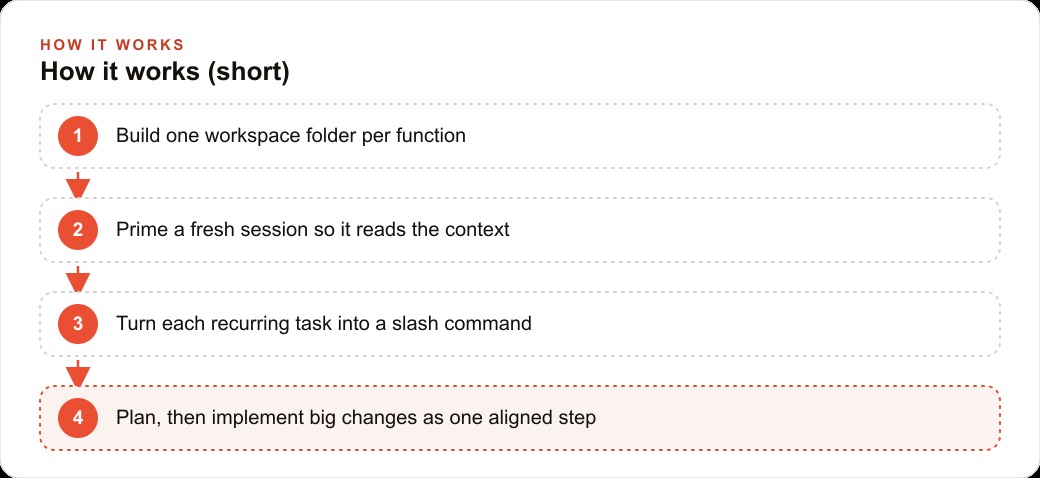
You automate your work with Claude Code by treating it as a digital employee inside a workspace of commands, context, scripts and skills, then priming it every session and turning recurring tasks into reusable slash commands.

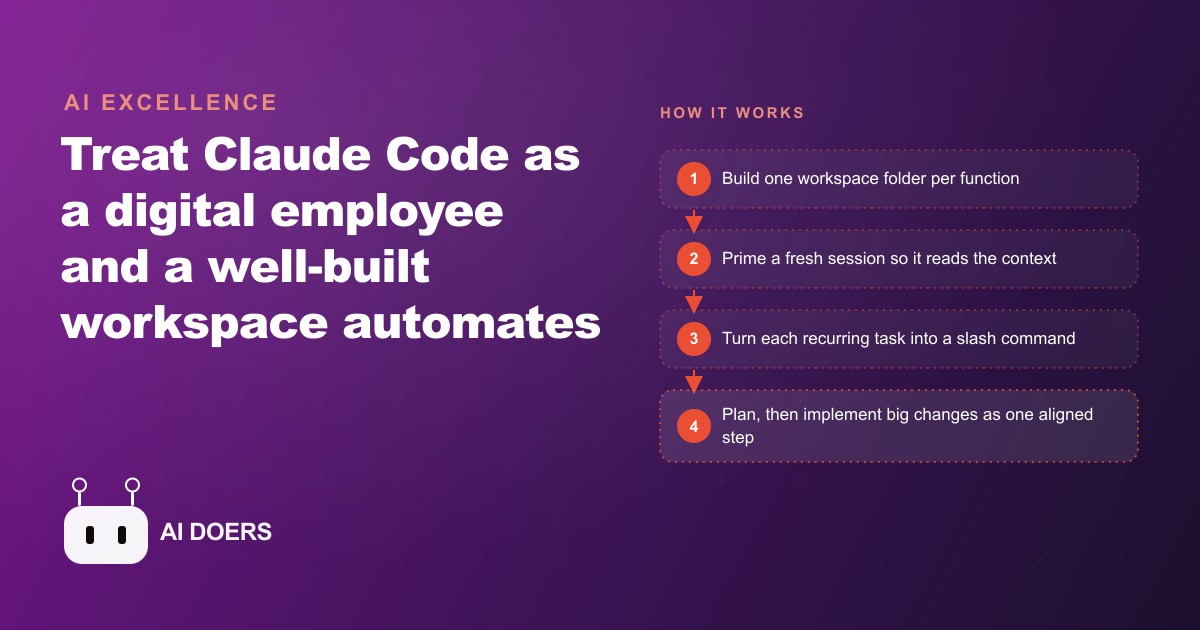
Build the workspace first and the automation follows. Skip it and you are paying for a very expensive autocomplete.
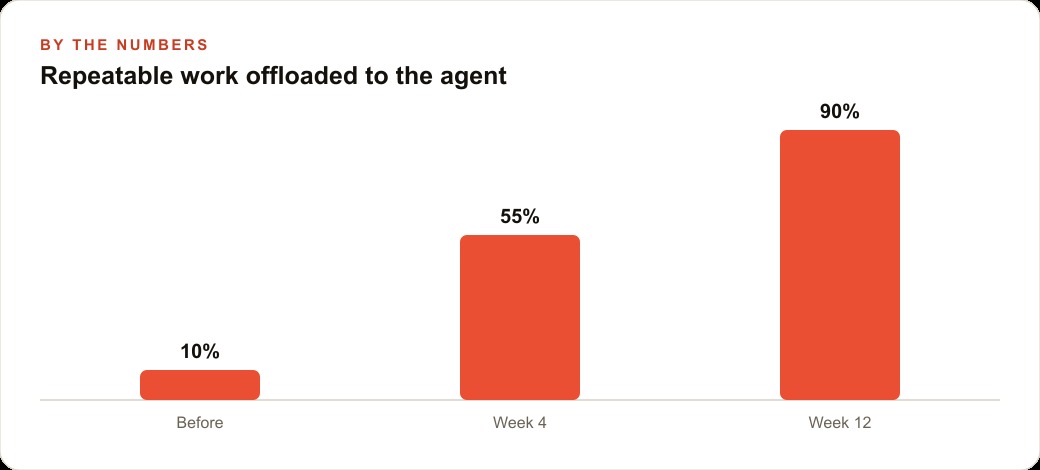
I am Madhuranjan Kumar, and I have spent the last several months watching people use Claude Code as a back-and-forth chat assistant and then complain that it does not save them much time. The issue is almost never the tool. The issue is the setup. Claude Code is not a chat window. It is a digital employee, and digital employees need a proper workplace before they can do real work. The workplace you build is called the workspace, and it is the single difference between an agent that automates 90 percent of your repeatable work by week twelve and one that feels like a faster way to write emails.
Build the folder structure before you open Claude Code for the first time
The workspace is one folder on your machine. Inside that folder you create a handful of sub-folders: one for commands, one for skills, one for context, one for scripts, and a file called claude.md that ties it all together. That is the entire structure. Nothing complicated, nothing that requires technical skill to build. The folder can be named after the business function it serves: marketing-workspace, reporting-workspace, customer-ops-workspace.
The reason the folder structure comes before anything else is that Claude Code reads the workspace at the start of every session. If the workspace is organized, the agent comes in oriented. If there is no workspace, the agent starts every session with nothing but whatever you type into the first message. That means you are spending the first several hundred tokens of every session explaining context that should already be in a file. Over fifty sessions, that accumulated re-explanation is a meaningful waste of both your time and the agent's effective working context.
Build the folder first. Organize it by function. One workspace per function, not one workspace for everything. The tighter the workspace's scope, the cleaner the output that comes out of it.
Write the claude.md file that tells the agent who it is and what workspace it lives in
The claude.md file is the agent's job description. It tells the agent what workspace it is sitting inside, what its role is within that workspace, what it is allowed to do, and what the house rules are. It does not need to be long. Two pages is enough. What it does need is specificity.
A generic claude.md that says something like "you are a helpful assistant for my business" produces generic output. A specific claude.md that says "you are the marketing operations agent for a seven-person software consultancy, your primary tasks are weekly content drafts, competitor summaries and email campaigns, you write in a direct tone without jargon, and you always check the context/current-data.md file before producing numbers-based outputs" produces output that sounds like it came from inside the organization.
I always include four things in the claude.md: what the workspace is for, what the agent's primary recurring tasks are, the tone and formatting rules, and which files to read before starting work. That last one is critical. Telling the agent "before any task, read context/overview.md and context/current-data.md" means the first thing it does every session is absorb the most important context, even before you give it a task. That habit alone improves output quality more than anything else I have done with the tool.
Create the context layer: who you are, what the business does, and what the current data says
The context folder is the onboarding document the agent reads at the start of every session. It holds three things: an overview of who you are and what the business does, a description of the current strategy and the work in progress, and a file of current data that gets updated regularly.
The overview file changes rarely. It describes the business, the products or services, the target customer, the tone of voice, and the competitive landscape. Write it once and update it when something meaningfully changes. The agent reads this file every session and uses it to calibrate every output it produces. Copy written without this file tends to sound generic. Copy written after reading this file tends to sound on-brand.
The current-data file changes often, ideally weekly. It holds the numbers the agent needs to work from: last week's revenue, the open deals in the pipeline, the current ad spend, the traffic numbers, the five most urgent items on the task list. This is the file that makes the difference between an agent working from stale assumptions and an agent working from current reality. Keeping this file accurate is the single most leveraged maintenance task in the whole workspace.
Turn the first recurring task into a slash command
A slash command is a plain markdown file inside the commands folder. You name it something descriptive, and when you type slash followed by that name, Claude Code reads the file and runs the workflow described inside it. The file contains the steps of the task written out clearly: what to read first, what to produce, what format the output should be in, what to do with the result.
The first command you write should be for the task you do most often. For most small business owners, that is something like a weekly summary, a content draft, or a status report. Write the steps out as you would explain them to a new employee on their first day. Be specific about the format you want the output in, because vague instructions produce vague outputs.
For a concrete example: I work with a bakery owner who was spending an hour and a half every Monday pulling last week's sales, calculating what she needed to reorder, formatting it the way the supplier required, and emailing it. That was ninety minutes of repeatable, rule-based work. After building a slash weekly-order command that listed every step, including reading the current-data file for sales numbers and producing the order in the supplier's required format, the task ran in under five minutes. Over fifty weeks, that is roughly sixty hours recovered from a single command. That is the compounding nature of the workspace.
Write a script that pulls live data so the agent never works from stale numbers
Scripts are the part of the workspace that beginners skip and experienced users treat as essential. A script is a small piece of code, usually Python or JavaScript, that pulls data from an external source: a point-of-sale system, a CRM, an ad platform, an analytics tool. The agent writes the script itself. You describe what you need and it writes the code. You run it, the data comes in, you put it into the current-data file, and the agent's next session starts with live numbers.
The alternative is relying on whatever you remember to paste into the conversation. This sounds manageable until you are three weeks into using the workspace and realize the agent has been working from the numbers you pasted in the first session. Stale data is the single most common source of plausible-sounding but wrong output from AI tools. A script that refreshes the current-data file every Sunday night eliminates that problem at the root.
Once the script is set up, you can point it at any tool that has an API. Most modern business tools do. This is not an advanced workflow. You describe what you want, the agent writes the script, you run it, the data shows up. Start with one data source that feeds the task you care about most and expand from there.
Run a fresh session with slash prime before any task that matters
Claude models give you roughly 200,000 tokens of working context. That sounds like a lot until you realize that a long conversation fills those tokens with chat history, and as they fill, the agent's effective access to its own instructions gets crowded out. I call this context blow, and the way it shows up in practice is that output quality slowly degrades over a long session. The tone drifts, the agent starts asking questions the context document already answered, and the outputs get incrementally more generic.
The fix is to keep sessions short and intentional, and to start every session with slash prime. The prime command tells the agent to read the claude.md and the context folder and hand back a short summary confirming it understands the workspace. That summary is not just a formality. It is confirmation that the agent is standing on solid ground before you hand it any task. If the summary is wrong or incomplete, you know to fix the context files before proceeding. If the summary is accurate, you proceed with confidence.
Treat slash prime the way a pilot treats a pre-flight checklist. It takes under a minute. It prevents failures that would take much longer to fix. Do not skip it.
Apply the plan-then-implement pattern for anything bigger than a one-liner
For small tasks, you can give the agent a direct instruction and get a clean result. For bigger tasks, the direct-instruction approach tends to produce outputs that are locally correct but globally inconsistent with the workspace. A command that was written assuming one context structure starts behaving oddly after the workspace grows. An output formatted one way conflicts with templates established elsewhere. The pieces are right but they do not fit together.
The plan-then-implement pattern fixes this. You run slash create-plan first, which tells the agent to read the entire workspace and produce a written plan for the change before touching anything. You review the plan. If it makes sense, you run slash implement. The agent executes against the plan it already produced, which means it has already thought through the interactions between the new change and the existing workspace before doing anything. The result is outputs that integrate cleanly rather than outputs that need to be manually reconciled afterward.
Use this pattern for any task that touches more than two files or that produces an output other people will see or rely on. It adds maybe ten minutes of planning time and eliminates most of the downstream fixing that would otherwise follow a direct-instruction approach.
Install skills only when an off-the-shelf plugin solves a real gap
Skills are packaged plugins that extend the workspace with capabilities that would take significant effort to build from scratch. The most commonly used ones convert markdown reports into finished PowerPoint presentations, pull structured competitor data from the web, and summarize documents in bulk. They install like any other package and show up in the slash command list alongside your custom commands.
The right time to install a skill is when you find yourself repeatedly trying to build the same capability inside a command and not quite getting it right. If you have tried three times to get the agent to produce a formatted presentation and the output keeps being almost-right but not quite, that is the moment to check whether a skill already exists for that task. Most of the time it does. Installing it and moving on is a better use of time than spending another two hours trying to prompt your way to the same result.
The wrong time to install a skill is at the beginning, before you know what the workspace actually needs. Build three or four commands first. Do a few weeks of real work with the workspace. The gaps become obvious through use. Then fill them with skills, one at a time, for each gap that a packaged solution clearly covers.
The compound effect of a well-built workspace is that the fixed cost of setting it up drops out of the calculation quickly. Three months after building it, the question is not whether the workspace was worth the setup time. The question is why you did not build it sooner. The workspace is the thing that turns Claude Code from a clever tool into a system that runs your repeatable operations reliably, week after week, without you having to reconstruct the context from scratch every time you open the terminal.
That is exactly what we do at AI DOERS. Book a private 30-minute call with Madhuranjan Kumar and we will map the fastest path to it for your specific business.
Book your call →
Madhuranjan Kumar
Madhuranjan Kumar brings 20 years of performance-marketing experience and has managed over $200 million in Facebook ad spend for brands across the United States and beyond. His expertise spans the full modern marketing stack: Meta, Google Ads, TikTok, email automation, CRM, and the websites that hold it together. At AI DOERS he turns that track record into lead-generation systems for businesses across every industry.