
How Notion 3.0's AI Turns Your Workspace Into an Agent
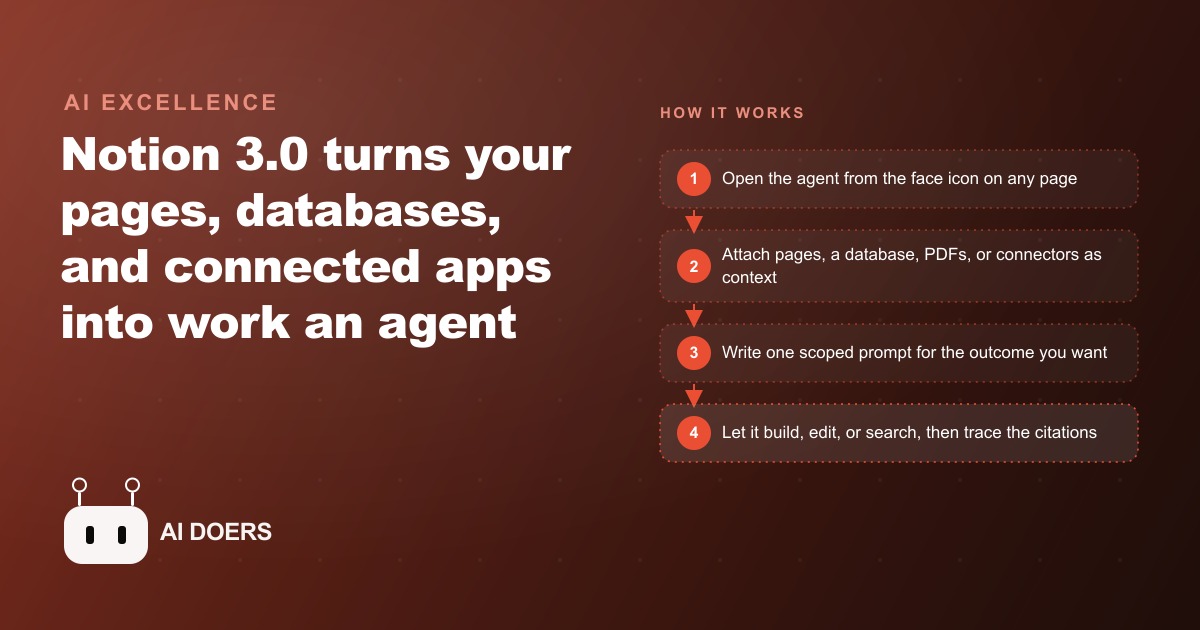
Notion 3.0 lets an agent act on your pages, databases, and connected apps from a single prompt, so it can build a content calendar, edit databases in bulk, run deep research, and search every source with cited answers.

Most law firms do not lose billable capacity in the courtroom. They lose it to the document assembly that happens before any case gets there, to the forty-five-minute status sweep across thirty open matters, and to the research afternoon that produces a brief nobody can find six months later. Notion 3.0's AI operates directly on that kind of knowledge waste.
The Knowledge Trap
A law firm generates a significant amount of knowledge every week. There are intake procedures refined through hundreds of consultations, standard operating procedures for each matter type, research memos that took an associate two days to produce, and communication templates shaped by years of client feedback. All of it matters. Almost none of it is consistently accessible to the whole team.
For most firms, that knowledge lives in fragments. Some sits in a shared drive that nobody has reorganized since it was first set up. Some is buried in email threads that disappeared into the archive the year they were written. A meaningful portion lives only in the institutional memory of senior staff, meaning it leaves when they do. A paralegal handling a new matter type for the first time has to ask someone, wait for a response, and then follow instructions that may or may not reflect the firm's current procedure. A junior associate starting research does not know whether the firm already answered this question for a different client two years ago. A partner reviewing a status update on an active matter opens three different tabs to piece together the current picture.
This is not a failure of any individual. It is the natural result of knowledge accumulating faster than any system gets updated to hold it. The cost shows up as repeated work, uneven outputs, slow onboarding for new hires, and the constant low-grade friction of searching for things that should be findable in seconds.
Notion 3.0's AI does not require the firm to migrate everything into a new structure. It operates on the knowledge that already exists inside the workspace and on whatever the firm connects to it from outside. That distinction matters because it removes the adoption barrier that kills most productivity investments in professional services.
The First Prompt That Changed the Process
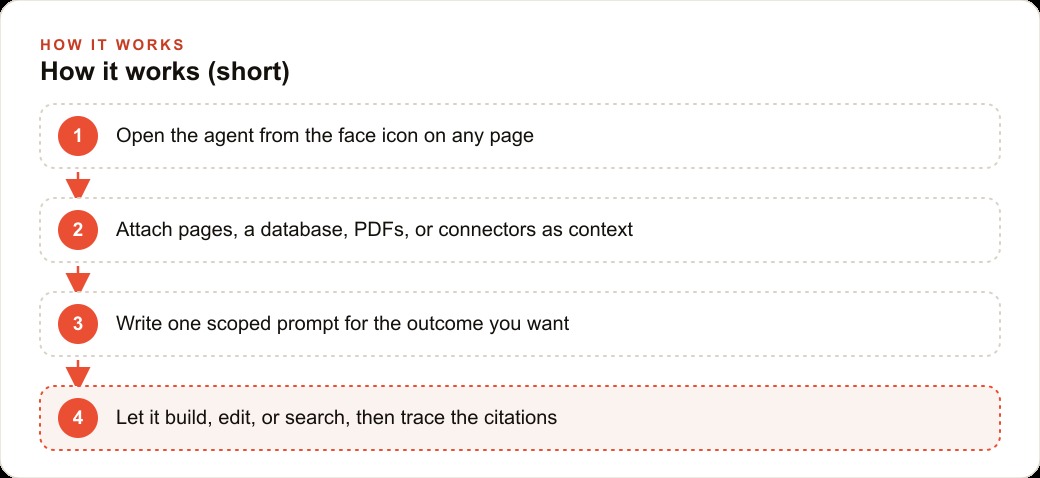
The agent lives inside Notion as an icon on the bottom right of any page. Opening it produces a panel that reads the active page automatically and accepts any additional context the user points it toward: multiple pages at once, an entire database, a PDF in the matter folder, a Google Drive document from the client file, or a Slack thread from last week's strategy discussion. A model picker at the top of the panel lets the user choose the underlying engine. One model handles structured writing with high format adherence. Another handles bulk analysis across a large database. The auto setting routes by the type of task in the prompt. Switching takes a single click.
For a paralegal at a firm that has moved its matter procedures and case templates into Notion, the first practical use is intake document drafting. A client arrives for a personal injury consultation. Before Notion AI, the paralegal opens the standard template, writes the narrative sections from scratch by combining handwritten notes and memory, checks it against the procedure the senior partner described in an email two years ago, and produces a draft that takes two to three hours for a complex matter. The attorney reviewing it then catches three formatting inconsistencies and one section answered in the wrong order based on the firm's specific intake protocol.
With the agent pointed at the firm's intake SOP, the consultation notes, and the relevant prior communication pulled from Drive, the paralegal writes one prompt with a scoped goal. The agent reads the SOP in full, follows every step the firm has defined, pulls the specific details from attached documents, and produces a draft intake document in roughly fifteen minutes. The attorney reviewing it is reading something that follows the firm's actual protocol because the protocol was the operating manual.
When the prompt is underspecified, the agent asks a targeted follow-up question rather than filling in the blanks with generic text. If the draft should reference a linked database of open matters, it offers to pull those entries and add direct links before completing the document. That clarifying behavior is what keeps the output specific to the firm's actual data rather than producing a plausible-sounding approximation.
Bulk Editing 30 Files in Two Minutes
Individual document drafting produces visible time savings. Bulk editing changes the underlying cost of keeping a practice organized.
A firm tracking thirty open matters in a Notion database maintains a standard set of status fields that update as matters move through stages: current stage, last attorney action, next scheduled date, outstanding items. Keeping those fields current matters because anyone querying the database is only as well served as the data is accurate. Under manual conditions, the update cadence is slower than it should be because the task is tedious and time-consuming, and it always competes with more visible work.
Before Notion AI, a paralegal doing a full status sweep opens each record, reads the most recent notes, updates the relevant fields, and moves to the next one. Thirty records done carefully takes around forty-five minutes. The task gets done less often than it should because of that cost, which means the database carries information that is partially stale at any given moment.
With the agent, the paralegal writes one prompt: update the status field in each record in this matter database based on the most recent notes in each entry. The agent reads every record and fills the correct field in real time, without waiting for a manual click on each row. The full sweep across thirty matters takes two to three minutes. What follows is a quick review pass to confirm accuracy, not the update task itself.
This is the capability that gets underestimated in demonstrations because it does not look impressive. Updating a status field is not exciting. But it is exactly the kind of work that fills a meaningful portion of a support team's week, and when it runs in two minutes instead of forty-five, the consequence is not only time saved. It is a database that stays current more often, which makes every subsequent query, every future agent task, and every attorney review more accurate. The compounding benefit of consistent data quality over a quarter exceeds the value of the individual time savings on any single update session.
The same pattern applies to any structured update that the firm runs repeatedly: flagging matters that have not had attorney action in more than thirty days, tagging incoming client communications by matter type, adding summary captions across a research database in bulk. These are the mechanical tasks that slow teams down not because each one is hard but because there are so many of them.
The SOP That Built Its Own Document
The most strategically significant capability for a firm with documented procedures is the agent using an SOP as an operating manual rather than as a reference document that gets consulted occasionally.
A firm that has put its deposition preparation checklist, client onboarding procedure, or document production protocol into Notion can point the agent at that SOP and ask it to build the full working document for a specific upcoming matter. The agent reads the procedure, identifies every defined step, and populates the document using specific details from whatever context is attached. It follows the protocol as written, not a general approximation of it.
For a junior associate in their second month, this means a trial preparation document produced on day one of a new assignment that reflects the firm's specific protocol rather than a reasonable guess at how trials are prepared in general. For a paralegal handling a new matter type, the output sounds like it came from someone who has done this work for years, because the firm's accumulated procedure is what the agent worked from.
Staff transitions illustrate why this matters at a structural level. When an experienced paralegal who carries procedure knowledge primarily in their memory leaves the firm, that knowledge leaves with them unless it was captured in writing and is accessible. When it lives in Notion and the agent can act on it, the departure does not create the institutional gap it otherwise would. The procedures persist in the system rather than in any individual.
Firms that manage client intake through a CRM and website stack can connect those records to the Notion environment through the same connector layer that handles Drive and Slack. The agent can then pull a new client's record from the CRM when assembling an intake document, rather than requiring the paralegal to transfer information manually between systems.
Research That Connects Every Source
The AI search capability in Notion 3.0 is where the tool becomes something closer to institutional memory that can be queried, not just a document assistant that answers questions about the current page.
AI search scans the entire Notion workspace plus all connected external sources and returns cited results for any query. In a product demonstration, a single query returned sixty-one cited results covering formal SOPs, project notes, and personal task entries, each one linking back to the exact source document. For a law firm, this means a query about prior handling of a particular legal issue type returns everything the firm has documented on it: past matter notes, research memos prepared for other clients, correspondence templates that addressed the same question, and attorney analysis written during a previous engagement. The results are cited so the associate reviewing them can distinguish between a formal brief prepared for a filed case and an informal note made during a strategy call.
Date filtering narrows results instantly. A partner pulling together background on an active arbitration matter can filter for mentions from the past sixty days and see only the current-state picture rather than everything the firm has ever touched on the issue.
The deep research button sends the agent to the web, returns curated findings organized by category, and saves them as a Notion page in one click. For a firm expanding into a new practice area or tracking a regulatory change, a research brief on the topic is ready in under thirty minutes rather than the half-day an associate would otherwise spend on manual web research.
PDF attachments close the final gap in context assembly. An attorney can attach an opposing party's filing directly to a prompt and ask the agent to compare its key provisions against the firm's standard contract template, or to flag any terms that deviate from what the firm's SOP identifies as standard industry practice. Combined with Notion pages, Drive documents, web research, and Slack context, a single prompt can draw from the complete picture of a matter at once.
Firms that run Facebook and Instagram ad campaigns as part of their client acquisition, a growing approach for consumer-facing practice areas like personal injury, immigration, or estate planning, can use the same connector layer to pull lead data from ad platforms into the Notion workspace, tracking ad-sourced inquiries alongside organic referrals in one database that the agent can query and update.
The SEO and organic search implications of the deep research feature are also worth noting for practice areas that publish educational content. A firm that produces blog articles or guides to attract potential clients can use the research button to pull current data on questions their audience is asking and fold those findings directly into a content brief, without leaving the workspace.
What a Firm of Ten Looks Like After a Quarter
The before and after numbers for a law firm of ten using these features consistently reflect how the work actually runs in professional services, not an optimistic projection.
Before Notion AI: intake drafting for a complex personal injury matter runs two to three hours. A status update sweep across thirty open matters consumes forty-five minutes per session. A junior associate researching a new issue type for the first time spends a full afternoon and may not find what the firm already documented on the same question. A new paralegal or associate takes four to six months to learn where everything is and how the firm actually does things, because the knowledge lives in people rather than in accessible systems.
After Notion AI: intake drafting from a scoped prompt pointed at the firm's SOP takes roughly fifteen minutes. The bulk status sweep across thirty matters takes two to three minutes plus a short review pass. A research brief on a new topic the firm has not addressed before is ready in under thirty minutes. A new team member has the firm's institutional knowledge accessible from day one, because AI search surfaces the right documents and the SOPs function as operating manuals rather than filing-cabinet artifacts.
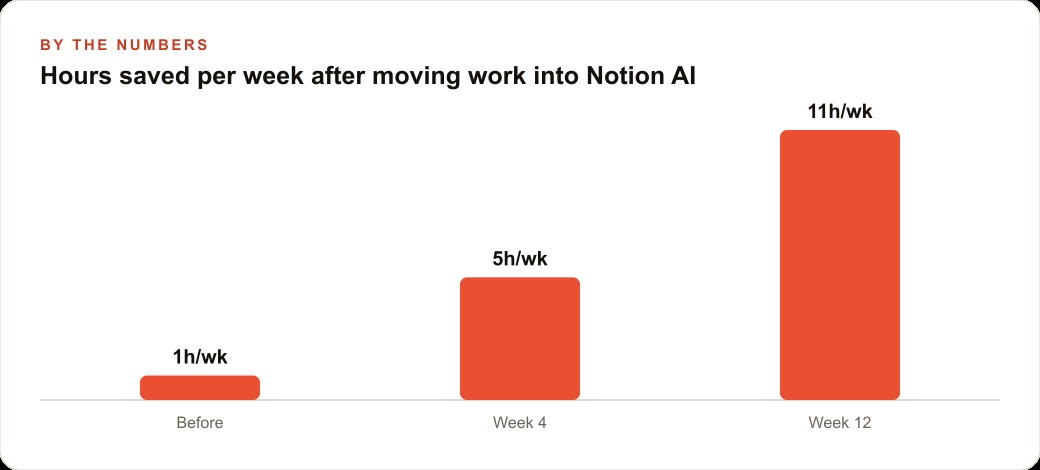
For a firm of ten where this work is distributed across paralegals and junior associates, the conservative monthly estimate is thirty to fifty combined hours freed from mechanical assembly, status updating, and information searching. The actual return depends on what those hours go toward. A firm that routes recovered paralegal time into client-facing support, or that allows junior associates to carry more matters because their non-billable research burden has dropped significantly, sees compounding gains that grow across quarters.
The cost to reach this state is Notion AI at roughly ten dollars per member per month on top of the base workspace plan. For a firm where paralegal time costs thirty to sixty dollars per hour and attorney review time costs multiples of that, the return from the first month of consistent use is positive before the second invoice arrives. The more important number is not the monthly savings but what the firm's knowledge system looks like twelve months later: current, searchable, consistent, and available to every team member regardless of how long they have been there.
Madhuranjan Kumar works with service businesses on setting up exactly this kind of knowledge workflow, from connecting the right sources to the agent through to structuring the SOPs so the agent produces useful output consistently. If you want to build it yourself, the right first step is moving your most-used intake procedure into Notion this week and testing one agent-assisted draft against the time your team currently spends producing the same document.
That is exactly what we do at AI DOERS. Book a private 30-minute call with Madhuranjan Kumar and we will map the fastest path to it for your specific business.
Book your call →
Madhuranjan Kumar
Madhuranjan Kumar brings 20 years of performance-marketing experience and has managed over $200 million in Facebook ad spend for brands across the United States and beyond. His expertise spans the full modern marketing stack: Meta, Google Ads, TikTok, email automation, CRM, and the websites that hold it together. At AI DOERS he turns that track record into lead-generation systems for businesses across every industry.