
How MCP Servers Turn Cursor Into a Full Agent
MCP servers extend Cursor from a code generator into an agent that reads your browser console, queries your database, searches the web, and calls any external API. Here is what that unlocks, and how a small business can use the same idea to connect its own tools.

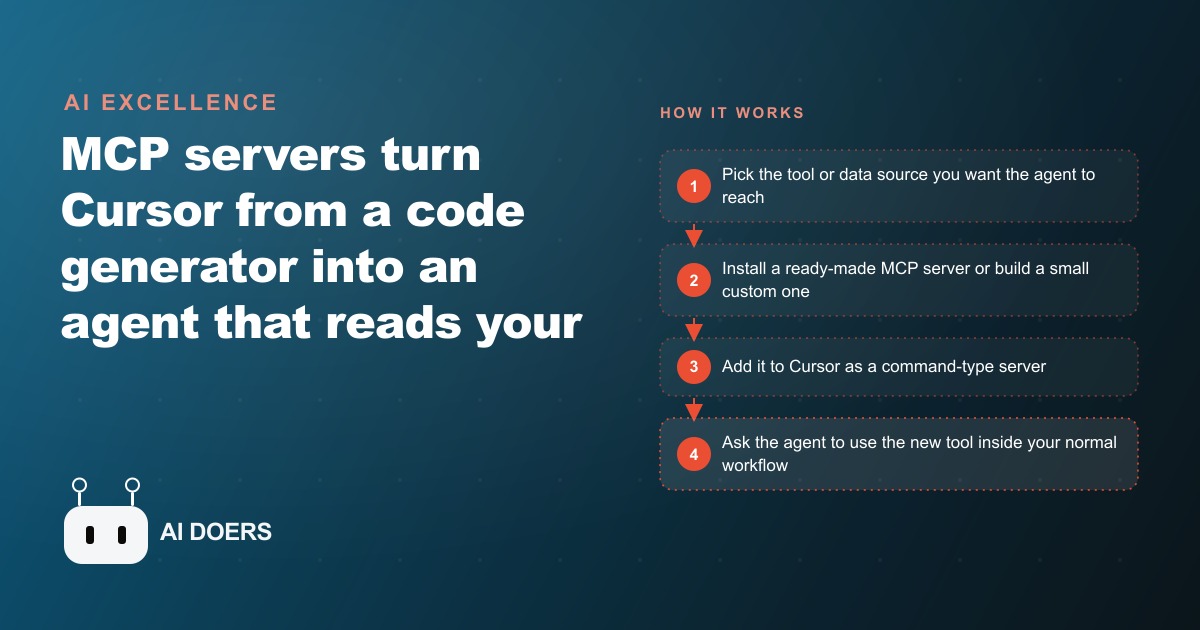
Cursor can write code all day, but the moment you bolt MCP servers onto it, it stops being a code generator and starts behaving like a coworker who can actually reach your tools. It reads your browser console, queries your database, searches the web, and pulls from your Figma files, all inside your normal workflow. I am Madhuranjan Kumar, and rather than give you one long lecture, I want to lay this out as a working list. Here are the concrete things MCP unlocks, why each one matters, and, at the end, exactly how the same idea turns a disconnected small business into one an agent can actually operate.
1. MCP is a USB-C port for AI
The cleanest way I explain MCP to clients is the analogy the walkthrough itself uses. The Model Context Protocol, introduced by Anthropic, is a USB-C port for AI applications. Just as USB-C gives you one standard way to plug a device into many accessories, MCP gives an AI model one standard way to plug into many systems. Before this standard, every tool needed its own custom integration, which is why most AI stayed trapped in a chat box. One standard port changes the entire equation, because now the agent has a single, predictable way to reach anything you connect.
2. Cursor stops guessing and starts reading your real systems
Once MCP is wired in, Cursor does far more than write code. It calls an image model to generate assets, reads your console logs to debug, queries a database directly, searches the web for current information, and even looks inside your Figma files. The shift is from an assistant that talks about your work to one that reaches into it. That difference is everything, because a model that can only guess at your context will always produce generic output, while a model that can read the actual state of your systems produces work you can ship.
3. Command type is the default, SSE is the exception
When you add an MCP server inside Cursor's settings, it asks for a type, and the honest answer is that you almost always want command. Command runs a small local process on your own machine. SSE points at a hosted, remote server. There are legitimate uses for SSE, but for the vast majority of setups, command is the right choice, so default to it and move on. Knowing this one detail saves beginners an hour of confusion, because the type selector is the first place people freeze.
4. Sequential thinking forces the agent to plan first
One of the most useful public servers is sequential thinking, which makes the agent reason through several ordered steps before it writes a single line. You prompt it to plan a build without coding yet, and it counts the steps and works through them in order. This matters because the failure mode of an eager agent is doing too much too fast. Forcing a plan first is the same discipline a good developer uses, and it turns a scattershot agent into a methodical one.
5. Browser tools MCP debugs from your real console
The browser tools server gives Cursor access to your browser console logs and network tab through a Chrome plugin. You ask what is in your console, and it pulls the actual logs and errors directly rather than making you copy and paste them. Debugging from real error messages instead of a vague description is a night-and-day upgrade, because the agent is now reasoning about what genuinely happened rather than what you think happened.
6. Point at an element and change only that
Element selection is the item that feels like magic the first time. You select a specific element on a page, then tell Cursor to restyle only that one, and it returns a targeted diff that updates the right component. No more describing "the blue button in the header, third from the left" and hoping the model finds it. You point, you ask, it changes exactly that. Precision like this is what separates a toy from a tool you reach for every day.
7. Ready-made directories get you started, and warn you
Directories like Smithery and cursor.directory list MCP servers other people have built. You search for what you want, copy its command, and paste it in. That is the fast path, and it is worth using. But the walkthrough is refreshingly honest about the state of things: there is no standardized install yet, quality is unstable, and many listed servers simply fail or show no tools. Expect to convert some JSON configs into single-line commands to get them running. Go in knowing that the public catalog is a mixed bag, so you do not waste an afternoon on a broken listing.
8. Build your own server when the public ones flake
Because the public options are hit or miss, building your own is often easier than fighting a broken one, and it is more approachable than it sounds. Using a service like Cloudflare, you run one command with the hello-world MCP example in TypeScript, and it hands you working boilerplate so you only write the functions yourself. Inside an MCP function you can call any external service, so you can wire the agent to your parts supplier's API, your scheduling system, or an image model on Replicate. The custom path is where the real leverage lives, because the one tool that matters most to your business is usually the one no public server covers.
9. Worked example: an auto repair shop connects four systems
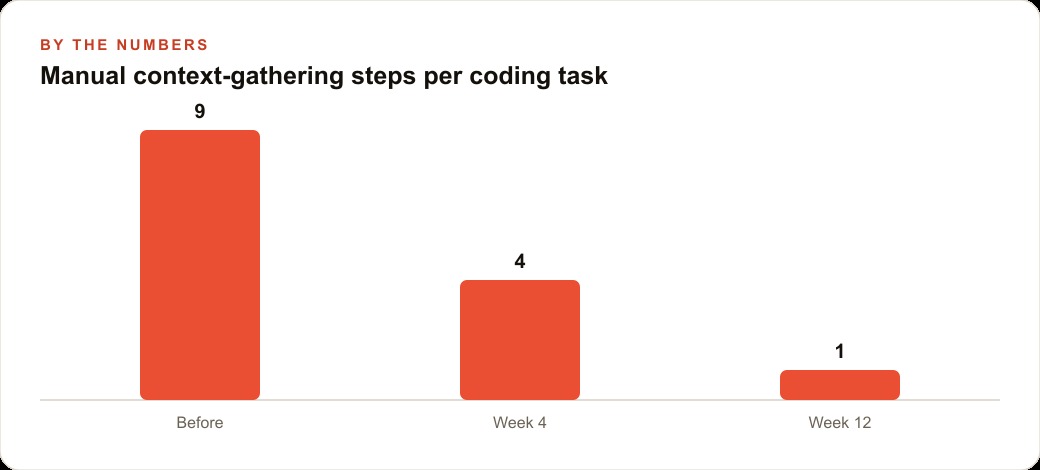
Here is the whole idea landing on a real business, with illustrative numbers to show the payoff. The shop owner is buried in disconnected systems: a scheduling calendar, a parts supplier catalog, a customer history spreadsheet, and a quoting tool. Each lives in its own window, and nothing talks to anything. Answering one customer question about a noise in a 2018 sedan means opening four logins and copying details back and forth, which realistically takes around nine separate manual steps and the better part of ten minutes.
I would connect each of those four systems to the agent through an MCP server, the same way Cursor connects to a database or a browser. Three might be solid ready-made servers from a directory, and the fourth, the parts supplier, gets a small custom server built with Cloudflare boilerplate because no public option covers it. Now when the customer calls, the owner asks the agent one question and it pulls the car's full service history, checks which parts are in stock, looks up the supplier price and lead time for what is missing, and drafts a quote, all in a single pass. The nine manual steps collapse toward one. Over a few weeks, the per-task context gathering drops from roughly nine steps to four, then to about one, and the ten-minute scramble becomes a ten-second question.
The same connected agent pays off well beyond the service desk. Because it can now read the shop's real customer history, it can help draft follow-up reminders that land in the CRM and website stack where the shop already manages appointments, and it can pull the vehicle and service data that makes retargeting on Facebook and Instagram ad campaigns actually relevant instead of generic. The shop keeps every system it already had. The only thing that changed is that one agent can now reach all of them at once.
10. The same standard port works far beyond coding
It is easy to file MCP under "developer tooling" and move on, but that misses the bigger point, and it is the one that matters most to a business owner. The reason MCP is a standard port is that it works for any tool, not just code editors. Most small businesses already pay for a stack of disconnected systems: a booking tool, a spreadsheet of customers, an accounting app, a parts or inventory database, a website. The barrier to using AI well has always been that the AI cannot see any of it. MCP removes that barrier by giving an agent one standard way to plug into each one, so you connect a tool once and the agent can read from it, act on it, and combine it with everything else. That is the difference between an AI that talks about your business and an AI that can work inside it, and it applies whether or not a line of code is ever written.
11. You can call any external API from inside a function
The item that makes custom servers genuinely powerful is that an MCP function is not limited to your own data. Inside the function you write, you can call any external service on the internet. The walkthrough demonstrates this by wiring Cursor to an image model hosted on Replicate, so the agent generates unique game art entirely on its own. Swap the example and the principle holds: inside one small function you could call a shipping-rate API, a payment processor, a weather service, or your supplier's ordering endpoint. This is what turns the agent from a reader of your systems into an actor within them. It does not just fetch information, it triggers real actions in real services, which is where the automation payoff actually lives.
12. Secret handling is still the rough edge to respect
No honest list would skip the wart, and here it is. The tooling around handling secret keys cleanly is still immature. When you connect a real service, that connection needs an API key, and the current MCP ecosystem does not have a polished, standard way to keep those keys safe. The practical rule is to keep your API keys out of any shared or committed files and to treat every connection to a live system as something that deserves care. This is not a reason to avoid MCP. It is a reason to go slowly with anything that touches money, customer records, or production systems, and to double-check where your credentials actually live before you point an agent at something sensitive.
How to start without boiling the ocean
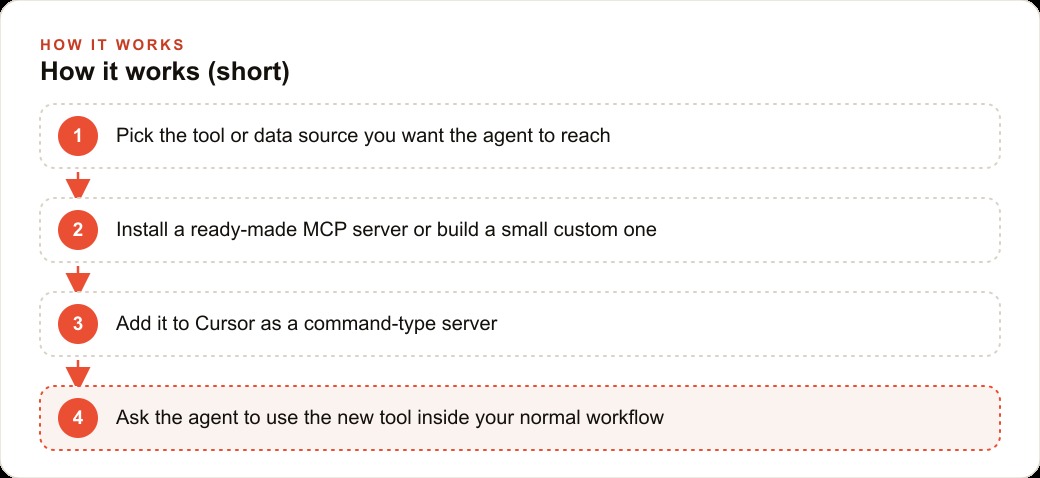
The mistake is trying to connect your whole stack on day one. Pick the single source of information you reach for most, your customer list, your calendar, or your inventory, and connect just that one first. Look for a ready-made server in a directory like Smithery, and if you find a solid one, copy its command and add it as a command-type server. If the public option is flaky, and many are, build a tiny custom server with Cloudflare boilerplate instead. One practical warning from the walkthrough: handling secret keys cleanly is still rough, so for anything real, keep your API keys out of shared files. Once that first connection works, add the next tool, then the next, until the agent can see your whole operation. That same connected foundation is what later lets the agent feed clean data into SEO and organic search and your reporting without extra plumbing.
The mental model to hold onto is the USB-C one, because it tells you exactly how to think about scale. You do not rewire your whole business the day you buy a laptop with a USB-C port. You plug in one accessory, then another, as you need them, and the port makes each new connection trivial. MCP works the same way. The first connector is the hardest because you are learning the pattern. The second is faster, the third is routine, and before long the agent can reach across your whole operation because every tool speaks through the same standard port. That is why starting small is not a compromise, it is the correct strategy. Each connection you add compounds with the ones already in place, until an agent that began by reading a single spreadsheet can quietly run errands across your entire stack.
You can build this yourself one connector at a time, and I would encourage you to wire up your most-used tool this week to feel how it changes things. If you would rather have someone map your specific stack, build the custom connectors your business needs, and stand it up so the agent works on the first try, that is exactly the kind of build I do for clients, and you can bring me in to handle it.
That is exactly what we do at AI DOERS. Book a private 30-minute call with Madhuranjan Kumar and we will map the fastest path to it for your specific business.
Book your call →
Madhuranjan Kumar
Madhuranjan Kumar brings 20 years of performance-marketing experience and has managed over $200 million in Facebook ad spend for brands across the United States and beyond. His expertise spans the full modern marketing stack: Meta, Google Ads, TikTok, email automation, CRM, and the websites that hold it together. At AI DOERS he turns that track record into lead-generation systems for businesses across every industry.