
Google Gemini Now Edits Photos with Text Prompts: 10 Use Cases That Will Change Your Content Workflow
Gemini's new image editing capability turns a photo into a fully editable asset you control with plain language. For businesses that rely on product images, social media visuals, and marketing materials, this is a meaningful step change in what a small team can produce.

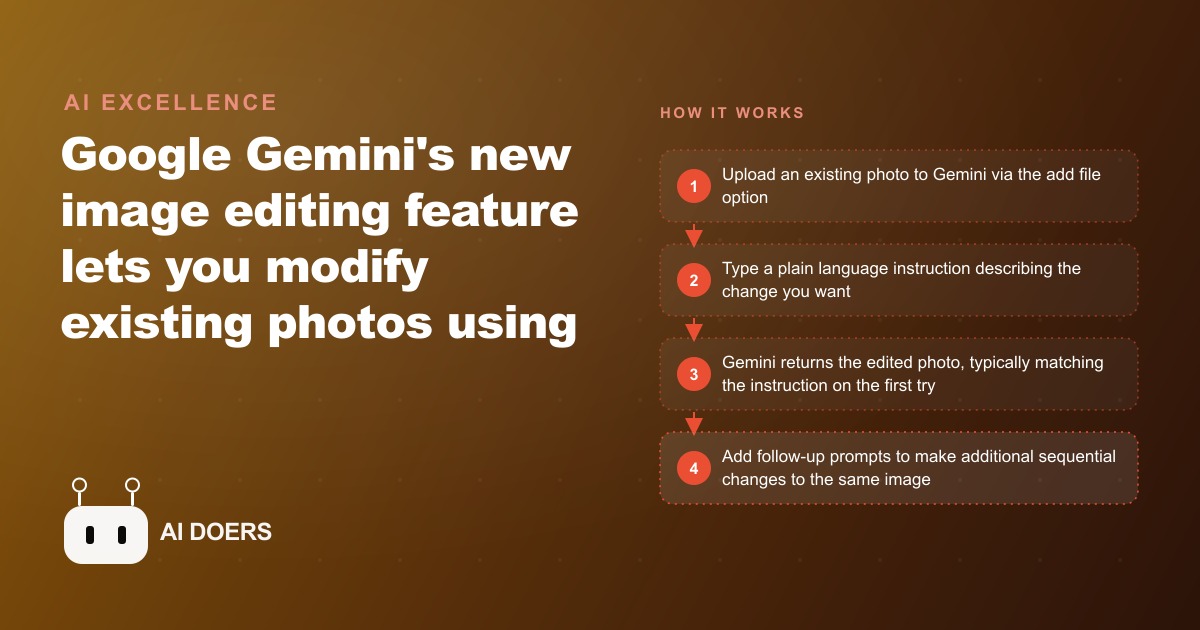
Google Gemini can now take an existing photograph and modify it using plain text instructions, and the practical applications for businesses that live on visual content arrived immediately. I am Madhuranjan Kumar, and rather than list every feature in the release, I want to focus on the three shifts that actually change what a small team can produce without a professional photographer or a designer on staff.
Gemini's photo editing is a meaningful step for teams that rely on visual content
The capability works differently from AI image generation, which creates an image from a text description of nothing. Photo editing starts with a real photograph you already own and modifies specific elements based on your instructions. The underlying photograph's composition and main subjects are preserved while the elements you describe changing are transformed.
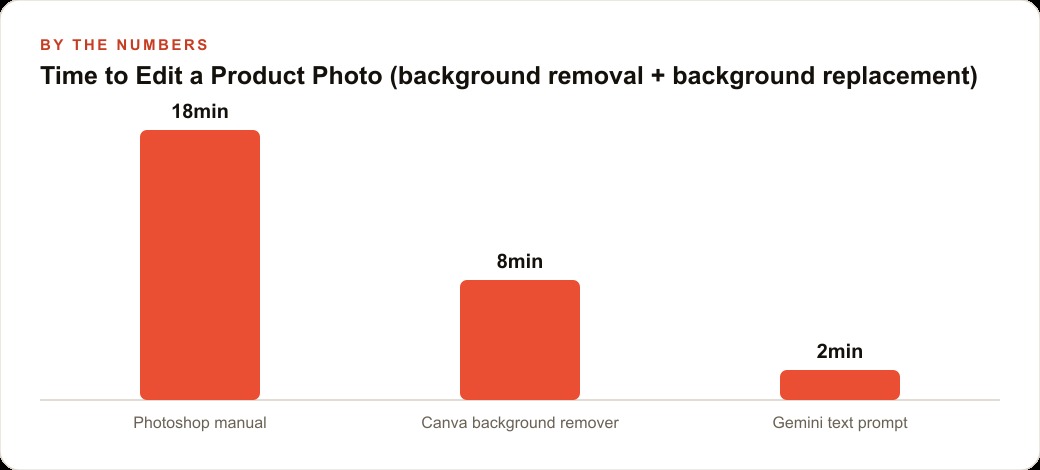
The range of changes is genuinely broad. Background removal and replacement, which used to require Photoshop skill or a dedicated tool at $8 to $20 per month, now happens from a single text prompt in the standard Gemini interface at gemini.google.com. The same applies to scene changes that previously required a studio: you can describe the environment you want the subject placed in and the model handles the compositing. Clothing changes on a person in a photo work cleanly enough for social media and most marketing applications, which is a direct benefit for fashion, fitness, and lifestyle brands that need variety across a product line without scheduling multiple shoots.
The quality on the first attempt is notably higher than earlier text-to-image editing tools, which often required multiple generations before producing something usable. That difference matters in practice because time spent on re-generations is time that does not go into the rest of the content workflow.
Multi-turn editing changes how quickly a business can test creative variations
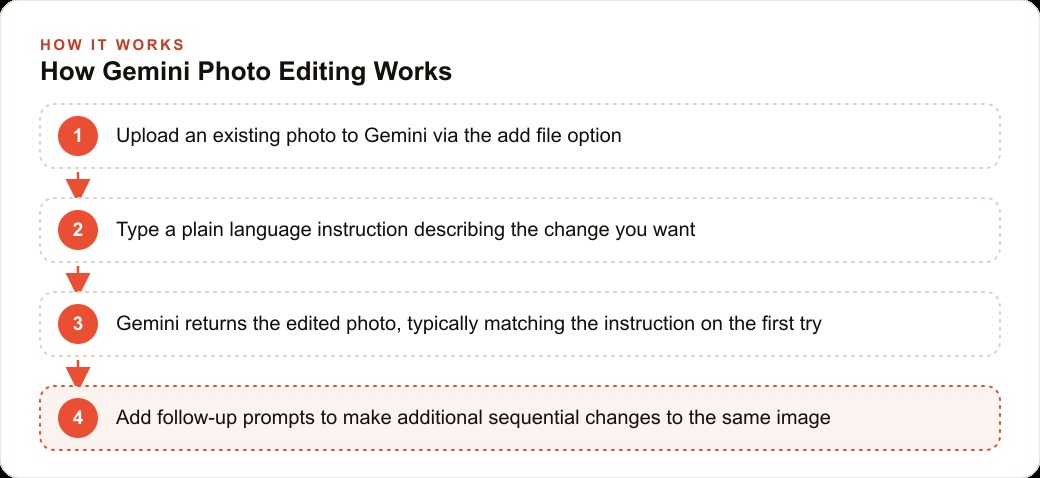
The feature that separates this from a one-shot editing tool is the ability to continue editing the same image through sequential follow-up prompts. You do not make one change and start over if you want another. Every follow-up prompt continues working on the result of the previous one, so you can build toward a final image through a conversation rather than through a series of separate tool operations.
This changes the economics of creative testing. A product shot that goes through three background variations to find the one that performs best in ads used to require three separate photography or design sessions. Now it requires one original photograph and three follow-up prompts to Gemini. The cost drops to near zero, which means testing happens more often, and more testing means better final creative decisions.
For businesses running Facebook and Instagram ad campaigns, this is worth paying attention to. Creative variation is one of the highest-leverage inputs in a paid social campaign. The same audience, the same offer, and the same copy can produce very different cost per lead depending on the background, the lighting, and the styling of the main product image. When generating those variations costs nothing, the practical barrier to testing them disappears.
The room decoration use case is a straightforward example of multi-turn editing in a business context. You upload a photo of an empty room, then add furniture in one prompt, adjust the wall color in a second, change the lighting mood in a third. Each prompt builds on the previous result. A real estate team can do this with a single original photo of a vacant property and produce a fully staged version in fifteen minutes without a single piece of rented furniture.
The clearest applications are live for product and real estate teams right now
Product photography is the most immediate use case for any business selling physical goods. Clean product images on a white or neutral background are a standard requirement for marketplaces like Amazon and Etsy, and the cost of professional background removal has historically been passed to sellers either as a per-image outsourcing fee or as a monthly subscription to dedicated tools. Gemini handles background removal in one prompt on the free tier, which eliminates that cost entirely for most small sellers.
Beyond background removal, the product image regeneration application changes what a single shoot can produce. One well-lit product photograph in a neutral setting becomes a source for multiple lifestyle scenes: the product on a rustic table, the product in natural daylight by a window, the product styled for a holiday promotion. Each scene is a separate prompt, and each becomes a distinct creative asset for different ad placements or seasonal campaigns.
For the SEO and organic content side, having fresh, varied product images for each season and each use case means more material for Google Shopping listings, product pages, and blog content without scheduling new shoots. A product page with three distinct lifestyle images typically converts better than one with a single studio shot, and the cost of producing three variations just dropped to the cost of one shoot plus twenty minutes with Gemini.
Real estate applications are nearly as direct. The staging cost for a vacant property is one of the more significant friction points in residential sales, and the photo-based version Gemini offers is not a replacement for physical staging in every situation, but it is a practical tool for generating staged listing images quickly. Upload an empty room photograph and describe the furniture, the color scheme, and the ambiance you want. The output is usable for listings, social posts, and marketing materials.
Room visualization and product staging land first; more complex compositing is still iterative
The honest limit at this stage is that complex compositions, particularly those involving putting a specific person into a specific location or combining multiple scenes with precise perspective matching, sometimes require two or three iterations to look natural. The model handles broad scene changes reliably. It handles fine compositing with mixed consistency.
For a business deciding how to use this, the practical rule is to apply Gemini photo editing where the changes are clear and the subject is a product or a space, and to use traditional photography for content where the compositing needs to be perfect, such as faces in close-up or legally sensitive before-and-after comparisons. Photo editing AI is appropriate for atmosphere, style, and scene. It is not a substitute for precision image work in regulated advertising contexts.
The multi-turn capability also means you do not have to get the image perfect in one prompt. If the first version is close but the background is too busy or the lighting is too harsh, say so in a follow-up and Gemini adjusts from the current result. That iterative conversation is faster than regenerating from scratch each time, and it is how most practical work with this tool actually runs.
The access question is simple: the feature is available in the standard Gemini interface at gemini.google.com, no additional setup required, on the free plan with standard limits. The paid plan at roughly $20 per month through Google One removes limits for heavy commercial use. For most small businesses with moderate image editing needs, the free tier is sufficient to evaluate whether this fits the workflow before committing to anything.
The setup is one experiment with three of your own images this week. Take a product photo, a team photo, and a location photo. Run one edit on each using a plain text instruction and see what comes back. Build from what works, and note where the output needs iteration. That is the fastest way to understand where this tool fits your specific content needs and where you still need traditional photography or design work. ## A concrete walkthrough for a med spa using Gemini photo editing across one month
The worked example that illustrates the full value is a med spa with four treatment rooms that offers laser treatments, injectables, and facial services. The business runs active social media and a consistent email newsletter, and the owner handles content production personally because the staff is fully occupied with appointments.
The starting point is one good photo per treatment area, taken by the owner on a recent iPhone during a quiet morning before appointments. Four photos total, one of each room, all reasonably well-lit but not professional quality. Under Gemini photo editing, here is what those four photos produce over one month.
Photo one, the laser treatment room: the background wall has a visible outlet that was always slightly distracting. Prompt to Gemini: remove the outlet from the wall and even out the ambient lighting to look like professional studio lighting with a clean, clinical feel. The edited version looks like a professional interior photograph. Used for the Google Business Profile header, the website treatment page, and one ad creative.
Photo two, the injectable room with the consultation chair: a natural light setup that was slightly harsh. Prompt: add soft, warm, flattering lighting consistent with a luxury spa, make the upholstery of the chair appear a deeper burgundy. The edited version looks deliberately styled. Used for three Instagram posts over the month, each with a different caption and offer.
Photo three, a product flat-lay of their signature skincare serum on the treatment cart: Prompt: place this serum bottle on a white marble surface with a soft, blurred spa-green background, add a soft shadow under the bottle and a subtle reflection on the marble. The result looks like a product photography session. Used for two email newsletter headers and one Facebook ad creative.
Photo four, the reception area: Prompt sequence over three turns: first, remove the magazines from the table and replace them with a small orchid in a white vase; second, add warm amber lighting that makes the space feel like a boutique hotel lobby; third, add a subtle text overlay space at the top right corner for text. The final version is used as the base for three promotional graphics, each with different offer text dropped into the reserved space.
Total content produced from four original photos: three Google Business Profile images, six Instagram posts, four Facebook ad creatives, six email newsletter headers, and one website hero image refresh. Total time spent in Gemini: approximately three hours across one week. Total photography cost: zero beyond the owner's time to take the original four photos.
The comparison to the alternative is useful: outsourcing the same volume of edited images at $5 per image would have been $100 for the month. Professional photography to produce genuinely new assets would have been $400 to $800 for a half-day session. Gemini photo editing on the free tier produced the same functional content library at the cost of three hours of the owner's time.
The discipline that makes this work is clear organization: save every edited version with a descriptive filename, note which prompts produced the best results for each type of content, and build a small prompt library so the most useful edits are reproducible. The business that does this consistently over six months has a content library that grows without growing the photography budget.
The key discipline that separates a sustainable Gemini editing practice from one that produces inconsistent results is prompt specificity. Vague prompts produce inconsistent results. Prompts that describe the exact change, the specific style, and the intended placement produce reproducible results that can be refined across multiple turns. Build a short prompt log for the edits that work best for your specific content type, business environment, and visual standards. That log becomes your creative brief for AI editing sessions, and the consistency it enforces is what makes the content library look intentional rather than experimental. Build it in the first month and refine it as you learn what the model responds to most reliably.
The final test of whether a Gemini editing workflow is production-ready for a business is whether the edited output matches what the platform technically requires. Google Business Profile images have aspect ratio requirements. Facebook ad creatives have text-to-image ratio guidelines that affect delivery. Instagram posts have resolution floors that affect how the image renders on different screen sizes. Before committing to an editing approach, run a sample of edited images through each platform's actual upload flow and confirm the edited version meets the platform's requirements. Most will. But knowing in advance rather than discovering it after a campaign goes live is worth the fifteen minutes of validation.
That is exactly what we do at AI DOERS. Book a private 30-minute call with Madhuranjan Kumar and we will map the fastest path to it for your specific business.
Book your call →
Madhuranjan Kumar
Madhuranjan Kumar brings 20 years of performance-marketing experience and has managed over $200 million in Facebook ad spend for brands across the United States and beyond. His expertise spans the full modern marketing stack: Meta, Google Ads, TikTok, email automation, CRM, and the websites that hold it together. At AI DOERS he turns that track record into lead-generation systems for businesses across every industry.