
11 Free AI Tools That Cut Software Costs for Small Businesses
Two powerful free AI releases triggered a broader look at what small businesses are already paying for unnecessarily. Here is a practical breakdown of the free tools available right now and how an auto repair shop can use them to cut monthly software costs.

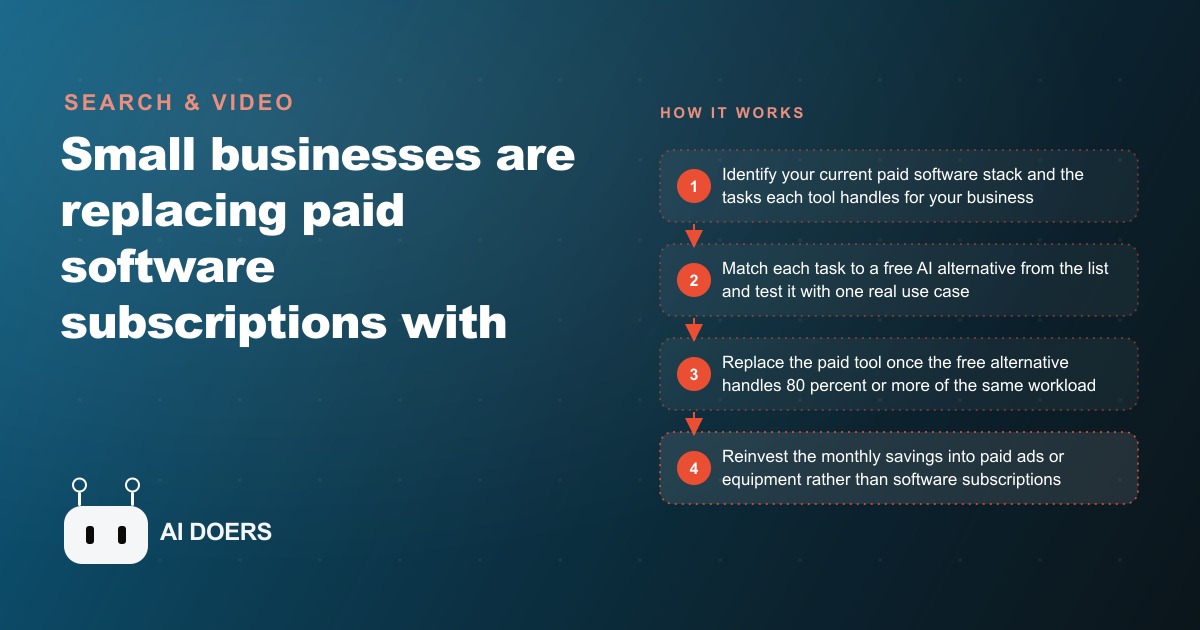
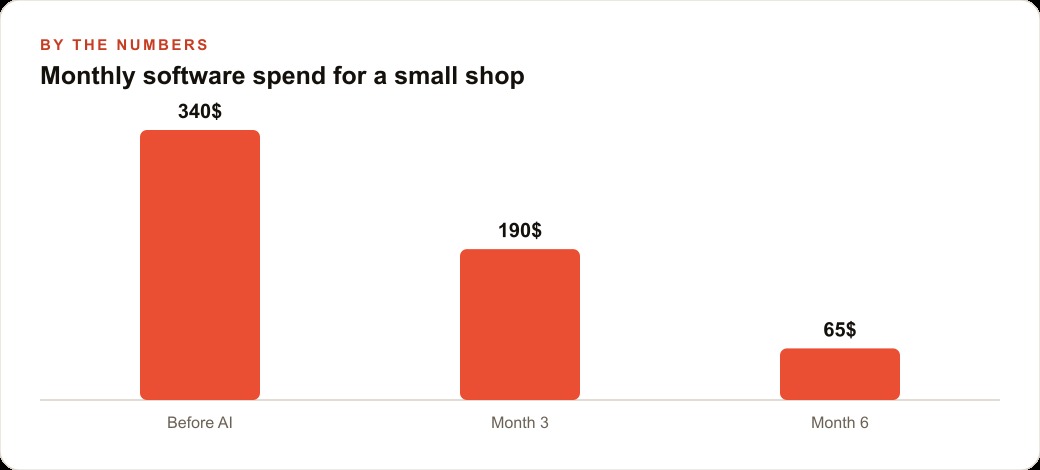
A typical small shop is quietly bleeding three to six hundred dollars a month on software subscriptions, and a wave of genuinely capable free AI tools has made a large chunk of that spend optional. Two big releases this week, Gemini 3 and a new Google image model called Nano Banana Pro, both arriving with generous free access, pushed me to map the full landscape of what a business can now do without paying anything. Below are the tools worth knowing, each with a plain account of what it replaces, followed by a worked example of an auto repair shop cutting its bill.
I am Madhuranjan Kumar. The honest test I applied to every tool here is not whether it dazzles in a demo but whether it handles eighty to ninety percent of a real task well enough that a customer never notices the last ten percent. Most of these pass that test. Here are the ones that matter.
1. Whisper Flow replaces paid dictation software
Whisper Flow is built on OpenAI's Whisper speech recognition model, and it captures what you say, fixes stumbles automatically, and adds correct punctuation. You speak, formatted text appears. It handles technical vocabulary, accents, and fast talkers far better than the old dictation tools, and the free tier gives you 2,000 words a week, which covers a typical day of emails, notes, and short documents. For any owner who writes all day, this is the single highest impact free tool on the list because the learning curve is almost zero and the time saved is immediate.
2. Comet browser puts an AI assistant in every tab
Comet bakes an assistant directly into the browsing experience, so you can summarize a page, compare prices, or research suppliers without copying URLs into a separate chat tool. The value is the removed friction. Instead of the tab shuffle, where you open four supplier pages and eyeball the differences, you ask the browser to compare them and get one consolidated answer. It replaces the habit of paying for separate research tools and, more importantly, it replaces the twenty minutes of manual cross checking that habit was covering for.
3. Notebook LM turns your documents into a cited expert
Notebook LM takes documents you upload and constrains a large language model to answer only from that content. Ask it about a specific service manual or supplier contract and it cannot invent an answer from its training data. It answers from what you gave it and cites the exact passage. For any business sitting on long technical documents, product specs, warranty guides, or regulatory manuals, this turns a five hundred page brick nobody reads into a searchable conversation. It quietly replaces both a document search tool and the hours of scanning pages by hand.
4. SAM 3 does object tracking and video editing automatically
Meta's Segment Anything Model 3 tracks any object you name across an entire video and applies effects like blur, glow, or contour to it, frame after frame. The work it replaces is brutal in traditional editing software: hours of manual masking, frame by frame, to isolate a single object. Naming the object and letting the model follow it collapses that into seconds. For a shop that wants to highlight a part in a repair video or blur a customer's license plate, this removes a task that used to require either paid editing software or a freelancer.
5. Canva Magic Studio designs from a text prompt
Canva's Magic Studio generates professional template options from a single text description and applies a consistent visual style. It does not hand you a finished design, it hands you a sophisticated starting point that kills the blank canvas problem for non designers. The template stays fully editable, so you swap text, colors, and images from there. In practice it does roughly eighty to ninety five percent of the design work for a simple flyer or social graphic, which is exactly the tier of design most small businesses were paying an entry level subscription or a junior freelancer for.
6. Kling AI generates short video ads for free
Kling's free tier includes credits for generating short clips from text or images, enough for two to four social posts a month. That lets a business produce social video without hiring a videographer or an editor. The output is not flawless, and fast moving subjects can show minor glitches, but for a product highlight or a seasonal promo clip it clears the bar for social feeds where nobody is scrutinizing single frames. It replaces the assumption that video content requires a crew.
7. ElevenLabs creates professional voiceovers for free
ElevenLabs offers 10,000 free characters a month of text to speech, producing voices with natural breath, inflection, and emotion that sound nothing like the robotic tools of a few years ago. The free voices are the same quality as the paid ones. That free allowance covers a full phone system script, a hold message, and a seasonal promotion recording with characters to spare. It replaces paying for professional voiceover production, which for a small business used to mean either an awkward homemade recording or a real invoice.
8. Suno makes original, license free music at no cost
Suno generates complete original songs, vocals, instruments, and structure, from a short text description, with 50 free daily credits. For a business that needs background music for videos, an on hold audio loop, or a simple jingle, this removes the licensing question entirely. You are not paying for a stock music subscription or worrying about a takedown, because the track is original and yours. Fifty credits a day is far more than any small business will use.
9. Gemini 3 covers the everyday reasoning and writing work
Gemini 3 launched this week with strong free access and handles the broad daily tasks: drafting, summarizing, planning, answering questions with current information. It is the general purpose workhorse that sits under a lot of the other work, and having a top tier model available free means the routine writing and thinking that a business used to ration is now something you can run continuously.
10. Nano Banana Pro handles image generation and editing
Google's new Nano Banana Pro image model arrived alongside Gemini 3 with generous free access and is currently one of the most capable image tools at any price. For product mockups, social graphics, and simple marketing imagery, it replaces both stock photo subscriptions and the cost of commissioning simple visuals. Paired with Canva for layout, it covers most of a small shop's visual needs.
11. NotebookLM and the free general assistants for research briefs
Rounding out the list, the free tiers of the major assistants, including ChatGPT's free plan, cover quick research, drafting, and question answering that used to justify a paid research subscription. The pattern across the whole list is the same: a fragmented stack of single feature paid tools is collapsing into a handful of capable free ones.
The worked example: an auto repair shop cuts its bill
Here is how a single location auto repair shop with six employees put these together and redirected the savings. Start with the most time consuming daily task, written communication. The service advisor sends 20 to 30 text and email updates a day, types estimates, and drafts review responses. Whisper Flow removes most of the typing, transcribing spoken updates with correct punctuation and technical terms. Time saved: roughly 45 minutes a day.
For parts research, the service manager used to keep three or four tabs open comparing supplier prices by hand. Comet browser summarizes and compares the same part across supplier sites in one answer. Time saved: roughly 20 minutes per job. The shop also has a thick warranty guide and a bulletin archive nobody reads. Notebook LM answers specific questions from both with citations in seconds, saving 10 to 15 minutes on each complex job.
For marketing, the shop was paying a local agency 300 dollars a month for four social posts and two flyers. Replace it: Canva Magic Studio for the flyers, Kling for short repair clips, ElevenLabs for the voiceover explaining each repair, and Suno for the background track. New monthly cost for that bundle: zero. Then the phone system. ElevenLabs generates a professional voicemail and hold message from a typed script in two minutes, well inside the free character allowance. Altogether, that package replaces paid social management, a stock music subscription, a dictation license, a document search tool, and professional voiceover, for a combined saving of roughly 250 to 400 dollars a month.
The smart move is where that saving goes. Software you cancel is not the win, it is the fuel. Redirecting a few hundred dollars a month into Facebook and Instagram ad campaigns or Google Ads buys real leads instead of tool subscriptions, the freed up content feeds SEO and organic search at no extra cost, and the whole operation runs cleaner when the leads land in a proper CRM and website stack for follow up.
Why this wave is different from the last one
It is fair to be skeptical, because business owners have heard the free tool promise before and watched it collapse into paywalls and nag screens. What makes this moment different is that the free tiers are competitive with the paid ones for real small business volumes, not crippled trials. ElevenLabs' free voices are the same voices you pay for, just capped at a monthly character count. Notebook LM's free tier handles the same documents as any paid version. These are not demos designed to frustrate you into upgrading, they are genuinely usable products that the companies are giving away to build habits and user bases while they compete for adoption.
That competition is exactly why the timing matters. The free tiers are most generous right now, while the companies are fighting for users. A tool offering 50 free video generations a day or 10,000 free voiceover characters a month is doing it to win loyalty, and those limits will likely tighten as the market settles. The business that starts building workflows around these tools today, learns their quirks, and locks in the habits gets the value while it is cheapest, and is better positioned when pricing eventually shifts because it already knows exactly what each tool is worth to it.
There is also a quieter structural change worth naming. For years, a small shop's software stack was fragmented because each tool solved one narrow problem and there was no affordable all in one option, so owners paid five subscriptions to get five features. This wave of free AI tools is beginning to collapse that fragmentation. A single free AI browser replaces the need for separate research tools. A single free assistant covers drafting, summarizing, and planning that once justified three products. The saving is not just the dollar amount, it is the reduction in the number of tools an owner has to manage, learn, and remember to cancel.
How to actually adopt these without wasting the savings
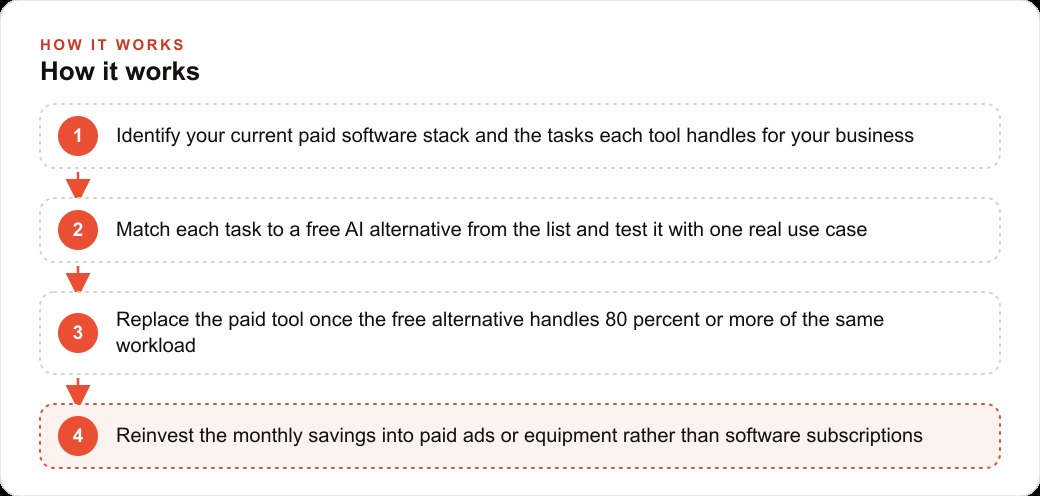
Do not swap your entire stack in a week. Pick one tool and one task, test it for two weeks on real work, then move to the next. Switching everything at once means learning too many interfaces and abandoning the experiment the first time one tool stumbles on an edge case. Start with Whisper Flow for the fastest daily payoff, then Notebook LM on one document your team struggles to navigate, then Canva Magic Studio on one real upcoming marketing need.
Two cautions carry across the whole list. Free does not mean permanently free, so know the paid alternative for any tool handling a mission critical function, because limits tighten as companies stop competing for adoption. And never publish AI output unreviewed. Build a one minute check into every generated piece, because Kling occasionally glitches, ElevenLabs sometimes mispronounces a technical term, and a generated template sometimes drifts off brand. All easily fixed, but only if you look before it reaches a customer.
The total learning investment across these tools is roughly eight to twelve hours spread over a couple of weeks, and against monthly savings of a few hundred dollars it pays back in the first month. If you want help mapping your current software costs to free replacements and building a simple weekly workflow around them, you can do it yourself with the plan above or bring in an expert to set it up, and that is exactly the kind of operational work I take on for owners who want to cut costs without cutting quality.
That is exactly what we do at AI DOERS. Book a private 30-minute call with Madhuranjan Kumar and we will map the fastest path to it for your specific business.
Book your call →
Madhuranjan Kumar
Madhuranjan Kumar brings 20 years of performance-marketing experience and has managed over $200 million in Facebook ad spend for brands across the United States and beyond. His expertise spans the full modern marketing stack: Meta, Google Ads, TikTok, email automation, CRM, and the websites that hold it together. At AI DOERS he turns that track record into lead-generation systems for businesses across every industry.