
Everything You Can Do With Google AI For Free (And Why It Matters)
Google has folded a full AI suite into free tiers most people never open. Here is the whole free stack, what each piece actually does for a business, and how I would put it to work this week.

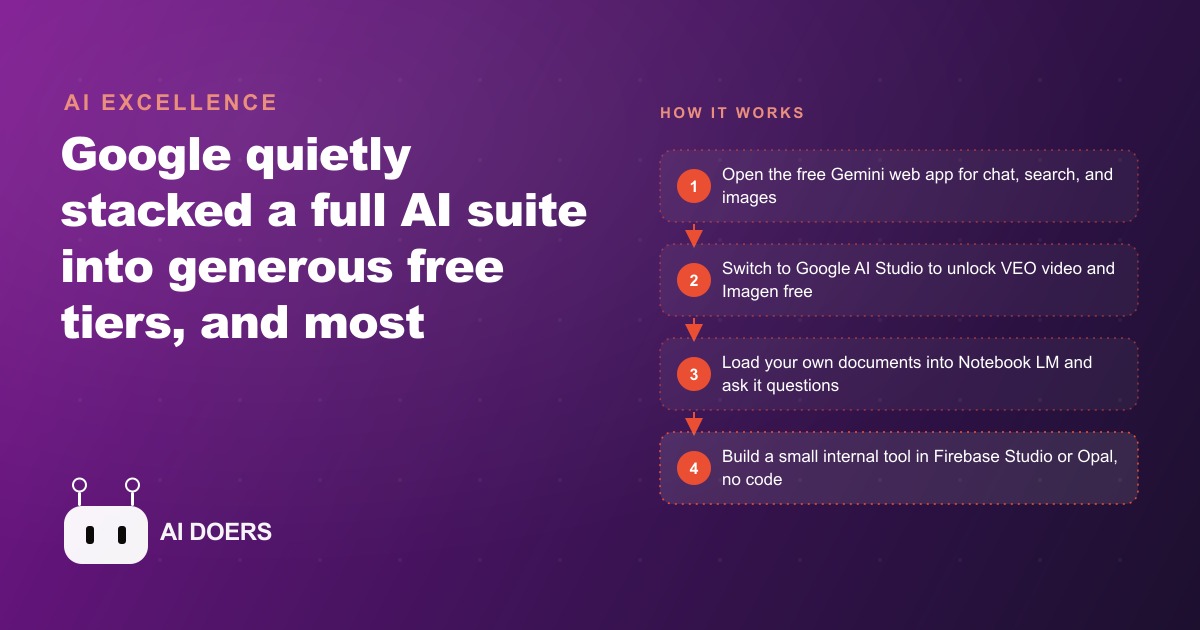
Google has quietly built a free AI suite that most businesses still paying for third-party tools have never fully explored. The suite is not in beta, not limited to developers, and not behind any paywall. It is available right now to anyone with a Google account, and the gap between what it offers and what many businesses are paying $20 to $150 per month for has, in specific categories, effectively closed.
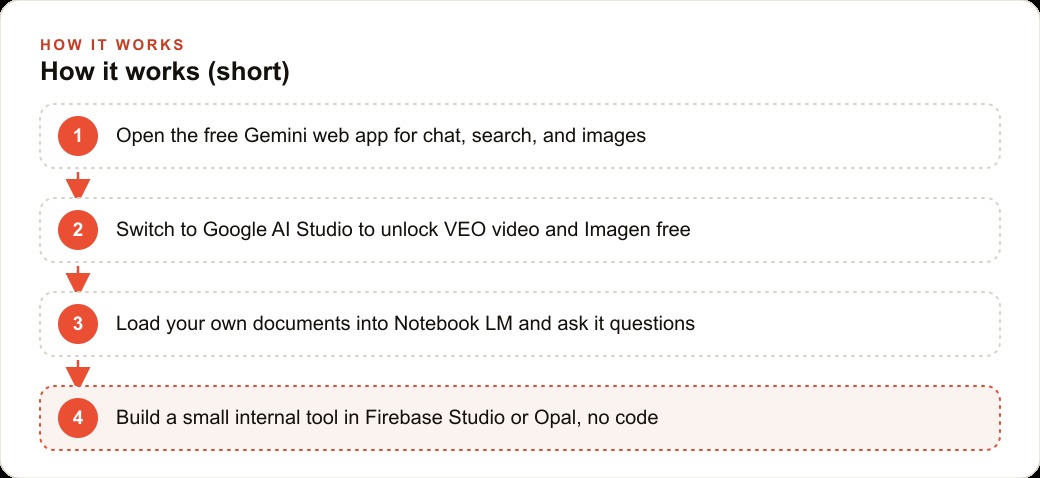
This matters now because the additions that landed in the most recent update to the free tier crossed a threshold that makes continued spending on certain paid alternatives genuinely hard to justify. The additions include AI-generated video via VEO, AI image generation via Imagen, live screen coaching through a feature called Stream Realtime, full-stack app building through Firebase Studio, and a document-chat tool in Notebook LM that handles internal knowledge bases better than many dedicated products built specifically for that purpose.
What follows is a breakdown of what actually changed, why each change matters for a small or mid-size business, and what a realistic stack replacement looks like using only the free Google tier.
Google AI Studio unlocks VEO and Imagen for free, not just inside the paid tier
For most of the past year, VEO (Google's video generation model) and Imagen (its image generation model) were associated with Google's paid offerings or with enterprise API access. That changed with the latest update to Google AI Studio.
Google AI Studio is the developer-facing interface for Google's AI models. It offers more control than the consumer Gemini app: temperature settings, token limits, system prompts, and the ability to swap between model versions. It has also, since the recent update, provided access to VEO video generation and Imagen image generation for free.
For a small business, this means the following capabilities are now available at zero cost. AI-generated images for social media posts, ads, internal documents, and client materials, produced from a text description in seconds. Short-form AI video for product demonstrations, explainer content, or social clips, without any filming or a video subscription. These were paid capabilities as recently as six months ago. They are not paid capabilities now.
The Gemini web app, the consumer face of the same system, adds two features worth examining separately. The first is Canvas, which generates working code or extended long-form writing from a single prompt. The second is a multimodal image model with character consistency, which allows a business to generate a custom character or product image and then maintain visual consistency across multiple generations without the character drifting between images. For businesses producing repeated visual content around a mascot, a recurring campaign element, or a product line, this is a capability that previously required either a human illustrator or a paid AI image tool with consistency features baked in.
Notebook LM is the tool most internal knowledge bases have been waiting for
Most businesses accumulate knowledge in formats that are inaccessible during the workday. A folder of PDF service manuals. A shared drive of previous project files. A collection of procedure documents written two years ago that nobody has updated but that still contain the most accurate descriptions of how certain things get done.
Notebook LM is Google's tool for making that material conversational. You upload your own documents (PDFs, Google Docs, web pages, plain text files), and the tool allows you to ask questions and get answers grounded entirely in what you uploaded. It does not pull from the general internet. It works only from the sources you provide. Every answer is cited back to the specific document and passage it drew from.
The practical implications for a small business are direct. A contractor who loads the project specs, change orders, and site-visit notes for an active job can ask the system questions during a client call rather than putting the client on hold to search through files. A service business that uploads its pricing guide, service terms, and FAQ document can use Notebook LM as the foundation for training new staff, cutting the time from hire to independent operation by giving new team members an always-available reference that answers in plain language.
Notebook LM also includes an audio podcast generator. It takes the uploaded documents and produces a two-host audio conversation discussing the material, in a format that sounds like a professional podcast episode. For businesses that want to turn internal documentation into training audio, or that want to give clients a summary of a proposal in audio form rather than a PDF, this is a production capability that previously required hours of recording and editing.
The citation behavior is what separates Notebook LM from other document-chat tools. When the source of an answer is traceable to a specific passage in a specific document, trust in the system is much higher than when answers appear without sourcing. For a team that is going to rely on this as a real operational reference, the citation feature is not a nice-to-have. It is what makes the tool defensible in practice.
The free tier now includes live screen coaching, which replaces tutorial watching
Google AI Studio includes a feature called Stream Realtime. It watches your screen in real time and provides spoken guidance on what it sees, allowing a user to describe what they are trying to do and receive live step-by-step coaching without leaving the application they are working in.
This is a fundamentally different interaction model from how most people currently learn new software. The standard approach is to encounter a problem, open a separate browser tab, search for a tutorial, watch a video at accelerated speed, pause it every thirty seconds to apply each step, lose your place, rewind, and finish twelve minutes later having completed a task that took four minutes to do. Stream Realtime removes that cycle entirely by watching the actual screen and coaching directly within the workflow.
For a small business, the use case is not primarily personal upskilling. It is staff training without a trainer. A new team member learning accounting software, a project manager learning a scheduling tool, a front desk person learning a CRM: each of these currently requires either a dedicated training session, a purchased course, or a lot of time alone with a tutorial library. Stream Realtime replaces all of that with live guided coaching that can be accessed any time the user is stuck, without blocking anyone else's schedule.
This feature is available in Google AI Studio at no cost. It is not in the paid Gemini tier. It is specifically in AI Studio, which most small businesses have never opened because the name suggests it is only for developers. It is not.
Firebase Studio means a small operation can build its own tools without a developer
Firebase Studio takes a plain-text description and produces a working full-stack web or mobile application. The application includes a backend, a database, authentication, and a deployable frontend. The generation is handled by AI, and the result is a functional application rather than a wireframe or prototype.
The current capability is not at the level where a complex enterprise system with dozens of integrations can be described in a sentence and produced without any technical review. It is at the level where a small business can describe a specific internal tool it needs and receive a working first version.
A service business that wants a booking form with automated confirmation emails and a simple admin view to see upcoming appointments can describe that in plain language and receive a functional app in Firebase Studio. A contractor who wants a client portal where homeowners can track the status of their project and upload photos can describe that and receive a working version to start from. These are tools that previously required hiring a developer at $80 to $150 per hour, or paying for a SaaS subscription to a product that covered eighty percent of what was needed and not the specific remaining twenty.
The free tier of Firebase Studio includes sufficient compute and storage to build and run tools at small-business scale. Costs begin only when traffic volume exceeds what the free tier covers, and for most internal tools, that threshold is not reached.
One plumbing company, three paid tools replaced, and what the math looks like
Before the Google free tier expansion, a plumbing company was running three paid subscriptions to cover its AI and content needs.
The first subscription was a $29 per month AI writing tool used to draft service descriptions, quote follow-up emails, and occasional social media captions. The second was a $19 per month AI image generation tool used to produce illustrations for the company website and Facebook posts. The third was a $49 per month internal documentation tool that allowed the team to ask questions and get answers from uploaded documents, primarily the supplier catalog and local code references.
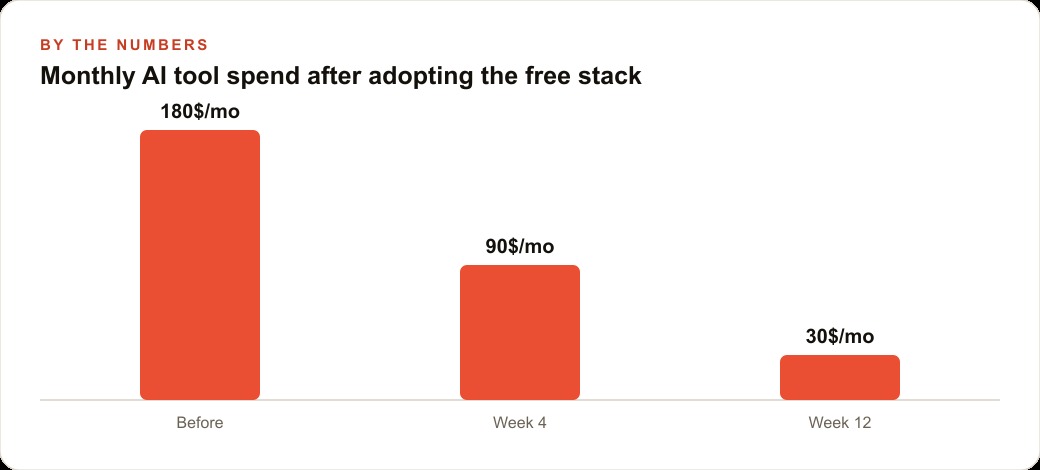
Total monthly spend: $97.
After the Google free tier update, the path to replacing all three is straightforward. The AI writing tool is replaced by the Gemini web app and Canvas, which handle long-form writing, emails, and short copy from a single interface at no cost. The image generation tool is replaced by Imagen in Google AI Studio or the character-consistent image model in the Gemini app, both free. The documentation tool is replaced by Notebook LM, which handles PDF uploads and conversational question-and-answer with cited answers.
The replacement is not a downgrade. Gemini's writing quality at the current model tier is competitive with most standalone writing tools in this price range. Imagen's image quality is sufficient for social media and web use without heavy post-editing. Notebook LM's citation behavior is actually more rigorous than many paid documentation tools, which generate responses without showing their sources.
Monthly savings: $97. Annual savings: $1,164. The time cost of the migration is approximately two to three hours to set up Notebook LM with the relevant documents and redirect existing workflows to the new interfaces. For a larger business running more tools or higher-tier subscriptions in these categories, the savings scale accordingly.
Gems give every recurring workflow its own persistent AI assistant
One addition to the free tier that most guides overlook is Gems. Gems are persistent custom AI assistants inside the Gemini app, each scoped to a single task or role. You define the instructions once and the assistant remembers them across every conversation. A customer inquiry assistant, a quote-drafting assistant, a social media caption assistant: each gets its own Gem with its own instructions, and you switch between them without re-explaining the context every time.
For a small business with three or four recurring AI tasks, Gems eliminate the overhead of prompt management. Instead of pasting a paragraph of context at the start of every session, you open the relevant Gem and it is already oriented. The instructions can include tone guidance, specific formatting requirements, details about the business and its clients, and examples of the kind of output you want. Everything you would otherwise have to re-specify is baked into the Gem permanently.
The practical effect is that the free tier behaves more like a configured team assistant than a generic chat tool. A business with four distinct recurring AI tasks can have four Gems, each tuned to that task's specific requirements, all free, all available any time someone on the team needs them.
How to approach the audit
The practical move following all of this is not to immediately cancel every AI subscription. It is to run a two-hour audit comparing what each current subscription is being used for against what the Google free tier now covers.
Madhuranjan recommends starting with tools used for writing, image generation, and document question-and-answer, because those are the categories where the free tier is most directly competitive. Tools used for specialized tasks, industry-specific integrations, or workflows that depend on specific third-party connections are less likely to have a direct free replacement.
For each tool on the list, ask one question: is the specific capability I am using this for now available in the Google free tier at comparable quality? If the answer is yes, the subscription is worth reassessing. If the answer is no, it may be worth keeping, but it is also worth testing the free alternative before renewing.
The gap between what a paid AI tool offers and what Google bundles into a free account is closing. For a portion of what businesses are currently spending, it has already closed entirely. The audit tells you where you stand.
That is exactly what we do at AI DOERS. Book a private 30-minute call with Madhuranjan Kumar and we will map the fastest path to it for your specific business.
Book your call →
Madhuranjan Kumar
Madhuranjan Kumar brings 20 years of performance-marketing experience and has managed over $200 million in Facebook ad spend for brands across the United States and beyond. His expertise spans the full modern marketing stack: Meta, Google Ads, TikTok, email automation, CRM, and the websites that hold it together. At AI DOERS he turns that track record into lead-generation systems for businesses across every industry.