
Claude's New Plugin Packs Bring Real Automation to Small Business
Claude shipped preset plugin packs for small business and legal work that bundle prompts, live data connectors, and automations into one system. Here is what they do, where they fall short, and how to set them up.

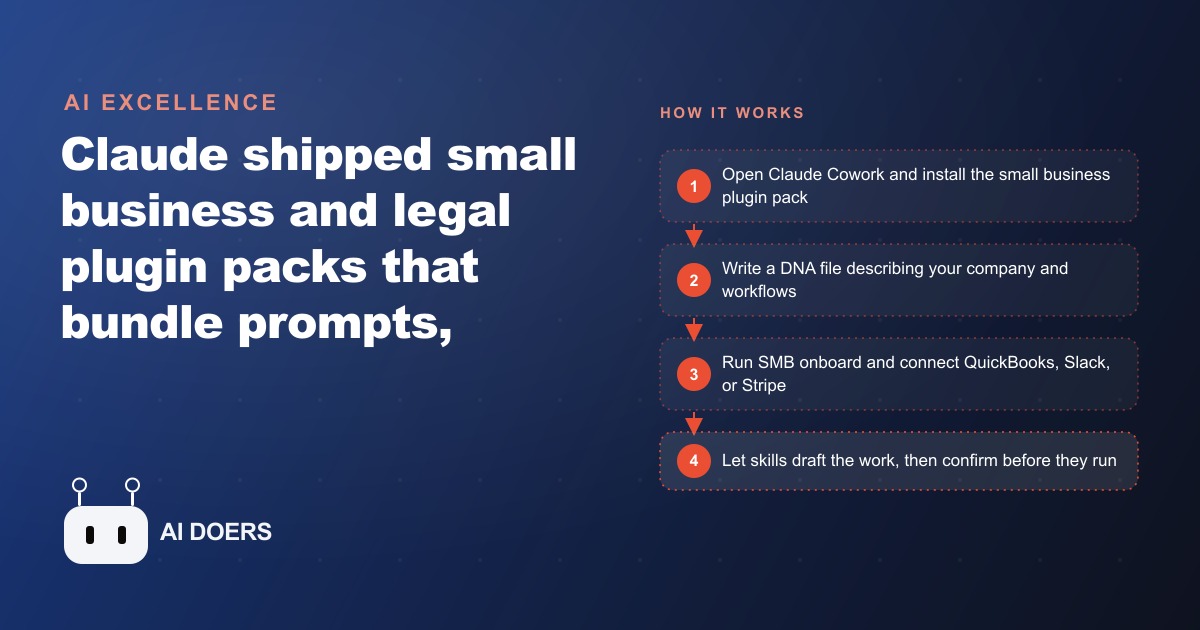
Claude just shipped something that looks small and is actually a category shift: preset plugin packs for small business and legal work that are already among the most used plugins available. I am Madhuranjan Kumar, and I want to take this release apart properly, because the interesting thing is not that Claude added automation. It is what a plugin really is under the hood, and why the way it is deliberately limited tells you more about where this is going than any feature list. The small business pack alone carries 31 ready-made skills, from planning payroll to chasing overdue invoices, and it can pull from your real tools like QuickBooks and PayPal. Let me explain each layer of what that actually means.
Anatomy of a plugin: three parts pretending to be one
A plugin looks like one thing when you install it, but it is really three separate ideas bolted together, and understanding the three is the key to understanding everything else. The first part is prompts, which Claude calls skills. A skill is a packaged, often multi-step instruction for a specific job. The second part is connectors, which pull in your live data from tools like Slack, QuickBooks, PayPal, or HubSpot. The third part is automations, the wiring that makes the whole thing run as one flow.
Why does this three-part structure matter? Because on its own, a clever prompt gives you a one-off reply based on nothing but what you typed. That is where most people's experience of AI stops. A plugin chains that prompt to your actual accounts, so the output is grounded in your numbers instead of a plausible guess. The prompt is the brain, the connector is the nervous system reaching into your real business, and the automation is the muscle that acts. Separate them in your mind and the rest of this release makes sense. Conflate them and you will misjudge what the tool can and cannot do.
Why the invoice-chase skill is the honest example
The clearest way to see the anatomy in motion is the invoice chase skill, and it is worth dissecting because it is representative of all 31. Ask a plain chatbot to help with overdue invoices and it will write you a generic reminder template. The plugin does something categorically different. It builds an accounts receivable aging report, scores each customer by their actual payment history, and drafts a tone-matched reminder for every overdue invoice, pulling the real data from QuickBooks and cross-checking it against PayPal.
Look at what changed. The output is no longer a template you have to fill in. It is a finished, specific piece of work grounded in your books: this customer, this amount, this many days late, this tone based on how they have paid before. That is the skill-plus-connector-plus-automation pattern doing its job, and the exact same pattern repeats across all 31 skills in the pack, from payroll planning to campaign drafting. Once you see it in the invoice example, you see it everywhere, which is why I keep coming back to it as the honest illustration of the whole system.
The deliberate ceiling: assisted, not autonomous
Here is the facet most reviews get wrong. By default, these skills get you most of the way and then pause for your confirmation before they run. People read that as a limitation. I read it as the single most important design decision in the release, and a correct one.
This is assisted automation, not a button that runs your whole business. And that is exactly what you want right now, because the cost of a mistake in your books, your payroll, or a client-facing message is high, and today's models still occasionally invent a detail. A system that drafts the aging report and the reminders but waits for your yes before sending is a system you can actually trust with real money. The human stays in the loop not because the technology cannot act, but because the responsible version of this technology should not act unsupervised on your finances yet. Understanding this ceiling protects you from the two failure modes: expecting magic and being disappointed, or trusting it blindly and getting burned. It is neither. It is a capable assistant that does the work and holds it for your approval.
Context is the ingredient nobody wants to hear about
The next facet is the one people skip, and it quietly decides whether the whole thing works for you. These packs are only as good as what they know about you. Claude leans on what it calls DNA files, documents that describe your company, your workflows, your service area, your typical jobs and margins. Feed it good ones and the output is sharp and specific. Feed it nothing and you get generic filler, and then people blame the plugin.
This is worth sitting with because it is counterintuitive. The impressive-sounding part is the automation, but the part that actually determines quality is the boring twenty minutes you spend writing down how your business works. Context is the fuel. The engine is fine, but an engine with no fuel goes nowhere. Every disappointing experience I have seen with these tools traces back to a user who installed the flashy skills and never wrote the unglamorous context. If you take one operational lesson from this whole release, take that one: the setup you least want to do is the setup that matters most.
The connector coupling that trips people up
There is a subtler constraint hiding in the design, and it catches people off guard. The skills are written for specific connectors. The invoice chase skill assumes QuickBooks and PayPal. If your business runs on a different accounting tool or a different payment processor, the skill will not simply adapt on its own. You have to edit the prompt, using the customize-with-Claude option, to fit your actual stack.
This coupling between a skill and its connector is not a bug, but it is a reality you should plan around. It means the packs work best out of the box for businesses using the mainstream tools they were written for, and they need a little hands-on editing for everyone else. That editing is not hard, but it is a step, and knowing it exists up front saves you the confusion of wondering why a skill points at software you do not use. When you map out which skills you want, check which connectors they assume, and budget the time to adjust the ones that do not match your tools.
Reading the wider signal: today manual, tomorrow ambient
Now zoom out, because the most valuable facet is what this release signals about the direction of travel. Claude paired this deliberately hands-on approach with a glimpse of where it goes next: Google's vision for Android and Gemini, where the same kind of skills run automatically in the background, booking appointments, rewriting rambling notes into clean messages, and building small widgets on demand. Claude Code itself added a view to watch several agents work in parallel and a command where you state an outcome and let it find the path.
Put those side by side and the trajectory is obvious. Today, these plugin packs are manual and confirmation-gated. Tomorrow, the same skills run ambiently, acting on their own with a light touch of oversight. The strategic read for an owner is this: the manual version you learn now is the exact skill set that becomes automatic later. The people who write good context files and wire up their connectors today are building the muscle that will let them adopt the autonomous version the day it is safe. Dismiss the current packs as too fiddly and you will be starting from zero when the ambient version arrives. Learn them now and you are early.
A worked example: what this looks like for a landscaping company
Let me ground the whole dissection in illustrative numbers, using an unnamed landscaping company. The business bleeds time in the same two places most trades do: chasing payments and repetitive admin. Seasonal crews and net-30 commercial clients mean overdue invoices are constant. So the owner connects QuickBooks and lets the invoice chase skill build the aging report, rank which property managers always pay late, and draft a polite reminder for each in the company's own tone, holding them for a five-minute review before sending.
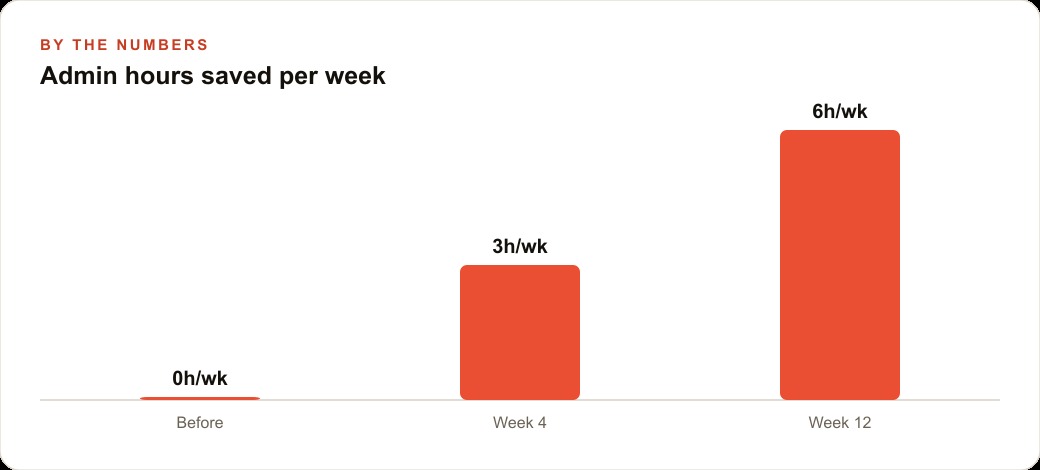
Put numbers on it. Say the owner used to spend one evening a week, about three hours, assembling who owed what and writing reminders one by one. The skill turns that into a five-minute morning review, recovering roughly three hours a week, close to twelve hours a month. If the owner's time is worth 50 dollars an hour, that is about 600 dollars a month recovered, plus the harder-to-measure gain of invoices going out faster and cash arriving sooner. From there the rest of the pack maps onto the trade: a payroll skill preps the weekly crew hours, a pipeline skill turns new quote requests into a follow-up list so spring leads do not slip, and a campaign skill drafts the seasonal emails, aeration in fall, cleanups in spring, before they are needed. Those quote requests, once captured, live in the CRM and website stack where nothing falls through the cracks, and the seasonal campaigns feed straight into Facebook and Instagram ad campaigns when it is time to push. The one move that makes all of it work is the DNA file the owner writes first, explaining the service area, the crews, the typical jobs and margins, so every skill reasons over the real business.
What 31 skills in one pack actually implies
It is easy to skim past the number, but thirty-one skills in a single small-business pack is worth pausing on, because it reframes what you are installing. This is not a tool with one clever trick. It is a library of packaged procedures covering most of the recurring administrative jobs a small business faces, from planning payroll to chasing invoices to drafting campaigns. The strategic implication is that you should not think of the pack as something you use, but as something you shop from. You are not meant to run all thirty-one. You are meant to find the three or four that map to your specific bleaks and lean on those.
This matters because the instinct with a big feature list is to feel obligated to use it all, and that instinct leads straight to overwhelm and abandonment. The healthier read is that the breadth exists so that whatever your particular pain is, invoicing, payroll, pipeline, campaigns, there is probably a skill aimed at it, and you can ignore the other twenty-seven without guilt. A landscaping company will live in the invoicing and campaign skills. A consulting firm will live in the proposal and pipeline skills. A retailer will lean on inventory and payroll. Same pack, completely different three-skill subset, and that flexibility is the actual product.
There is a deeper point hiding in the count too. Thirty-one skills means the pack encodes a lot of small-business judgment about what work is worth automating, and studying which skills exist is itself informative. It tells you where the repeatable, rules-based drudgery in a typical business actually lives, which is useful even before you automate any of it. When you browse the list and recognize four of them as things that eat your evenings, that recognition is the signal telling you where your time is leaking. The pack is, in a sense, a map of the boring work every small business shares, and the skills you reach for reveal the shape of your own bottlenecks. Read it that way and even the skills you never turn on have taught you something about where your hours go.
How to set it up without wasting the first afternoon
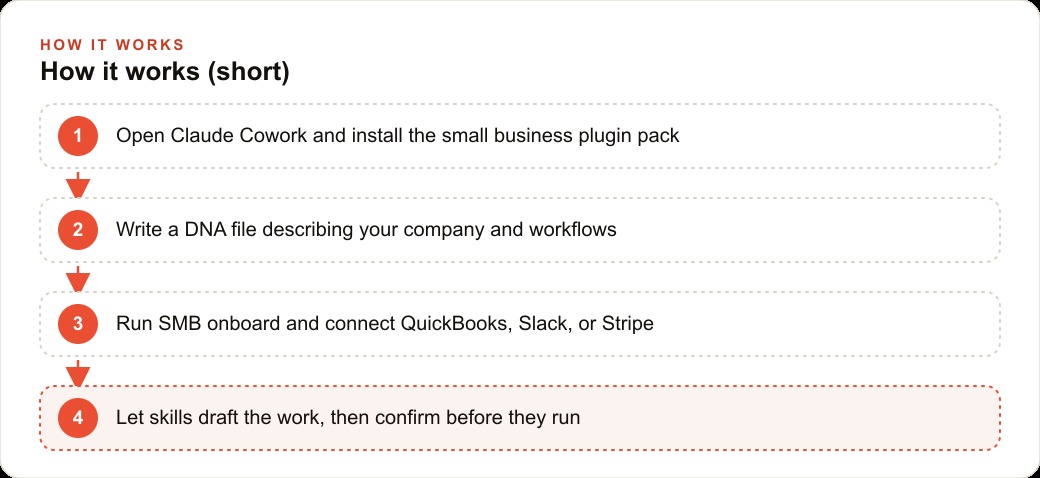
If you want to try it, do it in the right order. Open the Claude desktop app on a paid plan, switch from chat to Cowork, go to customize and personal plugins, then browse plugins and install the small business pack. Before you touch a single skill, spend twenty minutes writing that DNA file about your company, because as we covered, context is the fuel and everything else runs on it. Then start with the onboarding skill, not a random one: run the SMB onboard flow, let it interview you about team size and priorities, read the context you wrote, and recommend which tools to connect first, wiring up QuickBooks, Slack, or Stripe one at a time.
That sequence, context first, onboarding second, individual skills third, is what separates people who get real value from people who bounce off in frustration. You can set this up yourself in an afternoon, and I would encourage any owner to try, because doing it teaches you the manual version of a workflow that is about to become automatic. If you would rather have someone write the context files, connect your tools cleanly, and tune the skills to your exact stack so it works the first time, that is the kind of work I do for clients, and you can bring me in to handle it.
That is exactly what we do at AI DOERS. Book a private 30-minute call with Madhuranjan Kumar and we will map the fastest path to it for your specific business.
Book your call →
Madhuranjan Kumar
Madhuranjan Kumar brings 20 years of performance-marketing experience and has managed over $200 million in Facebook ad spend for brands across the United States and beyond. His expertise spans the full modern marketing stack: Meta, Google Ads, TikTok, email automation, CRM, and the websites that hold it together. At AI DOERS he turns that track record into lead-generation systems for businesses across every industry.