
Claude's Connectors and Excel Control Point Toward One Agent for Everything
This week's releases show Claude assembling a single agent for your digital work: upgraded connectors bring apps like Gamma right into the chat, Claude for Excel landed on the $20 Pro plan, and free users gained downloadable files and reusable skills, all converging on one assistant that starts and finishes your workflow.

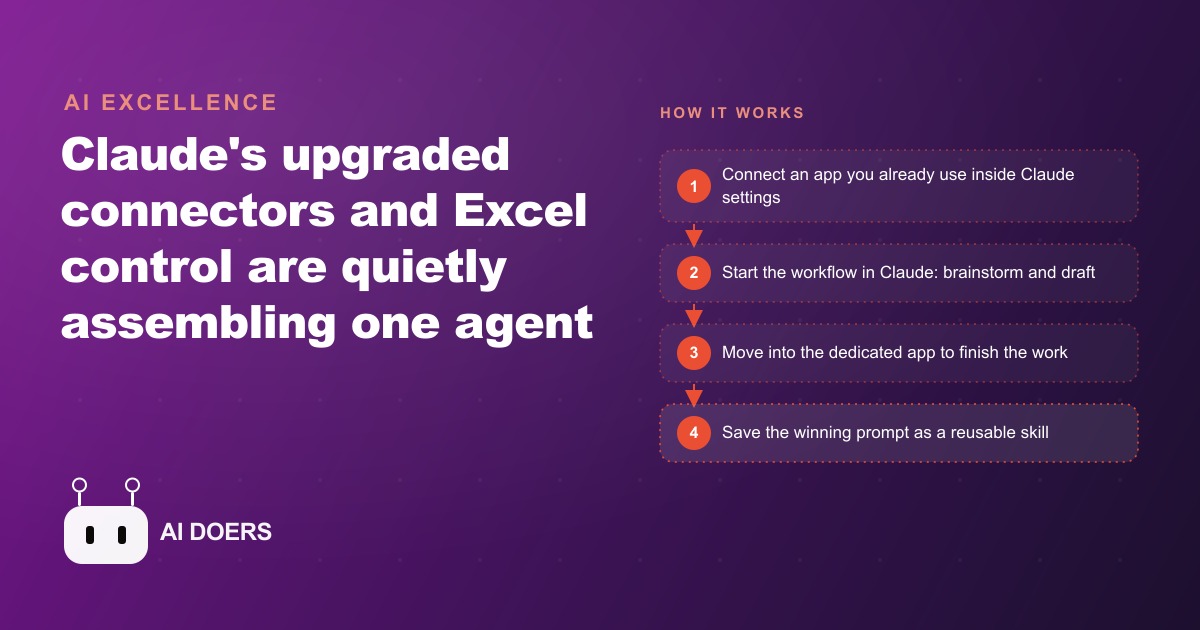
The era of bouncing between a dozen open tabs is quietly ending, and this week's releases make the direction unmistakable. One assistant is being assembled to start a task, carry it, and finish it, so you stop paying the tax of constant app-switching. I am Madhuranjan Kumar, and I read these roundups so you do not have to, then pull out the handful of items that actually change how a business works. Here are eight developments worth your attention, each one a concrete shift rather than hype, and each one a hint at where the consolidation is heading.
1. An open-source agent got a cease-and-desist, then a new name
The most eye-catching item was an open-source agent originally called Claudebot, renamed Maltbot after Anthropic sent a cease-and-desist over the name. It connects to your messages, your browser, and your entire computer, and it can schedule actions on its own. It is also rough. It breaks often and can get accounts banned quickly, so it belongs in the watch-this category rather than the rely-on-this one. I include it first because it is the canary. It shows where the reckless edge of this technology is going, which tells you where the careful, reliable versions are heading a few steps behind.
2. The reckless edge tells you where the safe path leads
That distinction is worth pausing on. The open-source agent does the risky things the big labs have deliberately avoided, which is exactly why it breaks and gets you banned. The lesson is not to run it. The lesson is that Claude is walking the very same path, just in a far more controlled and reliable way. When you see an unstable tool doing something audacious, you are looking at a preview of a capability that will arrive properly packaged and safe to use within months. Watching the reckless version is how you plan for the reliable one.
3. Connectors bring your apps inside the chat
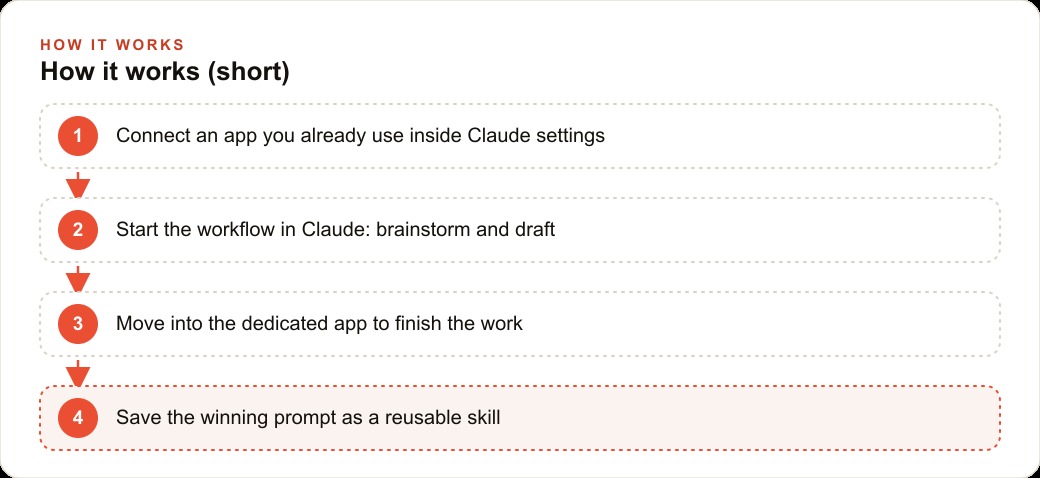
This is the item with the most immediate practical value. Claude upgraded its connectors so external apps appear right inside the chat, which means you never leave the conversation to start a task. You open settings, go to connectors, click browse, and link a tool you already use. In the demo this was shown with a presentation app and a design app. You connect once, then open a new chat and simply ask Claude to create a presentation, and it engages the connected app directly. The friction of hopping between tools, which quietly eats hours across a week, starts to disappear.
4. The winning pattern is to start the work in Claude
The habit that makes connectors pay off is starting the work in the chat. You brainstorm, prepare, and draft inside Claude first, then move into the dedicated app to finish. That order matters. The assistant is best at the messy early thinking, the shaping and structuring, and the specialist app is best at the polished final output. Get the thinking done where thinking is easy, then hand off to the tool that finishes it well. A services firm can draft a proposal in Claude and finish the layout in a design app, and the handoff is seamless rather than a copy-paste slog.
5. Different connectors play different roles
Not every connector behaves the same way, and knowing the difference saves confusion. Most connectors begin a workflow, letting you kick off a task that finishes elsewhere. But some end one. A team-chat connector, for instance, lets you summarize a long thread and send the recap out as a message. So you can think of your connectors in two buckets: the ones that open a task and the ones that close it. Wiring the openers to the start of your process and the closers to the end turns Claude into the connective tissue that runs from first idea to final send.
6. Claude for Excel lands on the twenty-dollar plan
For anyone who lives in spreadsheets, this is the sleeper hit. Claude for Excel is now available as an extension on the twenty-dollar Pro plan, and it does the automation that experts used to hand-code, just by talking to it. The old way of getting a spreadsheet to do something clever meant writing macros in a scripting language most people never learned. Now you describe the analysis you want in plain English and the assistant builds it. That single change takes a capability that was locked behind technical skill and hands it to anyone who can explain what they want.
7. Free users gained downloadable files and reusable skills
The free tier got two upgrades that matter more than they sound. First, free users can now generate downloadable files: Excel sheets, slide decks, Word documents, and markdown. That alone makes the free tier genuinely useful for real work. Second, and bigger, free users got skills. A skill packages a prompt that worked into something you can reuse forever, instead of rewriting it every time. This is the quiet source of compounding time savings, because the work you figure out once never has to be figured out again. I will come back to why skills are the real story in the worked example.
8. The rest of the field is specializing around the edges
While one assistant consolidates the center, the rest of the field is fanning out into specialists, and the smart move is to use both. One model gained agentic vision that analyzes an image with code rather than glancing at it, going so far as to draw boxes over each finger to correctly count six on an AI-generated hand, and to zoom in and inspect fine detail. Another lab shipped Prism, a free research workspace for scientific writing and collaboration built on a customized ChatGPT. A third built a study app that quizzes students on real exam questions. The pattern is a swarm of single-purpose tools alongside one universal assistant slowly taking shape. A smart business picks the assistant for the everyday workflow and the specialist tools for the occasional spikes. The mistake to avoid is treating this as an either-or choice, where you pick one universal tool and refuse to learn any others. The right posture is a hub with spokes. The hub is the assistant you live in day to day, the place you start almost everything, and the spokes are the two or three specialists you reach for when a task genuinely needs their edge. That way you get the consolidation benefit for the ninety percent of work that is routine, without giving up the extra quality on the rare task that deserves a purpose-built tool. And the honest caveat that runs under all of it: AI enhances rather than replaces. A director used one of these tools to animate hand drawings in a style she could not have afforded to draw frame by frame, but she still had to be a good director for the tool to make her better. You still have to be good at something for AI to amplify it.
A worked example: the e-commerce store that reclaims its afternoons
Let me tie the list together with an illustrative example. Picture an online store that runs on the same handful of repeated tasks every week: product descriptions, a sales report, restock decisions, and customer email. Here is how the consolidation changes the week.
First, connectors. I would link the store's design app and its documents to Claude, then start each new product launch inside the chat by drafting the description, the ad copy, and the social captions before moving to the design app to finish the creative. The thinking happens where thinking is easy, and the polish happens where polish belongs.
Second, the numbers. For the weekly report, I would lean on Claude for Excel. Drop in the weekly export and ask, in plain English, which products are trending up, which are dead stock, and what to reorder, and let the assistant build the analysis instead of wrestling with pivot tables. What used to be a dreaded formula-fight becomes a short conversation.
Third, and this is the real win, skills. The store writes a product description the same way every single time, so I would save that as a skill once and then trigger it for every new item to get consistent, on-brand copy in seconds. I would do the same for the weekly sales summary. Over a few weeks, those saved skills turn a full afternoon of routine work into a short morning.
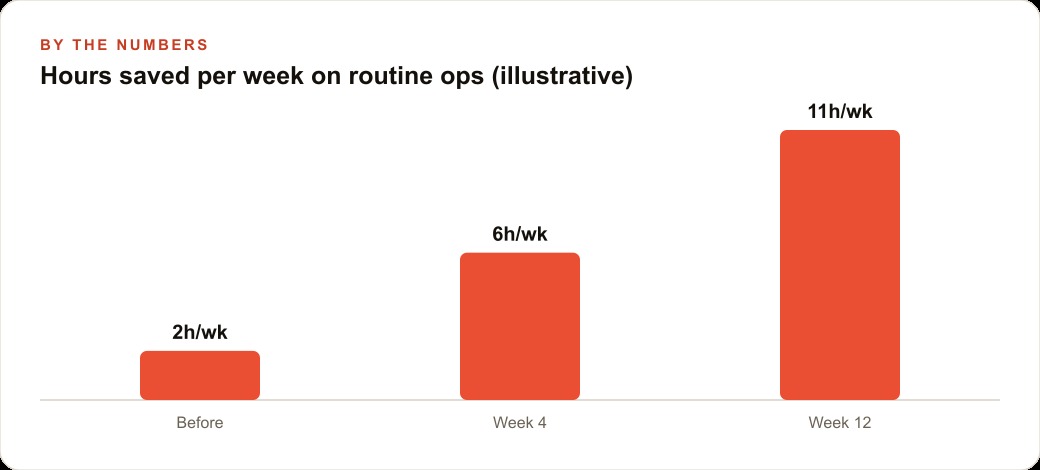
Now the illustrative numbers, meant to show the shape rather than promise a result. Before adopting any of this, the store might have recovered only about two hours a week from scattered AI use. By the fourth week, with connectors and Excel in the flow, that could be closer to six hours a week. By the twelfth week, with a real library of saved skills doing the repetitive drafting, it might reach eleven hours a week reclaimed. Those hours go back into merchandising and customers instead of formatting spreadsheets. And because the descriptions and captions drafted this way feed both the store's Facebook and Instagram ad campaigns and its SEO and organic search presence from the same source, the store gets consistent messaging across paid and organic without doing the work twice, while orders and customer replies still run through its CRM and website stack.
The through-line worth remembering
Eight items, one direction. The tabs are collapsing into a single assistant that starts and finishes your work, the specialist tools survive around the edges for the spikes, and the compounding advantage lives in skills, the prompts you solve once and reuse forever. You do not have to adopt all of it at once, and you should not try. Connect one app inside Claude's settings, run one real task end to end, add Claude for Excel for one report you usually dread, and save one prompt that worked as a reusable skill. Build the library one connector and one skill at a time, because the savings compound as it grows.
Why skills matter more than any single connector
If I had to point at one item on this list as the sleeper that changes the most, it would not be the flashy agent or even the Excel control. It would be skills, and it is worth explaining why, because most people scroll past them. A connector saves you the trip between two apps. Useful, but a one-time convenience each time you use it. A skill is different in kind, because it saves the thinking, not just the clicking. The first time you work out the exact phrasing that gets Claude to write a product description in your brand voice, that is real effort. Every time after, a skill replays that effort for free. The saving does not stay flat, it compounds, because your library of solved problems only grows and never shrinks.
This is the difference between using AI as a faster typewriter and using it as an institution that remembers. A business that saves its best prompts as skills is quietly building an asset, a codified way of doing its routine work that any team member can trigger and that stays consistent whether the person running it is the owner or a new hire on their first day. That consistency is worth as much as the time saving, because it means the product description, the sales summary, and the customer reply all come out on-brand every time, without depending on who happened to write the prompt. Connectors make today faster. Skills make every future day faster, and that is why I would tell any business to treat the skills library as the real project and the connectors as the plumbing that supports it.
You can absolutely set this up yourself, and I would start with a single connector today rather than trying to wire everything at once. If you would rather have someone map your routine tasks, connect the right apps, build the Excel workflows, and package your best prompts into skills your whole team can reuse, that is exactly the kind of work I do for clients, and you can bring me in to handle it.
That is exactly what we do at AI DOERS. Book a private 30-minute call with Madhuranjan Kumar and we will map the fastest path to it for your specific business.
Book your call →
Madhuranjan Kumar
Madhuranjan Kumar brings 20 years of performance-marketing experience and has managed over $200 million in Facebook ad spend for brands across the United States and beyond. His expertise spans the full modern marketing stack: Meta, Google Ads, TikTok, email automation, CRM, and the websites that hold it together. At AI DOERS he turns that track record into lead-generation systems for businesses across every industry.