
Claude Cowork Fundamentals: From Messy Folders to Self-Running Workflows
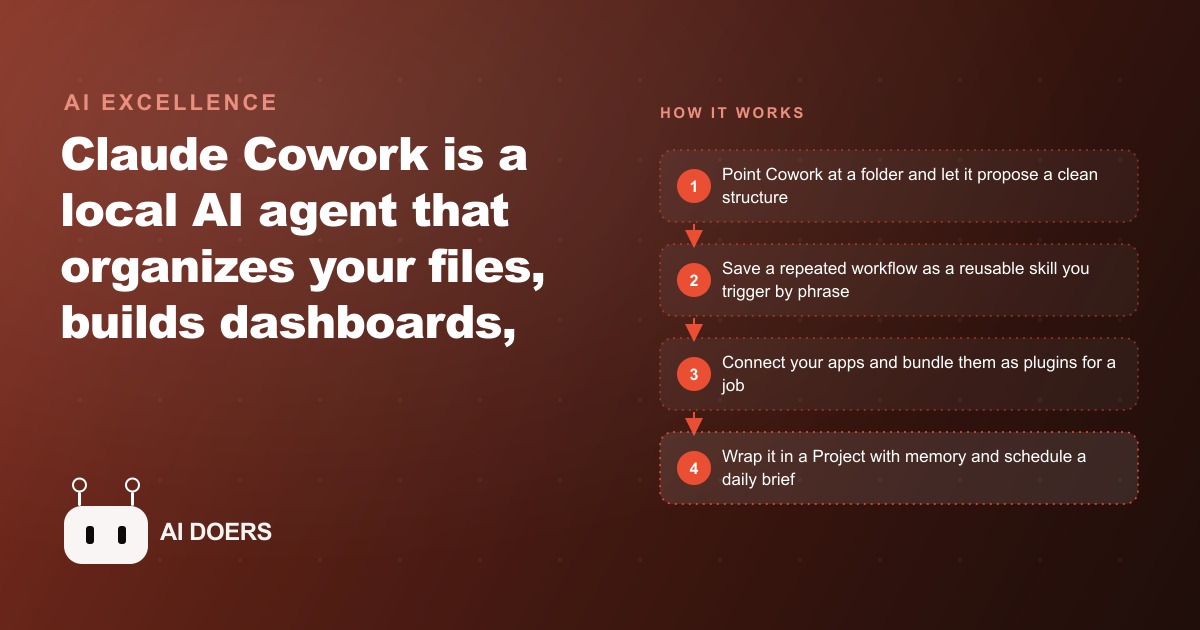
Claude Cowork is a local AI agent that lives on your computer and acts on your real files, apps, and tools. You start by pointing it at a folder, save the useful steps as skills, connect your apps, then wrap it in a Project that remembers context and runs scheduled work with no code.

The productivity tool you actually need is not another chatbot
I am Madhuranjan Kumar, and I want to say something that goes against most of the AI advice floating around right now. The endless race to write better prompts, to memorize clever tricks, to keep a chatbot tab open all day so you can copy answers back into your real work, is mostly a waste of your time. A chatbot that only talks is a very expensive way to stay exactly as busy as you were before. The real leap is a tool that stops giving you homework and starts doing the work on your actual files. That is what Claude Cowork from Anthropic is, and it quietly changes the whole question from what should I ask it to what should I stop doing myself.
Cowork is a local AI agent, a piece of software that lives on your own computer and acts on your files, your apps, and your tools directly. It installs as a hub with a few tabs: a normal chat for questions, a Cowork agent that works on your machine, and a Code tab for heavier builds. The distinction sounds small and is not. A chatbot tells you what to do. Cowork goes and does it, inside the folder you point it at, on the documents you already have. That single difference is the reason I think most people are optimizing the wrong thing.
The advice everyone repeats is quietly wrong
The standard story about AI at work goes like this. Learn prompt engineering, keep the model handy, and you will get a little faster at drafting and summarizing. It sounds reasonable, and it is why so many teams have an AI subscription that nobody can point to as having changed anything. Here is what that advice misses. The bottleneck in most small businesses was never the writing. It was the moving. Moving numbers between spreadsheets, moving files into the right folder, moving information out of five inboxes into one morning picture of what needs attention. A chat window does not touch any of that. You still do the moving by hand, and you feel productive because you are typing faster.
The counter-argument I hear is that a chatbot is safer and simpler, that you do not want an agent loose on your machine. I understand the instinct, and it is worth taking seriously, but it does not survive contact with how Cowork is actually built. It is a guided, permissioned agent aimed at a folder you choose, not a black box rummaging through your whole drive. In one walkthrough it was pointed at a cluttered desktop of hundreds of files and, while proposing a clean structure, it flagged an exposed API key sitting in a plain text file and recommended deleting it. Think about what that means. The supposedly risky agent was the thing that caught the real security problem the human had been ignoring for months. The cautious chatbot would never have seen it, because it never looks at your files at all.
What the tool actually does when you point it at your mess
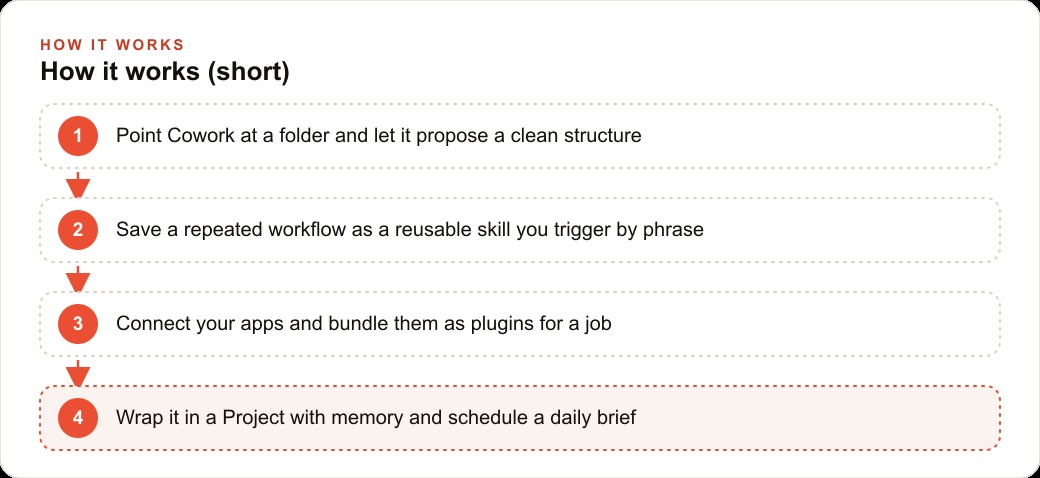
The honest way to understand Cowork is to watch it climb from a one-off favor to a standing system. The first rung is trivial. You aim it at a folder and it works inside it. Point it at a chaotic desktop and it proposes a sane structure. Point it at two years of credit card statements and ask for an interactive spending dashboard, and the slower, more meticulous model reads through everything and surfaces the recurring subscriptions and trends you had lost track of. On its own that is a nice trick, and if it stopped there I would agree with the skeptics that it is a toy.
It does not stop there, and this is where my contrarian point becomes concrete. The value is not in any single task. It is in saving the task. Feed Cowork a few screenshots of your logo and website and it writes a brand book as a PDF, then applies it so a plain dashboard suddenly carries your real colors and fonts. You save that sequence as a skill, which is nothing more exotic than a reusable text file of instructions you trigger by typing a short phrase like apply brand. From then on, styling anything is one phrase instead of an afternoon. Connectors link the agent to Gmail, Drive, Calendar, and Microsoft 365 so it can reach across your apps, and an inbox triage routine can pull all your mail and separate the signal from the noise. Plugins bundle skills and connectors for a single job, so a finance plugin can run financial statements over a whole folder with one command.
Then comes the step almost everyone skips, and it is the one that makes the tool feel less like software and more like staff. You can schedule it. Tell it to run every morning at 7am, pull a brief from your calendar and inbox, and drop the digest into your notes, and it is waiting for you when you wake up. Above all of that sit Projects, persistent workspaces that wrap a folder with their own instructions, memory, and connections, so the agent remembers context across every session instead of starting cold each time. A memory-focused plugin can even maintain its own instruction and memory files for you and fill the gaps when you ask it to update. None of this is prompt cleverness. It is accumulation, and accumulation is what a chat window can never give you.
It is worth pausing on why the two-model choice matters here, because it is the kind of detail that separates a demo from a working system. The faster model is fine for organizing files and quick answers, but for anything that has to be correct, like reading two years of statements and not miscounting a single subscription, you want the slower, more meticulous option. In practice that means you learn to spend the extra minutes where accuracy pays for itself and to move fast where it does not. That judgment is a skill you build once and reuse forever, and it is a far more durable thing to learn than any particular phrasing of a prompt. The people who dismiss agents as unreliable have usually run the quick model on a task that deserved the careful one, then blamed the tool for their own shortcut.
There is also a compounding effect that the chatbot crowd never gets to feel, because it only shows up when work is saved rather than retyped. Every skill you write makes the next skill easier, since Cowork can reuse the pieces you already defined. The brand skill feeds the dashboard skill, the dashboard skill feeds the scheduled brief, and a plugin ties them into one command. By the third month you are not building from scratch anymore. You are assembling standing systems out of parts you already trust, and that is the exact opposite of opening a fresh chat window and explaining your context from zero for the hundredth time.
Where I think the real return hides
So who should care, and who is chasing the wrong thing? Almost any business that drowns in files, repetitive admin, and scattered apps is sitting on more upside here than in any prompt course. If your team keeps documents in a dozen folders, copies figures between spreadsheets by hand, and starts each morning reconstructing what needs attention, Cowork collapses that into a few standing systems. A law firm organizes matter files and builds a billing dashboard. An online store reconciles orders against support tickets. An accounting practice runs statements through a finance plugin. The pattern never changes: point it at the mess, save the useful steps as skills, connect your apps, and let scheduled jobs and Projects carry the routine.
This is also where it connects to the paid growth work I care about. Once the admin drag is gone and your data is clean and dashboarded, you finally have accurate numbers to feed the parts of the business that make money, whether that is your Facebook and Instagram ad campaigns, your Google Ads spend, or the way your CRM and website stack hands leads to your team. The businesses that win with AI are not the ones with the cleverest prompts. They are the ones who stopped doing clerical work by hand so they could point their attention at the levers that actually grow revenue.
A property management company, with the numbers to prove the point
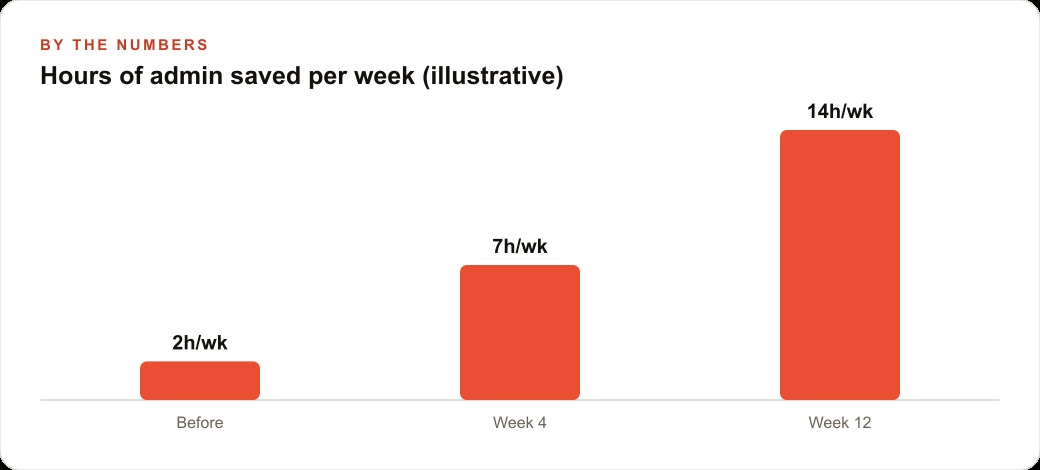
Let me make this concrete with an illustrative example, using round numbers to show the shape of the return rather than any real client figure. Picture a property management company handling 120 units with two office staff. Their daily pain is scattered information: leases, inspection photos, maintenance requests, rent records, and owner reports spread across folders and inboxes. Producing the monthly owner statements takes one person roughly 30 hours a month. Chasing arrears, sorting the shared inbox, and piecing together each morning's priorities eats another 6 hours a week between the two of them, call it 24 hours a month. That is around 54 hours a month of pure moving and reconstructing, before anyone does a minute of real work.
Now set up Cowork the way I would. First, point it at the document folder and let it propose a clean structure by property and unit so nothing gets lost. Second, build a rent and expense dashboard from the statements so arrears and recurring costs are visible at a glance. Third, save the monthly owner report as a skill, so generating each owner's statement drops from an afternoon to a single phrase. Suppose that alone cuts the 30 hours of monthly reporting down to about 6 hours of review and sending, a saving of 24 hours. Fourth, connect the shared inbox and calendar and schedule a 7am brief summarizing new maintenance requests, leases expiring soon, and overnight rent, delivered to the manager's notes before the first call. Say that trims the 24 hours of daily reconstruction to about 8, another 16 hours saved. Wrap it all in a Project with memory so the agent remembers each property's quirks across sessions.
Add it up and you have recovered roughly 40 hours a month. If you value staff time at a modest 25 dollars an hour, that is about 1,000 dollars a month in reclaimed capacity, or 12,000 dollars a year, and that is the conservative reading. The larger prize is that the same two people can now manage 180 or 200 units without the late-night paperwork, because the reporting and triage no longer scale with the number of doors. The company keeps doing exactly what it did before. What changed is that the clerical ceiling that used to cap its growth is simply gone. No prompt trick delivers that. Saved, scheduled, remembered work does.
Start smaller than you think, and start this week
The last piece of conventional wisdom I want to push back on is the urge to roll a new tool out across the whole business at once. Do not. The way to get burned by any capable agent is to hand it everything on day one. Start with a single folder, not your company. Install Cowork, aim it at your messiest folder, and ask it to organize the files so you feel the difference immediately. Next, take one task you repeat every week and save it as a skill you can trigger by phrase. Then connect one app, your email or your calendar, and schedule one simple morning brief. Only once those feel natural should you move up to Projects and a memory plugin so the agent holds context across sessions. None of these steps require code, which is the entire point, and each one is small enough to abandon if it does not earn its place.
Here is my honest conclusion. You can absolutely build all of this yourself, one layer at a time, and if you take one thing from this piece, let it be the folder cleanup this week instead of another hour spent polishing prompts. But if you would rather have someone map your real workflows, wire up your apps, and stand up the scheduled briefs and Projects so they work on the first morning, that is exactly the kind of build I do, and you are welcome to bring me in to handle it. The teams that get ahead with AI are not the best talkers to a chatbot. They are the ones who quietly stopped doing the busywork by hand.
That is exactly what we do at AI DOERS. Book a private 30-minute call with Madhuranjan Kumar and we will map the fastest path to it for your specific business.
Book your call →
Madhuranjan Kumar
Madhuranjan Kumar brings 20 years of performance-marketing experience and has managed over $200 million in Facebook ad spend for brands across the United States and beyond. His expertise spans the full modern marketing stack: Meta, Google Ads, TikTok, email automation, CRM, and the websites that hold it together. At AI DOERS he turns that track record into lead-generation systems for businesses across every industry.