
Claude Code Scheduled Tasks Turn Your AI Into a 24/7 Employee
Native scheduled tasks let Claude Code run your skills and workflows automatically on a schedule. Here is how they work, the gotchas, and how a small trade shop can use them.

The Electrician Who Spent the First Hour of Every Day on Admin Instead of Billable Work
The jobsite starts at eight, but the day starts at six, and that gap has a way of disappearing into the exact kind of work that nobody schedules and nobody counts.
For a four-person residential electrical operation, the pattern had been consistent for years. Every working morning, the owner opened the same four screens in the same order: the job calendar, the invoice aging report, the permit tracker, and the message thread with the crew. By the time that loop was done, sixty to seventy-five minutes had passed without a single billable minute logged. The crew had questions waiting. A job had a materials list to confirm. Two permit applications were sitting in the city queue with no clear status update. An invoice from three weeks ago had received no response. Nothing on that list was complicated. Nothing required a decision only the owner could make. Every item was a matter of gathering information that already existed somewhere, applying one simple rule to it, and sending a short message based on what that information said.
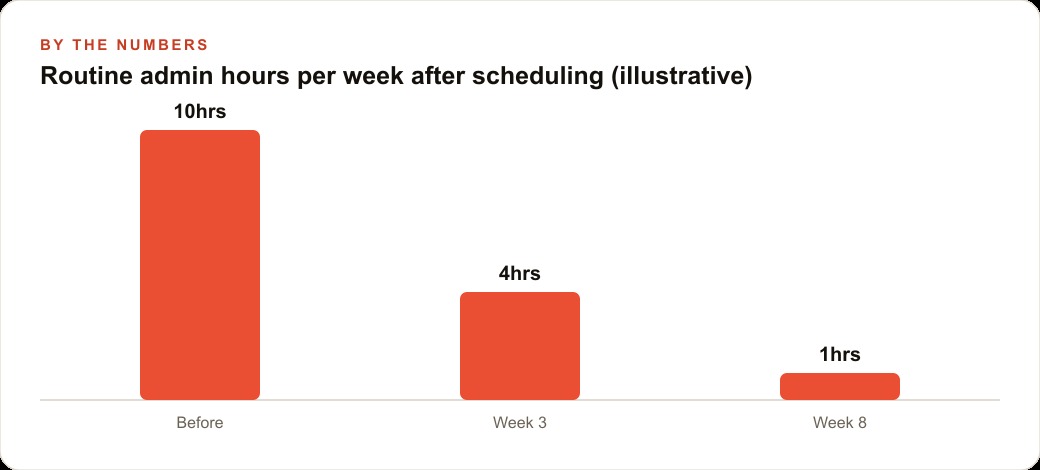
Over five working days, that pattern added up to five or six hours of pure overhead. An experienced electrician billing at $85 to $110 an hour was spending roughly half a billable day each week doing tasks that followed the same logic every single time. The information changed. The logic never did. Route the jobs in order of distance from home base. Flag invoices older than twenty-one days. Note permits with no movement for ten business days. Tell the crew who is going where and what to bring.
That is a precise description of work a scheduled AI agent can handle. Not because the task is trivial, but because it is consistent. The agent does not need judgment. It needs instructions, files, and a clock.
Building the Six AM Brief That Runs Without Anyone at the Keyboard
Madhuranjan Kumar set this up as a single scheduled task firing at six in the morning on every working day, producing one short document before anyone had sat down at a desk.
The task reads three files. The first is the job calendar covering today and the following two days, stored as a plain text or CSV file in the project folder. The second is the open-invoice log, which lists each outstanding invoice with the amount, the customer name, and the date it was sent. The third is the permit tracker, which lists each active permit application, the address it covers, the date the application was submitted, and the most recent status note.
The output is a single plain-text brief with three sections. The first section lists today's jobs in driving-order sequence with the address and job type for each stop. The second section lists every invoice more than twenty-one days outstanding, with the amount and the customer name, flagged for a follow-up call. The third section lists every permit application that has been waiting more than ten business days and notes it as needing a call to the permit office for a status check.
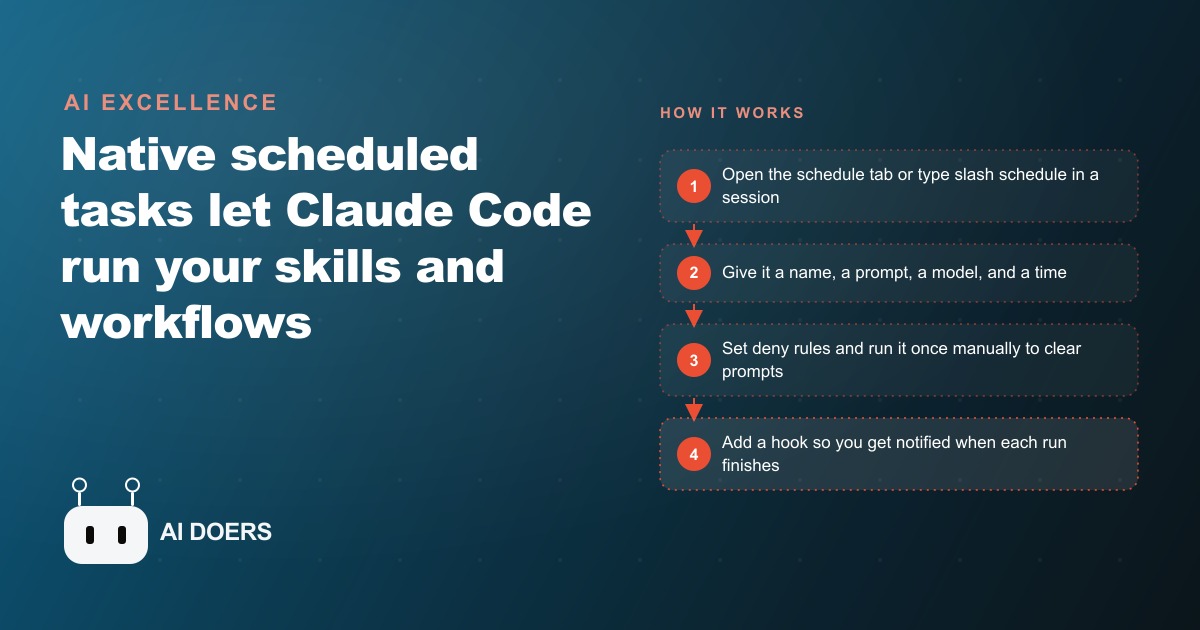
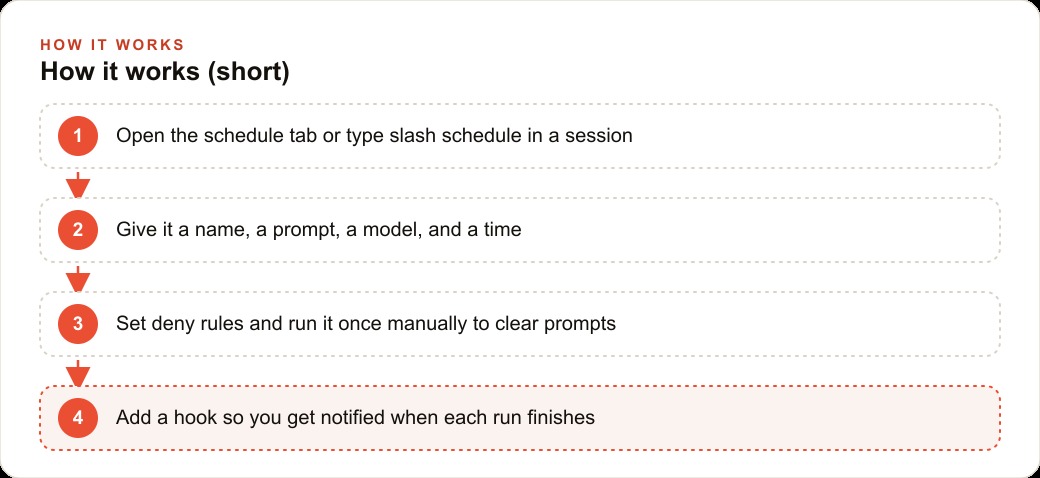
Setting this up inside Claude Code takes about fifteen minutes. Open the schedule tab, create a new task, give it a short name, write the prompt, select the model, point it at the project folder, and set the time. Alternatively, type the slash schedule command in any existing session and walk through the same steps in conversation. Either path lands in the same place: a task that fires on its own and writes a file to the folder without anyone present.
The model selection matters more than most operators expect. A task reading three small files and writing one short summary does not need the most capable model in the stack. A lighter, faster model handles it cleanly and uses fewer tokens, which keeps the ongoing background cost low. Save the heavier model for tasks that require multi-step reasoning or judgment calls across ambiguous information. A daily brief that applies fixed rules to structured data is not one of those tasks.
Before trusting any scheduled run, run the task manually twice. The first run surfaces every permission prompt: the agent asks whether it can read a specific file or write to a specific folder, and each approval is recorded so that all future runs proceed without stopping. The second run should complete from start to finish without any prompts. Only after two clean manual runs should the schedule be turned on. A task that stalls silently at six in the morning because it hit a permission prompt it never got an answer to is one of the most avoidable failure modes in scheduled automation.
The First Week: What the Agent Got Right and One Thing It Repeated Unnecessarily
The brief was useful from the first run. Route order saved ten to fifteen minutes of map-juggling each morning. The permit section surfaced two applications that were genuinely stalled, and follow-up calls placed the same day moved both forward within forty-eight hours. The invoice section caught three accounts that had drifted past twenty-five days without any outreach.
The one problem that appeared by Wednesday was not a bug. An invoice for a completed panel upgrade job kept appearing in the brief as outstanding and requiring follow-up. The customer had paid. The payment had been received. The reason the invoice still appeared was that the person handling accounts entered payments into the file on Thursdays, and the agent was reading the file in a state where that payment had not yet been logged.
The agent was correct. The file said the invoice was outstanding. From the file's perspective, it was. The fix was not to make the agent smarter about detecting payments. The fix was to add one sentence to the prompt noting that payments are entered weekly on Thursdays and that any invoice flagged between Wednesday and the following Thursday should be cross-checked against the Thursday payment entry before a call is made. After that addition, the brief included a short note in the invoice section on non-Thursday runs: invoices flagged today should be verified against Thursday's payment log before outreach.
The broader lesson from week one is that a scheduled agent is only as accurate as the files it reads. The brief improved noticeably after thirty minutes were spent tidying the source files before the second week started. Consistent date formatting in the invoice log. A clear status field added to the permit tracker so the agent had something specific to quote rather than inferring status from unstructured notes. Job types standardized to a short fixed vocabulary so the route-order section read cleanly rather than mixing shorthand from different members of the crew. Those thirty minutes of cleanup compounded in value every day for the rest of the month.
The One-File Log Pattern That Made the Agent Remember What It Did Yesterday
By the end of week one, a new problem appeared. The permit section of each brief flagged the same two applications in identical language every morning. The owner had called the permit office on Tuesday about both. No resolution yet, but the calls had been made. Wednesday's brief read exactly like Monday's. Thursday's brief read exactly like Monday's. The flag that had been a useful signal on the first day had become background noise by day five.
The cause is fundamental to how scheduled tasks work. Each run starts completely fresh. There is no memory of what any previous run flagged, suggested, or noted. Every run is a new session reading the same files and applying the same logic. Without something to break the loop, a permit that has been flagged five times will be flagged five more times in exactly the same language.
The fix is a log file kept in the project folder. At the end of each run, the agent writes a short entry: the date, what was flagged, what actions were suggested, and whether any item was marked as already-addressed. At the start of the next run, before reading any of the three source files, the agent reads the last three entries from the log.
What changes is the language in the output. If a permit appears in the log as flagged on two previous days with no resolution noted, the next morning's brief does not say the same thing it said on day one. It says this application has been flagged for three consecutive days with no resolution recorded and that today may need a direct call to the permit office rather than another message left with a staff member. The underlying action being suggested is the same. The urgency and specificity are higher, and the person reading the brief understands the situation has history without having to remember it.
The log file also served a documentation function that only became obvious a few weeks later. When a question arose about whether a follow-up call to the permit office had been made before a specific deadline, the log had the record: the permit had been flagged on day eight, again on day nine, and a note had been added to the source file on day ten indicating a call had been placed. That note appeared in the log entry for day eleven, and the brief had stopped flagging the application after that. The record existed without anyone having to maintain a separate tracking document alongside the brief.
Adding Permit Tracking and Overdue Invoice Flags in Week Three
The first two weeks ran without changes to the setup. That period was deliberate. The goal was to observe how the output matched actual morning needs before adjusting anything. Two patterns emerged.
First, the permit section was the most consistently useful part of the brief. The invoice section was useful but required more mental sorting than it should have. When twelve invoices appeared in the flagged list and three of them belonged to slow-pay customers who always settled eventually, and two were in active dispute sitting with the customer's accountant, the list still required reading and mental filtering before any action was clear. The brief was surfacing the right data but leaving too much sorting work for the person reading it.
Week three changes were made in two passes.
The permit section was expanded to include the application date and a calculated count of business days since submission. The city's published processing window for residential electrical permits is fifteen business days. When an application exceeded that window, the brief now flagged it explicitly: this application was submitted twenty business days ago, the city's published window is fifteen business days, the application is overdue by published standards. That language change made the flag directly actionable. An overdue-by-published-standards flag is a different kind of signal than a long-wait flag. It gives the owner something specific to reference in a call to the permit office.
The invoice section was refined by adding a simple status field to the invoice log file. Each outstanding invoice now carries one of three values in a new column: dispute, slow-pay, or unprompted. The brief prompt was updated to report only invoices with the unprompted status older than twenty-one days as needing outreach, to list disputed invoices separately with a note that no outreach was recommended until the dispute resolved, and to list slow-pay invoices as informational only with no action suggested. The twelve-item list that required filtering every morning became three clearly actionable items and a short informational note on the others.
Both refinements were made by editing the natural-language prompt and running the task manually once to verify the output matched the intention. No code was changed. No task was rebuilt from scratch. The ability to improve a scheduled task by updating a paragraph of plain instructions rather than modifying a script is a material practical advantage. An operator does not need to be a programmer to improve the task. They need to know what they want the output to say.
What the Owner Does With the Hour That Used to Disappear Into Admin
Ten weeks after the first scheduled run, the brief fires at six every working morning. The owner reads it over coffee before the crew arrives. Review takes five to eight minutes. By the time the first vehicle is loaded, the day's route is confirmed, two invoices are flagged for calls this week, and one permit needs a follow-up today. Everything that used to take sixty to seventy-five minutes now takes under ten.
Nothing from the original morning routine has been eliminated. Everything has been compressed. The assembly of information happens automatically overnight. The owner's role is now to read a clean summary and act on what it surfaces rather than gather raw information, cross-reference it against four screens, and format it into something useful. That is a different task. It takes a fraction of the time and arrives with less friction at the start of the day.
Five to six hours of weekly admin time has been reduced to thirty-five to forty minutes of reading and decision-making. The remaining time goes into the actual decisions: the call to the permit office, the message to the slow-pay customer, the route adjustment when a new job came in the night before. Those decisions still require the owner's judgment. The data assembly that informed them no longer does.
The numbers over the ten-week period are concrete. The brief flagged eleven permits that exceeded the city's published fifteen-business-day processing window. Eight of those were resolved faster than they likely would have been without the morning prompt because the call to the permit office happened the same day rather than being noticed and deferred. The invoice section contributed to collection on three accounts that had crossed forty-five days outstanding and were at risk of being written off entirely. The route order suggestion was accepted without modification on thirty-four of forty-seven working days, with an estimated ten to fifteen minutes of planning time saved per day on each of those thirty-four days.
Conservatively across ten weeks, between forty and fifty hours of overhead time was reclaimed. For a trades business where every additional service call that fits into the week represents direct revenue, that time is not abstract. It is one to two additional jobs per week that can be scheduled into time that used to be consumed before the first vehicle left the property.
The Discipline That Prevents a Scheduled Agent From Running Off the Rails Overnight
The first question most operators ask before turning on a scheduled task is a version of: what is the worst it could do?
For a task reading three files and writing one log file and one brief: not much. The scope is narrow and the outputs are documents that sit in a folder until a person reads them. But the discipline of setting deny rules before any task runs unsupervised is not about the risk profile of this specific task. It is about building a habit that protects the operation as tasks grow in scope over time.
Deny rules for this setup are configured once in the task settings and apply to every run without anyone having to remember them. The agent cannot delete any file. It cannot modify the job calendar or the invoice log. It cannot send any message or email. It cannot execute any external command outside reading the three source files, reading the log, and writing the two output files. Those four restrictions mean the agent can flag that an invoice might need a call, but the call itself always goes through the owner. The agent surfaces information. The owner decides. The action happens through a human hand.
Running the task manually before the first automated run is not optional. Permission prompts appear the first time the agent attempts to read a file or folder it has not been granted access to previously. Approving those prompts during a supervised run means the six AM scheduled run does not stall silently because the agent reached a file and had no stored answer to its access question. A task that stalls silently and produces no output is harder to debug than a task that produces an error, because silence gives no information about where the failure occurred. Silent stalls on new scheduled tasks are the most common early failure mode, and the prevention is always the same: run it manually first and clear every prompt before the clock takes over.
Notification hooks add the final layer of operating discipline. A hook configured to send a short message when the task completes means the owner knows the brief is ready without opening the app to check. If the notification does not arrive by six-fifteen, something went wrong and the next step is a manual run to identify what stopped it. The hook converts a silent background process into a visible event, which is the right posture for any automated task running without a person in the room.
The combination of narrow deny rules, a supervised first run to clear all permissions, and a completion notification covers the three most common failure points for a new scheduled agent. All three take under fifteen minutes to set up. Set them before the first automated run, not after something goes wrong and the troubleshooting begins.
That is exactly what we do at AI DOERS. Book a private 30-minute call with Madhuranjan Kumar and we will map the fastest path to it for your specific business.
Book your call →
Madhuranjan Kumar
Madhuranjan Kumar brings 20 years of performance-marketing experience and has managed over $200 million in Facebook ad spend for brands across the United States and beyond. His expertise spans the full modern marketing stack: Meta, Google Ads, TikTok, email automation, CRM, and the websites that hold it together. At AI DOERS he turns that track record into lead-generation systems for businesses across every industry.