
Claude Code's New Agent View, Explained
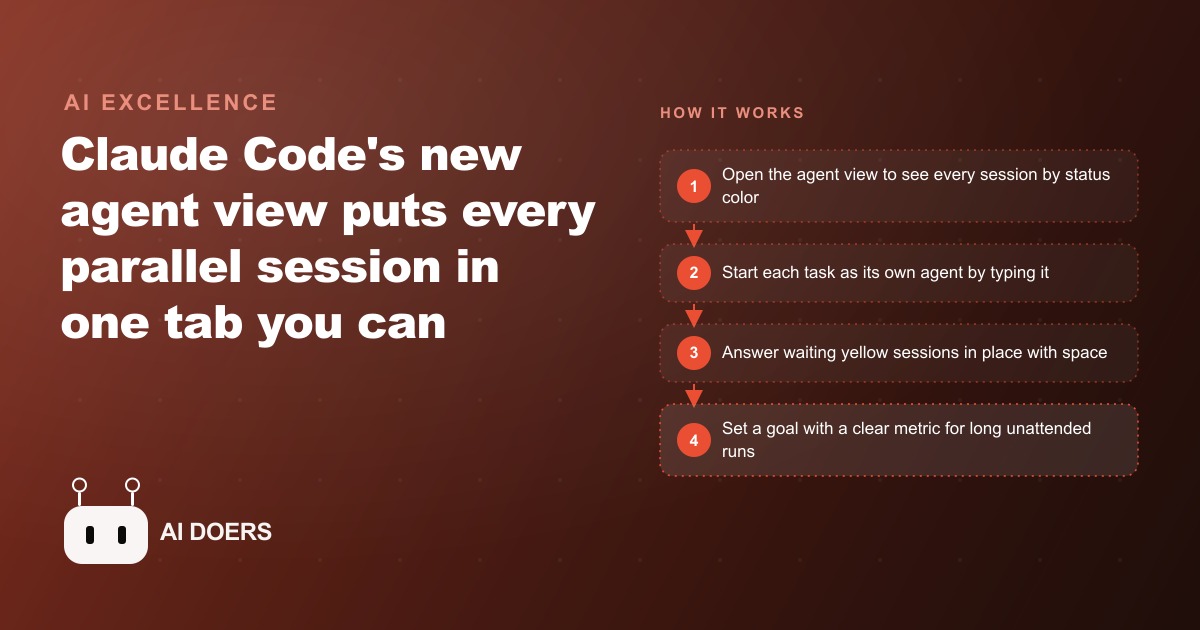
Claude Code's agent view is a single terminal tab that shows every running session by color-coded status, lets you move between them with arrow keys, reply to waiting agents in place, and launch new ones by typing. It is the control room for running many agents at once.

Running one AI agent at a time is the equivalent of hiring five staff and only letting one of them work at a time. The others sit idle while you wait for the first one to finish before you hand the next task to the next person. No one would structure a team that way deliberately, yet that is exactly how most people are using Claude Code right now: one session open, one task running, and everything else waiting in line behind it. I am Madhuranjan Kumar, and the argument I want to make here is that this is not just a missed opportunity. It is the main reason AI tools feel less transformative in practice than they should on paper.
Claude Code's new agent view is the control room that removes this bottleneck. It puts every running session in a single terminal tab organized by status, gives you keyboard navigation between them, lets you reply to blocked sessions without entering them, and provides tools for launching autonomous long-running work that can execute overnight without supervision. The capability to run parallel sessions has existed for a while. The control room that made it manageable is what just arrived.
The capability has been there; the control room was missing
The models have been capable of running independent parallel tasks for months. You could open five terminal windows, start a Claude Code session in each, and run five different agents simultaneously. The problem was not the models. It was the operational overhead of managing that configuration. Five terminal tabs with identical appearances offered no quick way to see which agent was actively working, which had finished and was waiting for your review, and which had been sitting idle waiting for your input for twenty minutes while you were focused on something else.
The practical effect was that most people ran one or two sessions at most, not because the work did not justify more but because managing more felt more chaotic than it was worth. The bottleneck on AI value was never model capability. It was the management overhead imposed by having no organized view of what was running. That is the bottleneck the agent view eliminates.
The analogy to a physical team is exact. If you hired five capable people to work on five separate tasks simultaneously, the first thing you would do is create a way to see at a glance who is working, who is finished, and who needs something from you before they can continue. You would not manage five people by checking in on each one sequentially without any shared visibility. The agent view is that shared visibility, applied to a fleet of AI sessions.
Color-coded status turns chaos into a manageable queue
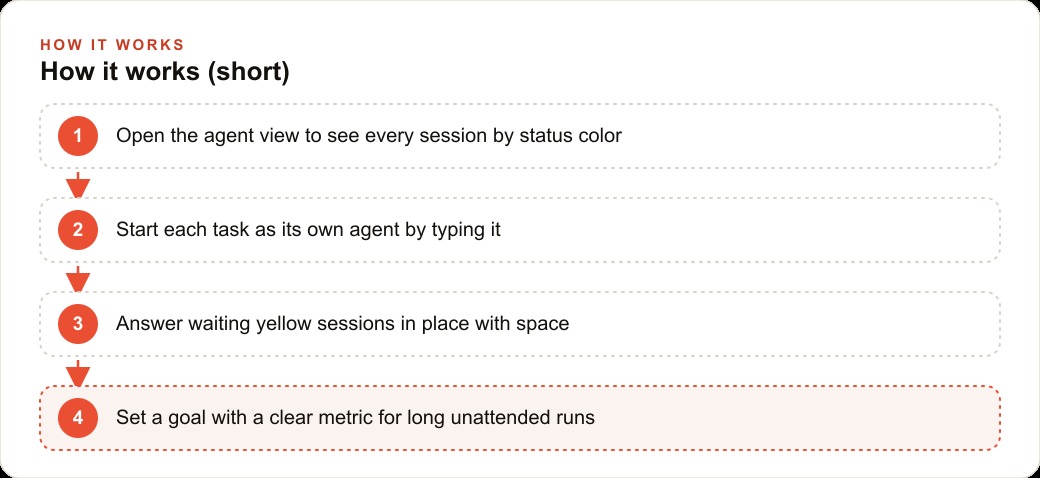
The agent view shows every running session in a single organized view with a color-coded status indicator for each one. Yellow means the session is blocked and waiting for your input before it can proceed. Green means it has finished and the result is ready to review. The navigation is entirely through arrow keys: left from any session opens the agent view, right enters a specific session, left again backs out to the overview. Your mouse works as an alternative if you prefer clicking.
The color system does more than save you a few clicks. It changes the cognitive model for managing a fleet of agents. Instead of keeping track in your head of which sessions you started, what state you left each one in, and which ones might be waiting on you, the view handles that tracking for you. You look at the agent view, read the colors, and immediately know what the fleet needs from you.
When a session shows yellow and you need to answer it without stepping fully into that session, you press space to open an inline reply. You can approve a plan, decline a step, or provide additional context right from the dashboard view. This is the difference between a manager who has to walk to each person's desk to check in and a manager who can see everyone's status from one spot and only moves when something needs attention.
Starting a new agent from the view is as simple as typing the task description. There is no command to prefix or a specific syntax to learn. You type what you want done and it launches a new Claude Code session for that task. Sending an existing session to the background uses slash bg inside the session, or you can launch with specific flags that name the task and push it directly into the background from the start. Sessions you are done with clear out with a double Control-X, keeping the view clean as work accumulates and completes.
The /goal command turns overnight hours into supervised autonomous work
The slash goal command extends the agent view into a different category of work: long-running autonomous sessions that can execute for hours without requiring your presence. You set an objective and the agent works toward it, experimenting, iterating, and retrying until it reaches the target or surfaces a decision point it cannot resolve without your input. These runs can go overnight and report back when done.
The goal command performs significantly better when given a clear, measurable objective rather than a vague direction. Ask it to reduce the number of duplicate records in a database to zero and it has an exact finish line it can test programmatically. Ask it to clean up the database and it has no way to know when it has succeeded. The specificity of the goal is what makes autonomous execution reliable, because the agent can verify its own progress rather than guessing when to stop.
The practical application of overnight goal runs is significant for any business that has repetitive, time-consuming data or administrative tasks. The agent view lets you set those tasks running before you leave for the evening, check the dashboard the next morning for green completion status, review the results, and move on. The eight hours between the end of your workday and the start of the next one become productive working time rather than downtime.
Parallelism is not a power-user trick; it is the natural working pattern
The reason parallelism feels advanced is that the tools to manage it have not existed until now. With the agent view in place, running five or ten sessions simultaneously is not more complex than running one. You open the view, you see everything, you respond to what needs you. The operations are the same. The scale is different.
An HVAC company with five technicians in the field runs a daily set of back-office tasks that consume hours of office staff time: formatting technician notes from the day's jobs into customer-facing service summaries, preparing invoice drafts from job tickets, updating customer records with work completed, generating a reorder list for parts consumed during the week's jobs, and drafting maintenance reminder messages for customers whose annual service is coming due in the next thirty days. Each of those is a separate, clearly scoped task. Each one can run as its own agent in the view simultaneously.
In a parallel-agent setup, the office manager opens the agent view first thing in the morning. Green sessions have finished their overnight runs and the outputs are ready to review. Yellow sessions finished their data-gathering step and are waiting for a human decision before proceeding, such as confirming a part number before creating a reorder request, or approving the wording of a maintenance reminder before it goes out to customers. The manager presses space, answers each yellow session in place, and the agents continue. The manager does not step into each session individually. They read the dashboard, respond to what needs them, and move on.
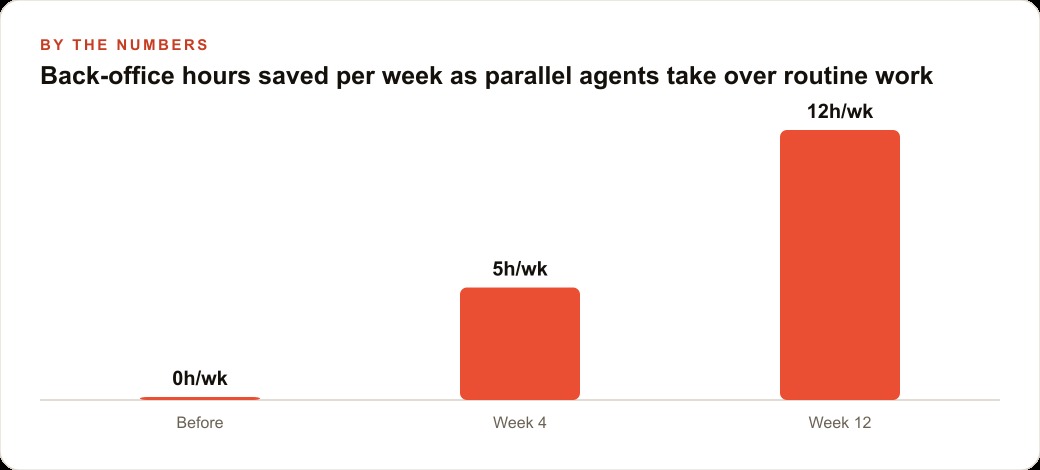
The goal command is where the overnight savings become concrete. At the end of each week, the company sets a goal: reconcile every open job ticket from the week against the customer records and flag any that are missing a signed completion document. The agent runs the reconciliation overnight, processes the records, and produces a list of the specific tickets that need follow-up before billing goes out. The office manager arrives Monday morning to a finished audit rather than spending two hours doing it manually. That alone saves roughly eight hours of staff time per week across the administrative team.
The Facebook and Instagram ad campaigns that the company runs for seasonal service promotions benefit from parallel agents too: one agent drafting three headline variants, one building the email copy for the accompanying send to the service list, and one researching competitor promotions to inform the offer structure, all running simultaneously while the manager handles other work. The CRM and website stack that automates follow-up for each type of service request can be maintained by agents that update the templates based on new offers, running while other agents handle the operational back-office tasks. The Google Ads keyword list refresh that happens each quarter does not require the owner to sit and work through it manually when an agent can run it in the background and surface the changes for a brief review.
The operational muscle you build now compounds as the tools mature
The businesses that are learning to manage five to ten concurrent agents today are building something that will matter more next year than it does now: the operational muscle to work at a level of parallelism that most of their competitors have not even considered yet. The agent view is the interface that makes that parallelism manageable. But the real asset being built is the workflow design skill, knowing which tasks should run in parallel, how to scope a goal clearly enough that an agent can execute it autonomously, and how to read the dashboard and respond to what needs you quickly enough that blocked agents do not accumulate.
The learning curve is real but it is not steep. The controls are minimal. Arrow keys, space to reply, double Control-X to close. Start with two sessions rather than ten. Open the view, start one agent by typing a task description, start a second one, and practice the navigation loop until it feels natural. Add a third session once the first two feel easy. Try one overnight goal run on a task with a clear measurable finish line and review what comes back in the morning.
The goal command also opens up a category of work that was previously impractical: improvement loops. Rather than running a task once and reviewing the output, you set a goal that defines the improvement target and the agent iterates until it reaches it. A business that wants to standardize the format of all its customer-facing documents can set a goal with a clear format specification and let the agent process the document library overnight, flagging any that it cannot confidently update for human review. A team managing a large contact list in their CRM and website stack can set a goal to identify and consolidate duplicate records to zero, let the agent run the reconciliation, and review only the ambiguous cases the agent surfaced. These are tasks that previously required dedicated staff time or a specialized contractor. They now run as supervised autonomous overnight work, supervised by a dashboard rather than a human sitting at a screen.
The agent view ships as a research preview, which means it is actively being developed and you should expect occasional rough edges in multi-session management and the goal command behavior. Treat it as a powerful tool under active development rather than a finished product, keep a human in the review loop for any output that goes into a business system or goes out to a customer, and update your approach as the tool matures. The direction of development is clear from this release: toward a control room model where a single person manages many agents simultaneously, reviews outputs, approves actions, and the value extracted from AI tools scales with the quality of the management rather than the amount of time spent at the keyboard.
That is exactly what we do at AI DOERS. Book a private 30-minute call with Madhuranjan Kumar and we will map the fastest path to it for your specific business.
Book your call →
Madhuranjan Kumar
Madhuranjan Kumar brings 20 years of performance-marketing experience and has managed over $200 million in Facebook ad spend for brands across the United States and beyond. His expertise spans the full modern marketing stack: Meta, Google Ads, TikTok, email automation, CRM, and the websites that hold it together. At AI DOERS he turns that track record into lead-generation systems for businesses across every industry.