
Claude Code From Beginner to Expert: The Setup That Actually Makes the Difference
Claude Code is the fastest growing AI coding tool for a reason, but most people never customize it. Here is the four part setup, the recommended workflows, and how I would point all of it at a real business.

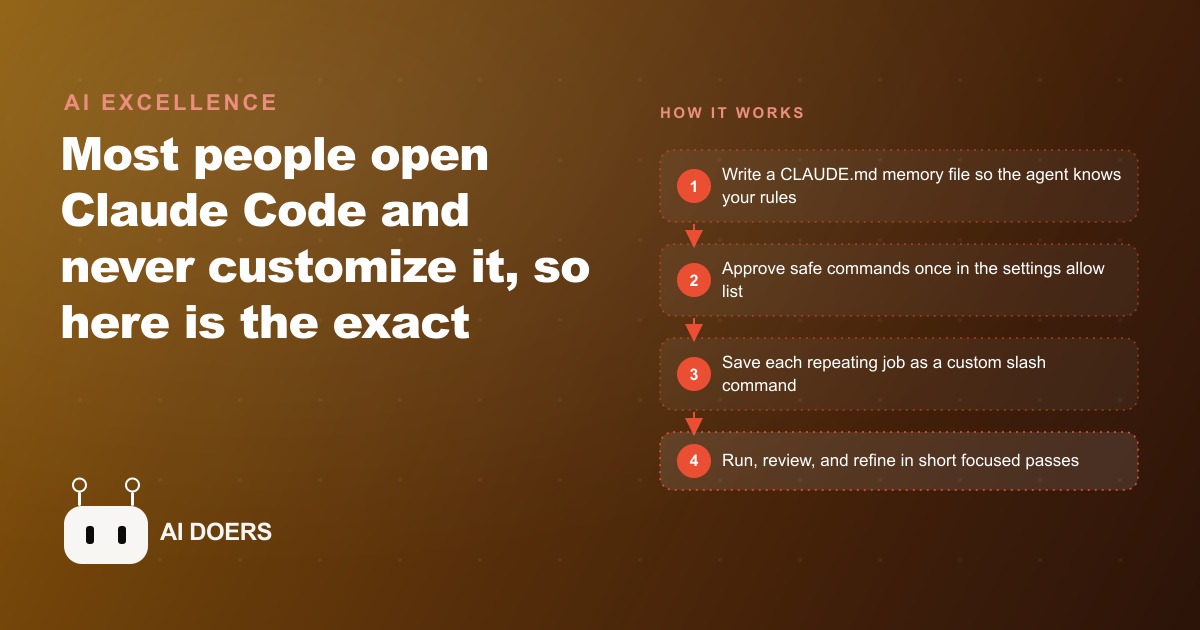
The gap between opening the app and running it
Almost everyone who tries Claude Code experiences the same thing: they open it, type a quick request, get a decent answer, and conclude that is the tool. It is not. The real product is a coding agent that can read an entire project, change many files at once, run commands, and check its own results, but it only becomes that once you configure it. I am Madhuranjan Kumar, and I want to take the setup apart along the four dimensions that actually separate a casual user from someone moving several times faster, then examine the workflows and the judgment that hold it together.
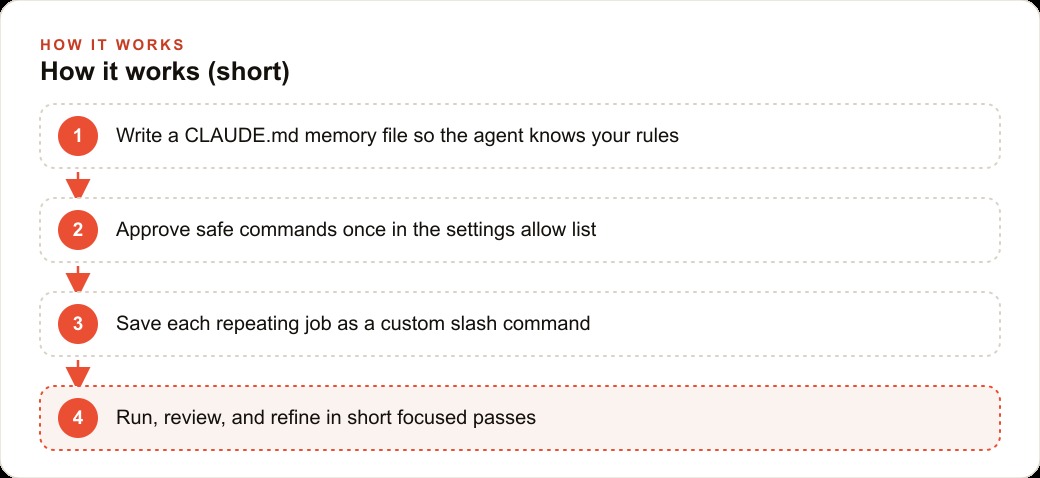
The reason this is worth a careful look rather than a quick tip list is that each piece of setup solves a distinct problem. Memory solves forgetting. Permissions solve friction. Slash commands solve repetition. Workflow solves quality. Treat them as four separate levers and you understand why the tool feels flat without them and fast with them.
The first facet: memory, or teaching the agent your rules once
The foundation is a project memory file, usually named CLAUDE.md, and the cleanest way to think about it is as the agent's standing instructions. Without it, every session starts from zero and the agent guesses at your code style, your architecture, and your rules. With it, the agent walks in already knowing how your project works. You can write this file by hand, but the faster path is to type the initialization command and let the agent read your entire project and generate a dense set of instructions on its own, which you then trim and correct.
What goes in the memory file is where judgment enters. Generic instructions produce generic behavior, so the useful memory file encodes the specific things that trip an outsider up: which patterns your codebase prefers, which files are sacred, what must never change without sign off. The deeper point is that the memory file is not documentation for humans, it is behavior for the agent. Every rule you put in it is a rule the agent actually follows on every task, which means the quality of this one file quietly sets a ceiling on the quality of everything the agent does afterward.
The second facet: permissions, or removing a thousand tiny interruptions
The second lever is a settings file with an allow list and a deny list of commands, and its whole purpose is to remove friction without removing safety. By default the agent stops and asks before running commands, which is sensible the first time and maddening the hundredth. You approve the safe, repeating commands once, the agent runs them without pausing, and genuinely dangerous commands stay blocked forever on the deny list.
The facet worth examining here is what the allow list reveals about trust. You are not being reckless by approving commands, you are encoding a judgment about which actions are safe to let run unattended in this specific project. Reading files, running the test suite, checking status: these repeat constantly and carry little risk, so they belong on the allow list. Anything that deletes, force pushes, or touches production stays behind a prompt or on the deny list. Tuned well, the setting turns a session from a stream of interruptions into a smooth run, and the agent stops feeling like a nervous intern asking permission to breathe.
The third facet: slash commands, or compressing a workflow into one word
The third piece is custom slash commands, and this is the one that changes how much you can offload. A custom command is simply a markdown file that holds the instructions for a multi step job. You write the ten steps of a workflow once, save it, and from then on a single short command runs the entire thing, because the agent already knows the sequence by heart.
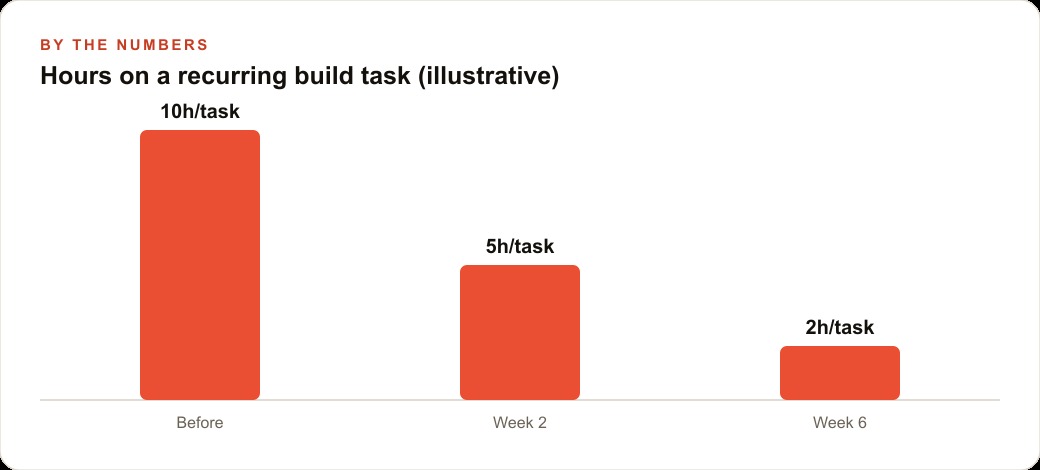
The angle I find most useful here is to think of a slash command as a promotion for a process you have already proven. You do not write a command for a task you have done once. You write it for the job you keep repeating, after you have watched the agent do it correctly a few times, so the command captures the version that works. That is why commands compound: each one takes a workflow that used to require your attention and turns it into something you trigger and walk away from. The illustrative curve of hours spent on a recurring build task, dropping from ten to five to two over a few weeks, is really the story of these commands accumulating.
The fourth facet: workflow, where quality actually comes from
Setup gets the agent ready. Workflow is what makes its output good, and the makers of the tool are specific about the patterns that work. The core loop is explore, then plan, then build, then commit. Have the agent read the relevant files first, switch it into a planning mode so it thinks before it acts, then let it write the code, then save it. Planning before building is not ceremony, it catches mistakes while they are cheap, before they are baked into a dozen files.
Three habits sit on top of that loop. Write the test first when the behavior is clear, then have the agent write code to pass it, which gives it an objective target instead of a vague hope. Show it what you want by dragging in a screenshot of a design and letting it iterate until the result matches, because two or three rounds of visual feedback beat paragraphs of description. And when you want a real second opinion, run two sessions side by side, one writing and one reviewing with a clean context, because a fresh context gives an honest critique instead of the same agent grading its own homework. Even the phrasing you use is a lever: instructions like think and think harder map to how much reasoning the agent spends before answering, which is a genuine built in dial, not a superstition.
The thread running through all of it is specificity. Vague prompts produce vague results. Name the exact file, describe the exact behavior, and the first attempt succeeds far more often. The escape key is part of the workflow too: the moment the agent drifts off course, stop it early rather than letting it build on a wrong turn.
A worked example: pointing the whole setup at a med spa
Abstractions get real when you aim them at a business, so take a med spa. The revenue leak is usually the website and the booking flow, so that is where I would point the setup first. The memory file would spell out the brand voice, the service menu, and a hard rule that no price or medical claim changes without sign off. That single rule, living in memory, protects the business on every future task without anyone having to remember it.
Then the slash commands. I would write one that takes a new treatment, adds a clean service page in the existing style, wires it into the booking widget, and flags anything that needs a human to approve. A second command would run a weekly check on the site, take screenshots of the booking steps on mobile using the browser connection, and report any broken link or slow page before a client ever hits it. After the storefront, I would point the agent at the back office glue: the reminder scripts, the intake form exports, the little Monday reports the front desk rebuilds by hand. The agent reads how those already work, tightens them, and tests its own changes so nothing breaks live.
None of this replaces the practitioners or the front desk. It removes the technical chores that keep the owner tethered to a laptop instead of running the clinic. And it connects outward: a booking flow the agent keeps healthy is the last step of every Facebook and Instagram ad campaigns click and every Google Ads visit, so the same setup that fixes the site quietly protects the return on the ad spend, and the tidied back office scripts feed the CRM and website stack where follow up actually happens.
Why the four facets reinforce each other instead of standing alone
The temptation with a four part setup is to treat the parts as a menu and pick one, but the facets are multiplicative, not additive, and that is the insight most tip lists miss. A memory file with no allow list still stops constantly to ask permission, so the agent's knowledge cannot turn into momentum. An allow list with no memory file runs commands smoothly but on wrong assumptions, so it moves fast in the wrong direction. Slash commands built before you have proven the workflow just encode a bad process quickly. Each facet removes a different tax, and the speed you actually feel comes from removing all four at once.
That is why I frame the setup as a system rather than a checklist. The memory file tells the agent what your rules are, the allow list lets it act on them without interruption, the slash commands let it repeat proven work on demand, and the workflow habits keep the output honest. Skip one and the others carry a hidden drag. Put all four in place and the tool crosses a threshold, from a clever autocomplete that needs babysitting into something you can hand a whole job and trust to check its own work. The illustrative drop from ten hours to two on a recurring task is not any single facet. It is the compounding effect of the four operating together.
Which businesses this really serves, and how to begin
Read the med spa example broadly, because the tool serves almost any business that builds or maintains software, internal tools, or a website, not just tech companies. If you have a booking system, a customer portal, a marketing site, or a pile of small scripts holding the operation together, an agent that reads your code and follows saved instructions takes real work off your team. The owners who pull ahead are not the ones chasing every feature. They pick one painful, repeating job and let the agent own it end to end.
Begin small and resist wiring up everything at once. Create the memory file for one project, approve only the commands that project needs, and prove it on real tasks for a week. When a job repeats, save it as a slash command. When a change feels risky, run a second session to review the first. Be specific in every prompt, and reach for the escape key the moment the agent wanders. The deeper tricks, headless automation and several agents running in parallel, are powerful, but they are step three, not step one.
There is a subtler reason to begin with one project rather than your whole operation, and it is about trust rather than caution. The first time an agent quietly fixes something that used to eat a Monday morning, the whole team's relationship to the tool changes, and that earned confidence is what carries you through the harder, messier automations later. Start too broad and the early wins get lost in half finished experiments, and people conclude the tool is more trouble than it is worth. Start narrow, ship one visible win, and you buy the goodwill to expand. Momentum in this work is a real asset, and the fastest way to build it is a single, obviously useful job done end to end before you touch the next one.
A focused owner can stand up that first website workflow in an afternoon. The harder part is choosing the right job and writing the instructions so the agent behaves the way your business actually does, which is the judgment work where a lot of people stall after the first demo. You can take the do it yourself path above, or bring in someone who has already wired this up many times and have it handed over working.
That is exactly what we do at AI DOERS. Book a private 30-minute call with Madhuranjan Kumar and we will map the fastest path to it for your specific business.
Book your call →
Madhuranjan Kumar
Madhuranjan Kumar brings 20 years of performance-marketing experience and has managed over $200 million in Facebook ad spend for brands across the United States and beyond. His expertise spans the full modern marketing stack: Meta, Google Ads, TikTok, email automation, CRM, and the websites that hold it together. At AI DOERS he turns that track record into lead-generation systems for businesses across every industry.