
Claude Code Auto Mode: A Safer Way to Run Long Tasks
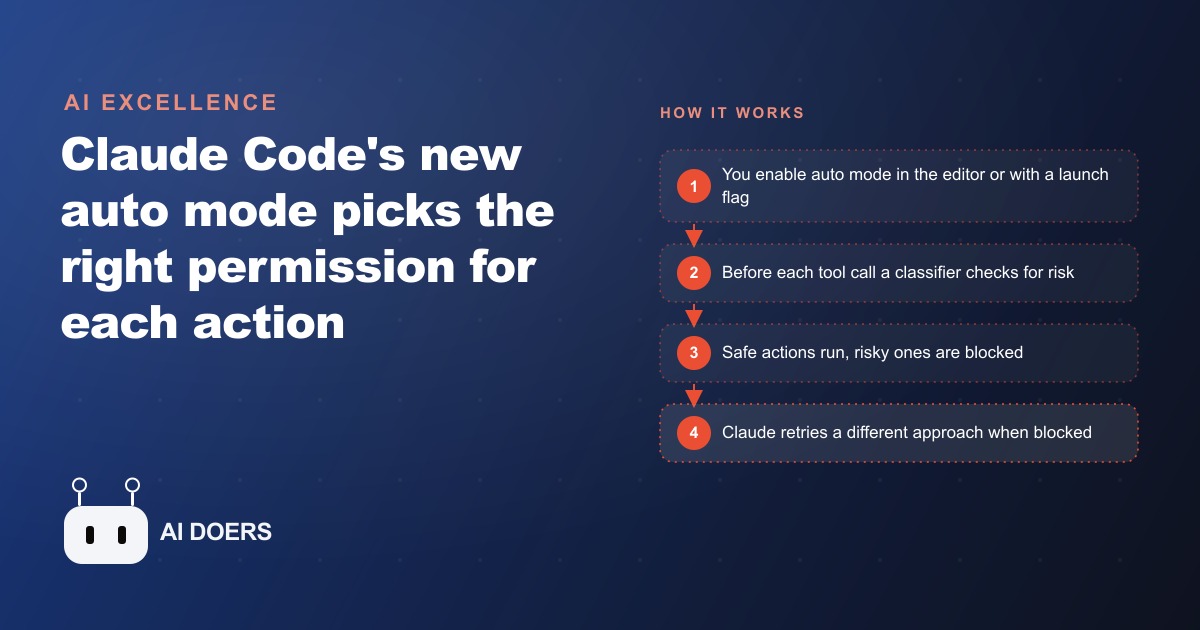
Auto mode automatically chooses the right permission for each action, classifying every tool call for risk so you get fewer interruptions without the danger of skipping permissions.

A landscaping company with six trucks and one overworked office manager is not where you expect to find a lesson about AI permissions, but that is exactly where the story of Claude Code's new auto mode gets interesting. The owner is not a developer. He started using a coding agent a few months ago to script his scheduling, turn his price list into quotes, and clean up the tangle of job and invoice spreadsheets that had been eating his Sunday evenings. I am Madhuranjan Kumar, and I wire tools like this into real businesses, so I want to walk through the honest arc of how that setup went from constant interruptions to something the owner could actually walk away from, and why a single permission setting made the difference.
The Sunday night that broke his patience
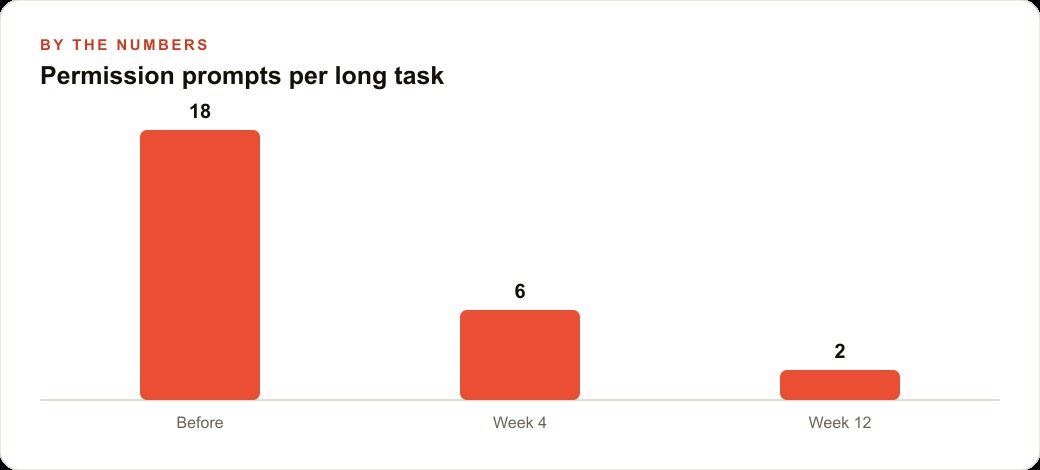
The first version of the workflow used ask-before-edits, the mode where the agent stops and asks permission before every single change. On paper that sounds safe and sensible. In practice, regenerating a week of job sheets meant sitting at the laptop clicking approve, approve, approve, roughly eighteen times for one task, while a real quote for a real customer waited in his inbox. He counted it one night out of frustration. Eighteen prompts to do one thing he did not even fully understand. He was not reviewing those prompts in any meaningful way by the tenth one. He was just clicking yes to make the machine keep moving, which is the worst of both worlds: all the friction of approval with none of the actual safety, because a human who rubber stamps everything is not really guarding anything.
That is the trap ask-before-edits sets for a busy operator. It feels responsible, but the moment the interruptions outnumber your attention, the approvals become noise. He was one bad week away from doing what a lot of people do next, which is flip the agent into bypass mode and let it run wild.
Why he almost made the dangerous choice, and did not
Bypass mode, the one the tool literally labels dangerously skip permissions, would have solved the interruption problem instantly. No prompts, no clicking, the long tasks just run. He was tempted. The reason he hesitated is the same reason the label exists. In bypass mode the agent can do anything at all with no one watching, and this is a business whose spreadsheets hold customer addresses, deposit amounts, and the master schedule that every truck depends on. One confident wrong move, an overwritten schedule or a deleted client record, and Monday morning is chaos across six crews. He did the math on that risk and decided the gamble was not worth the quiet. So he sat stuck between a mode that interrupted him too much and a mode that scared him too much, which is precisely the gap auto mode was built to fill.
The first week on auto mode
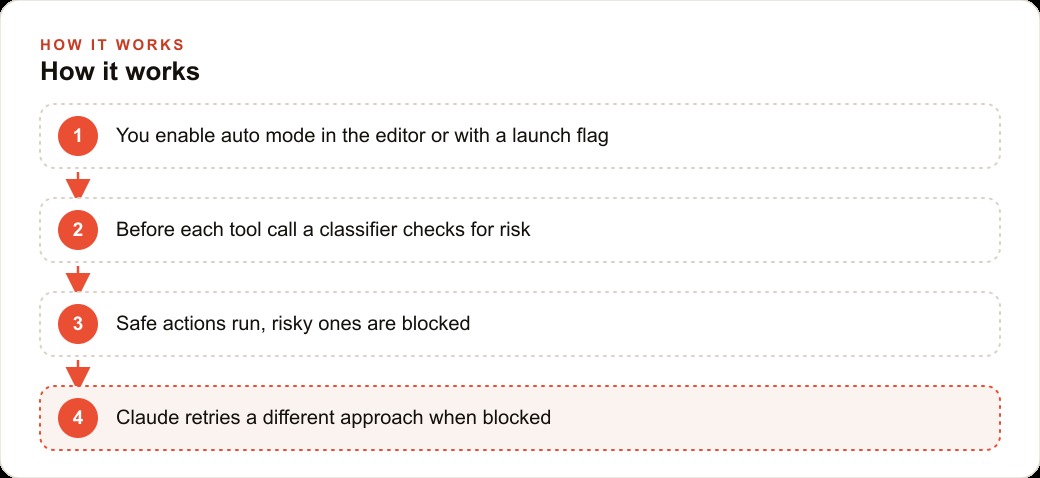
Auto mode is the middle path. Instead of asking a human before every action, or asking no one at all, it puts a classifier in front of each tool call. Before the agent reads a file, runs a command, or edits a sheet, that classifier looks at the action, decides whether it is safe or risky, and checks for signs of prompt injection or anything sneaky. Safe actions run straight through. Risky ones get blocked, and the agent has to find a different route or stop.
The change in the first week was immediate and a little anticlimactic, in the best way. He kicked off the same job-sheet regeneration that used to demand eighteen approvals and it simply ran. Reading the price list, drafting the quotes, formatting the spreadsheet, all of that is routine and safe, so none of it interrupted him. The number of prompts he had to answer on a typical long task dropped from around eighteen to about six in that first stretch, and the six that remained were the ones that actually deserved a human glance. For the first time he started a task, closed the laptop, and left for a site visit while it worked. The office manager described it as the difference between babysitting a toddler and handing a task to a competent temp who knows when to ask.
The morning the classifier earned its keep
The quiet payoff arrived a couple of weeks in. During a cleanup run on the invoice spreadsheets, the agent went down a path that would have overwritten the master schedule, the single file the whole operation is built on. Under bypass mode that action would have executed silently and the owner would have discovered it only when a crew showed up at the wrong address. Under auto mode the classifier flagged the step as risky and blocked it. The agent noted it could not complete that particular move, tried a safer approach that left the master file untouched, and carried on. No damage, no drama, and the owner only learned about it because he read the log later. That is the entire value proposition in one incident. The routine work never bothered him, and the one genuinely dangerous action was the one thing that got stopped.
It is worth being clear-eyed here. Auto mode reduces risk, it does not erase it. The classifier is a strong second set of eyes, not a guarantee, which is why the standing advice is to run this kind of automation in an isolated environment where a mistake cannot reach anything you cannot afford to lose. This company runs its agent against copies and a sandboxed working folder, not the live accounting system, and that discipline is part of why the near miss stayed a near miss.
Locking down the one project that mattered most
For most of the work, auto mode's judgment was enough. But there was one project the owner refused to leave to any classifier: the folder tied to customer payment details. For that one, he layered on the older, more precise tool that still has a real place. A local settings file sits inside that project with an explicit deny list, so certain commands simply cannot run there no matter what any agent decides. Auto mode handles the day-to-day thinking everywhere else, and the deny list is a hard wall around the most sensitive corner.
This is the part people miss when they treat the new mode as a replacement for everything that came before. It is not. The allow, deny, and ask lists in a settings file give you surgical, per-project or global control, and for the highest-stakes work that precision is exactly what you want. Auto mode's advantage is that it saves you from copying a settings file into every ordinary project and hand-tuning permissions you will never think about again. The smart setup uses both: auto mode as the sensible default across the whole operation, and a strict settings file bolted onto the one or two places where a wrong move is unforgivable.
What it cost and what it bought back
Auto mode is slightly more expensive to run than the plain modes, and the reason is fair. That classifier is itself an AI check that runs before each tool call, so every action carries a small extra cost for the review. In this company's case the increase was minor, a rounding error against the value of the time it returned. The owner was reclaiming several evenings a month that used to vanish into approval clicking and spreadsheet wrangling, and he was doing it without taking on the open-ended risk of an unwatched agent. When you weigh a small per-task cost against hours of an owner's week and the avoided cost of one overwritten schedule, the trade is not close.
Turning it on was almost boring, which is how these things should be. In the editor it is a matter of opening the permissions mode and switching it to auto. From a terminal you launch the agent with the flag that enables auto mode, then shift-tab through the permission modes until you land on it. On a team or enterprise plan an admin has to allow the auto permission mode at the organization level first, the same way bypass mode has to be allowed, and it can be switched off again just as easily if a company decides it wants tighter control.
Reading the log is where the trust actually forms
One habit the owner did not expect to matter turned out to be the most important of all: he started reading the session log. Not every line, and not every day, but a quick skim after each long run. Auto mode keeps a record of what the agent did, which actions ran, and which the classifier blocked and why. That log is what turned a nervous experiment into genuine trust. In the first week he read it closely because he did not yet believe the classifier would catch anything. By the third week he read it because it was interesting, a running account of the judgment calls a second set of eyes had made on his behalf.
This is the part I would press on any owner adopting this. Auto mode is not a black box you flip on and forget. It is a system whose decisions you can inspect, and inspecting them early is how you calibrate how much to hand over. The owner learned, for instance, that the classifier was cautious about anything touching the master schedule and relaxed about formatting and reading, which matched his own instincts exactly. That match is what let him widen the scope of what he trusted it to run unattended. Had he never looked, he would either have trusted it blindly or not at all, and both of those are worse than the informed middle.
Why the middle path beats the two extremes for every operator
Step back from the trucks and the spreadsheets and the pattern is bigger than one landscaping company. Every business that automates anything faces the same fork the owner faced. You can gate every action behind a human and drown in approvals, or you can let the machine run free and pray it never does something catastrophic. Those two extremes feel like the only options because they are the easy ones to build. The valuable and harder thing is a system that moves fast on the safe majority and stops itself on the dangerous few, and that is precisely the shape auto mode gives you out of the box.
That is why this story is worth telling even to owners who will never run a coding agent. The lesson is not really about permissions in one tool. It is about refusing the false choice between speed and safety. The owner did not have to become a developer to get both. He had to understand where his real risks lived, pick a default that handled the rest, and put one hard wall around the money. Any operator automating any part of their business can copy that exact reasoning, whatever the tool. Speed on the safe stuff, a hard stop on the dangerous stuff, and a habit of glancing at the record so trust is earned rather than assumed.
The habits that made it work beyond the office spreadsheets
The interesting thing the owner realized is that the automation he built to save his evenings quietly touched the rest of the business too. The clean quote sheets and consistent client data feed straight into how the company markets itself. When the same structured information that the agent maintains flows into the systems that run his Facebook and Instagram ad campaigns, the follow-up on a new lead is faster because the data is already tidy. The tuned scheduling and the quote turnaround also make the money spent on Google Ads work harder, because a lead that gets a same-day quote is a lead far more likely to book. And because his job and pricing pages stay accurate as a byproduct of the cleanup work, that maintained content quietly supports SEO and organic search without anyone writing a separate word for it.
If there is one thing the owner would tell another operator standing where he stood, it is this. The instinct when an agent interrupts you too much is to turn all the guardrails off, and that instinct is exactly backwards. The move that actually worked was letting a smarter default handle the safe, boring majority of the work while keeping a hard wall around the few things that could genuinely hurt the business. Auto mode is not a promise that nothing will ever go wrong. It is a way to run fast where it is safe and stay locked down where it counts, and for a six-truck company with one office manager, that balance was the whole point. He set it up in an afternoon. The harder and more valuable decision was naming the one project that deserved the deny list, and that judgment is the part worth getting right before you trust an agent with a long task and walk out the door.
That is exactly what we do at AI DOERS. Book a private 30-minute call with Madhuranjan Kumar and we will map the fastest path to it for your specific business.
Book your call →
Madhuranjan Kumar
Madhuranjan Kumar brings 20 years of performance-marketing experience and has managed over $200 million in Facebook ad spend for brands across the United States and beyond. His expertise spans the full modern marketing stack: Meta, Google Ads, TikTok, email automation, CRM, and the websites that hold it together. At AI DOERS he turns that track record into lead-generation systems for businesses across every industry.