
ChatGPT 5 Is Out and It Changes More Than You Think: A Complete Guide for Business Owners
GPT-5 is not just a better ChatGPT. It is a fundamentally different architecture that brings reasoning into every conversation by default, deprecates all previous models, and for the first time opens OpenAI's flagship capability to free users. Here is what that actually means for your business.

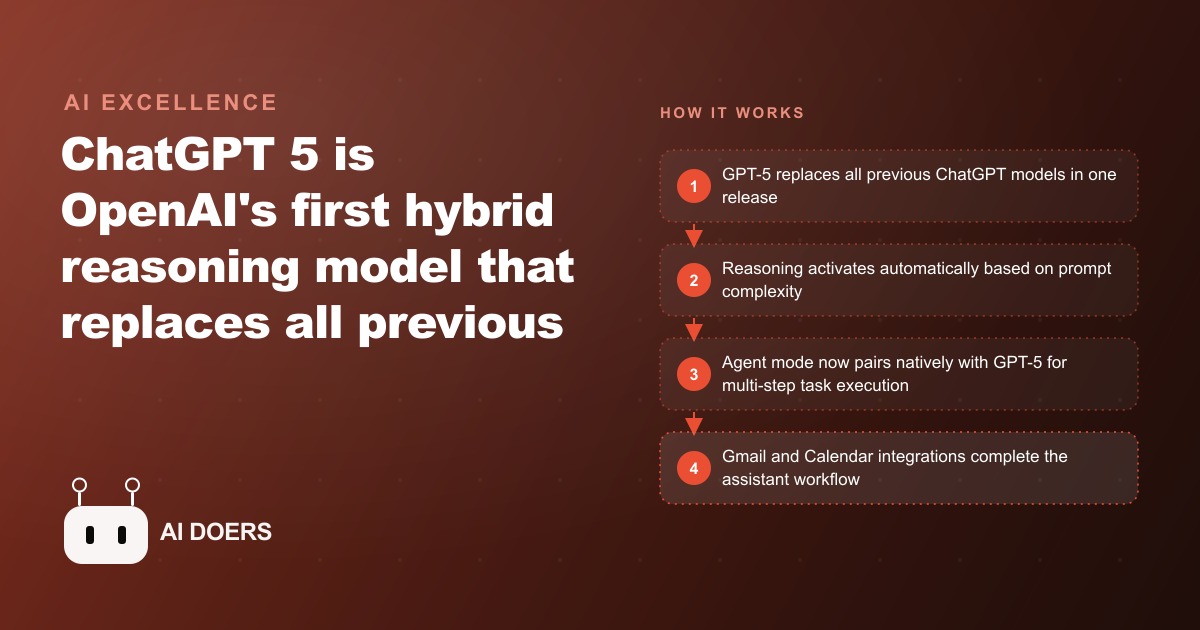
OpenAI just did something it has never done before: it deleted every previous version of ChatGPT in a single release. GPT-5 is now the only model most people can use, it brings step-by-step reasoning into every conversation by default, and for the first time the flagship model is available to free accounts. I am Madhuranjan Kumar, and I want to cut through the launch noise and tell you what actually changed, who it changes things for, and the one move worth making this week.
GPT-5 quietly retired every model you were choosing between
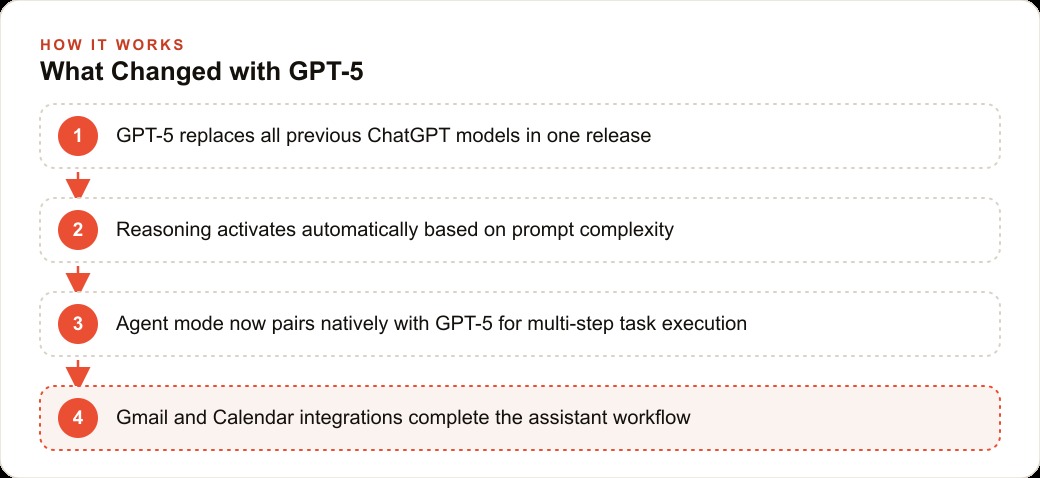
The headline is not that GPT-5 is smarter, though it is. The headline is that the menu disappeared. Every model before GPT-5 has been deprecated. Whether you log into a free account, a Plus account, or a Pro account, GPT-5 is what you get, and the confusing dropdown of model names is mostly gone. That sounds like a small housekeeping change. It is not. For two years the single biggest source of wasted output was people picking the wrong model, sending a hard analytical task to a fast shallow model or a trivial question to a slow reasoning one. That judgment call is gone. You no longer choose, and that alone raises the average quality of what ordinary users get out of the tool.
This is the kind of change that matters more for non-technical owners than for power users. The people who already knew which model to pick lose a little control. The far larger group who never understood the difference suddenly stop getting bad answers caused by the wrong engine. When you strip a decision out of a product, you lift the floor for everyone who was getting it wrong, and that was most people.
Reasoning now happens whether you ask for it or not
The mechanism behind the merge is the interesting part. GPT-5 is a hybrid model that decides on its own how long to think before it answers. Ask it something simple and it responds fast. Give it a multi-step analytical prompt and it pauses, reasons through the steps, and returns something more structured and more specific. You do not toggle anything. The model reads the complexity of your request and calibrates.
Practically, this means the quality of your output now depends more on the quality of your prompt than on any setting you remember to flip. A vague request still gets a fast, shallow answer, because the model reads it as simple. A detailed, multi-part request triggers the deeper reasoning path. For business owners this is the lesson to carry: the model will now meet you at the level of your question, so the return on writing a clear, specific prompt just went up. For genuinely hard work there is still a separate thinking mode on paid plans that forces extended reasoning, but the default auto behavior already covers most of what a small business throws at it.
The free tier just inherited OpenAI's best model
The most underrated line in the announcement is that free users now get GPT-5. Previously, free accounts got a stripped-down model and paying customers got the good reasoning one. Now the starting point for everyone is the flagship. When a free user exhausts their allowance, the session downgrades to a lighter model and keeps going, but they begin each day on the best thing OpenAI ships.
This narrows the capability gap between a free user and a paying one, and it changes the math for a small business deciding whether to pay. If your usage is light, you may genuinely not need a subscription to get serious value anymore. If your usage is heavy, the reason to pay is no longer access to a better brain, it is removing the usage cap and unlocking the thinking mode. That is a cleaner decision than it used to be, and it means you can test whether ChatGPT earns a place in your workflow before you spend a cent.
Agent mode is the feature that actually matters now
If you tried ChatGPT's agent mode last year and gave up, this is the part to re-read. Agent mode is where the model browses the web, writes and runs code, manages files, and takes multi-step actions on your behalf. It was genuinely unreliable before, forever needing hand-holding. It was also built specifically to pair with GPT-5's reasoning, and with that reasoning integrated by default, agent sessions now go much further before they need you to step in.
The reason is straightforward. Multi-step work requires planning, executing, checking the intermediate result, and adjusting. That is exactly what reasoning enables. An agent that can plan a sequence, run it, evaluate what came back, and correct course is a different tool from one that blindly follows a script. Pair that with the Gmail and Google Calendar integrations rolling out shortly after launch, plus connectors for Google Drive, Dropbox, and others, and ChatGPT moves from a clever assistant toward something that can actually complete a job with your real context in hand. For a business already running Facebook and Instagram ad campaigns, that reliability means an agent can genuinely help draft, sort, and route the work instead of producing a mess you have to redo. This is the capability most likely to change how a small business operates, and it is the one most people will overlook because it does not fit in a single screenshot.
A worked example: the contractor who got five hours back a month
Let me ground all of this in illustrative numbers with an unnamed licensed electrical contractor who runs a four-person shop doing residential and light commercial work. The owner's real pain is proposals. A detailed job proposal takes 45 to 90 minutes to write, and the shop produces 15 to 20 a month. Each one needs a plain-language scope, a materials list, a labor-hours estimate, a line-item price, the relevant code reference, and a customer consent section.
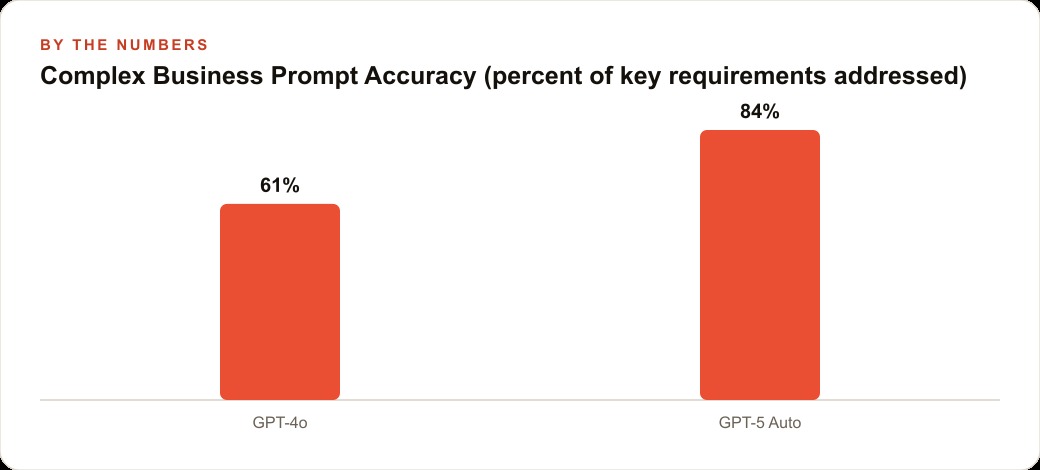
With GPT-5 on auto, the owner types the job details from site notes: square footage, the panel upgrade needed, the number of circuits to add, and the local code jurisdiction. The model spends a moment reasoning, then returns a complete draft that addresses all six components with reasonable specificity, cites the correct code article, keeps the customer-facing description in plain language, and formats cleanly for print. The owner adds specific supplier part numbers and sends it. Editing time: about 8 minutes. On the same prompt, the old fast model used to address four of six components, skip the code section, and format the materials list inconsistently, taking about 25 minutes to fix.
Across 18 proposals a month, that is roughly 5.4 hours of the owner's time recovered every month. At an effective billable value of 90 dollars an hour, that is close to 486 dollars of recovered capacity monthly, against a 20 dollar Plus subscription. The point is not the exact figures, which will vary by shop. The point is the shape: a task that used to need three follow-up corrections now produces a usable first draft, and the time saved dwarfs the cost. That recovered time is worth even more if it is redirected into work that grows the business, like finally answering the leads that come in from Google Ads within the hour instead of the next day, especially when those leads sit in a CRM and website stack waiting for a fast follow-up.
The tiers, and which one you actually need
There are three levels. The free plan gives GPT-5 with a usage cap and a downgrade after the cap, which is more than free ever offered before. Plus at 20 dollars a month removes the cap for GPT-5 and unlocks the thinking mode for extended reasoning. Pro at 200 dollars a month adds priority access, the highest thinking mode, and early access to features like deep research and agent improvements.
For most small business owners, Plus is the right level. It removes the limits and adds thinking mode without the 200 dollar commitment. Pro earns its price only if your business leans heavily on deep research, complex technical analysis, or intensive agent sessions where extended reasoning produces materially better output. My honest read: start free, confirm the model earns a place in one real workflow, then step up to Plus. Very few small businesses need Pro, and paying for it before you have exhausted Plus is spending ahead of your usage.
The mistakes that will waste the upgrade
A few traps are worth naming. First, do not dismiss agent mode because it failed for you before. It was rebuilt for GPT-5 and deserves a fresh, low-stakes test. Second, do not treat the model as error-free. It hallucinates less and produces more complete drafts, but it still misses details you left out of the prompt and occasionally misreads ambiguous intent, so review everything before it goes to a client or into anything legal. Third, do not ignore thinking mode for work that genuinely needs it, like a financial analysis or a multi-document synthesis, where the extra seconds buy a materially better answer. Fourth, do not skip connectors. Linking your Google Drive or Dropbox once means the model pulls context from your real documents instead of whatever you remember to paste, and that makes every relevant session better.
The connectors are the sleeper upgrade
One part of this release deserves more attention than it is getting, because it changes the ceiling on how useful the model can be to your specific business. GPT-5 works with connectors that link it to tools you already use: Google Drive, Dropbox, GitHub, Canva, and more. Once connected, the model can pull information from those sources into any conversation without you copying and pasting a single thing. That sounds mundane. It is quietly the difference between a smart stranger and an assistant that knows your business.
Here is why it matters more than the raw model improvement. A model reasoning over a blank prompt can only work with what you remember to type, and you always forget something. A model reasoning over your actual documents, your real pricing sheet, your genuine project notes, your true customer list, produces answers grounded in your reality instead of a plausible average. For a small business, that grounding is where the model stops being a novelty and starts being a coworker. Ask it to draft a proposal and it can pull your real rate card. Ask it to summarize a project and it can read the actual files instead of a summary you half-remember.
The practical move is to set up your connectors once, before you start relying on the model for real work, and then forget about them. Link the Drive or Dropbox folder where your business documents live. From that point, every relevant session is better by default, because the context is already there. Combine that with the Gmail and Calendar integrations rolling out after launch, and GPT-5 can reason about your schedule, your inbox, and your documents in one place. That combination, more than any benchmark, is what turns the model into something that meaningfully reduces your workload rather than just answering trivia faster. The businesses that wire up their real data early will get years of compounding benefit from a fifteen-minute setup, and most people will never bother, which is exactly why the ones who do will pull ahead.
The move to make this week
Here is the concrete plan. Log in, confirm you are on GPT-5, and open the custom instructions to add a short description of your business, your role, and how you like responses formatted, so every session starts with your context. Then pick one real task you know well enough to judge, run it on auto, and compare the output to what you used to get. Connect a file source if you have documents that matter. Finally, give agent mode one small multi-step job, browsing a few pages, extracting information, and formatting it, and watch how far it gets on its own. As the Gmail and Calendar integrations arrive, connect those too, because the combination of email context, calendar awareness, and reasoning is the closest thing yet to a genuinely useful AI business assistant.
GPT-5 is worth a deliberate afternoon on your actual work, not five minutes of poking. If you want help configuring it for your specific workflow and pointing agent mode at the right tasks in your business, that is worth a focused session, and it is exactly the kind of setup I do for clients so the tool earns its keep from day one.
That is exactly what we do at AI DOERS. Book a private 30-minute call with Madhuranjan Kumar and we will map the fastest path to it for your specific business.
Book your call →
Madhuranjan Kumar
Madhuranjan Kumar brings 20 years of performance-marketing experience and has managed over $200 million in Facebook ad spend for brands across the United States and beyond. His expertise spans the full modern marketing stack: Meta, Google Ads, TikTok, email automation, CRM, and the websites that hold it together. At AI DOERS he turns that track record into lead-generation systems for businesses across every industry.