
ChatGPT Pulse Delivers Your Morning Briefing Before You Ask: Here Is What That Means for How You Work
ChatGPT Pulse is a proactive AI feature that reviews your previous conversations and delivers a personalized daily briefing each morning. For business owners, it changes the relationship with AI from reactive tool to proactive assistant.

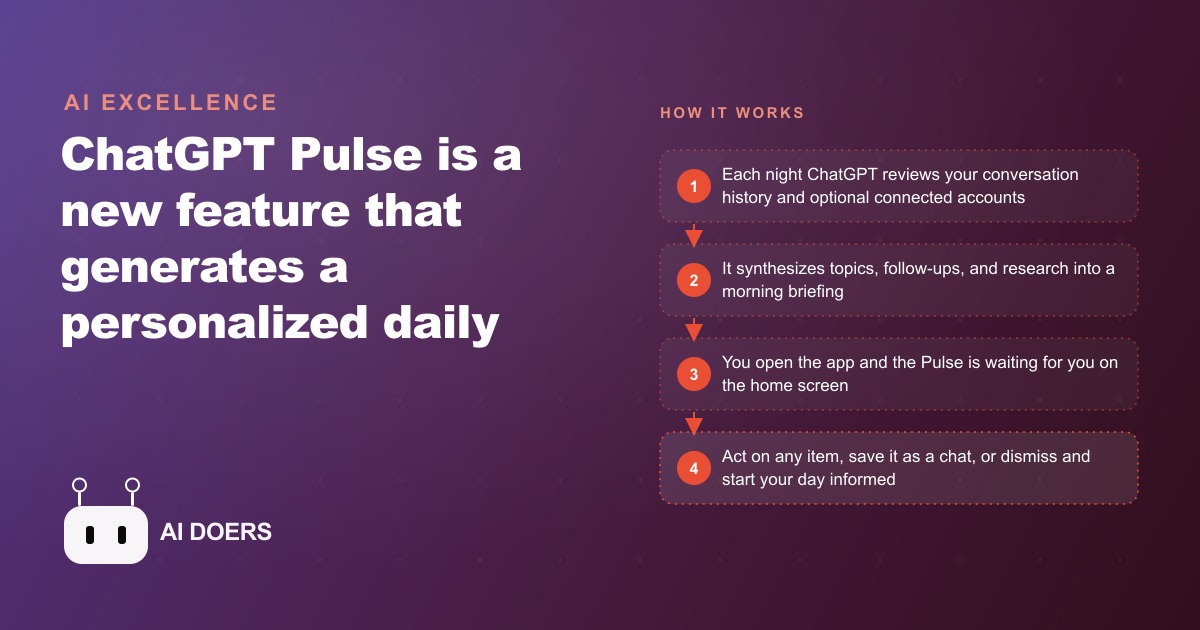
For as long as these tools have existed, you have started every AI conversation. You open the app, you type the prompt, you decide what to ask. ChatGPT Pulse quietly breaks that pattern: it wakes up before you do, reviews what you were working on, and hands you a briefing the moment you open the app. I am Madhuranjan Kumar, and I think this small inversion matters more than the feature list suggests, because it is a preview of where every AI assistant is heading. Here is what Pulse actually is, broken into the pieces worth understanding, ending with a concrete look at what it does for a real business.
1. It flips AI from reactive to proactive
Every AI assistant until now waited for you. It sat there until you decided to engage, chose what to ask, and interpreted the output. Pulse introduces a layer of proactive intelligence: the AI has already done some thinking on your behalf before you pick up your phone. Instead of a blank box demanding a prompt, you get a prepared update. That is a genuine shift in the relationship, from a tool you operate to an assistant that shows up with something ready. It sounds minor and it changes the whole feel of the first interaction of your day.
2. It reads yesterday's conversations every night
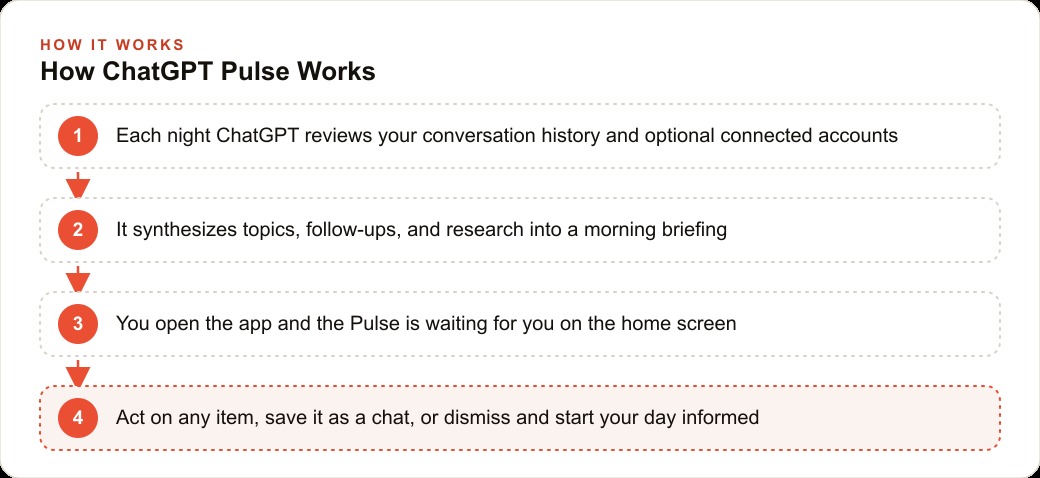
The engine underneath is synthesis. Each night, Pulse reviews your conversation history from the day before, what topics you engaged with, what questions you asked, and which follow-ups seemed important based on how those conversations developed. It packages that into a curated briefing that appears when you launch the mobile app. This is why the feature gets more useful the more you actually use ChatGPT during the day. The briefing is only as rich as the material it has to work from, so a day of real work becomes a genuinely informative next morning, while a quiet day produces a thin one.
3. Gmail and Calendar are optional, not required
Two extra sources can feed Pulse, and both are opt-in. Connect your Gmail and it can incorporate email context, threads that may need a response, new information that arrived, scheduling confirmations. Connect Google Calendar and it can surface upcoming meetings, deadlines, and events. The important detail is that neither is mandatory. Pulse works from conversation history alone, so you can get real value without ever linking an outside account. That makes the privacy decision yours to make deliberately rather than something bundled in by default.
4. You can assign it standing research topics
This is the most underused capability, and I think it is the best one. You can tell ChatGPT what to monitor and include in future briefings. Ask it to track developments in a specific industry, watch a competitor category, or surface new information on a topic you are learning, and the next morning that research appears in your Pulse without you asking again. Set the instruction once and the system keeps delivering. For anyone whose job depends on staying current, this turns Pulse from a diary of yesterday into a standing intelligence feed you configured on purpose.
5. Each briefing is ephemeral by design
Every Pulse card is available for that day only, then it disappears unless you save it. Tap an item and ask a follow-up, and it becomes a full conversation thread you can keep. Otherwise it expires. This is a deliberate design choice, not a limitation. It keeps your feed clean and forces intentional saves, so you are not drowning in a backlog of old briefings. The tradeoff is that you have to act in the moment. An insight you notice and then forget to save is simply gone at midnight, which puts a small demand on your attention that is easy to underestimate.
6. It launched on the Pro tier first
At its rollout, Pulse is available to Pro subscribers at 200 dollars per month on the mobile app, the premium tier aimed at power users and researchers, which also includes the most capable models and heavier usage limits. OpenAI has indicated it will expand to the Plus plan and eventually to all users as the feature matures. Knowing this pricing trajectory matters for a business decision, because the value math changes enormously as it moves down the tiers, and I will come back to that in the worked example.
7. It targets the most valuable hour of your day
Here is why the whole thing is worth caring about. The first thirty to sixty minutes of a workday are among the highest-value hours for most owners, because what you focus on in that window often sets the direction for the entire day. Yet most people spend those minutes just getting oriented: checking email, scanning the calendar, mentally reconstructing where they left off. That orientation is necessary but mechanical, and it is not where your judgment belongs. Pulse handles the orientation layer automatically. You open the app, see what you were working on, what is coming up, and what you asked it to research, and you are oriented in about ninety seconds instead of half an hour. The reconstruction phase simply disappears.
8. It suits businesses that juggle many parallel threads
The clearest fit is any owner or manager tracking lots of relationships and projects at once. If you are holding five client accounts, three internal projects, and a stream of ongoing tasks, Pulse keeps all of those threads visible without you maintaining a mental inventory. Real estate agents fit especially well, with dozens of simultaneous client relationships each at a different stage. Consultants and coaches running multiple client sessions a week benefit from a briefing that synthesizes across those relationships. Service businesses that do intake calls and follow-up engagements benefit from a system that keeps them oriented across clients without constantly switching between the CRM and website stack and a notes app. The smaller the team, the bigger the gain, because the orientation burden falls on one person.
9. Use it to get oriented, not to set your priorities
The first trap is expecting Pulse to replace your judgment about what matters. It is good at surfacing what was active in your recent conversations, but it does not know which client is about to make a decision, which project is most at risk, or what your highest-leverage move is today. Use it to get oriented faster, not to outsource your prioritization. The briefing tells you what was recent. Only you know what is important, and confusing the two is how people let a tool quietly flatten their strategic thinking into a to-do list of whatever happened to be loud yesterday.
10. Connect accounts deliberately, save items before they vanish
Two more habits keep Pulse honest. First, decide on Gmail and Calendar connections based on your actual privacy comfort, not because linking sounds useful. Both are optional and revocable, so make the choice on purpose. Second, act on the items that matter before the briefing expires at day's end. If you open Pulse, spot a genuine follow-up, then get pulled away before saving it, the insight is lost. Build the habit of saving any item you intend to act on to a named conversation the instant you see it. And do not leave the research feature idle, because a standing instruction to monitor your industry or a competitor is one of the highest-value things Pulse can do and one of the most commonly forgotten.
A worked example: a solo real estate agent
Let me ground all of this in one business. Consider a solo real estate agent with 12 active buyers and 4 active listings at any given time. That is 16 relationships, each generating notes, conversations, document exchanges, and follow-up tasks every week. Today the agent spends 20 to 30 minutes each morning reading through yesterday's notes and email to reconstruct what needs attention. That reconstruction is pure overhead, and it happens during the most valuable window of the day.
Now add Pulse. The agent already uses ChatGPT throughout the day to draft client emails, summarize inspection reports, research comparable sales, and prepare offer-strategy notes, so all of that context lives in the conversation history. The next morning, Pulse has reviewed those conversations and produced a briefing. It surfaces that yesterday they worked through a negotiation strategy on a buyer's offer and the open follow-up was to calculate a maximum stretch price. It notes that a client called with financing questions that never got resolved. It shows the two property showings on the calendar that afternoon and suggests reviewing the neighborhood comps before the first one. The agent reads all of this in about three minutes, taps the financing item to continue that thread directly, and moves into the day already oriented.
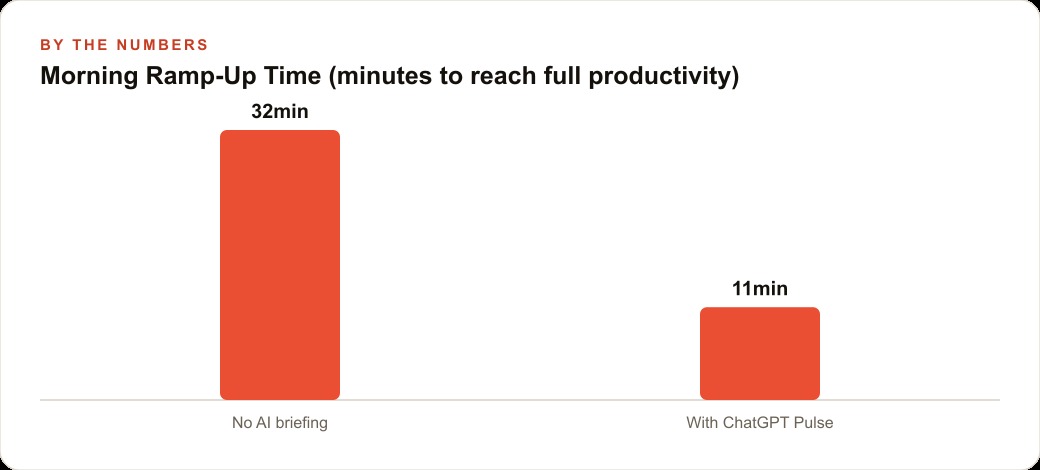
The illustrative numbers make the case. That morning ramp-up, the time from opening the phone to actually being productive, might run around 32 minutes without a briefing and around 11 minutes with Pulse doing the synthesis. Across a month of five-day weeks, recovering roughly 25 minutes each morning adds up to something on the order of 8 hours. If the agent values their time at around 100 dollars an hour, that is roughly 800 dollars of recovered productivity a month, against a 200 dollar subscription. Those figures are illustrative rather than promised, but the shape holds: the math already works at the premium tier, and it becomes dramatically more favorable as Pulse reaches the Plus plan near 20 dollars a month, where even recovering two hours makes it cost-positive. The recovered time is not abstract either. The agent spends it on additional outreach to prospective buyers, the kind of prospecting that, paired with steady Facebook and Instagram ad campaigns, actually grows the pipeline instead of just maintaining it.
11. It is a preview, so form the habit now
The last thing worth saying is that Pulse is less important as a single feature than as a signal of direction. For years the deal with AI has been that you carry all the initiative. You remember to ask, you decide what to ask, you interpret what comes back. Pulse is the first mainstream crack in that arrangement, where the system does a little thinking without being summoned. It is easy to shrug at the first version, which is limited, mobile-only, and priced for power users. That would be a mistake. The interesting thing is the pattern, and the pattern is going to spread to every assistant you use.
The businesses that get comfortable with proactive AI early will have an edge when it becomes the norm, because they will already have the habits: checking a briefing before the inbox, giving a system standing instructions about what to watch, trusting a machine to surface context while reserving judgment for themselves. Those are learnable habits, and Pulse is a low-stakes place to learn them. Treat this version as practice for a way of working that is coming regardless, and you will be fluent in it while everyone else is still typing cold prompts into a blank box every morning.
How to set it up and what to expect
Getting started is quick. Pulse is currently mobile-only, so install the ChatGPT app and log in, and if you have Pro access the feature should appear automatically. Launch it the next morning and you should see the Pulse card on the home screen, and if you have been using ChatGPT regularly there will already be enough history for a meaningful first briefing. Optionally connect Google Calendar and Gmail from the settings, remembering both are revocable at any time. Then give it standing research instructions, telling it in any conversation to monitor a specific topic and include updates in your daily Pulse, and that instruction persists going forward. Finally, build the habit of opening Pulse before your inbox, because the briefing is most valuable when it orients you before the noise of email starts pulling your attention apart.
The bigger picture is that Pulse is an early look at proactive AI. The current paradigm, where you initiate every interaction, is going to shift toward systems that know your context and surface the right information before you ask. That same proactive posture will eventually reach the tools behind your marketing and your content, where a system that already understands your priorities can flag an opportunity in SEO and organic search or a shift in your market before you go looking. Pulse is the first consumer taste of that, and it is worth forming good habits around it now.
You can set this up yourself in about fifteen minutes. If you want to build a more structured AI morning routine that combines Pulse with the other tools specific to how your business runs, that is worth a short strategy conversation.
That is exactly what we do at AI DOERS. Book a private 30-minute call with Madhuranjan Kumar and we will map the fastest path to it for your specific business.
Book your call →
Madhuranjan Kumar
Madhuranjan Kumar brings 20 years of performance-marketing experience and has managed over $200 million in Facebook ad spend for brands across the United States and beyond. His expertise spans the full modern marketing stack: Meta, Google Ads, TikTok, email automation, CRM, and the websites that hold it together. At AI DOERS he turns that track record into lead-generation systems for businesses across every industry.