
The ChatGPT Prompting Techniques That Actually Change Your Business Results
Most people use ChatGPT the same way they use a search engine. These structured prompting techniques treat it as a thinking partner and get dramatically better output.

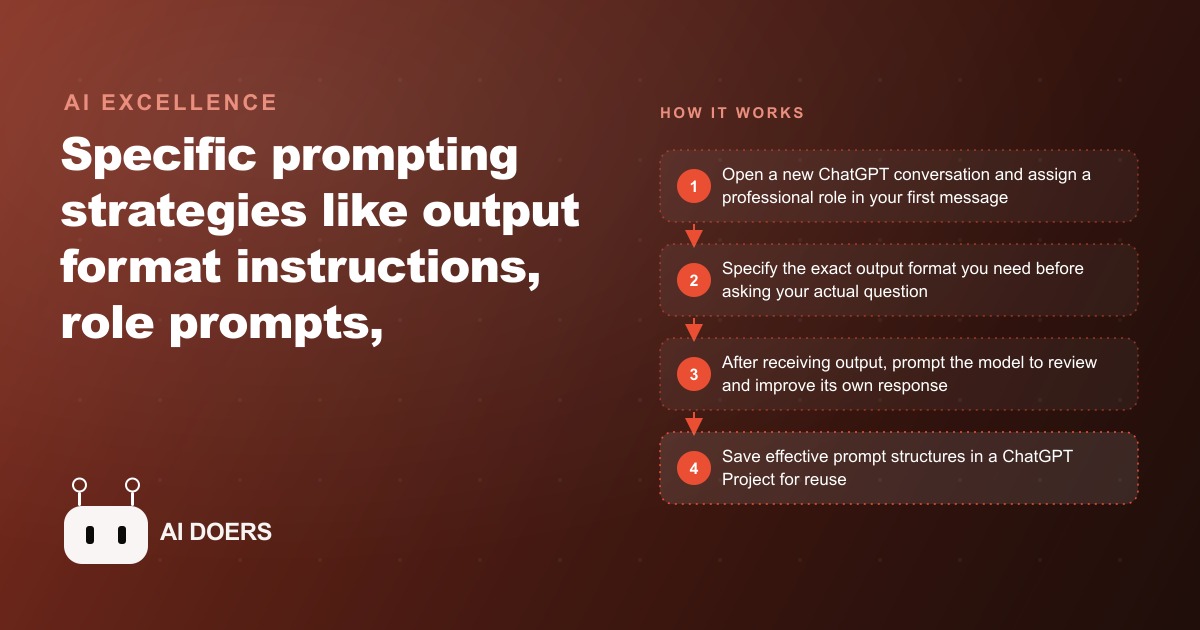
Most people type a question into ChatGPT the way they type a query into a search engine, then feel let down when the answer is generic. The tool is not the problem. The brief is. Madhuranjan Kumar here, and after testing prompting approaches with law firms, e-commerce brands, and service businesses over the past year, I have found that a handful of specific moves reliably turn mediocre output into work you can almost ship as is. Here are seven of them, each one concrete enough to use in your next conversation.
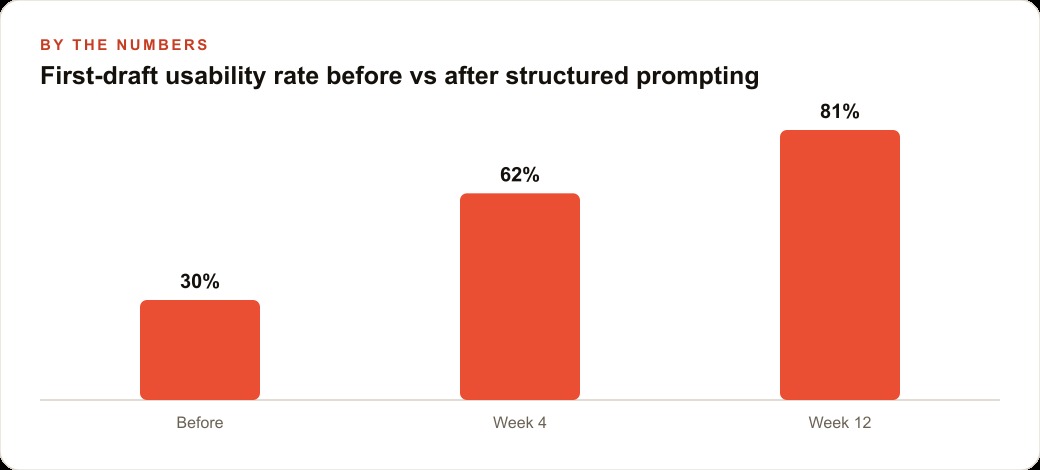
Treat what follows as a menu, not a lecture. You do not need all seven every time. But once these become habit, the difference in your first drafts is not marginal. In one immigration practice I worked with, layering three of these techniques together cut a document revision cycle from four rounds down to one within about two weeks of consistent use.
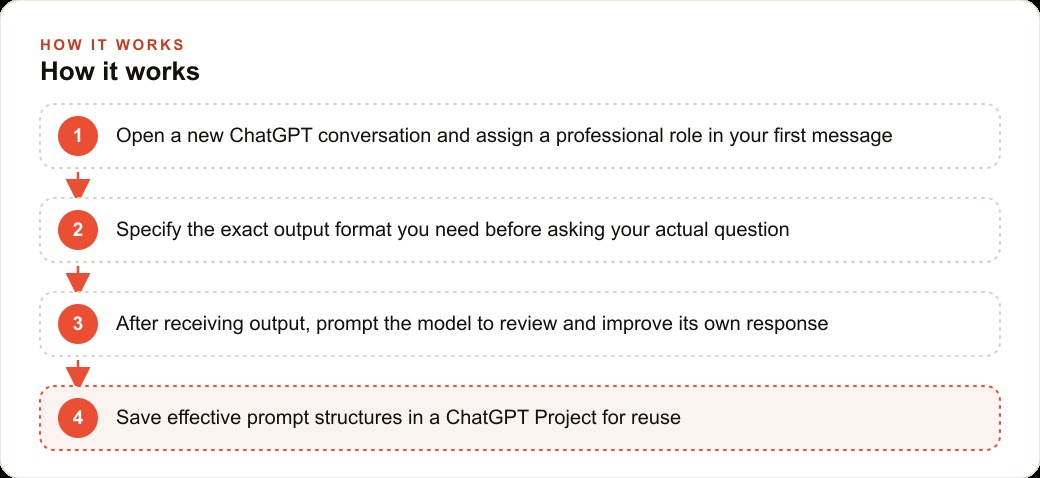
1. Lock the output format before you ask the real question
The single highest-leverage change you can make is telling ChatGPT exactly what shape the answer should take before you ask for the content. This eliminates the reformatting step that quietly eats your time.
Instead of "write me a list of SEO keywords for a family law practice," say: "Return a markdown table with three columns, keyword, search volume category as low, medium, or high, and primary intent as informational, commercial, or transactional. Give me fifteen rows. Then write one short paragraph summarizing any patterns." Now the model has a template to fill, and the result drops straight into a spreadsheet or a planning doc with no cleanup.
The same logic applies everywhere. Ask for JSON when you are feeding a script, numbered steps when you are building training material, and a question and answer layout when you are drafting an FAQ page. Whatever the downstream use, specify it at the top. This one move compresses a two step process, generate then reformat, into a single step.
2. Assign a professional role in the first sentence
A role prompt hands ChatGPT an identity before you make your request. "You are a senior paralegal specializing in personal injury cases with fifteen years at a plaintiff-side firm" changes several things at once: the vocabulary it reaches for, what it assumes you already know, the examples it picks, and the caveats it includes.
For professional service businesses this is the difference between output that sounds like generic AI and output that sounds like it came from someone with real domain fluency. A marketing consultant who assigns the role of a direct response copywriter with a decade in healthcare advertising gets copy that uses the right language and skips the tells that mark obvious machine writing.
One honest caveat: a role does not make the model more factually accurate. It has the same underlying knowledge whatever hat you put on it. The role shifts tone, framing, and emphasis, not the truth of specific claims. In high-stakes contexts, verify facts no matter which role you assigned.
3. Add a self-review pass to the end of every prompt
Append one more instruction after your actual request: "After drafting your response, review it for clarity, accuracy, and completeness. List any changes you made and why." This creates an internal error-correction pass, and it catches roughly thirty to forty percent of the most common first-draft problems: vague phrasing, missing considerations, logical gaps, and formatting slips.
It will not catch factual errors, which still need outside verification, but it meaningfully improves structure and reasoning. For a firm drafting client intake summaries, this pass reduces the cases where a staff member has to circle back to the client because the summary missed an obvious issue. For an e-commerce brand writing product descriptions, it strips out the bland, generic selling points a human editor would have flagged anyway. On a flat subscription the only cost is a few extra seconds of generation. Take the trade every time.
4. Save your best structures inside a Custom Project
ChatGPT's Projects feature stores a persistent context that loads automatically into every conversation inside it. Put your tone of voice guidelines there, background on your services, a list of things the model should never say, and your formatting preferences.
A law firm's project might hold the house style for client communications, a standing note that all output must be reviewed by a licensed attorney before delivery, the firm's practice areas, and the jurisdictional caveats that should always appear. Once it is set up, nobody has to re-explain the firm's approach in every prompt, and the output stays consistent across different team members using the same project. For a business where several people use the tool for different functions, Projects are the infrastructure layer that makes the whole thing consistent instead of idiosyncratic.
5. Split hard problems with tree-of-thought prompting
For genuinely complex questions, do not ask for one answer. Ask the model to generate three distinct approaches to the problem, evaluate the strengths and weaknesses of each, and then build the strongest final answer on the best one. "Give me three different strategies for this, assess each honestly, then develop the best into a full recommendation" produces noticeably more thorough analysis than a single-pass reply.
This works because it forces the model to explore the solution space before committing, rather than latching onto the first plausible path. Use it for pricing decisions, market entry questions, positioning choices, and anything where the obvious answer might not be the best one.
6. Run high-stakes prompts three times and take the consensus
When the cost of being wrong is high, borrow a reliability trick: run the same important prompt in three separate conversations, then compare the answers and take what shows up consistently. This self-consistency approach reduces the chance that a single confident but wrong response leads you astray.
I have seen this earn its keep in a specific way. A paralegal assessing whether a petition was strong enough to file would ask three separate ChatGPT sessions for the three most likely grounds for a denial. When two or three sessions flagged the same vulnerability, that was a reliable signal to fix it before filing rather than discover it after a denial. The technique is simple, it costs only a few extra minutes, and it turns a coin-flip answer into something you can act on.
There is a subtler benefit worth naming. Because the model is asking rather than telling, it does not push you toward a decision it has no business making. A human advisor has incentives and blind spots. A reflection prompt has neither; it simply mirrors. For a solo operator carrying a hard call about hiring, pricing, or firing a client, that neutral mirror is often exactly what is missing, and it is available at any hour for the price of a subscription you already pay.
7. Use a reflection loop for the decisions only you can make
Not every prompt is about producing a deliverable. Some of the most valuable uses are for thinking. Set ChatGPT up as a structured journaling partner: describe a decision you are wrestling with and ask it to reflect your own statements back to you as questions rather than handing you advice.
For a business owner without a coach or a board, this is a cheap and surprisingly effective way to process a hard call. Asked to probe rather than prescribe, the model surfaces the assumptions you are making, the option you are avoiding, and the fear underneath a decision. You still make the choice. The loop just makes your own reasoning visible, which is most of what good coaching does anyway.
A worked example: the firm that absorbed a staffing cut
Here is how these stack in practice. A small immigration practice handles around eighty client matters a month with three attorneys and two paralegals. Each intake summary took a paralegal roughly forty five minutes to draft from interview notes. After a budget cut reduced the paralegal team, the remaining staff were drowning.
The fix combined three of the techniques above. A Custom Project (number four) held the firm's intake categories, the disclaimers required in their state, and a fixed output format of a structured memo with eight named sections. Every intake prompt opened with a role assignment (number two): a senior paralegal specializing in family-based and employment-based petitions. And every prompt ended with a self-review pass (number three) asking the model to flag missing sections, vague language, or legal risks worth attorney attention.
Summaries that had taken forty five minutes of drafting now took about ten minutes of prompt editing per case. The quality was high enough that attorneys spent their review time on substantive legal questions instead of fixing structure and grammar. Across ninety days the firm processed the same volume of matters with one fewer paralegal, avoiding a hire that would have cost around fifty five thousand dollars a year in salary and benefits. The self-consistency method (number six) handled the pre-filing risk check on top of that.
What this is worth and where it fits
For a solo practitioner or small firm, the cost is the ChatGPT subscription, twenty dollars a month for Plus or two hundred for Pro if you need higher limits and the most capable models. None of the seven techniques cost anything extra. They are just better ways of using what you already pay for.
The return depends on what you are replacing. If structured prompting saves an owner or a staff member two hours a week on writing and analysis, and those hours are worth around seventy five dollars each in equivalent professional work, that is six hundred dollars a month of value against a twenty dollar subscription. In my experience the real savings tend to run higher once the habit sets in.
There is a compounding benefit beyond time. The same clean, structured content you generate for one channel can feed several others. A well-drafted set of client FAQs supports both your website and your SEO and organic search footprint. Clear, benefit-led copy generated with a role prompt is the raw material for Facebook and Instagram ad campaigns. And a structured intake summary flows naturally into the follow-up sequences that live in your CRM and website stack.
The mistakes that keep people stuck
Three errors account for most disappointing results. The first is leading with the question instead of the context, forcing the model to guess the audience, length, tone, and purpose, then correcting each wrong guess in follow-ups. The second is accepting the first draft without a review pass, when the model was only ever producing the statistically likely response, not its best one. The third is treating every task the same, when a creative brainstorm, a factual summary, and a legal analysis each want a different prompt structure.
A fourth mistake, quieter than the others, is never combining the techniques. Each one helps on its own, but the real gains come from stacking them, a role plus a format plus a review pass in a single prompt, so the model is constrained on tone, shape, and quality all at once. People try one technique, see a modest lift, and conclude the whole approach is overrated. The truth is that a single technique is a demonstration and the stack is the actual workflow. Once you feel the difference of a fully layered prompt, going back to a bare question feels like writing with your off hand.
Fix all of this by building a small library. Write two or three prompt templates for your most common tasks, each including a role, a format specification, your request, and a review instruction. Test each one on five real examples, note where it falls short, and revise. After two weeks you will have a system that cuts your revision time in half, and within ninety days it will feel as natural as any other workflow you use. Build it yourself over a few focused sessions, or bring in help to design it around your specific business context.
That is exactly what we do at AI DOERS. Book a private 30-minute call with Madhuranjan Kumar and we will map the fastest path to it for your specific business.
Book your call →
Madhuranjan Kumar
Madhuranjan Kumar brings 20 years of performance-marketing experience and has managed over $200 million in Facebook ad spend for brands across the United States and beyond. His expertise spans the full modern marketing stack: Meta, Google Ads, TikTok, email automation, CRM, and the websites that hold it together. At AI DOERS he turns that track record into lead-generation systems for businesses across every industry.