
ChatGPT Projects Explained: How to Build a Permanent AI Assistant for Every Area of Your Business
Projects is one of the most underrated features in ChatGPT. It turns the AI from a general-purpose chat tool into a focused assistant that remembers your work, knows your files, and gets better the more you use it.


There is a small law firm I keep coming back to when I explain ChatGPT Projects, because their story shows the feature doing exactly what it was built to do. Three attorneys, employment and business contract law, no large support staff behind them. They are good at the law and buried in the writing that surrounds it. I am going to walk you through their year with this feature, and along the way you will understand what Projects actually is, why it matters, and how you would set the same thing up for your own business. I am Madhuranjan Kumar, and I want you to see this the way the firm saw it, one problem at a time.
The bottleneck was ninety minutes a day of the same letters
The firm did not have a growth problem. They had a time problem. Every attorney sat down each morning and wrote client correspondence that sounded almost identical to the correspondence they wrote the day before. A letter explaining the timeline of a contract dispute. An email walking a client through the next step of an employment claim. A note confirming what was agreed on a call. Different names, different case numbers, but the same shape, the same tone, the same careful legal phrasing repeated over and over.
When they added it up, each attorney was spending roughly ninety minutes a day on this drafting. Not on strategy, not on the parts of lawyering that are hard to replace, just on turning known facts into formal prose that matched how the firm liked to sound. Across three people that is close to four and a half hours a day of the firm's most expensive time going into rewriting the same letter with new details.
They had tried plain ChatGPT for this. It helped a little and frustrated them a lot. The problem was memory, or the lack of it. Every time an attorney opened a new chat, the assistant knew nothing. It did not know the firm's tone. It did not know their letter templates. It did not know that this practice preferred one citation format over another, or that client-facing language had to stay calm and plain rather than dense and defensive. So each session started with the attorney re-explaining all of that context, pasting in an old letter as an example, restating their preferences, and only then getting output that still needed heavy editing. The setup cost ate the time savings. A regular chat forgets you the moment you close the tab, and for repetitive professional work that forgetting is the whole problem.
Building the Client Communications project
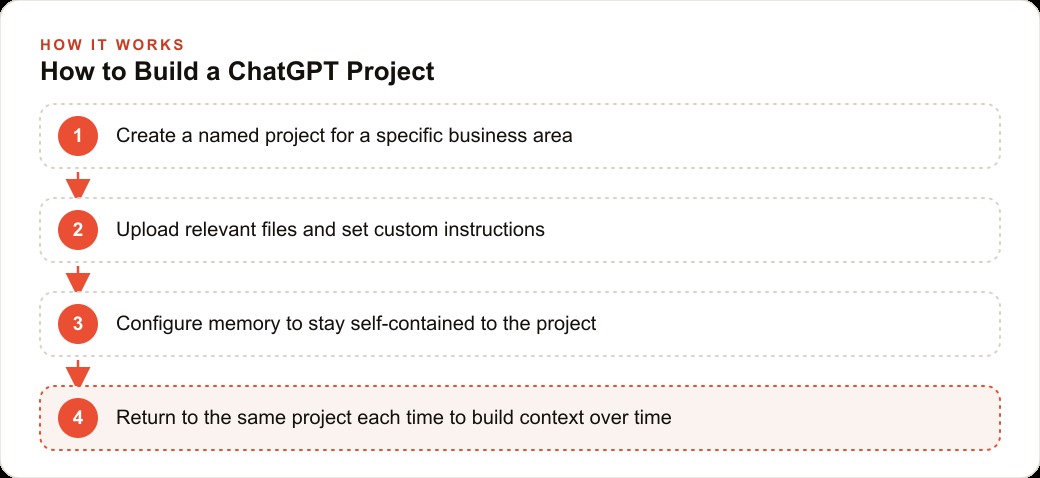
The change started when one of the attorneys created a Project. In ChatGPT the Projects section sits in the sidebar, and a project is simply a named container that holds three things together in one place: the files you upload, the custom instructions you write, and the entire conversation history for that one area of work. Instead of a scatter of one-off chats, you get a single workspace you return to. Open the project and everything you were working on is already there, waiting, exactly where you left it.
They named theirs Client Communications. That name mattered more than it looks. The temptation for most people is to make one giant project called Business and pour everything into it. That gives the assistant no focus. A project earns its value from being about one specific job, so the firm kept the scope tight. This project existed to draft and refine client-facing letters and emails, nothing else. Matter research, billing questions, and internal memos would get their own projects later.
What is worth noticing here is how low the barrier was. Projects are available on every ChatGPT account, including the free tier, so there was nothing to purchase or unlock to begin. Creating the container took under a minute. The value was not in the container itself. It was in what they loaded into it next.
Loading the knowledge base that made it specific
An empty project is just a chat with a label on it. What turns it into a specialist is the file library, and this is where the firm spent their real setup effort.
Inside the project they uploaded the materials that defined how the firm actually communicated. Their standard letter templates for the most common situations. A short glossary of firm-specific terminology, the phrases they used deliberately and the ones they avoided. Their preferred citation format. A one-page brief describing the firm's voice, which came down to calm, plain, and reassuring rather than combative. A few real past letters, with client details stripped out, as examples of the finished quality they expected.
These files become the reference material the assistant reaches for whenever it answers inside that project. You do not paste a template into the chat every time you need it. The assistant already has it. Upload a fifty page document and it can pull from any part of that document in any conversation in the project, without you hunting for the relevant page. For the firm this meant that when an attorney asked for a dispute-timeline letter, the assistant was not inventing a structure from generic legal knowledge. It was following the firm's own template, using the firm's own terminology, in the firm's own tone.
They also connected Google Drive, which let them pull documents straight into the project without downloading and re-uploading each one. That mattered because their templates were living files. When a template got revised in Drive, updating the project was quick, and the knowledge base stayed current instead of quietly going stale. A stale knowledge base is one of the easiest ways to undermine a project. Guidelines change, new templates get written, and if the files inside the project never catch up, the assistant keeps drafting against last year's standard.
Alongside the files they wrote the project's custom instructions. These are rules that apply to every conversation inside this project and only this project. The firm told it to write at a reading level a client could follow without a law degree, to keep letters under a certain length unless asked otherwise, to never give the client a firm deadline the attorney had not approved, and to always end with a clear next step. Because these instructions were scoped to the project, they did not have to become global settings that would then bleed into every unrelated chat the attorneys had. This is a real advantage. You get to shape the assistant precisely for one job without that shaping leaking everywhere else.
The self-contained memory setting that changed the output
The setting that made the biggest single difference was the one most people never touch.
By default a project can reach into your general ChatGPT memory, the things the assistant has picked up across all your other conversations. That sounds helpful and often is not. For a law firm handling client-sensitive drafting, the last thing they wanted was context from an unrelated chat about, say, someone's travel plans or a different matter drifting into a formal client letter. It introduces noise, and noise in legal correspondence is worse than useless.
So they set the project to be self-contained. In the project's settings you can tell it to only access its own memories. Once they did that, the project learned from conversations inside itself and nothing from the outside world bled in. It became a sealed workspace. Everything the assistant knew about how to write for this firm came from this firm's files and this firm's own history of drafting sessions.
The effect on output quality was immediate and it kept improving. Because the memory was clean, the assistant was not being pulled in odd directions. Every correction an attorney made inside the project sharpened the project rather than getting diluted by unrelated context. If you take only one configuration lesson from this firm, take this one. Set client-sensitive projects to their own memory. It is the difference between a focused assistant and a distracted one.
The first real letter, and the two-minute review
With the files loaded, the instructions written, and the memory sealed, an attorney tried it on a real task. A client had asked about the likely timeline of a contract dispute. Instead of opening a blank page, the attorney opened the project and typed a few sentences describing the situation and the facts specific to that client.
The assistant drafted a letter using the firm's actual template structure, in the firm's tone, using the terminology from the uploaded glossary, and closing with a clear next step exactly as the instructions required. The attorney read it, adjusted two phrases, and it was ready. The review took about two minutes. Writing that same letter cold, from nothing, had reliably taken around fifteen.
That gap, fifteen minutes down to two, is the entire point of the feature. The assistant was not smarter than the attorney about the law. It was faster at the mechanical part, the turning of known facts into the firm's house style, because it already carried all the context the attorney would otherwise have to supply by hand every time.
Three months in, the assistant got sharper
Here is the part that surprised them. The tool did not stay the same. It got better on its own, because the context compounded.
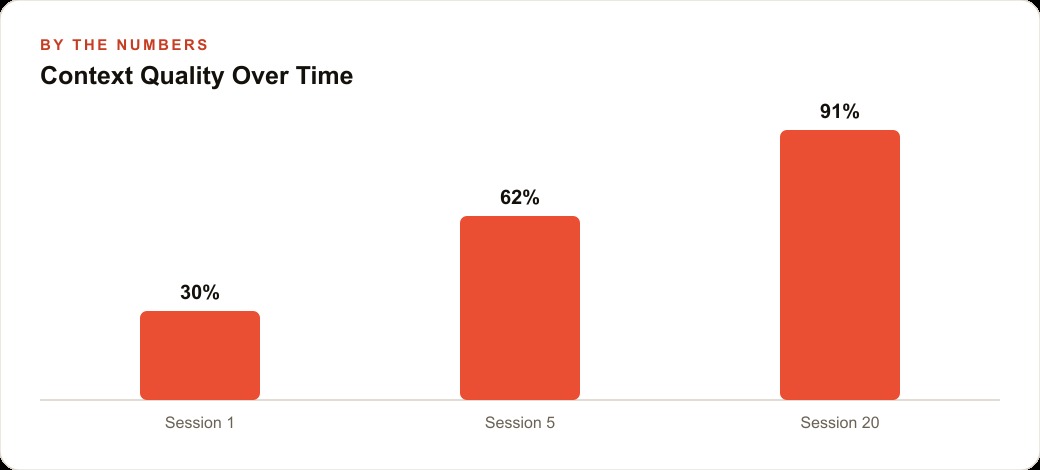
A regular chat starts fresh every time and never accumulates anything. A project holds its full history, so every session adds to what it understands. After three months of daily use the Client Communications project had absorbed hundreds of exchanges. It had learned that one attorney liked slightly warmer openings and another preferred to get straight to the point. It had picked up the phrases the firm reached for again and again in specific situations. It had internalized the corrections that came up repeatedly, so those corrections stopped being needed.
The output at month three was noticeably better than the output in week one, and nobody had done anything special to make that happen except keep using the same project instead of scattering the work across new chats. This is the quiet superpower of the feature. Value builds up. A project you have worked in for a quarter is meaningfully more useful for your specific tasks than one you opened this morning, and that gap only widens with time.
It is also worth saying that they never lost any capability by staying organized this way. Every tool ChatGPT offers works inside a project. Web search, deep research, image generation, file handling, all of it is available in the project conversation. Organizing their work did not put them in a walled-off, stripped-down mode. It gave them the full toolset plus all the accumulated context, in one place.
The hours the firm got back
Let me put illustrative numbers on the outcome, the way the firm did when they reviewed it.
Each attorney had been spending about ninety minutes a day drafting. With the project handling the first draft and the attorney reviewing rather than writing from scratch, that dropped by roughly half. Call it forty-five minutes saved per attorney per day. Over a working month that is close to thirty hours of an attorney's time recovered, per person. Across three attorneys that is on the order of ninety hours a month the firm was no longer pouring into repetitive drafting.
Against that, the cost side is almost embarrassingly small. Projects are included on every ChatGPT plan, including the free one, at no extra charge. A paid individual plan, in the region of twenty dollars a month, buys more capable models and higher usage limits, which a working professional will want. Even paying for all three attorneys, the monthly software cost is a rounding error next to the value of the time returned. When the recovered hours are attorney hours, the arithmetic is not close.
For a smaller operation the math is even simpler. If you are a solo owner and a project saves you two hours a week you used to lose to admin, content, or the same repeated writing, that is time you redirect into work that actually grows the business, or time you simply get back for yourself. Both are worth something real.
Where a project like this fits alongside everything else you run
The firm's Client Communications project was one drawer in a larger cabinet, and that is the right way to think about it. They went on to build separate projects for other recurring jobs, one per function, because tight scope is what keeps each one sharp. A marketing team does the same, often running one project per client loaded with that client's brand voice and past results, so the assistant that helps write their Facebook and Instagram ad campaigns stays consistent with the assistant that shapes their Google Ads copy. A content team keeps a dedicated project for SEO and organic search drafting, its knowledge base full of style guides and past top performers. An operations lead keeps one wired to notes about their CRM and website stack so process questions get answered against how their systems are actually configured rather than in the abstract.
The pattern is always the same. Find the work you return to again and again. Give it a project. Load the files that make it specific. Write instructions that shape the tone and format. Seal the memory so the workspace stays clean. Then keep going back to that same project instead of opening a fresh chat, because the returning is the habit that lets the context compound.
The mistakes to sidestep are the mirror image of what the firm did right. Do not create a project and leave it empty, because an empty project is just a labeled chat with none of the advantage. Do not build one sprawling project for your whole business, because breadth kills focus. Do not skip the self-contained memory setting, especially on sensitive work, because the noise it lets in quietly degrades everything. And do not let the files rot, because a knowledge base only helps while it reflects how you actually work today.
None of this is complicated to start. The firm's setup took under an hour of real effort, most of it spent gathering the templates and writing the tone brief, and the habit of opening the right project instead of a blank chat took a couple of weeks to become automatic. After that it simply ran. If you have one area of your business that eats the same slice of your time every single day, that is where to build your first project, and the rest will follow from there.
That is exactly what we do at AI DOERS. Book a private 30-minute call with Madhuranjan Kumar and we will map the fastest path to it for your specific business.
Book your call →
Madhuranjan Kumar
Madhuranjan Kumar brings 20 years of performance-marketing experience and has managed over $200 million in Facebook ad spend for brands across the United States and beyond. His expertise spans the full modern marketing stack: Meta, Google Ads, TikTok, email automation, CRM, and the websites that hold it together. At AI DOERS he turns that track record into lead-generation systems for businesses across every industry.