
How to Give ChatGPT Persistent Memory Using an External Database So It Knows Your Customers
ChatGPT forgets everything between sessions. This walkthrough shows how to connect a Custom GPT to an Airtable database through Make so it remembers every customer interaction and personalizes every conversation.

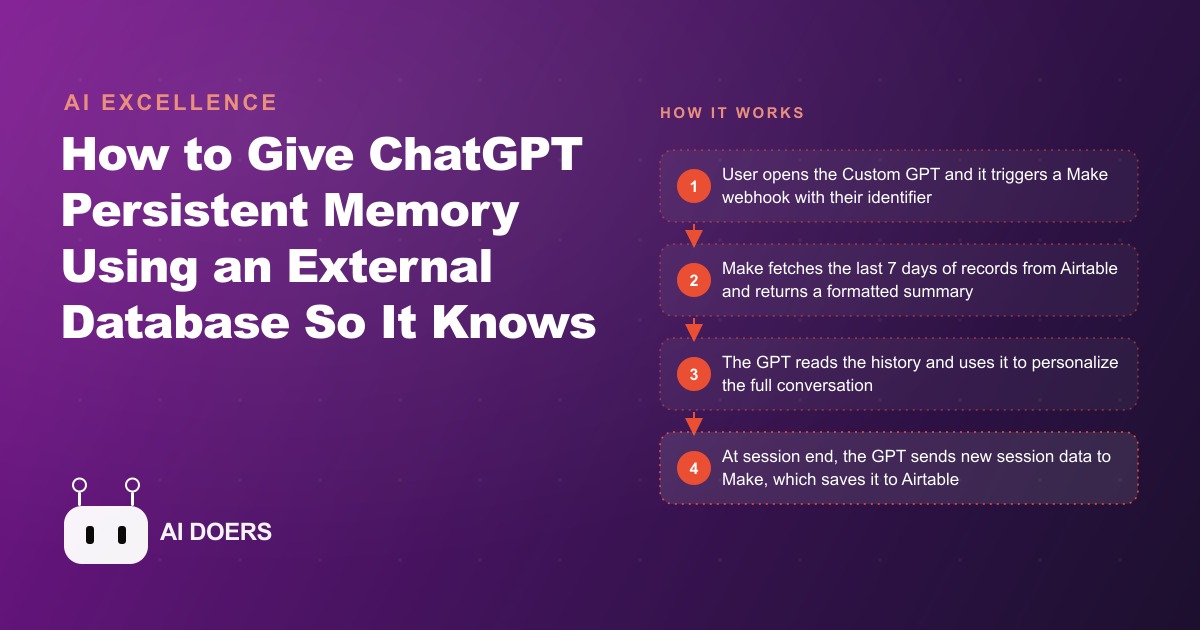
ChatGPT forgets every conversation the moment you close the tab. For casual use that is fine. For a gym that wants an AI coaching assistant to actually know its members, it is a fundamental problem that makes the whole thing feel like a gimmick. I am Madhuranjan Kumar, and this is the story of how a mid-sized gym solved that problem with an Airtable database, a Make automation, and a Custom GPT, and what the retention numbers looked like afterward.
The problem: a coaching chatbot that remembered nothing
The gym had about 300 active members and a straightforward goal: give members a way to check in with an AI coach that knew their recent training history, their energy levels from the last few sessions, and their stated goals for the current week. The existing option, a generic ChatGPT deployment, required members to re-explain themselves every single session. Name, goals, training background, what they had done last week: all of it started from zero each time. The experience felt more like filling out an intake form than talking to a coach, and members stopped using it within two weeks.
The underlying problem was that the memory was in the wrong place. ChatGPT's built-in memory feature is a general personal memory system, not a structured per-user database that a business can manage, query, and control. Building a real persistent memory for this gym meant storing the data externally in a database the gym owned, then feeding the relevant history into each conversation at the start of every session. That architecture is the key insight: the AI does not need to remember. It needs to read.
Choosing Airtable as the external memory store
The database needed to be simple to set up, easy to query through an automation, and free at the starting volume. Airtable met all three. The free tier supports up to 1,200 records per base, which handles a 300-member gym logging one session per week for more than three years before hitting a limit. The structure of the Member Sessions table that we built was deliberately minimal: Member Name as a plain text identifier, Date as a date field, Exercises Completed as a long text field, Personal Records as a short text field, Energy Level as a number from 1 to 5, and Goals for Next Session as a long text field.
The reason for keeping the session record structure tight is the context window. When the AI reads the last seven days of session records at the start of a conversation, it is reading all of them in a single block of text. A session record that is a full conversational transcript runs long and provides more noise than signal. A record with five structured fields runs short and provides the exact information a coach needs to open a relevant first message: what was done, how the person felt doing it, and what they are working toward next. Compact records with clear field labels consistently produce better first messages than long transcripts with the same underlying information buried inside them.
Building the Make automation that bridges the GPT and Airtable
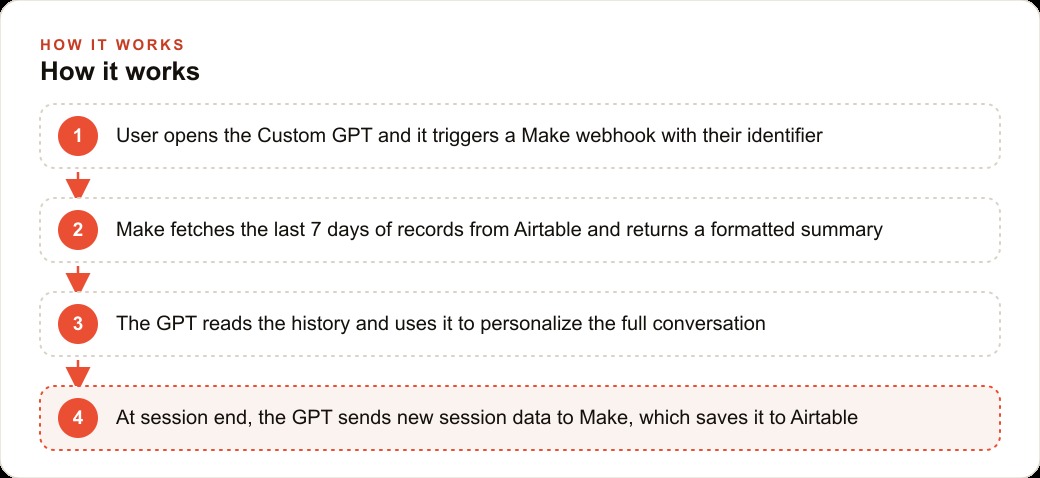
Make, the visual automation platform, is the bridge between the Custom GPT and the Airtable database. The setup requires two scenarios, which is Make's term for an automation workflow. The first scenario handles session start: it receives a webhook trigger from the Custom GPT carrying the member's name, queries Airtable for all session records from that member in the last seven days, formats those records into a clean readable summary, and returns that summary to the GPT as the response to the trigger. The second scenario handles session end: it receives a webhook carrying the structured session data the GPT collected during the conversation, and writes a new row to the Member Sessions table in Airtable.
The Make setup is visual and requires no coding. Each scenario is a series of nodes connected by arrows. The webhook node receives the incoming data. The Airtable search node queries for records. A formatter node converts the Airtable output into a readable text block. The response node sends that text back to the waiting GPT. The whole scenario typically runs in under three seconds, which is fast enough that the member never waits for a noticeable pause after opening the conversation.
Testing the two scenarios carefully before connecting them to the GPT is the step that catches the problems that cost the most time to debug after launch. The most common failure point is the webhook timing out because an Airtable query takes longer than expected on the first run while connections are established. Running ten test calls through each scenario with sample member data, verifying that records appear in Airtable correctly, and confirming that the formatted summary returns the expected content for a member with multiple past sessions all happen before any member opens the GPT. Testing after launch with real members watching is a worse experience than testing an hour earlier with fake data.
Wiring the Custom GPT to call the right webhooks at the right moments
The Custom GPT is built in ChatGPT's GPT builder and configured with two custom actions, each pointing to one of the Make webhook URLs. The system prompt is where the behavior is defined. It instructs the GPT to call the history-fetch action at the very start of every conversation, passing the member's name. After receiving the history summary, it reads it before composing its first message. During the conversation it asks about today's training plan, energy level, and any notable performance. At the end of the session, when the member indicates they are done, it calls the session-save action with the structured data fields it collected.
The system prompt also defines the coaching persona: warm, direct, focused on progress over perfection, never prescriptive about specific weights without knowing the member's level. The history that comes back from Airtable gives the GPT enough context to open with a relevant, personalized first message rather than a generic greeting. That first message is the moment where the system either feels like a real coach or feels like a chatbot that read some data. The prompt and the persona are what make it the former.
The identifier consistency rule is worth emphasizing because it is the single most common point of failure in this architecture. If the member sometimes types their name as "James" and sometimes as "James C" and sometimes provides their membership number instead, the Airtable query returns no matching records and the AI opens with no history, which defeats the entire system. The fix is to enforce a consistent identifier format from day one, either a full name, an email address, or a membership number, and to make the GPT always request and always send that exact identifier format in its webhook call. This is a five-minute decision at setup time that prevents a recurring support problem after launch.
The first real session: what it felt like from the member's side
After three weeks of setup and testing, the system launched. The member experience was immediately different. A member who had been using the gym for a month, with several past sessions logged, opened the GPT and was greeted with a message that referenced their last session specifically. The message noted a personal best they had mentioned in the previous session, asked how their shoulder felt after the overhead press volume they had done, and asked whether they wanted to repeat the same structure or adjust based on their energy today.
That opening is not impressive because it is technically sophisticated. It is impressive because it is what a coach who was paying attention would say. The member felt known. That feeling is what drives the behavioral change that translates into retention: members who feel known by their gym are less likely to let a membership lapse when a cheaper option appears across the street. They are buying a relationship, not just access to equipment.
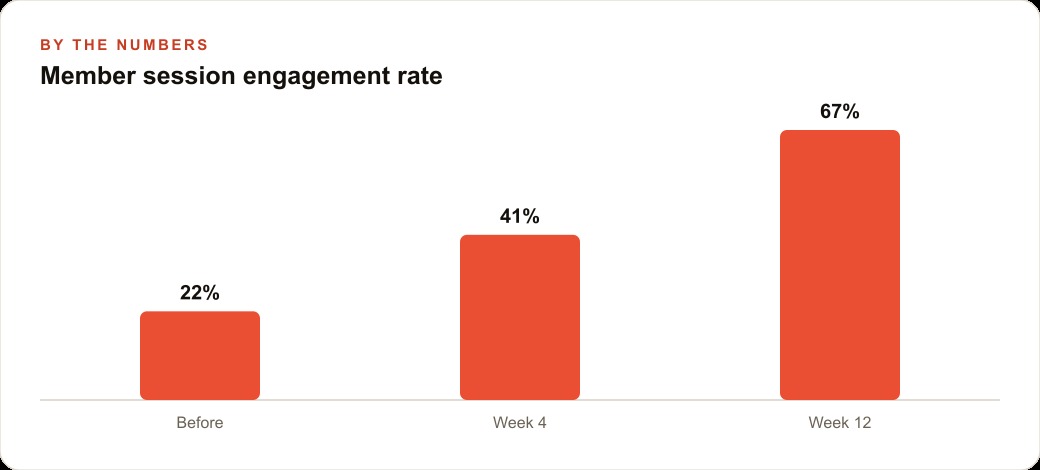
The sessions that followed were qualitatively different from the generic chatbot sessions that had preceded them. Members asked specific questions about progression because they knew the AI remembered where they were. They reported energy levels because they knew it mattered for the recommendation they would get. They set goals at the end of sessions because they knew those goals would come up next time. The system created a feedback loop of engagement that the memoryless version had no mechanism to produce.
Retention numbers that justify the monthly cost
The monthly operating cost of this system is modest. ChatGPT Plus runs $20 per month. Airtable's free tier handles the volume without a paid subscription for the first few years. Make's free tier covers a moderate number of monthly operations. Total cost for a gym of 300 members: approximately $20 to $40 per month depending on session volume.
The retention math that justifies that cost: if a gym charges $55 per month and the personalized coaching experience reduces cancellations by a modest amount because members feel more connected to the experience, the retained revenue from even a small number of additional members who stay instead of leaving covers the system cost many times over. A single retained member at $55 per month covers more than a year of operating cost. The system does not need to retain many people for the economics to close clearly. The specificity of "Coach knows my last three sessions" is the differentiator that makes the gym's experience meaningfully different from a month-to-month commodity, and for businesses running meta ads to acquire members, retaining them longer reduces the effective cost of every acquisition dollar spent.
The system can also feed a CRM and website stack if the gym tracks member lifecycle data externally. Session frequency data, energy trends, goal setting patterns: all of this lives in Airtable and can be surfaced to a CRM that tracks member health scores and triggers re-engagement workflows for members who have not logged a session in two weeks. The coaching system becomes not just a retention tool but a data source for the broader member experience operation.
That is exactly what we do at AI DOERS. Book a private 30-minute call with Madhuranjan Kumar and we will map the fastest path to it for your specific business.
Book your call →
Madhuranjan Kumar
Madhuranjan Kumar brings 20 years of performance-marketing experience and has managed over $200 million in Facebook ad spend for brands across the United States and beyond. His expertise spans the full modern marketing stack: Meta, Google Ads, TikTok, email automation, CRM, and the websites that hold it together. At AI DOERS he turns that track record into lead-generation systems for businesses across every industry.