
The Complete Beginner's Guide to ChatGPT Image Generation: Generate, Edit, and Transform
ChatGPT now lets you create, edit, and transform images through natural conversation. Here is every capability explained with practical examples for how to use each one.

ChatGPT now generates images with multiple paragraphs of readable text inside them, a capability that was the single biggest blocker keeping AI image tools out of real marketing workflows, and it shipped free to every account this week.
Free image generation with readable text just shipped to every ChatGPT account, including the free tier
The release that changes the practical picture for businesses using AI image tools is not a new model launch announced at a paid tier. It is the moment when the specific capability that blocked AI image generation from entering real marketing workflows became free and accessible to every user of the platform. ChatGPT's GPT-4o-powered image generation is now available on free accounts with basic usage limits and on paid plans with broader access, and it handles a problem that every competing tool has failed on until now: generating multiple paragraphs of readable, accurately spelled text inside an image.
I am Madhuranjan Kumar, and the significance of that specific capability is worth stating plainly. For years, AI image generators produced impressive visual compositions but failed systematically on any design that required readable text. A poster with an event name, a social graphic with a quote, an infographic with labeled sections, a product image with a tagline: all of these required manual editing in a separate design tool after generation because no AI image tool could reliably render more than a few words without producing garbled or misspelled characters. That limitation kept the tools in the category of creative assistance rather than production-ready design output. This release eliminates that limitation for the most common category of business marketing designs.
The accessible pricing matters as much as the capability itself. A feature available only on a $20 monthly plan reaches a fraction of the potential user base. A feature available on the free tier, even with daily generation limits, reaches every person who has ever opened a ChatGPT account. The combination of a previously blocked capability becoming reliable and that capability being available at zero cost defines a genuine shift in what is accessible to small businesses and solo operators who have been working around the text limitation for years.
Accurate text inside a generated image is a different category of tool from what shipped before
The technical reason accurate text generation in images was difficult for so long explains why this specific improvement is more significant than an incremental benchmark gain. Image generation models learn to produce visual patterns by training on images and their descriptions. Text in images, from the model's perspective during training, is just another visual pattern: a set of shapes that humans use to represent language. The model learns to reproduce the visual appearance of text but not its semantic content. The result is text that looks like text from a distance, with the right general shapes and density, but contains spelling errors, invented characters, and logical inconsistencies on close inspection.
ChatGPT's implementation integrates the language model layer directly into the image generation process in a way that allows the model to treat text content semantically rather than purely visually. When you ask it to place the phrase "Spring Sale: 20% Off All Services" in a poster, it knows that phrase is language and it generates the image with that specific phrase rendered correctly. The same applies to multiple paragraphs: a flyer with a headline, a date, a location, a price, and a call to action all render accurately in the same image without any manual editing required afterward.
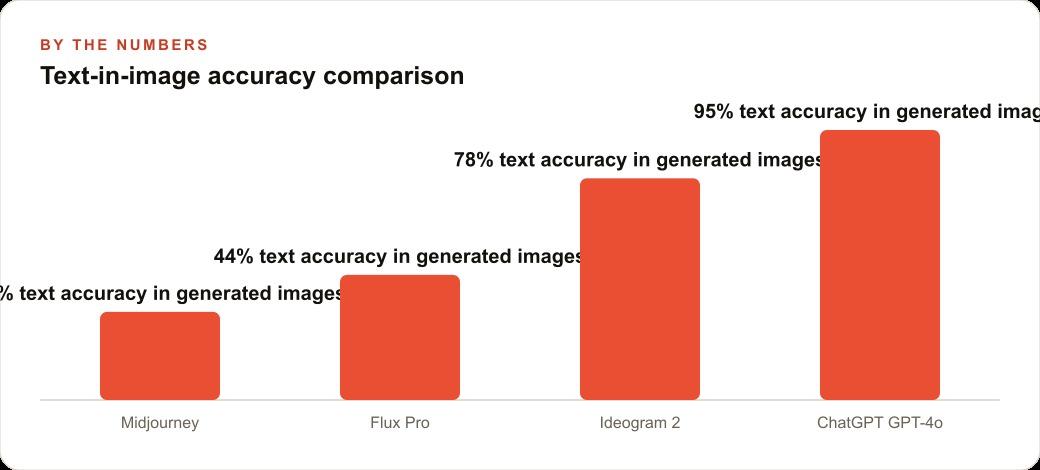
A comparison across the leading AI image tools shows the practical gap. Midjourney renders approximately 31 percent of requested text accurately in complex multi-element designs. Flux Pro lands at roughly 44 percent. Ideogram 2, specifically marketed as a text-in-image solution, reaches approximately 78 percent. ChatGPT's GPT-4o image generation reaches approximately 95 percent text accuracy on the same class of multi-element designs. The gap between 78 percent and 95 percent may sound narrow, but for production marketing assets where a misspelled event name or an incorrect price creates a usability problem, the difference is between a tool that occasionally requires editing and a tool that consistently does not.
For anyone who has spent time correcting the text in AI-generated marketing images, or who has given up on AI image tools for anything requiring readable text, this is the change that removes that blocker. Event posters, promotional graphics with offer details, educational infographics with labeled steps, customer testimonial graphics with quoted text, social media posts with text-heavy designs, and ad creative with body copy inside the image are all now accessible as AI-generated outputs without a post-generation correction step.
The conversational editing loop eliminates the cycle of reprompting from scratch
Every image generation tool that shipped before this one operated on the same interaction model: write a prompt, receive an image, evaluate it, write a new prompt incorporating everything from the first one plus the changes you want, receive a new image, and repeat. Each iteration required the user to remember and restate the full context of what they were trying to achieve, because the tool held no memory of the prior generation. A small change to one element required a complete new prompt that reconstructed the entire image specification.
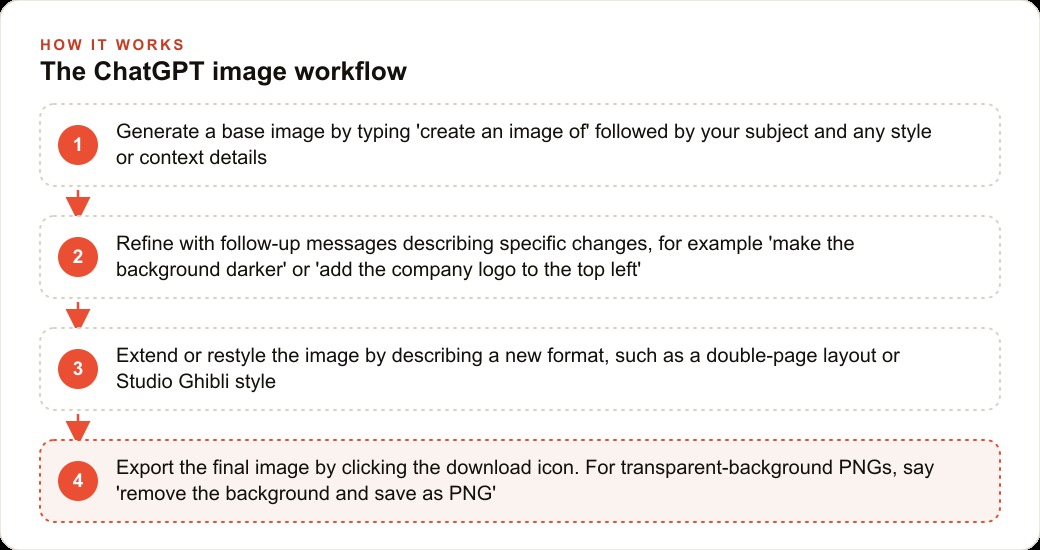
ChatGPT's image generation operates inside a running conversation. The model holds context across every exchange, including the images it has generated and the descriptions of what you asked for. After generating an image, you describe only the specific element you want to change and the model applies that change while keeping everything else intact. Change the background to a sunset. Make the headline larger. Replace the house in the lower right with an office building. Move the logo to the top left corner. Each of these is a simple follow-up message rather than a complete prompt rewrite.
The implication for business users is a qualitative change in how the tool fits into a production workflow. Instead of spending 30 to 45 minutes iterating on prompts to converge on the image you wanted, you spend 5 to 10 minutes describing the initial concept and then making specific adjustments in natural language. The total output time drops substantially, and the process becomes accessible to people who do not have the prompt engineering skills to write a precise image specification from scratch.
The conversational loop also enables a different creative process. You can start with a rough concept, generate an initial image, evaluate it with real stakeholders, collect specific feedback on what to change, and apply those changes in the next message. The cycle from concept to stakeholder review to revised output becomes fast enough to fit within a single meeting or a single working session. That speed changes how AI image generation can be integrated into real business design processes rather than used as a separate, isolated tool.
One-photo person placement changes personal brand content production economics
Every personal brand and business that uses a founder's face in marketing faces the same recurring cost: professional photography sessions. Getting a new set of usable photos in different contexts and settings with different clothing and backgrounds typically requires booking a photographer, arranging time, editing a selection of shots, and spending a meaningful amount of money. The cost per usable image from a professional session is high enough that most small businesses supplement their limited photo library with stock photography, which creates a visible inconsistency in brand identity.
ChatGPT's image generation changes this with a specific capability: upload one well-lit photo of a person and the model can place that person in new visual scenarios, backgrounds, and contexts without additional photography sessions or fine-tuning on a large set of reference images. One reference photo enables a new output image in a different setting, in different clothing appropriate for different campaigns, against different backgrounds, or in styles that fit different marketing contexts.
This is not a replacement for professional photography in close-inspection applications. For a printed poster at large scale or a high-resolution profile photo, professional photography remains the right answer. For social media marketing images, promotional graphics, email header images, and web content that displays at smaller sizes, the quality is sufficient for typical production use, and the economics are completely different. One reference photo and a monthly subscription replace what previously required a photographer, a location, and several hundred to several thousand dollars per session. The operator who needs fresh visual content for a campaign each month can produce that content without scheduling and paying for a new photography session each time.
The concrete move: use the ad creative recreation workflow this week if you run any paid advertising
The highest-value immediate application of this tool for any business running paid advertising is the ad creative recreation workflow. The process is direct: find an ad format in your category that performs well or that you have observed running for a long time without being pulled, which is a reliable signal that it is converting profitably. Upload that ad image to ChatGPT. Describe your own product or service and the specific changes you need: your brand name, your offer, your colors, your call to action. Ask ChatGPT to recreate the layout and visual logic of the reference ad for your business.
The output is a draft ad creative that inherits the proven compositional logic of something that has already demonstrated it works in the market, rewritten for your specific offer. The text in the output is accurate and correctly spelled, the layout follows the reference, and any refinement is applied through a simple follow-up message rather than a complete reprompt.
To put concrete numbers to the workflow, consider an independent roofing contractor who had been paying $200 per month to a freelance graphic designer for new promotional graphics. The turnaround time for each graphic was 3 to 5 days from brief to delivery, and revision requests added another day or two on top of that. After moving to a $20 ChatGPT Plus subscription, the same contractor produces a usable promotional graphic in under 5 minutes, with any revision applied in the next conversational message rather than through an external revision cycle. The net cost saving is $180 per month. The time saving is the more significant change: a graphic that used to take 4 days to receive is now available in the same 5-minute working session. Across a year, the contractor produces more than 50 unique promotional graphics at a small fraction of the prior cost, with same-day turnaround and the ability to test more creative variants because the cost per asset is near zero.
This is the application to prioritize first, not because it is the most technically interesting use of the capability, but because it maps directly to revenue. Better and more frequent ad creative, produced at lower cost and with faster iteration, improves paid advertising performance in a measurable way. Start this week: open ChatGPT on the free plan or a paid plan, find a high-performing ad in your category, upload it, describe your business and your offer, and request the recreation. The first output gives you a working draft in the same session, and any gap between that draft and the final asset closes through the conversational loop without additional cost.Style transfer is the capability that most surprised first-time users who came from other AI image tools. You can take a photograph and type "turn this into a Studio Ghibli illustration" and the model applies the visual language of that animation style to the photographic content. You can type "restyle this as a comic book panel" or "make this look like a watercolor painting" and the model applies the style faithfully while keeping the composition and subject matter of the original image. The reverse direction also works: injecting photographic realism into an illustrated or graphic design produces results that blend styles in ways no static filter can match.
For businesses, the style transfer capability has a specific application in brand consistency across content formats. A product that appears in a clean product photograph can be restyled into an illustrated version for use in a different channel context, or moved from a formal photographic style to a warmer editorial style for a different audience, all from the same source image and all within the same conversation. The conversational loop means each style variation requires only a short follow-up message rather than a new generation from scratch.
The capability that binds all of these features together is the LLM layer that sits above the image generation engine. Because the image generation in ChatGPT is integrated with GPT-4o's language model, you can give directional feedback rather than technical specifications. Tell it the image looks too formal and it will decide how to make it less formal: softening colors, adjusting the composition, making the typography less rigid. Tell it to make the image more aspirational and it will reason about what that means in the context of the specific image and apply adjustments accordingly. No other image tool gives you this kind of natural-language creative direction. Every other tool requires you to specify intent in visual terms: exact colors, named artistic movements, or detailed composition instructions. ChatGPT lets you describe the outcome you want and lets the model determine the visual path to get there.
For any business owner who is not a trained designer, this directional feedback loop is the capability that makes the tool genuinely accessible in a way that prompt-engineering-heavy tools are not. You do not need to know which visual adjustments would fix the problem. You need to be able to say what the problem is, and the model determines the fix. That change in the interaction model is what moves AI image generation from a tool for technically skilled users to a tool for anyone who can describe what they want to see.
That is exactly what we do at AI DOERS. Book a private 30-minute call with Madhuranjan Kumar and we will map the fastest path to it for your specific business.
Book your call →
Madhuranjan Kumar
Madhuranjan Kumar brings 20 years of performance-marketing experience and has managed over $200 million in Facebook ad spend for brands across the United States and beyond. His expertise spans the full modern marketing stack: Meta, Google Ads, TikTok, email automation, CRM, and the websites that hold it together. At AI DOERS he turns that track record into lead-generation systems for businesses across every industry.