
How a Law Firm Can Use ChatGPT Deep Research to Cut Research Time in Half
ChatGPT Deep Research reads up to 40 sources per query and returns 10,000-word structured reports. Here are 12 concrete ways a law firm can use it today.

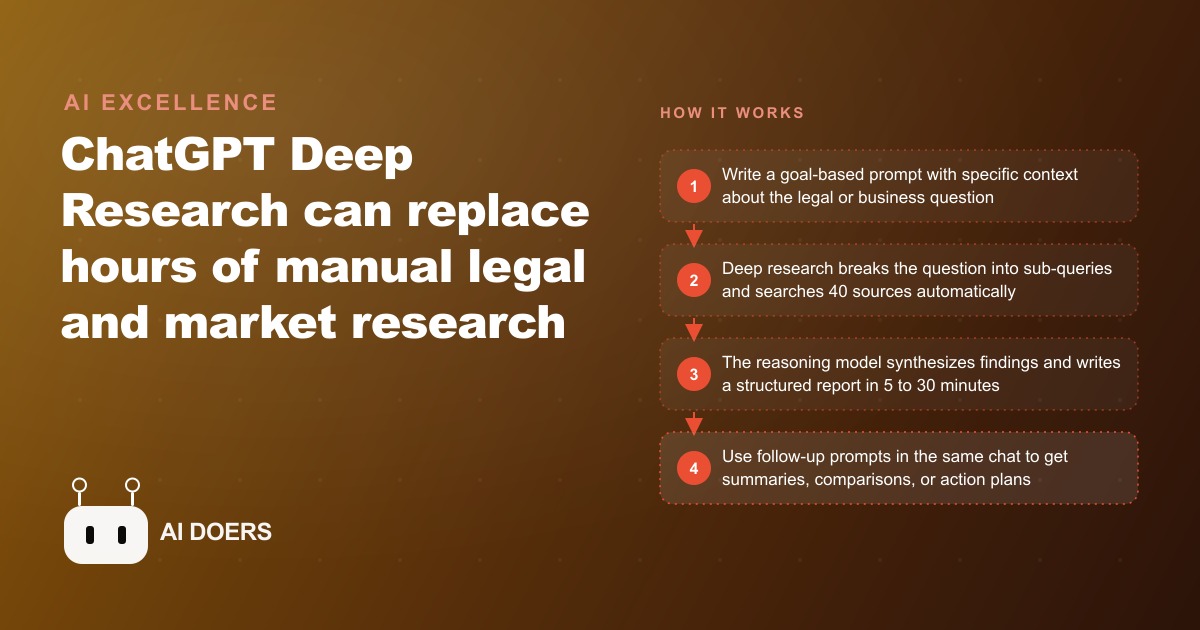
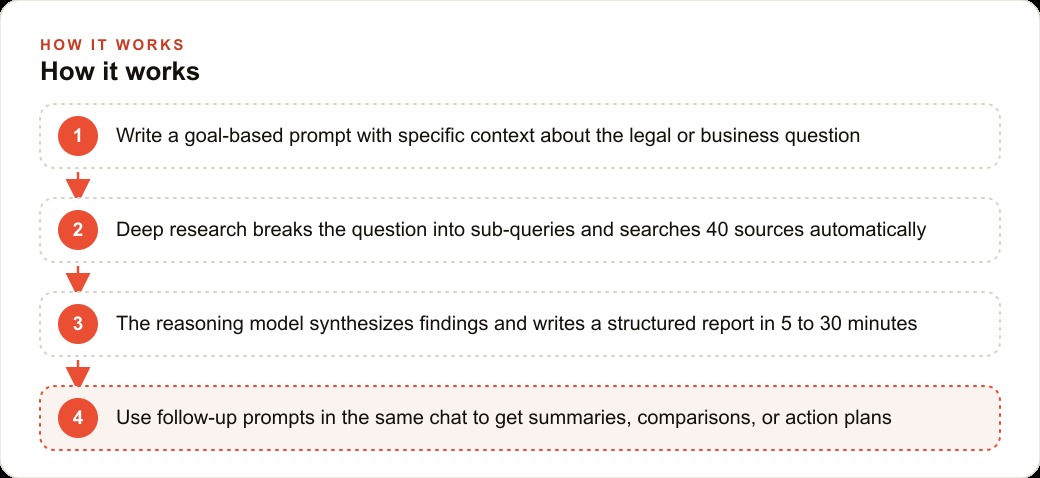
A single ChatGPT Deep Research prompt can read up to 40 live web sources in full and return a 10,000-word structured report in under half an hour. For a law firm where junior associates burn 40 to 60 percent of their billable hours on reading statutes and hunting for precedent, that is not a novelty. It is a direct hit on the largest cost center in the building. Below are twelve concrete ways a firm can put it to work this week, followed by an honest look at where it breaks and how to price around it.
1. Turn a state law change into a client memo in twenty minutes
The most repeatable win is regulatory compliance research. When a corporate client asks the firm to advise on new privacy obligations after a state statute changes, an associate can run a goal-based query such as: create an ultimate in-depth guide to data privacy compliance requirements for mid-size technology companies operating in the relevant state as of this year, covering current statutory requirements, recent enforcement actions, penalties for non-compliance, and practical implementation steps. Twenty minutes later the model returns a categorized report with citations. The associate verifies the primary sources, then uses the synthesized framework as the skeleton of the memo rather than reading statutes cold for a full day. The time saved does not come from skipping the lawyering. It comes from skipping the assembly.
2. Walk into a pitch already fluent in the prospect's industry
Before a partner pitches a large manufacturer on an employment law retainer, a deep research query can profile that entire sector: the most common employment disputes in US manufacturing over the last three years, typical settlement ranges, which regulatory agencies are most active, and which claim types are rising. The partner walks in able to speak to the prospect's actual risk profile instead of generic reassurances. In a competitive pitch, sounding like you already understand the client's world is often the difference between winning the account and getting a polite follow-up email that never converts.
3. Say yes to matters outside your core practice
When a request lands in an unfamiliar area, say environmental contamination liability at a firm that mostly does real estate, the default reflex is to refer it out and lose the fee. A deep research query on the governing legal framework, recent case outcomes, and typical remediation cost structures gives the team enough grounding to decide whether they can handle it, and to bring in a specialist from an informed position rather than starting from zero. The report does not make anyone an expert. It makes the intake decision a confident one instead of a guess. Over a year, that single change turns a stream of referred-away matters into billable engagements the firm would otherwise never have quoted.
4. Build a reusable reference document, not a one-off answer
The highest-leverage move is to run deep research once on a question the firm meets repeatedly, then treat the output as a living reference. A single comprehensive report on, say, the compliance obligations for a specific practice area can be consulted across a dozen future matters. The time cost of one twenty-minute session spreads across many uses, which is what turns a per-query tool into firm infrastructure. Store these in a shared folder organized by practice area and the library compounds in value every month.
5. Use goal-based prompts instead of step-by-step instructions
Deep research rewards telling the model what you want to achieve rather than how to achieve it. Instead of instructing it to search for privacy regulations and list the requirements, describe the destination: a complete guide to a specific compliance regime for a firm of a given size, with implementation steps, common violations and their penalties, and what changed in the last twelve months. The reasoning model plans its own path to that goal, and it plans a better one than most humans would script by hand. The instinct to micromanage the search is exactly what limits the depth of the answer.
6. Add the phrase that signals maximum depth
One small prompting habit meaningfully changes the output. Adding a framing like ultimate in-depth guide tells the model to treat the request as a comprehensive reference document rather than a quick summary. It digs further, structures the result more thoroughly, and errs toward completeness. It is a tiny lever, but on research where thoroughness is the whole point, it consistently produces a more usable artifact than an open-ended request that lets the model decide the answer is short.
7. Specify the output format before you run it
Telling the model exactly how you want the findings laid out is one of the most reliable quality upgrades available. A comparison table of jurisdictions, a numbered implementation checklist, a report broken into named sections, each of these produces cleaner, more actionable output than leaving the shape open. A law firm that always asks for a defined structure gets deliverables that can be dropped into internal templates with minimal reformatting, which saves time twice: once in the research and again in the write-up.
8. Squeeze every report with follow-up prompts
The first ten-thousand-word report is not the finish line. Because the full context carries through the conversation, you can immediately switch to a faster model and ask for a one-page executive summary, a deeper breakdown of a single section, a client-facing plain-language version, or a prioritized action checklist. Each follow-up multiplies the value of the original research session without re-running the expensive deep search. Firms that stop at the first output are leaving most of the value on the table. A useful habit is to end every deep research session with the same two follow-ups every time, a summary and an action list, so the workflow produces a consistent set of deliverables no matter who ran it.
9. Replace hours of manual comparison research
Deep research collapses tasks that involve opening and comparing many separate sources. The classic consumer example is travel planning, where it compares flights, accommodation, and itineraries in one query instead of fifteen open browser tabs. The legal parallel is any matter that requires surveying a landscape: comparing how several states treat the same issue, benchmarking vendor contract terms across an industry, or surveying how courts in different circuits have ruled on a narrow question. The manual version is slow tab-by-tab drudgery. The deep research version is one well-framed prompt.
10. Generate briefing documents on demand
A prompt that specifies your topic interests can produce a custom briefing that reads like a report prepared for a decision-maker. A firm can use this to keep partners current on regulatory developments in the practice areas they cover, producing a running intelligence digest without assigning anyone to monitor sources manually. Some users pipe these briefings into audio tools to listen to them, but for a firm the written briefing that lands in an inbox every week is already the win.
11. Cross-reference sources a single search engine would miss
The depth advantage shows up most clearly when a question needs synthesis across source types. In the consumer world, people have used it for health research that cross-references clinical studies, treatment literature, and patient experience, with one user claiming the result exceeded the value of an expensive private research team. The legal version is a question that spans statutes, agency guidance, case law, and industry commentary at once. A regular search returns links. Deep research reads all of them and tells you where they agree and where they contradict each other, which is the part that actually takes a human analyst hours.
12. Handle first-time procurement and onboarding research
When a client is entering something bureaucratic and unfamiliar, federal contracting is the textbook case, a single well-crafted query on the requirements, typical onboarding timelines, and the most common obstacles can replace weeks of fragmented research. For a firm advising a client through a government contract, a corporate registration, or an unfamiliar licensing regime, one report becomes the map the whole engagement runs on. The client sees a firm that moved fast and knew the terrain, which is exactly the reputation that generates referrals.
A worked example: what the math looks like for a mid-size firm
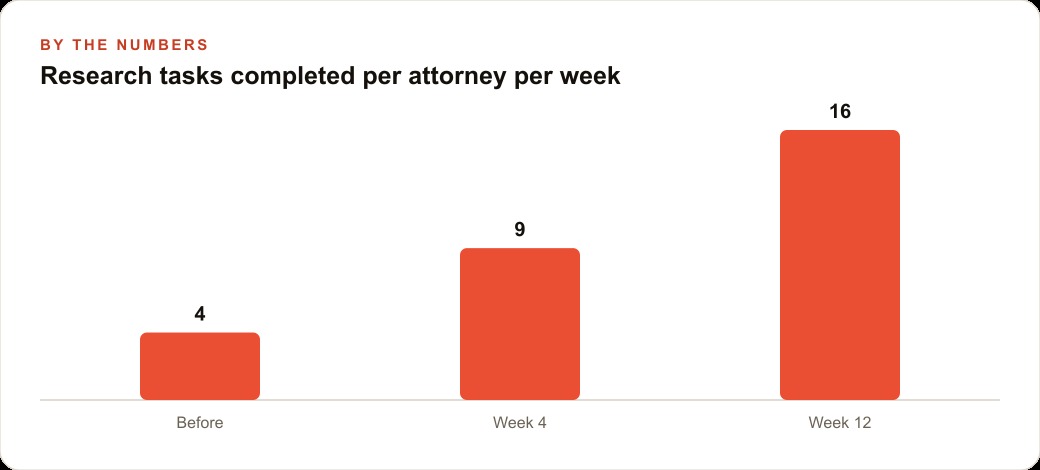
Consider a firm with ten to fifteen attorneys and one designated deep research operator. The ChatGPT Pro plan runs $200 per month and includes a generous monthly allotment of deep research queries, enough for daily use. Assume the firm runs five significant research tasks a month that would each have taken an associate four hours. Deep research plus careful human review compresses each to roughly one hour, freeing three associate hours per task. That is fifteen hours a month returned to the firm.
At an illustrative associate billing rate of $300 per hour, those fifteen hours represent $4,500 of capacity that can be redirected to billable analysis or to serving more matters, against a $200 software cost. These figures are illustrative rather than a guaranteed result, since real outcomes depend on the firm's caseload, review discipline, and how much of the freed time actually converts to revenue. But even at a fraction of that conversion, the tool pays for itself many times over. For a solo practitioner the value shows up differently: the ability to take on research-heavy matters that previously required outside support, without adding headcount.
The deeper point is that clients are learning this technology exists. A client who knows a certain research task can be done in twenty minutes will eventually question a four-hour bill for it. The firms that have already figured out how to use these tools and price accordingly are ahead of that conversation instead of being ambushed by it. The same pressure to modernize the front office that pushes firms toward better Facebook and Instagram ad campaigns and a cleaner intake pipeline through their CRM and website stack is now reaching the research desk, and it is arriving faster there.
Where deep research breaks, and how to stay safe
Three failure modes matter more than the rest in a legal context. First, never treat the output as a finished work product. The model synthesizes sources but it does not verify citations to the standard a legal filing demands, so every case citation and statutory reference must be checked against the primary source before it reaches a client. Second, keep client-identifying details out of prompts. Queries on the standard plan are processed by OpenAI and may inform system improvements unless the firm is on an enterprise plan with a data processing agreement, so structure prompts with hypothetical facts and general descriptions. Third, vague prompts produce vague reports. Specificity about jurisdiction, time frame, business context, and output format is what separates a genuinely useful report from a padded one.
A fourth quieter mistake is treating deep research as a standalone answer machine rather than the first step of a workflow. The report is a starting point that gets its real value from targeted follow-ups, model switches for different sub-tasks, and review by someone who actually knows the practice area. The tool does the reading. The lawyer still does the judgment.
Getting started this week
Setup is quick. Open a new conversation on a ChatGPT Pro account, select the deep research mode, and answer the clarifying questions it asks about your context. Expect the first report in roughly eight to twenty-five minutes depending on complexity. Start with a compliance or regulatory question in your core practice area that recurs often, because that first report immediately becomes a reusable reference. Use a consistent prompt pattern that names the topic, the three or four aspects to cover, the jurisdiction or industry, the time frame, and the required output format. Then run your follow-ups on a faster model to produce the executive summary and action checklist in the same session.
The firms that win with this are not the ones chasing every new feature. They are the ones that pick a handful of these twelve use cases, build a repeatable prompt library around them, and fold the freed hours back into work only a lawyer can do. That is where the research desk stops being a cost center and starts being an edge.
That is exactly what we do at AI DOERS. Book a private 30-minute call with Madhuranjan Kumar and we will map the fastest path to it for your specific business.
Book your call →
Madhuranjan Kumar
Madhuranjan Kumar brings 20 years of performance-marketing experience and has managed over $200 million in Facebook ad spend for brands across the United States and beyond. His expertise spans the full modern marketing stack: Meta, Google Ads, TikTok, email automation, CRM, and the websites that hold it together. At AI DOERS he turns that track record into lead-generation systems for businesses across every industry.